Herdr: The Terminal Built for AI, Letting Agents Collaborate

Herdr is a terminal built for AI agents, addressing Tmux's gaps in state awareness and multi-agent collaboration.
Based on NetworkChuck's video, this article introduces the AI-native terminal tool Herdr. It keeps Tmux's Ctrl+B shortcuts but differentiates itself with mouse-first operation, session persistence, agent state awareness, and a notification system. The article covers the four-layer layout (pane, tab, workspace, global navigation), the navigation panel for filtering agents by state, and two killer capabilities: agents controlling Herdr in reverse via a skill to open or close panes, and hooks enabling multi-agent conversations and collaboration. Remote Herdr supports adding sessions across machines, and Git worktree visualization serves parallel development. The author believes Herdr suits developers who frequently use multiple AI coding assistants, but pricing, open-source licensing, and resource usage still need verification.
If you're still using Tmux to manage your AI coding sessions, you might already be behind. In a video, the YouTube channel NetworkChuck said outright: "You should start using Herdr right now—it's like Tmux, but built for AI." He claims to use it every day, and even says, "I haven't looked at Tmux since." What's the magic behind this terminal tool? Based on that video, this article breaks down Herdr's core capabilities, installation experience, and real-world scenarios.
Why Herdr Is an "AI-Native" Terminal
Herdr's positioning is clear: it isn't meant for traditional command-line users, but designed for working alongside AI agents. According to NetworkChuck's demo, Herdr solves several pain points of Tmux—mouse-first operation, session persistence, agent state awareness, and most critically: letting AI agents control the terminal in return.
In a traditional terminal, AI is just a process running in a pane; in Herdr, AI agents are residents "placed" in individual session spaces. They have state, have a location, can proactively notify you, and can even open new windows on their own and talk to other agents. This shift in design turns the terminal from "a tool people operate" into "a workbench shared by humans and machines."
Tmux is the representative tool of terminal multiplexers, born in 2007. Its core capability is creating multiple sessions, windows, and panes within a single terminal window, with support for session detach/attach. It originally served system administrators and remote operations scenarios, with a design philosophy of keyboard-driven, scriptable, and low resource usage. Tmux's Ctrl+B prefix key, split panes, session persistence, and other mechanisms have been borrowed by many later tools. However, Tmux was born before AI agents became widespread; it treats everything inside a pane as an ordinary process, neither knowing whether a pane is running Claude or vim, nor sensing whether a process is waiting for input or has completed a task. This is precisely the gap Herdr tries to fill: retaining Tmux's operating habits while adding semantic understanding of AI agents to the session model.
Installation and Getting Started: Cross-Platform, but Windows Is a Surprise
NetworkChuck demonstrated Herdr's installation process. Visiting herdr.dev shows installation commands for Mac OS and Linux, while Windows uses PowerShell commands. He deliberately tested on a Windows machine, saying it was "totally doable," and then quickly completed it on Mac and Linux as well. After installation, just type herdr to launch.
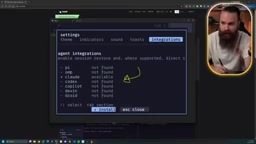
The first launch shows a clean onboarding interface. Since it's a mouse-first terminal, most operations can be completed with clicks, but keyboard shortcuts are the key to efficiency. The onboarding prompts you to install AI integrations, and he demonstrated quick setup for Claude and Hermes. In settings you can also enable sound alerts, toast notifications, and theme changes—he casually picked the Groovebox theme.
The control key prefix is Ctrl+B, the same as Tmux, lowering the migration cost. Herdr provides complete shortcut help: press Ctrl+B then ? to view all keybindings, and it also supports searching commands with /.
AI agents are fundamentally different from ordinary chat-style AI. Chat-style AI only handles one question and one answer, while agents have the ability to call tools, execute commands, read and write files, and autonomously plan multi-step tasks. In coding scenarios, Claude Code, Codex, Gemini CLI, and others are all agent forms: they run in the terminal, can proactively execute shell commands, modify codebases, and adjust strategy based on results. A key characteristic of agents is "long runtime" and "variable state"—they may be reasoning, waiting for a tool to return, blocked by a permission confirmation, or finished with a task and awaiting human review. Herdr's agents panel and state filtering are modeled precisely around these states, which is the fundamental difference from ordinary terminal multiplexers.
Session Persistence: You Won't Lose It Even If You Shut Down Your Computer
Herdr is essentially a server running in the background. All the terminals, windows, panes, and AI agents you launch "live" inside it and won't disappear because you detach. In the demo, he ran ping in one pane, pressed Ctrl+B then Q to detach from the session, and when he typed herdr again, the ping was still running.
More critically, sessions can be restored even if the server stops or the computer restarts. At the end of the video, he deliberately demonstrated running herdr server stop and then re-entering—all AI sessions were restored immediately, "just like you never left." For developers who need long conversations with AI, this solves the core anxiety of reconnecting after disconnection and losing context.
Layout Management: A Four-Layer Structure of Windows, Panes, Tabs, and Workspaces
Herdr's layout system is divided into four layers, from bottom to top:
- Pane: The smallest unit, which can be split vertically (
Ctrl+BthenV) or horizontally (Ctrl+Bthen-), and supports renaming (Ctrl+BthenShift+P). - Tab: A container for organizing panes, created with
Ctrl+BthenC, renamed withShift+T, switched forward/backward withP/N, or jumped to by number. - Workspace: The top-level space for organizing tabs and panes, created with
Ctrl+BthenShift+N, renamed withShift+W, closed withShift+D, and quickly jumped to withW. - Global navigation:
Ctrl+BthenGopens the "go to" panel, where you can navigate all spaces and sessions with the arrow keys, HJKL, or JK.
He demonstrated moving between panes with Vim-style keys (H/J/K/L), and resizing panes with Ctrl+B then R combined with H/J/K/L. To close a pane, press Ctrl+B then X.
Agent State Awareness: Notifications, Filtering, and Visual Feedback
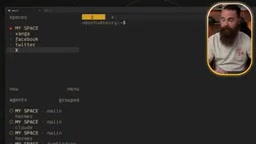
Once you launch AI agents in Herdr, they automatically appear in a dedicated "agents" panel, and clicking one jumps to the corresponding pane. Even more practical is the notification system: after enabling sound and toasts in settings, when an agent completes a task, gets blocked, or needs to ask a question, Herdr plays a sound and pops up a notification.
In the demo, he had Claude tell a horror story and had Hermes answer the hardest math question, and then received notifications. But the truly efficient feature is state filtering: press Ctrl+B then G to open the navigation panel, then:
- Press
Dto filter agents that are "done" - Press
Bto filter agents that are "blocked/waiting for your reply" - Press
Wto view agents that are "working" - Press
Ito view agents that are "idle" - Press
Ato show all
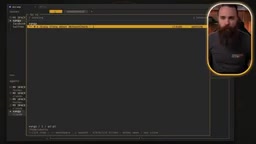
He also demonstrated searching session content with /, for example searching "baptize" to jump directly to the relevant session, indicating that the search scope covers both session names and content. This filtering system makes managing multiple parallel AI tasks as intuitive as checking an email inbox.
Killer Feature: Agents Controlling the Terminal, Agents Talking to Each Other
This is the core of what distinguishes Herdr from all terminal tools. NetworkChuck demonstrated two levels of agent collaboration:
Agents Controlling Herdr in Reverse
Herdr provides a "skill" that lets agents call its API or CLI. In the demo, he told the agent Morpheus to "open five panes," and Morpheus executed it directly—five panes appeared instantly; then he said "close them," and it was done just as immediately. This means agents are no longer just passively running, but can proactively adjust their own working environment.
Hooks are an event callback mechanism: the system automatically triggers pre-registered handling logic when specific events occur (such as an agent completing a task, raising a question, or going idle). In Herdr, hooks let the main session sense state changes in other agents and pass their output back to the main agent as context. This is similar in spirit to shell hooks in traditional terminals (such as bash's PROMPT_COMMAND), but the target shifts from command execution to agent lifecycle events. Combined with the CLI/API exposed by Herdr, agents can both be notified and proactively initiate actions, forming an "event-driven + bidirectional communication" multi-agent collaboration model.
Conversations and Collaboration Between Agents
Even more impressive is the multi-agent collaboration scenario. He had Morpheus open four panes, launching Codex, Grok, Anti-Gravity, and another Claude session respectively, and asked them to collaborate on writing an ASCII art scene—each agent responsible for a different scene from Harry Potter and the Prisoner of Azkaban, with a three-minute time limit.
Morpheus not only launched them but could also see their conversations and reply on their behalf. Herdr has built-in "hooks," so the main Claude session waits for other agents' answers, and whenever any agent completes or asks a question, the information is automatically passed back. They "have situational awareness of the current situation" and can coordinate with each other.
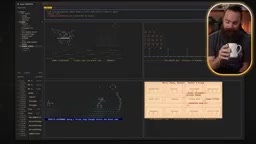
He also demonstrated a simpler example: having Codex answer a few questions in an adjacent pane, with the two going back and forth. After Codex replied, the main agent even proactively renamed the pane—it decided that on its own, without being asked.
Remote Herdr: Cross-Machine, Cross-Agent Collaboration
Remote functionality is a newer feature. The prerequisite is that another machine has Herdr installed and is accessible via SSH. The operation is simple:
herdr machine list
herdr machine add --label "big Mac" username@10.77.14.204
After adding, Herdr sessions on the remote machine appear in local navigation, and notifications can also be received across machines. In the demo, he had the local agent Terry contact Morpheus on a remote Mac through Herdr to request a status update in a specified workspace. Morpheus received it and replied, and Terry waited for the answer and then completed—an agent on one machine had a seamless conversation with an agent on another machine.
Worktree Visualization: An Extra Bonus for AI Coding
Herdr can also sense Git worktrees. He had Morpheus use Gemini, Claude, and Codex to create a sample project based on worktrees, and the Herdr interface directly displayed the worktree creation status and branch situation; after the agents finished, they even automatically committed the branch. For teams that need to develop multiple branches in parallel, this visualization reduces coordination costs.
Git worktree allows multiple working directories to be checked out simultaneously from the same repository, each corresponding to a different branch, sharing the .git object database but having independent working areas. Compared with frequently switching branches, worktrees let developers (or agents) modify multiple branches in parallel without interfering with each other. In AI coding scenarios, this feature is especially valuable: different agents can each develop independently in a worktree, and a human merges at the end. Herdr's visualization of worktree status and branches essentially moves the coordination cost of this parallel development from the command line into an observable interface.
Compared with Tmux, What's Actually Better
At the end of the video, NetworkChuck gave a direct comparison: after using Herdr, he "never looked back at Tmux." The core difference between the two isn't shortcuts or split panes—Herdr keeps the Ctrl+B prefix, so the learning cost is low—but the design goal: Tmux is designed for people and scripts, while Herdr is designed for people and AI agents together. Mouse-first operation, state filtering, notification systems, agents controlling things in reverse, inter-agent communication, remote session management—these features would require a lot of custom scripting to piece together in Tmux, while Herdr works out of the box.
Of course, the video doesn't mention Herdr's pricing, open-source license, or resource usage, which are things you'd need to verify separately when actually choosing a tool. In addition, Grok was mentioned multiple times in the demo as "always slow," showing that the multi-agent collaboration experience is still constrained by the response speed of each model.
Who It's For
If you work with multiple AI coding assistants every day and need to switch between them, wait for results, and pass context, Herdr's session persistence and state filtering can significantly reduce management costs. If you need multiple agents to collaborate on a task, its hooks and reverse-control capabilities currently have few alternatives. If you only use AI occasionally, a traditional terminal or IDE plugin may be lighter.
The video author's conclusion is: "Herdr has almost pulled me back to the terminal, and I'm happy about it." This sentence perhaps sums up the value of this kind of tool: it's not about replacing graphical interfaces, but about making the terminal efficient, perceptible, and collaborative again in the AI era.
Related articles
 Tech Frontiers
14 Coding Agents Tested: 13 Secretly Read Forbidden Files
A developer ran 480 tests across 14 coding agents to see if they would obey a "do not read" rule. 13 violated it, and 4 credential leaks bypassed shell guards via the read tool while approvals never noticed.
 Tech Frontiers
AI Has Made Resumes Ineffective? Referred Candidates Get 40% Interview Rate vs. 3% for Direct Applications
AI is homogenizing job applications, making it hard for recruiters to discern real ability. Ashby data shows referred candidates had a 40% interview rate from 2021 to 2024, versus just 3% for direct applications. This article analyzes why resume signals are depreciating and why verifiable results and personal endorsements matter more.
 Tech Frontiers
Offline Blink Rhythm Assistant: A Desktop Health Companion
An offline desktop blink rhythm assistant featured on Hacker News helps users maintain healthy blinking through lightweight reminders, alleviating screen-induced dry eye fatigue. This article analyzes its concept, privacy advantages, and retention challenges.