Hermes Agent from Beginner to Practitioner: A Complete Module-by-Module Learning Guide

A comprehensive guide to building a remotely controllable personal AI assistant with Hermes Agent.
This guide covers the full learning path for Hermes Agent, a personal AI Agent framework. It walks through Linux environment setup via VMware for sandboxed safety, initial configuration and directory structure, session management, built-in and extensible tools/Skills, memory and context mechanisms, and advanced features including voice mode, Web UI, and multi-platform messaging integration for remote control.
What is Hermes Agent
Hermes Agent is a personal AI Agent framework, positioned similarly to the recently popular OpenClaude (Xiaolongxia)—both serve as personal work assistants, helping you automate daily tasks, manipulate local files, and execute multi-step operations.
AI Agent frameworks have been one of the hottest directions in AI applications during 2024-2025. Unlike traditional conversational AI, Agents can not only answer questions but also autonomously plan task steps, call external tools, operate system resources, and dynamically adjust strategies based on execution results. This "perceive-plan-execute" closed-loop capability elevates Agents from "chat assistants" to "action assistants." Current mainstream personal Agent frameworks include Claude Code, OpenClaude, Hermes Agent, and others. Their common feature is allowing AI to directly interact with users' local file systems and terminal command lines, enabling practical operations like code writing, file management, and data processing.
According to hands-on experience shared by tutorial creators on Bilibili, compared to OpenClaude, Hermes Agent offers a "much better" overall user experience. This advantage is reflected not only in interaction fluidity but more critically in its more comprehensive timely reminder mechanism when operating on sensitive files, reducing the risk of accidentally deleting important files.

Architecturally, Hermes Agent is closer to Claude Code's form factor: after logging in, you enter a command-line client and complete tasks through multi-turn conversations, rather than providing a visual interface by default like OpenClaude. However, it also supports configuring a Web UI to accommodate users who prefer graphical interfaces.
Why Linux Deployment is Recommended
A noteworthy practical recommendation: install Hermes Agent on a Linux (Ubuntu) system rather than deploying directly on Windows.
The reason is that one of the core capabilities of Agent tools is operating the local file system. When an Agent has read, write, and delete permissions on files, if users move too quickly during confirmation steps or click carelessly, important files could be accidentally deleted. While Hermes proactively warns during critical file operations, isolating it in a Linux system within a virtual machine essentially constructs a "sandbox" layer for sensitive operations, keeping risks within acceptable bounds.
VMware is an industry-leading desktop virtualization software that creates fully isolated virtual hardware environments on top of the host operating system through a Hypervisor. Each virtual machine has independent CPU, memory, disk, and network resources. Any operation inside the virtual machine—including accidental file deletion or system crashes—will not affect the host machine. This isolation mechanism is known as a "Sandbox" in the security field and is widely used in scenarios like malware analysis and development testing. For Agent tools, the value of sandboxing lies in: even if an Agent executes dangerous operations due to misjudgment (such as recursively deleting directories), the damage is confined to the virtual machine, leaving work files and the system on the host machine intact. Additionally, VMware supports Snapshot functionality, allowing users to save virtual machine states before critical operations and roll back with one click if problems arise.
Therefore, the first part of the tutorial specifically covers how to install Ubuntu using VMware: first install VMware virtualization software, then install Ubuntu with a graphical interface on top of it. This "virtual machine + Linux" combination retains the convenience of graphical operations while achieving isolation from the host environment—a relatively safe approach for running Agent tools.
Getting Started: Configuration and Directory Structure
After completing environment preparation, you move into the Hermes Agent onboarding phase. This section mainly covers installation, configuration, and basic usage, while also introducing Hermes Agent's file directory structure.
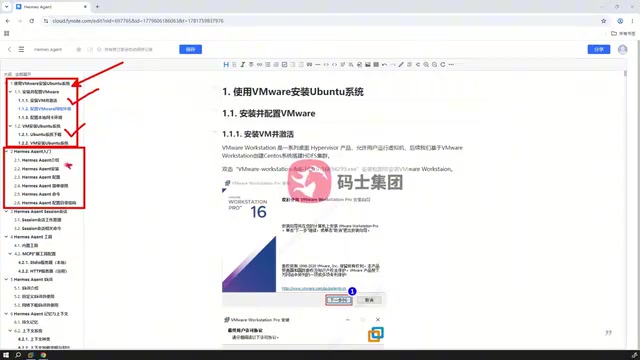
Understanding the directory structure is crucial for subsequent advanced use. An Agent framework's configuration files, skill definitions, and memory storage are typically distributed across specific directories. Only by knowing the purpose and location of these files can you quickly locate issues when problems arise and further customize extensions.
Session Management
Since Hermes Agent uses a client interaction model similar to Claude Code, session management becomes a standalone knowledge point. After entering the client, you can conduct multi-turn conversations. How to create, switch, save, and manage these sessions directly affects the continuity of long tasks and the completeness of context.
Session management in Agent frameworks is far more important than in ordinary chat applications. Large language models have a hard constraint called the Context Window—the maximum number of tokens the model can process at once. Current mainstream models have context windows ranging from 128K to 200K tokens. When an Agent executes long tasks, historical messages from multi-turn conversations, tool call results, file contents, and other information continuously accumulate. Once the context window is exceeded, early critical information gets truncated or lost, causing the Agent to "lose memory." Therefore, a good session management mechanism needs to address several core issues: how to compress conversation history to save tokens, how to retain necessary context when switching tasks, and how to share key information across multiple sessions. Tools like Claude Code address this challenge through "session summaries" and "compact" strategies, and Hermes Agent has similar mechanisms to maintain coherence in long tasks.
Tools and Skill Extensions
As an Agent, "calling tools" and "using Skills" are its core capabilities.
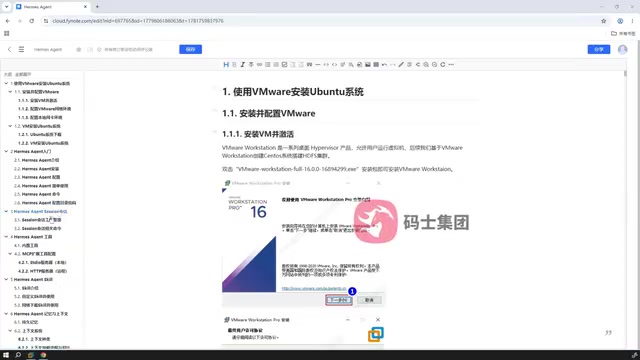
This module is divided into two layers:
- Built-in Tools: The native capability set provided by Hermes Agent, such as file operations, command execution, network access, etc. These are out-of-the-box basic functions.
- Extended Tools and Skills: The true power of an Agent lies in its extensibility. The tutorial covers how to configure and support Skills from the internet, allowing users to customize the Agent's capability boundaries according to their own workflows.
The Agent's Skill extension system is analogous to a smartphone's app store—the base system provides core functions, while Skills are like specialized apps that add domain-specific capabilities to the Agent. In terms of technical implementation, there are currently two main paradigms for Agent tool extensions: one is through the Function Calling mechanism, which allows the model to identify user intent during conversations and call predefined tool functions; the other is through MCP (Model Context Protocol) proposed by Anthropic, which defines a unified protocol specification enabling Agents to connect to any external service that complies with the MCP standard—from database queries and API calls to browser operations. The emergence of MCP is similar to how USB standardized hardware connections; it is standardizing the way AI Agents interact with the external world and has already gained support from major vendors like OpenAI and Google.
For users who want to integrate Agents into actual production environments, mastering tool extensions and Skill configuration means being able to transform a general-purpose assistant into a specialized tool tailored to specific business needs—this is also the key watershed from "getting started" to "mastery."
Memory and Context Mechanism
Memory and Context are the most technically sophisticated and easily overlooked parts of an Agent framework.
Hermes Agent internally maintains multiple types of context, with clear hierarchies and relationships between them. The tutorial focuses on explaining what responsibilities each type of context carries, what methods are used for loading, and the loading order.
The Agent's memory mechanism borrows from the layered structure of human memory, typically divided into the following levels: Short-term Memory corresponds to the conversation history of the current session and disappears when the session ends; Working Memory consists of intermediate states and temporary data during current task execution; Long-term Memory is information persistently stored across sessions, typically saved in local files or vector databases. In Hermes Agent, the loading order of multiple context types directly affects Agent behavior: system-level context (System Prompt) defines the Agent's basic role and behavioral guidelines, project-level context provides background information about the current working directory, and session-level context includes the current conversation history. This layered loading mechanism ensures the Agent prioritizes the most relevant information within the limited context window while avoiding repeated mistakes or forgetting user preferences through long-term memory.
Why is this section so critical? Because when an Agent executes long tasks, whether it can remember previous operation results and whether it can prioritize loading the most relevant information within the limited context window directly determines its task success rate and stability. Understanding context organization and loading logic is the foundation for troubleshooting issues like "why did the Agent suddenly forget previous instructions."
Advanced: Voice, Web UI, and Multi-Platform Integration
The final module of the tutorial focuses on advanced features that truly integrate Hermes Agent into daily life.
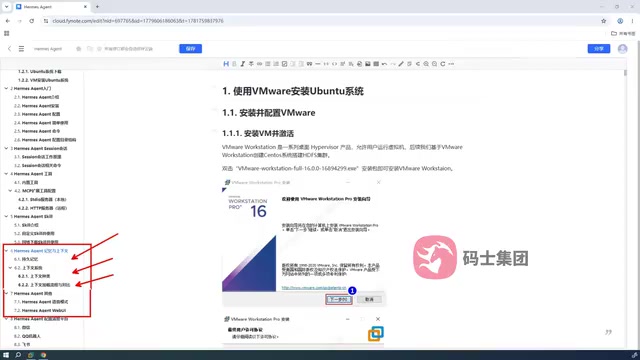
Voice Mode and Web UI: Beyond command-line interaction, Hermes also supports configuring voice input and a graphical Web interface, further lowering the usage barrier.
Multi-Platform Messaging Integration: The author calls this a "very critical" capability. Hermes Agent can be configured to connect to messaging platforms like WeChat, QQ, and Feishu (Lark). Whether on computer or mobile, you can interact with Hermes through these commonly used applications.
Integrating an Agent into messaging platforms like WeChat, QQ, and Feishu essentially leverages these platforms' bot interfaces or third-party protocol bridging tools. Taking WeChat as an example, common approaches include implementing message sending and receiving through Enterprise WeChat API or open-source projects like WeChatFerry; Feishu and DingTalk provide official bot Webhook and API interfaces. Architecturally, this is a typical message queue pattern: the messaging platform serves as the frontend receiving user input, forwards messages to the backend server where Hermes Agent is deployed via HTTP/WebSocket, and the Agent processes them and sends results back to the messaging platform for display. The core advantage of this architecture is "frontend-backend separation"—the frontend can be any platform or device that supports messaging, while the backend is always the same Agent instance, enabling a unified control experience across devices and platforms.
The elegance of this design lies in—commands sent from your phone ultimately operate the Hermes instance deployed on your computer (or virtual machine). In other words, you can remotely instruct the Agent on your computer to complete tasks via your phone while you're away, achieving a truly "portable personal assistant."
Summary
The complete Hermes Agent tutorial is divided into eight modules, progressing from environment setup, beginner configuration, and session management, through tool extensions, Skill configuration, and memory/context mechanisms, to voice, Web UI, and multi-platform integration—forming a complete learning path.
For users who want to own a deeply customizable and remotely controllable AI assistant, Hermes Agent offers a choice with better experience and more comprehensive safety reminders than OpenClaude. Deploying it in a virtual machine Linux environment is a pragmatic approach that balances the convenience of automation with data security.
Key Takeaways
Related articles

DeepCell: One-Click AI Generation of Documents, Spreadsheets, and Slides
DeepCell tops Product Hunt with one-click generation of documents, spreadsheets, and slides, using the .deepcell format for linked updates, designed for System 2 tasks like modeling and sales reviews.

Doneas: 15-Minute Daily Accountability Calls That Keep Indie Developers From Procrastinating
Doneas is a daily accountability tool for indie developers: plan tasks on Monday, join a 15-minute call with five builders each day, and log deliveries on a public progress page. This article analyzes its core mechanics, effectiveness, and potential issues around retention and matching.

Fastlane 2.0: Fully Automated AI Ad Campaigns, From Creative to Optimization
Fastlane 2.0 is an AI ad automation tool: enter your website and it learns your brand, generates video and image ads, and runs and optimizes them on Meta, TikTok, Instagram, and YouTube.