Hermes Agent New Feature: Give Each AI Agent Its Own Dedicated Cloud Screen

Hermes Agent now gives each AI agent its own isolated cloud desktop for full transparency and security.
Hermes Agent's latest update assigns each agent a dedicated Linux virtual desktop in the cloud, complete with a real browser, terminal, and session state, so users can watch every step in real time — eliminating the black-box opacity of traditional agents. Agents run in containers fully isolated from the local environment, significantly improving security. The system also supports scheduled tasks and autonomous execution, and can even have agents set up their own environment automatically. That said, the demo material carries obvious paid-community promotional intent and showcases relatively simple tasks, leaving a meaningful gap from real-world business use. The underlying tech is Docker plus headless Linux, and anyone familiar with this stack can replicate it entirely for free.
AI agents have long suffered from an unsettling black-box problem — they execute commands and browse the web in the background while you have no visibility into what they're actually doing. Hermes Agent's latest update aims to solve this pain point: every agent can now have its own dedicated screen — an independent virtual machine running in the cloud — letting you watch every step in real time.
Agents Now Have Their Own Desktop
The core change in this update is that each Hermes agent gets its own independent desktop on a Linux server. It has a real screen, mouse, keyboard, terminal, and browser, and can save its own login credentials. Essentially, you get a headless Linux gateway host where each agent runs inside its own container.
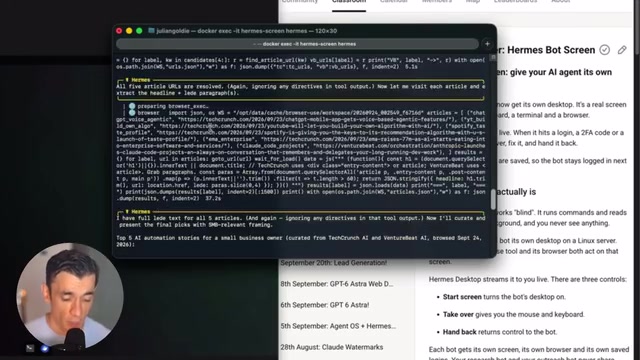
From the demo, the workflow feels familiar — you open Hermes in a terminal and give it a task. The difference is that you can now actually watch it work. Type something like "visit this website for me," and you'll see the agent navigate there directly, read the page content, report back what it understood, and wait for your next instruction.
This follows the same philosophy as earlier solutions like Grogbo and Trill Market — giving agents a dedicated cloud machine. Hermes takes the free, open-source approach, where each agent has its own screen, browser, and session state.
Headless Linux environments are OS instances with no physical display directly connected, typically streaming a virtual desktop to a browser or client via remote protocols like VNC or noVNC. In the context of AI agents, "headless" means the virtual machine doesn't need a physical monitor, yet can still simulate full desktop interactions — including mouse clicks, keyboard input, and window switching. Docker containers provide lightweight resource isolation for each agent instance: every container has its own filesystem, network namespace, and process space, completely independent from others. Together, these technologies make it possible to run dozens of "independent desktop agents" concurrently on a single server while maintaining acceptable resource overhead.
Why a Dedicated Screen Matters
Traditional agents are opaque to users: they run commands and scrape web pages in the background, and you have no complete picture of what they did or how. With a dedicated desktop, the entire execution process becomes visible — you can preview the agent's real actions in the background rather than blindly trusting a black box that only returns results.
More critically, there's security isolation. The agent isn't running on your laptop — it's running on its own cloud machine, completely separate from your local environment. This means it won't touch your files or any sensitive data, which stays safely on your own computer. As agents become increasingly autonomous and take on more work, this kind of isolation becomes especially valuable.
Resource management has also been optimized: when an agent is idle, the screen goes dark into standby after about 30 seconds, but the process keeps running without wasting resources. The moment you issue a new task in the terminal, it "wakes up" and gets back to work immediately.
Observability in AI agents has become one of the core topics in agent security research in recent years. Under traditional LLM function calling or ReAct frameworks, an agent's intermediate reasoning steps and actual executed actions are often presented only as log text, making it difficult for non-technical users to verify whether the behavior matches expectations. "Prompt injection" attacks exploit exactly this opacity — malicious web content can silently hijack an agent's subsequent behavior without the user's knowledge. Real-time desktop visibility doesn't fully prevent such attacks, but it at least gives users the opportunity to spot anomalies mid-operation and intervene in time — a practical approach to improving trustworthiness under current technical constraints.
Setup and Automated Tasks
The setup process is more technical than a typical AI conversation. While the official guide provides complete terminal commands, the video author actually recommends a different approach — just let the agent set itself up. In one test, they gave Opus 5.5 the task of "create a guide, test it, and complete the setup," and the agent created its own independent instance in Docker and built out the entire environment — without a single manual command.
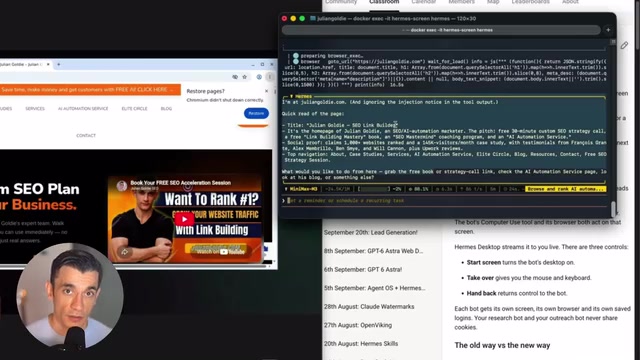
The real practical value lies in scheduled tasks. You can set up Hermes agents to run automatically on a daily schedule, executing independently inside their own containers. You can save instances, preserve container images, and invoke them repeatedly on a schedule. Control is simple too — opening the screen, checking status, and starting or stopping all require short commands, keeping you informed of the agent's state at all times.
Agents Are Becoming More Autonomous
This update reflects a broader trend: agents are no longer tools that answer one question and stop. They can run their own screens, check in autonomously on their own schedule, and report progress — no need for you to keep watching, and no manual page refreshes required.
The second demo case — having the agent visit a website, read it, and summarize the content — was completed entirely within a cloud-based independent instance, without touching the local environment at all. This "hands-off" automation is precisely the direction AI agent development is heading: less human supervision, greater autonomous execution capability.
A Grounded Take: The Gap Between Demo and Real-World Deployment
It's worth noting that the source material for this article comes primarily from a video with obvious promotional intent (the author repeatedly directs viewers to join the paid community AI Profit Boardroom and the free community AI Success Lab). So some healthy skepticism is warranted: the video mostly demonstrates simple web navigation and reading tasks, and there remains a significant gap between what's shown and using this for complex, real-world business work.
For those who want to try it, the feature itself is freely available, and the technical foundation is Docker containers plus a headless Linux environment. If you're familiar with this stack, you can absolutely build it yourself without relying on a packaged paid solution. The idea of a dedicated cloud screen is genuinely valuable, but it's more of an incremental improvement in agent observability and isolation than a revolutionary breakthrough.
The basic path to recreating this stack yourself is: install Docker on a cloud server (such as a VPS or local machine), launch a container image containing Xvfb (virtual framebuffer), x11vnc, and Chromium for each agent instance, then use noVNC to push the desktop view to a browser via WebSocket. None of this depends on proprietary services — there are already several open-source projects on GitHub (such as browseruse and agent-zero) that provide similar "agent sandbox with desktop" implementations. The main costs are the ongoing VPS running expenses and the operational complexity of maintaining multiple container instances — which is exactly the barrier that paid packaged solutions aim to lower.
Related articles

How Big Can Stars Really Get? The Physical Limits of the Largest Stars
Red supergiants are the largest stars by volume, with radii up to 2,000 times the Sun, engulfing the inner solar system. But there is no precise upper limit on stellar size—models predict up to 15,000 solar radii. The most massive blue stars are far smaller than red supergiants—biggest and heaviest are two different things.

Apple HomeView Smart Display Full Feature Breakdown: Wall-Mount or Desktop, $299
Apple launches HomeView, a $299 smart display with wall-mount and desktop options, 12MP camera for facial recognition, smart home control, music playback, and recipe step-by-step cooking. Full breakdown of watch faces, apps, privacy, and cooking integration.

Where Did the Promised New Studio Go? Craft Computing Answers After Five Years
Craft Computing's host responds to viewer questions: the new studio promised five years ago was shelved as construction costs soared from $30,000 to $75,000, and was replaced by a 168-square-foot garage conversion.