Hermes Agent Web UI Complete Review: Kanban Feature + Desktop App Hands-On Experience
Hermes Agent launches Web UI, desktop app, and Kanban board, bringing open-source AI Agent UX on par with commercial products.
Hermes Agent delivers major interface updates including a Web UI, Mac desktop app, new Terminal UI dashboard, and Kanban board feature. These updates transform AI Agents from developer-only terminal tools into productivity tools accessible to everyday users. The Kanban feature is the most groundbreaking—users can assign tasks to Agents like team members and have them completed independently. Hermes is completely free and open-source, supports multiple model integrations, and serves as a strong complement to commercial products like Claude Code.
Introduction: AI Agents Shouldn't Live Only in the Terminal
If you've been using AI Agents, chances are you've typed commands into a dark terminal interface. While functional, the experience is far from friendly—it feels more like a developer's tool than a product ordinary users can easily pick up.
Hermes Agent recently rolled out a series of interface updates, including a Web UI, desktop application, a brand-new Terminal UI dashboard, and an eye-catching Kanban feature. All these updates share a single core goal: Make AI Agents as easy to use as ChatGPT while preserving open-source flexibility and powerful automation capabilities.
This article will break down the user experience and practical value of each new feature based on hands-on testing.
What Is Hermes Agent? A Quick Core Concepts Primer
Hermes is essentially an AI Agent framework. Think of it as a "management layer"—it's responsible for communicating with large language models in the right way and extracting useful outputs from them.
An AI Agent is a software system capable of autonomously perceiving its environment, making decisions, and executing actions. Unlike traditional chatbots, Agents possess tool-calling, multi-step reasoning, and autonomous planning capabilities—they don't just answer questions, but can decompose complex tasks, invoke external tools, and maintain coherent execution logic across multiple steps. An Agent framework provides the infrastructure for building such systems, including core components like prompt management, tool registration, memory systems, and execution loops. Current mainstream open-source Agent frameworks include LangChain, AutoGPT, CrewAI, and others. Hermes positions itself in this ecosystem as a lightweight solution with greater emphasis on practical productivity and user experience.
It supports multiple models as its "brain":
- OpenAI's GPT-4.5, ChatGPT
- DeepSeekAd (fast, stable, and extremely cost-effective)
- Various free APIs through OpenRouter (including Alpha, Gemini, and others supporting 1 million Token context windows)
OpenRouter is an AI model routing service that unifies APIs from multiple LLM providers under a single interface. Developers only need to integrate with OpenRouter's API to access models from dozens of providers including OpenAI, Anthropic, Google, Meta, and more. Its core value lies in: a unified API format that reduces switching costs, transparent pricing with on-demand selection of the most cost-effective models, and some models even offering free quotas. For frameworks like Hermes, integrating OpenRouter means users can try virtually every mainstream model on the market with zero configuration cost.
Regarding the 1 million Token context window, it's worth explaining its significance. Tokens are the basic units through which LLMs process text—one English word typically corresponds to 1-4 tokens. The context window refers to the maximum number of tokens a model can process in a single conversation. One million tokens means the model can process approximately 750,000 words of English content in one go—equivalent to an entire lengthy novel or the complete source code of a large codebase. This is especially significant for AI Agents: a larger context window means the Agent can understand the full picture of more complex projects and make more accurate decisions without making errors due to "forgetting" earlier information.
The key point: Hermes itself is completely open-source and free. If you're willing to use free API providers, the entire solution can run at zero cost.
Hermes Web UI Hands-On: A Quantum Leap from Terminal to Browser
Hermes Web UI is a free, open-source project with an extremely simple installation process—you can even have Hermes Agent handle the installation itself. Paste the GitHub project information to it, tell it to run, and the Agent will automatically set up the entire environment.
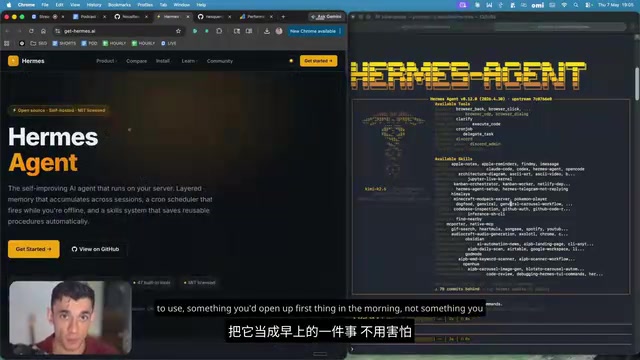
Once running, the difference is immediately apparent. The terminal interface and Web UI are completely different experiences:
- Terminal version: Black screen with white text, requires manual command input, extremely unfriendly to non-technical users
- Web UI version: Clean, smooth web interface accessible from a browser or even your phone at any time
A very practical detail from testing: if the open-source project runs into issues (which happens often), you just go back to Hermes and say "fix this for me," and the Agent will automatically diagnose and repair it. This is exactly what having an Agent means—you don't have to solve every technical problem yourself; just hand it off to the Agent.
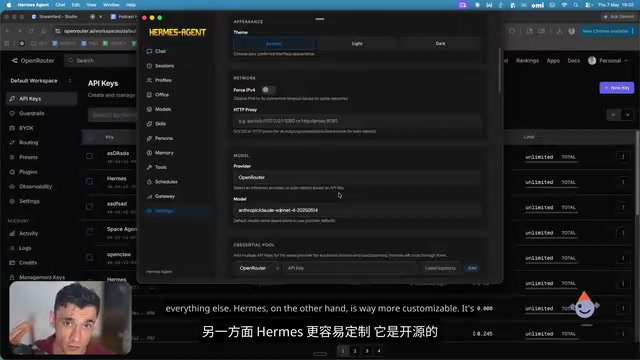
Switching models or APIs is also convenient—just run hermes set in the terminal, and switching takes about 30 seconds.
Hermes Workspace and Kanban Feature: Agent Becomes a Team Member
This is the most exciting update so far. The Hermes Workspace interface looks and feels like ChatGPT—open it and start chatting immediately with zero learning curve.
But the real killer feature is the Kanban function launched just this week.
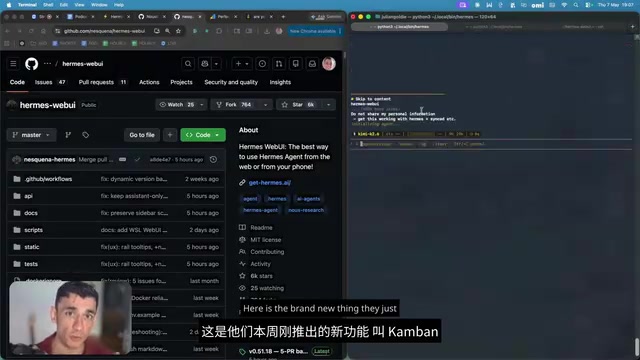
Kanban originated from the Toyota Production System and is a visual work management method. Its core concept is dividing workflows into columns (such as "To Do," "In Progress," "Done"), with each task represented as a card that flows between columns. In software development, tools like Trello and Jira digitized Kanban, making it a standard for project management. Hermes's innovation in bringing Kanban to the AI Agent domain is this: the executor of task cards is no longer a human team member, but an AI Agent. This essentially combines the project management paradigm with autonomous AI execution capabilities, allowing users to manage AI workflows the same way they'd manage a team.
How the Kanban Feature Works
- Create a Kanban Board in Hermes Workspace
- Add tasks and assign them to the Agent (e.g., "Create an SEO calculator, determine the details yourself")
- The Agent automatically picks up the task and executes it
- You can check task progress and completion status at any time
In testing, we had the Agent complete an entire AI/SEO blog post—no hand-holding required. We simply placed a task on the board, and the Agent independently completed all the work.
What does this mean? You're essentially running a "one-person team," and this Agent team member doesn't rest, doesn't procrastinate, and doesn't need management. You give it tasks, it delivers. No babysitting required, no checking in every five minutes to ask about progress.
Of course, using the Kanban feature directly from Hermes's native command line is currently more powerful—the Workspace version is still in its early stages. But as a starting point, it already shows enormous potential.
Desktop App and New Terminal UI Dashboard
Hermes Swift: Mac Native Desktop App
Hermes Swift is the desktop-native version of the Web UI, running directly on Mac without needing a browser. In testing, we had it build a website for a community—it started building locally, and the entire process was smooth and natural.
The advantage of a native desktop app over the Web UI is that it can access the local file system and system resources more directly, reducing permission restrictions from browser sandboxing while also avoiding network latency impacts on interaction experience. For developers who frequently work with local projects, the native app provides a more seamless workflow.
Honestly, once you've used the desktop version or Web UI, it's hard to go back to the terminal version.
New Terminal UI Dashboard
Even if you must work in the terminal, the new UI plugin makes the experience considerably more comfortable.
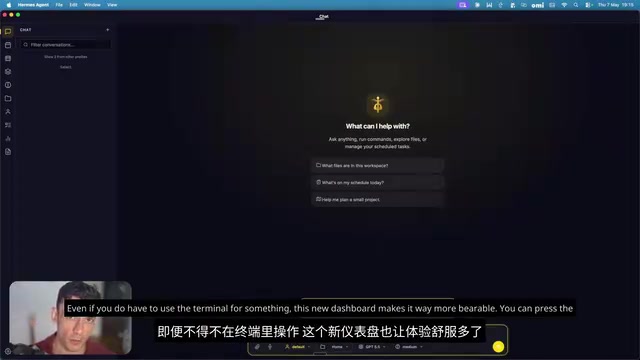
Key improvements include:
- Command Palette: Quickly invoke a command panel, similar to pressing Ctrl+Shift+P in VS Code to bring up the quick command search box, letting you execute operations without memorizing specific command syntax
- Profile Switching: Quickly switch between different Hermes configurations—for example, one Profile using GPT-4.5 for complex reasoning and another using DeepSeek for daily conversations, switching on demand
- Context and Analytics Panel: Real-time view of conversation context and analytics data, including current token consumption, conversation history length, and other key information
- Color Themes: Support for custom color schemes, even a "party mode"
Much cleaner than the standard terminal interface. If you insist on staying in the terminal, at least you can make it fun.
Real-World Testing Pitfalls: API Management Requires Attention
The biggest issue encountered during testing was API management. When running multiple interfaces and extensions simultaneously, switching model providers sometimes modifies part of the configuration, causing other features to break.
The root cause lies in the configuration complexity of AI Agent frameworks. Different model providers have different API formats, authentication methods, and parameter requirements. When multiple components (Web UI, desktop app, Terminal plugin) share the same configuration file, a change in one place can produce chain reactions. This is especially common in the early stages of open-source projects—feature iteration is fast, but compatibility testing between modules isn't yet thorough enough.
This doesn't happen every time, but frequently enough to warrant caution. Fortunately, the fix is simple:
- Copy the error message from the terminal
- Paste it into the Hermes conversation
- Let the Agent fix it itself
This is genuinely the fastest approach—your Agent itself can serve as IT support. This "self-healing" capability is also one of the core characteristics distinguishing AI Agents from traditional software—with traditional software, you can only wait for developers to fix bugs or dig through documentation yourself, while an Agent can understand the meaning of error messages and proactively attempt solutions.
Hermes Agent vs Claude Code: How to Choose?
This is a question many people care about, and the answer depends on your use case.
Claude Code is a command-line AI coding assistant from Anthropic, based on the Claude series of large language models. It can directly read and write local files, execute terminal commands, understand the context of an entire codebase, and handle the full development workflow from code generation to debugging and refactoring. Claude Code's advantages lie in Anthropic's deep optimization of model safety and reliability, plus the smooth experience from native integration with Claude models. However, as a commercial product, it's tied to Anthropic's API and pricing system, lacking flexibility in model selection.
When to Choose Claude Code
- Need stability and reliability, works out of the box
- Don't want to spend time debugging configurations
- Value the polish and maturity of the desktop experience
- Production environments where reliability comes first
When to Choose Hermes Agent
- Need high customizability, modify as needed
- Want to connect any model and run locally
- Limited budget, want to use it completely free
- Want to try features like Kanban, Workspace, and custom configurations that closed-source tools don't offer
My recommendation: use both. Use Claude Code when you need to complete tasks quickly and reliably; use Hermes when you want to run interesting automation experiments, test new workflows, or build custom processes. They're not mutually exclusive.
From a broader perspective, this "open-source vs commercial" choice will persist in the AI tools space for a long time. Open-source solutions offer maximum freedom and zero-cost advantages but require users to bear more configuration and maintenance costs; commercial solutions trade higher prices for lower barriers to entry and more stable experiences. The ideal strategy is often to choose flexibly based on the importance and urgency of specific tasks.
Conclusion: Open-Source AI Agent Experience Is Catching Up to Commercial Products
This round of Hermes updates represents a qualitative leap. From Web UI to desktop app, from Terminal dashboard to Kanban board, every improvement pushes in the same direction: Making AI Agents no longer exclusive developer tools, but productivity partners that everyone can and wants to use.
The power of the open-source community is on full display here—new features ship every week, driven by an active community behind it all. If you haven't tried Hermes yet, now is the best time. After all, it's free—there's no reason not to give it a shot.
Key Takeaways
- Hermes Agent launches Web UI, desktop app, and new Terminal UI, fundamentally improving the user experience over traditional terminal operations
- The new Kanban feature lets Agents accept task assignments like team members and complete work independently, enabling true task automation
- Hermes is completely open-source and free, supporting multiple models including GPT, DeepSeek, and Gemini—combined with free APIs, it can run at zero cost
- Compared to Claude Code, Hermes wins on customization and feature richness, while Claude Code wins on stability and out-of-the-box usability—the two are complementary
- API management is currently the biggest pain point, but it can be quickly resolved by having the Agent fix errors itself
Related articles
 Product Reviews
The Programmer's Desk Setup Guide: Building a Workspace That Feels Like Home
Discover how programmers build productive, comfortable workspaces. From multi-monitor setups to ergonomic design, explore the desk philosophy that drives focus and flow.
 Product Reviews
Qoder vs Cursor Real-World Comparison: Which $20/Month AI IDE Is Better?
Hands-on comparison of Qoder vs Cursor AI IDEs: Agent autonomy, human interaction count, and architecture decisions. Qoder needed only 2 interactions vs Cursor's 8.
 Product Reviews
Cursor Cloud Agent Demo: Eliminating Bottlenecks Across the Entire Software Development Lifecycle
Deep analysis of Cursor's Cloud Agent demo showing how cloud VMs, automated test artifacts, and a full-chain control plane systematically eliminate human bottlenecks across the software development lifecycle.