HF Buckets and Xet: Upload Only What Changed, Eliminate Bandwidth Waste

Hugging Face Xet uses content-defined chunking to upload only what changed in large datasets.
Hugging Face's Xet technology uses Content-Defined Chunking (CDC) to split large files into ~64KB content-aware chunks, fingerprint each one, and upload only those that have changed. Built into the HF CLI with no extra setup, it works out of the box for CSV files. Parquet requires explicitly setting `use_content_defined_chunking=True` in PyArrow — without it, even minor changes trigger near-full re-uploads. In production: always write via HF CLI, sort data only once, and lock your writer settings.
When working with large datasets, one often-overlooked cost is this: every time you update a file — even if you only changed a few rows — you have to re-upload the entire thing. For files that are hundreds of megabytes or even gigabytes in size, this means massive redundant bandwidth consumption and painfully long wait times. Hugging Face's Xet technology was built specifically to address this pain point — it lets you upload only the parts that actually changed.
This article is based on a YouTube technical demo, breaking down how HF Buckets works with Xet, the compatibility pitfalls with Parquet files, and the key details you need to know before putting this into a production pipeline.
Xet: Git for File Chunks
Xet is Hugging Face's storage layer technology. Think of it as "Git, but for file fragments rather than entire files." One of its biggest advantages is that no extra installation is needed — Xet is already built into the Hugging Face CLI and the Hugging Face Hub, which means every upload you make is already going through this mechanism.
The core process has three steps:
- Content chunking: Each file is split into ~64KB pieces, with split points determined by the content itself. This is crucial — because the cut points depend on content, a change in one place won't shift all subsequent cut points.
- Fingerprinting: Each chunk gets a fingerprint. Identical bytes produce identical fingerprints on any machine.
- Incremental diffing: Before uploading, the client asks the Hub: "Which of these fingerprints do you already have?" Chunks that already exist stay local and are never transmitted.
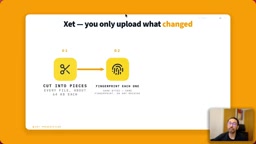
This is the essence of "upload only what changed." It's similar in spirit to Git's diff approach, but at the granularity of byte-level chunks within a single file.
Content-Defined Chunking (CDC) is the fundamental reason Xet can ensure that changes don't affect downstream cut points — it's worth explaining clearly. Traditional fixed-size chunking splits a file at fixed byte intervals: bytes 0–64KB form the first chunk, 64–128KB the second, and so on. The problem is that inserting even a single byte at the start of the file shifts every subsequent chunk's boundaries, changing every chunk's content and invalidating every fingerprint — effectively forcing a full re-upload. CDC works differently: it uses a sliding window to compute a local hash, and whenever that hash meets a specific condition (e.g., the last few bits are zero), it cuts there. The cut points are determined by content, not byte offset. This means an unmodified region of the file — regardless of where it appears in the byte stream — will always produce the same cut points and the same fingerprints. Git's object storage uses a similar idea, and Xet brings this mechanism down to the byte-chunk level within individual files.
Hands-On Demo: Incremental Uploads with CSV Files
The demo uses New York City taxi trip data — a CSV file with roughly 1.5 million rows and 191MB in size. The workflow is straightforward:
First, create a Bucket:
hf buckets create nyc-taxi-data
Then copy the CSV file up. Since this is the first upload, the entire file is transmitted:
hf buckets copy nyc.csv hf://buckets/<username>/nyc-taxi-data
Next, the presenter uses head -n 101 to extract the first 100 rows (minus the header) and appends them to the end of the original file, then runs the copy command again. This time, Xet recognizes that the vast majority of the content already exists on the Hub and uploads only the newly added 100 rows — noticeably faster.
This validates Xet's core value: on the second upload, the Hub already holds nearly all the chunks from that file, so only the new rows need to be transmitted.
The Parquet Trap and One Critical Config Line
The real challenge shows up with Parquet. Parquet is an extremely common columnar storage format in data engineering, but by default it disrupts Xet's deduplication logic.
The presenter uses PyArrow as the engine to convert CSV to Parquet. The critical detail here is a single parameter — use_content_defined_chunking (CDC). Only by setting this flag to True will PyArrow write the file in a way that's compatible with Hugging Face Hub, allowing Xet's deduplication to actually work.
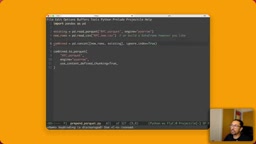
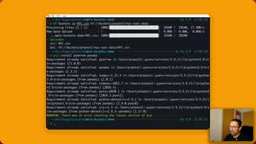
The demo also deliberately runs a more extreme test: instead of appending to the end, 100 rows of new data are prepended to the beginning of the Parquet file, and then hf buckets sync is run. Even with the change at the very front of the file, the output still shows that most chunks already exist on the server and only the changed portion needs to be uploaded.
A pair of comparison numbers makes this concrete: for a 100MB Parquet file with 3,000 rows added near the beginning — using default Parquet settings, almost the entire file needs to be re-uploaded; with content-defined chunking enabled, only about 6 chunks need to be transmitted.
It's worth emphasizing that Xet is running in both cases. The reason the default settings fail isn't that Xet gets turned off — it's that the way the file is written means Xet "can't find any chunks to match," so the magic has nothing to work with.
The reason Parquet breaks Xet's deduplication lies in its columnar encoding and internal data organization. A Parquet file consists of multiple Row Groups, each storing data by column, with a Footer (metadata index) written at the end of the file. By default, engines like PyArrow determine Row Group boundaries based on row count or memory limits, and the Footer changes on every rewrite — even appending a few rows can significantly alter the file's byte layout. Setting
use_content_defined_chunking=Trueinstructs PyArrow to follow CDC principles when serializing internal Data Pages, so that identical content produces identical byte sequences, allowing Xet's fingerprint matching to hit existing chunks. This parameter was introduced through collaboration between Hugging Face and the PyArrow team and is a relatively new feature — confirm your PyArrow version supports it before use.
Five Things to Know Before Going to Production
For integrating this approach into a production pipeline, the video offers several practical guidelines:
You Must Use the Hugging Face CLI
Chunking happens on your local machine, and only Hugging Face's toolchain performs this step. Buckets are compatible with any S3 tool (AWS CLI or any S3 library), but those tools upload the entire file every time. Reading can use any S3 library, but writing is where deduplication happens — always use the HF CLI for writes.

Hugging Face Buckets exposes a storage interface compatible with the Amazon S3 protocol, so technically any S3 API-compatible tool (
aws s3 cp, boto3, s3fs) can read from and write to a Bucket. However, the S3 protocol itself contains no CDC chunking logic — it's simply an object storage interface where an upload replaces the entire object. Xet's chunking and fingerprint computation happen locally on the client, and are exclusive to the HF CLI and thehuggingface_hubPython library. This means reading data with any S3 tool is fine (e.g., reading directly from ans3://path with pandas), but writing while bypassing HF's toolchain means giving up incremental uploads entirely. When integrating into CI/CD pipelines or Airflow DAGs, pay close attention to whether any dependency introduces steps that write directly to S3.
Version Control: copy and sync Overwrite
The copy and sync commands in Buckets overwrite existing content directly. Once your data is finalized, copy it into a dataset repo — this is a server-to-server copy that completes almost instantly, and it gives you version history as well.
Sort Only Once
Chunk boundaries follow data values. If you re-sort a file to speed up queries, every chunk changes, and you're back to a full upload. The right approach is to sort first, then write — and only ever append after that.
Keep Writer Settings Consistent
Xet matches bytes, not data semantics. If you switch compression algorithms, change page settings, or a library upgrade silently changes its defaults, you'll end up with a file Xet has never seen before — even if the data is identical. Lock down your writer settings, upgrade intentionally, and expect the first upload after an upgrade to be a full one.
Summary
Xet's value is in turning "upload the whole file" into "upload the diff" — for large datasets that update frequently, this translates into real, measurable savings in bandwidth and time. The barrier to entry is also low: it's built into the HF toolchain with no extra installation required. What users actually need to do is enable use_content_defined_chunking for Parquet scenarios, and follow a few production disciplines around sorting and writer settings. Once you understand the core mechanism of content-defined chunking, integrating this approach reliably into your data pipeline becomes straightforward.
Related articles

JobRunner MCP Server: AI Agents Can Now Fix Failed Java Jobs
JobRunner launches an open-source MCP server enabling AI agents to view cluster status, diagnose failures, and recover Java jobs—incident response from any cloud coding environment or existing agent.

MLAI Digital Launches 9 Security Agents: MCP Server Safeguards the Full Lifecycle of Agentic AI
MLAI Digital launches Security MCP Server with nine built-in specialized security agents covering vulnerability discovery, attack simulation, prompt injection detection, API and infrastructure assessment, and accelerated remediation—embedding security validation across the full Agentic AI lifecycle from development to production.

Running Isaac Lab on H100 GPUs: Exploring Better Approaches
Exploring optimization methods for running Isaac Lab on NVIDIA H100 GPUs, including MIG configuration, mixed precision, TensorRT acceleration, and community experience to improve robotics simulation and reinforcement learning efficiency.