HIX AI Full Review: Is the All-in-One AI Presentation, Video & Image Generator Actually Good?

HIX AI integrates presentations, video, and image AI creation in one platform — tested and reviewed.
This article provides a comprehensive hands-on review of HIX AI, an all-in-one AI Agent platform that integrates AI presentations, video, image generation, and deep research into a single workspace, solving the pain point of content creators constantly switching between multiple AI tools. Testing revealed unique presentation templates unlikely to look like others', fluid and realistic video generation powered by top models like Seedance 2.0, and image generation supporting up to 4K resolution. Core advantages include a unified workflow, rich model ecosystem, differentiated design, and low barrier to entry.
Content creators probably all share this experience: you open one tool to write copy, switch to another platform for presentations, jump to yet another website for image generation, and then use a completely different service for video editing. Just switching between different tools and remembering their various workflows already burns through a significant amount of time and energy.
In fact, the tool fragmentation problem facing content creators reached unprecedented levels in 2024. Statistics show that a full-stack content creator needs an average of 5 to 8 different AI tools to complete daily work: ChatGPT or Claude for copywriting, Midjourney or DALL·E for images, Runway or Pika for video, Gamma or Beautiful.ai for presentations, plus various post-production editing tools. Each tool has its own subscription fee, operational logic, and learning curve. This fragmentation not only increases financial costs but also causes serious workflow disruption and context-switching overhead.
HIX AI aims to solve exactly this problem — packing AI presentations, AI video, AI image generation, and deep research into a single platform, creating what they call the "Ultimate AI Agent." An AI Agent (intelligent agent) is one of the hottest concepts in the AI field in recent years, referring to an intelligent system capable of autonomously perceiving its environment, making decisions, and executing tasks. Unlike traditional AI tools that can only passively respond to single commands, AI Agents possess capabilities for task planning, tool invocation, and multi-step execution, breaking down complex work into multiple subtasks and completing them sequentially.
The concept of AI Agents originates from "intelligent agent" theory in artificial intelligence research, traceable back to multi-agent system research in the 1990s. But what truly brought this concept into the mainstream was the viral success of the AutoGPT project in 2023 — it demonstrated the possibility of having large language models autonomously decompose tasks, invoke tools, and iterate on execution. Between 2024 and 2025, AI Agents moved from proof-of-concept to productization: OpenAI launched an Agent framework capable of autonomous web browsing and code execution, Google's Project Mariner enabled AI agents to directly operate browsers for complex tasks, and Anthropic's Claude added "Computer Use" functionality. These developments mark a fundamental shift of AI from "Q&A tool" to "task executor." From OpenAI to Google to major tech companies, AI Agents are viewed as the core form of next-generation AI applications. HIX AI positioning itself as the "Ultimate AI Agent" is precisely targeting this trend — not just providing point solutions, but attempting to become an intelligent agent that orchestrates the entire content creation workflow. It sounds great, but how does it actually perform in practice? This article provides a comprehensive hands-on review to see whether HIX AI can truly handle the daily needs of content creators.
What Is HIX AI? Platform Features & Interface Overview
HIX AI positions itself as an intelligent all-in-one AI agent platform, designed to help users handle tasks of all sizes in brand operations. After logging in, the first impression is that the interface is quite clean — no flashy buttons crammed everywhere. It supports multi-language switching, so Chinese-speaking users can directly set the interface to Chinese, keeping the barrier to entry low.
The operational logic is also intuitive: click "New" to start a new task, and "Library" stores all previously generated projects for easy retrieval and reuse. In the core interaction area, beyond basic text prompt input, it also supports uploading files and images as reference materials, and even has voice input — a thoughtful design for those who prefer to "talk through" their ideas.

The bottom of the platform clearly lists five core functional modules: AI Slides (Presentations), AI Video, AI Images, Document Processing, and Deep Research, plus standard AI chat. The categorization is clear at a glance — no need to dig through layers of menus.
AI Presentation Generation Test: Unique Design Styles That Stand Out
Plenty of Templates That Won't Look Like Everyone Else's
Presentation generation is the HIX AI feature that pleasantly surprised me the most. After entering the AI Slides module, the platform offers a large selection of design templates, and the key point is that these templates have highly distinctive visual styles — not the generic business templates you see everywhere, but layouts with clear design sensibility. Presentations made with HIX AI are unlikely to look the same as those produced with other tools, which is a genuine advantage for those who care about brand image.
Also worth mentioning is that the platform defaults to the Nero Banana Pro model to enhance presentation visual quality, showing that HIX AI has put thought into targeted model pairing.
No Draft Ready? You Can Start from Scratch Quickly
During testing, I discovered a very practical workflow: when you don't have a ready-made draft, you can first use HIX AI's chat function to generate a presentation content framework, then seamlessly transition to presentation creation.
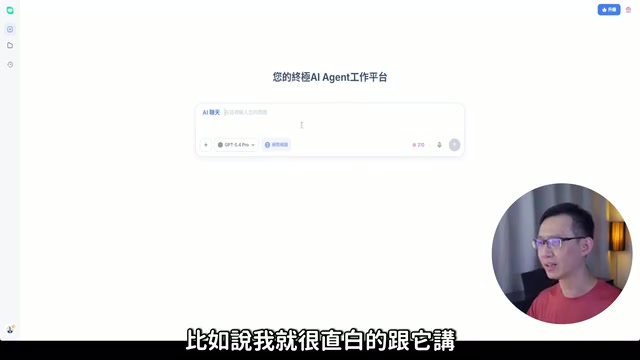
Here are the specific steps:
- Create a new project and select the AI chat function, choosing an appropriate large language model from the model list (the platform integrates models like GPT-5.4 Pro). Large Language Models (LLMs) acquire capabilities in language understanding, logical reasoning, and content generation through training on massive text datasets. The core architecture of these models is the Transformer, proposed by Google in their 2017 paper "Attention Is All You Need," which uses "self-attention mechanisms" to capture semantic relationships between any positions in text. From the GPT series to Claude and Gemini, today's mainstream LLMs are all built on this architecture, but differ in training data, fine-tuning strategies, and alignment approaches, resulting in different strengths: some excel at creative writing, while others are stronger in logical analysis and code generation. The platform's approach of integrating multiple models allows users to choose the most suitable model for specific tasks rather than being constrained by a single model's limitations. This "model routing" strategy is also the mainstream trend among current AI platforms.
- Enable web search to give generated content timeliness and accuracy
- Input your presentation requirements, such as "A presentation about applying AI audio-visual technology to work efficiency improvement, covering tool applications and concept learning, 10 pages total, with copy planning for each page"
- Copy the generated copy into the AI Slides function to generate a complete presentation with one click
The entire process from conception to finished product takes only a few minutes. The generated presentations not only have unique visual styles but also organize content strictly according to requirements, with impressively high completion quality.
AI Video Generation Test: Top Models Like Seedance 2.0 All Covered
Three Generation Modes for Different Creative Scenarios
HIX AI's video generation feature offers three modes:
- Text-to-Video: Generate videos from pure text descriptions
- Image-to-Video: Transform static images into dynamic videos
- Reference-based Generation: Provide reference materials for AI to create from
Model Lineup: Nearly All the Strongest Video AI Models Are Here
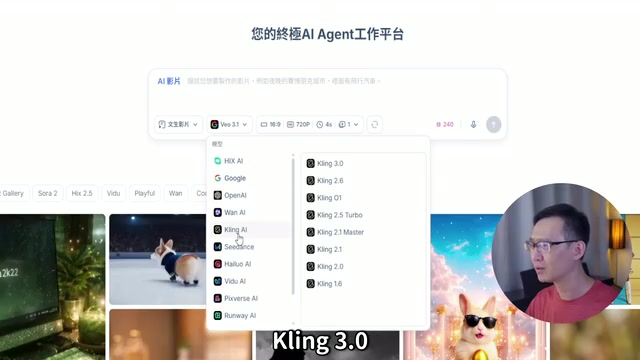
In terms of model selection, HIX AI's lineup can only be described as "premium": Google VO 3.1, OpenAI Sora 2 Pro, Kling 3.0, Seedance 2.0 — these are all currently the top models in the video generation field, all integrated into a single platform.
It's worth understanding that video generation AI experienced explosive progress between 2024 and 2025. From the early stage of only being able to generate a few seconds of blurry footage to today's models producing high-definition, coherent videos with complex camera movements and character interactions, the pace of technological iteration has been remarkable. Most of these models are based on Diffusion Models or Transformer architectures, learning temporal coherence and physical world motion patterns through training on large-scale video datasets.
The core idea of diffusion models comes from the diffusion process in thermodynamics: first gradually adding noise to data until it becomes pure random noise (forward process), then training a neural network to learn to reverse this process, progressively restoring clear images or video frames from noise (reverse process). In video generation, models also need to learn temporal consistency between frames, ensuring character appearance, lighting changes, and object motion remain coherent along the timeline. This is why early video generation models often exhibited "face-morphing" or objects suddenly disappearing. Since 2024, through the introduction of Spatial-Temporal Attention mechanisms and larger-scale video training data, these issues have been significantly improved.
Among these, Seedance 2.0, developed by a team under ByteDance, is known for natural motion and visual consistency; Kling 3.0, from Kuaishou, has unique advantages in Chinese-language scenarios and facial expression generation.
For this test, I selected Seedance 2.0, one of the currently recognized top-performing video generation models. Generation parameters support custom aspect ratios (e.g., 16:9), resolution, video length, and output quantity, providing ample control.
How to Write Prompts for Best Results?
Based on testing experience, the more detailed the video generation prompt, the better the output quality. This actually involves "Prompt Engineering" — a specialized skill of carefully designing text instructions given to AI models to guide them toward producing results that better match expectations. Prompt engineering matters because AI model output quality is highly dependent on input precision and structural organization. Research shows that the same model can produce dramatically different quality outputs when receiving a vague one-sentence description versus structured detailed instructions. In video and image generation, the structural level of prompts directly impacts output quality, with detailed prompts containing complete elements typically achieving far superior results compared to brief descriptions. I recommend including the following elements:
- Character setup: Who appears in the frame
- Shot description: Specific actions and visuals for each shot
- Camera movement: Push, pull, pan, tilt, and other cinematic language
- Scene background: Environment and atmosphere settings
- Dialogue content: What characters say and in what language
The test results were genuinely impressive — videos generated by Seedance 2.0 were natural, fluid, and highly realistic, with character dialogue showing no obvious uncanniness. The overall quality reached a level ready for direct publication and sharing. This is partly thanks to the model's capabilities and partly indicates that HIX AI has done solid optimization at the prompt understanding and task execution level.
AI Image Generation Test: Up to 4K Resolution Output
Entering the AI image generation feature, the platform showcases a large variety of case examples in different styles — cute, realistic, artistic creative, and commercial design are all represented, covering a wide range.
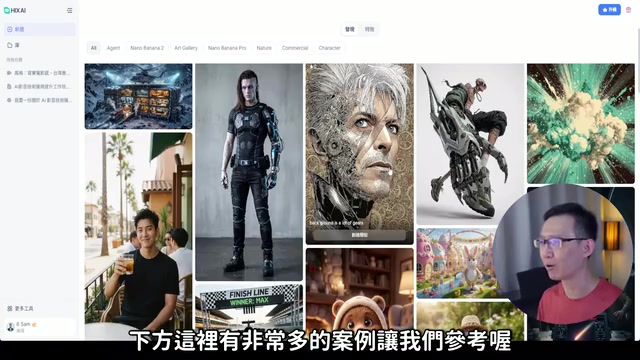
One design I found particularly practical: when you see a case you like, clicking the "Create Similar" button automatically fills the corresponding prompt into the input box. You can generate directly or fine-tune from there. For those who aren't great at writing prompts, this feature dramatically lowers the entry barrier — essentially, the platform is doing the prompt engineering work for users, allowing those without this skill to still achieve high-quality outputs.
On the model side, beyond HIX AI's proprietary models, it also integrates top image generation models from various platforms. For this test, I selected Google's Nano Banana Pro model, which supports up to 4K resolution — among similar AI image generation tools, this specification is quite outstanding.
It's important to understand that increasing AI image generation resolution isn't simply a matter of adding more pixels — it involves comprehensive upgrades to model architecture, memory management, and training strategies. Early Stable Diffusion 1.x trained and inferred at 512×512 pixels, and forcing upscaling to higher resolutions would cause repeated structures and compositional collapse. Later, through cascaded generation (generating at low resolution first then progressively upscaling), tiled rendering (splitting large images into multiple blocks for separate generation then stitching), and training directly on high-resolution data, the resolution bottleneck was gradually broken. From the initial 512×512 pixels of Stable Diffusion and DALL·E to today's 4K (approximately 3840×2160 pixels) output support, image quality has improved by dozens of times. 4K output places extremely high demands on the model's detail generation capability, because at high resolution, any texture distortion, edge aliasing, or local inconsistency becomes magnified to visible levels. High-resolution output means not just more pixels but requires the model to achieve higher standards in detail consistency, texture realism, and global composition. 4K-level AI-generated images can already be directly used for print materials, large-format posters, and high-definition screen displays, offering practical production value for commercial design and brand visuals rather than being limited to social media sharing. The actually generated images featured exquisite details and beautiful visuals, with satisfying quality.
Is HIX AI Worth Using? Core Advantages & Recommendations
After this comprehensive testing round, HIX AI as an all-in-one AI Agent platform has several core advantages worth noting:
First, it truly achieves an all-in-one experience. From copywriting ideation and presentation creation to video generation and image creation, the entire content creation chain can be completed within a single platform without constantly switching tools. The value of this integration lies not only in saving time but also in maintaining thought continuity throughout the creative process — every tool switch means a context interruption and readaptation, and an all-in-one platform eliminates these hidden costs.
Second, the AI model ecosystem is extremely rich. The platform integrates the strongest AI models across various domains, including GPT-5.4 Pro, Sora 2 Pro, Kling 3.0, and Seedance 2.0, meaning one subscription gives you access to capabilities from multiple services. HIX AI's "model aggregation" strategy technically relies on API gateways and model routing systems — the platform interfaces with multiple AI model providers' APIs through a unified interface layer, routing requests to the most appropriate model based on the user's specific task type, input content, and quality requirements. The advantage of this architecture is that users don't need to understand the technical differences between underlying models, the platform can seamlessly switch when models are updated, and it can obtain cost advantages through bulk API call purchasing to offer more competitive pricing to users. For users, this means the combined cost of individually subscribing to each top-tier AI service is considerable, and the different operational logic and interface designs across platforms create non-trivial learning costs — a model aggregation platform solves both pain points at once.
Third, presentation design has clear differentiation. The templates' visual styles are unique, making outputs unlikely to look the same as those from other platforms — particularly appealing for users with brand image requirements.
Fourth, the barrier to entry is low. Supporting text, voice, file upload, and other input methods, combined with case references and one-click reuse features, even AI tool beginners can get started quickly.
For content creators, brand operators, or professionals who frequently need to produce multimedia assets, HIX AI offers a choice worth serious consideration. Its greatest value isn't that any single feature is extraordinarily powerful, but rather that it integrates multiple top-tier AI capabilities into a single workflow, making what was previously tedious multi-platform operation simple and manageable.
Related articles
 Product Reviews
The Programmer's Desk Setup Guide: Building a Workspace That Feels Like Home
Discover how programmers build productive, comfortable workspaces. From multi-monitor setups to ergonomic design, explore the desk philosophy that drives focus and flow.
 Product Reviews
Qoder vs Cursor Real-World Comparison: Which $20/Month AI IDE Is Better?
Hands-on comparison of Qoder vs Cursor AI IDEs: Agent autonomy, human interaction count, and architecture decisions. Qoder needed only 2 interactions vs Cursor's 8.
 Product Reviews
Cursor Cloud Agent Demo: Eliminating Bottlenecks Across the Entire Software Development Lifecycle
Deep analysis of Cursor's Cloud Agent demo showing how cloud VMs, automated test artifacts, and a full-chain control plane systematically eliminate human bottlenecks across the software development lifecycle.