How a 700-Person Law Firm Automated Slack Workflows with AI Agents + n8n

A 700-person law firm used n8n to connect AI and Slack, handing information relay to workflows.
The article describes how a law firm of 700 to 800 people, with the help of an automation vendor, used n8n to build minimalist 'trigger + AI step + Slack action' workflows, solving four types of information loss: meetings without minutes, lost DM tasks, manual onboarding, and missed calls without review. The core approach is to design an independent small chain for each pain point. The author notes that n8n was chosen over native Slack automation because it requires cross-channel aggregation and understanding of unstructured content, and the small-chain architecture is easy to maintain and explainable.
How a 700-Person Law Firm Automated Slack Workflows with AI Agents + n8n
When a law firm of 700 to 800 people moves almost all of its collaboration into Slack, the problems don't disappear just because the tool is advanced—long voice meetings go unrecorded, tasks dispatched via direct messages vanish into thin air, new hires rely on hand-holding, and missed calls go unreviewed. An automation vendor (called "soft" in the video) took on this client and used n8n to build a series of small chains—"trigger + AI step + Slack action"—moving information collection and task assignment out of human hands and into workflows.

The Problem Isn't Slack—It's the "Human Middle Layer"
The troubles in this case are very concrete: executives and department heads hold meetings and assign work in Slack, but no one takes minutes; tasks are passed privately via DMs with no unified entry point; lawyers who need to appear in court have to dig through every channel themselves to piece together case context; new employees don't know what to do after onboarding and must be told via manual DMs; and when conference calls are missed, no one knows what happened.
According to the video, these steps were previously handled by specially hired staff who collected and relayed information, forming an expensive and error-prone "human middle layer." The goal of automation isn't to replace Slack, but to break this relay work down into reusable workflows.
Four Workflows for Four Types of High-Frequency Loss
The vendor designed four types of automation for the client, each following the same minimalist structure: one trigger event, one AI processing step, and one execution action within Slack.
Automatic Case Context Aggregation
The historical information lawyers need before appearing in court is scattered across various channels. The workflow triggers when needed, and the AI step extracts and summarizes case background from relevant channels, then sends it back to Slack in a structured form, reducing the time spent manually digging through channels.
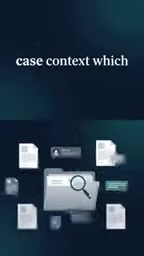
Here, "AI Agent" doesn't refer to a standalone all-purpose program, but rather an LLM step within the workflow that is given a specific role and prompt: it receives message text captured from Slack channels and, following preset instructions, performs filtering, merging, and structured output. Unlike a single Q&A interaction, an agent step can incorporate context, call tools (such as retrieving historical messages), and produce formatted results. In the case aggregation scenario, it needs to determine which messages are relevant to a specific case, filter out chatter noise, and then organize them into a timeline or bullet-point list. Such tasks traditionally rely on manual reading—exactly the kind of work LLMs excel at and rule engines struggle with, and the core reason for introducing an AI step rather than pure keyword matching.
Onboarding Guide Agent
New employee onboarding no longer depends on a colleague manually sending DMs. After triggering, the AI step generates a checklist of what to know and do based on the role, and pushes the corresponding tasks and guidance in Slack, turning "having someone guide you" into "having a process guide you."
Missed Call and Long Meeting Review
These are two high-frequency pain points: no one knows what a missed call was about, and no one remembers the conclusions after a long voice meeting ends. The workflow captures these events, uses AI to generate summaries and to-do lists, and sends them back to Slack, turning "what happened" into a searchable record.

Speech transcription and summarization are usually done in two steps: first, a speech recognition (ASR) service converts the recording to text, then an LLM summarizes the text and extracts to-dos and owners. For long meetings, a full transcript alone has limited value—the key is generating structured conclusions and action items, which requires the model to identify decision points and commitments within long texts. The missed call scenario relies more on the trigger mechanism—the phone system must push missed calls and recordings to the workflow via webhook, otherwise the subsequent AI steps can't start. Understanding this helps grasp the prerequisite of this approach: the effectiveness of automation depends heavily on whether upstream events can be reliably captured and standardized into a data format the workflow can consume.
Why n8n Instead of Pure Native Slack Automation
Slack's built-in automation capabilities lean toward simple triggers and notifications; cross-channel information aggregation and understanding of unstructured content are beyond its scope. The value of n8n lies in chaining event triggers, AI reasoning, and Slack actions into a maintainable chain: each scenario is an independent small chain, with a small blast radius when something goes wrong, and easy to extend as needed.
Another benefit of this "small chain" architecture is explainability—organizations like law firms that are sensitive to accuracy need to see exactly what each step does, rather than a black box.

n8n is an open-source workflow automation tool that uses visual node orchestration, letting users chain API calls to different systems, data processing, and conditional branches into an executable flow. Compared with SaaS tools like Zapier, n8n can be self-hosted, keeping data within the corporate intranet—especially critical for organizations with extremely high confidentiality requirements like law firms. It comes with a large number of built-in connectors and also supports HTTP requests and custom code nodes, so it can flexibly call LLM APIs for tasks like summarization, classification, and information extraction. The "trigger + AI step + Slack action" described in the article corresponds precisely to the combination of Webhook or scheduled trigger nodes, AI/HTTP request nodes, and Slack nodes in n8n. This node-based design makes the input and output of each step visible and debuggable, naturally meeting explainability needs.
Reusable Implementation Ideas
Several principles applicable to mid-to-large organizations can be distilled from this case: first identify "where information is generated and where it is lost," then map each loss point to an independent workflow; keep each workflow minimal in structure, avoiding premature attempts to build an all-encompassing platform; let AI steps handle only understanding and summarization, while actions still land in Slack, which the team already uses daily, lowering adoption costs.
The video ends with the slogan "move work from people to workflows," but for an organization of 700 people, a more accurate phrasing might be: free people from information搬运 (hauling) so they can do the work that requires judgment.
One-line Summary
A 700-person law firm used n8n to connect AI and Slack, handing information relay to workflows.
Paragraph Summary
The article describes how a law firm of 700 to 800 people, with the help of an automation vendor, used n8n to build minimalist "trigger + AI step + Slack action" workflows, solving four types of information loss: meetings without minutes, lost DM tasks, manual onboarding, and missed calls without review. The core approach is to design an independent small chain for each pain point: case context is aggregated and sent back from various channels by AI, onboarding guidance is generated by an agent as a role-based checklist, and missed calls and long meetings are summarized with to-dos by AI. The author notes that n8n was chosen over native Slack automation because it requires cross-channel aggregation and understanding of unstructured content, and the small-chain architecture is easy to maintain and explainable, suitable for mid-to-large organizations sensitive to accuracy.
Related articles

Hands-On with the Gemini 4 Argon API: Thinking Levels and Background Mode Explained
A Free Code Camp crash course on the Gemini 4 Argon API: from getting a key and sending your first request to controlling reasoning costs with thinking levels, enabling multi-turn chat with previous_interaction_id, and generating a Breakout game in background mode—plus a Google engineer's take on the model's capabilities.

Reinforcement Learning Takes On Getting Over It: Distributed Training Strategies Behind 63% Progress
A developer uses deep reinforcement learning to tackle Getting Over It. The agent climbs from the bottom to 63% progress but gets stuck at the anvil. The project is open-sourced, using divide-and-conquer training and CPU-only training, seeking community collaboration to break the bottleneck.

Sigma FP2 Released: The World's Smallest Full-Frame Camera Gets Sensor and Screen Upgrades
Sigma launches the FP2 full-frame camera, retaining its smallest-and-lightest design with three key upgrades: improved sensor, articulating LCD screen, and longer battery life—built for portable video creators.