How CS Students Should Use AI to Learn Programming — Without the "Used It But Learned Nothing" Trap

How CS students can use AI as a thinking catalyst — not a substitute — to actually learn programming.
Using AI to learn programming is common among CS students, but many end up feeling like they haven't truly learned anything. This article identifies two key traps — asking for answers too directly and seeking help too soon — and offers four practical strategies: struggling independently first, using Socratic prompting, applying the Feynman Technique, and practicing retrieval. The goal is to make AI a learning accelerator, not a thinking replacement.
A CS Student's Real Dilemma
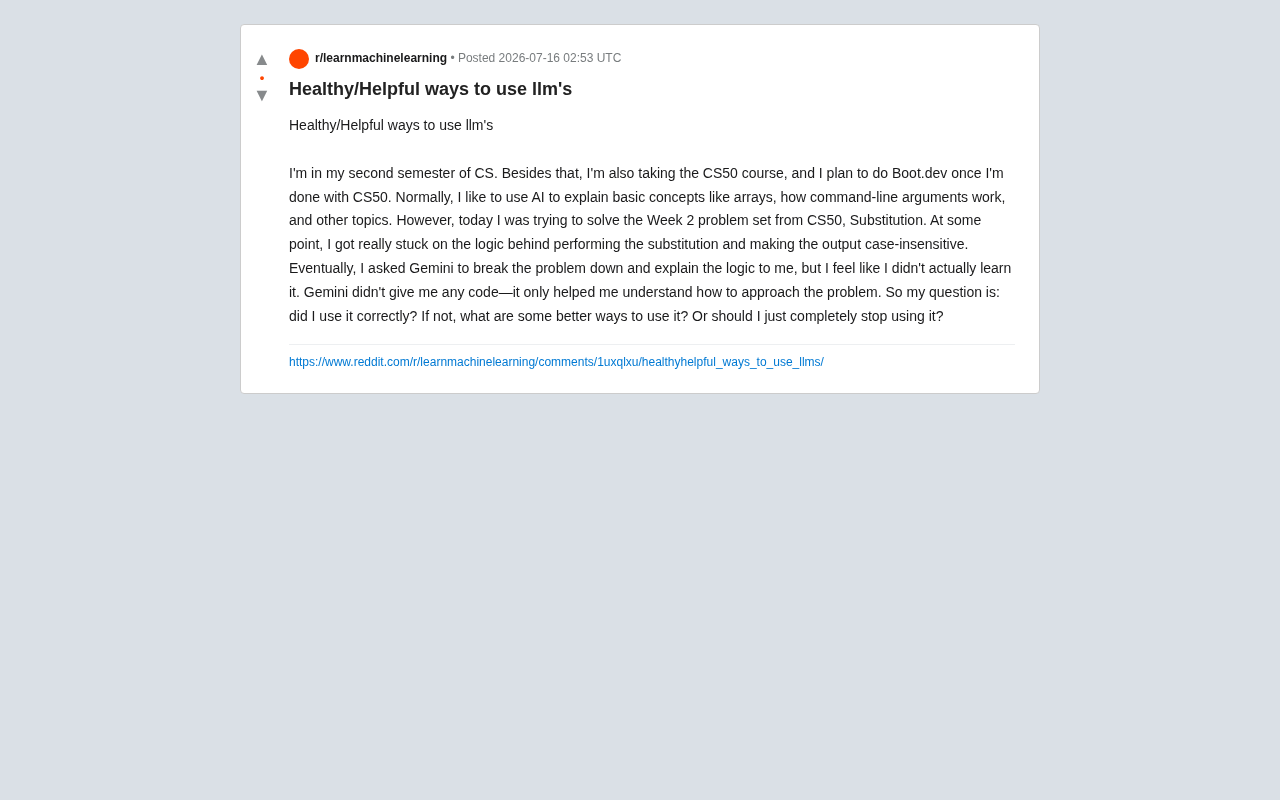
A post from a second-year computer science student on Reddit recently struck a chord with many readers. This student was taking their regular coursework while also self-studying CS50 (Harvard's famous introductory course), with plans to move on to Boot.dev afterward.
Background: CS50 is Harvard University's open introductory computer science course, officially titled "Introduction to Computer Science" and taught by Professor David Malan. Since launching in 2007, it has become one of the world's most popular public courses, covering C, Python, SQL, JavaScript, and more — known for its rigorous project-based assignments. Boot.dev is a structured learning platform focused on backend development, using gamification to guide learners through Python, Go, algorithms, and other fundamentals. Together, these two represent one of the most popular self-taught programming paths today.
The student regularly used AI (like Gemini) to explain foundational concepts — how arrays work, how command-line arguments are processed, and so on. But when tackling the Substitution cipher problem in CS50 Week 2, they got stuck on implementing the substitution logic and case-insensitive handling. They eventually asked Gemini to break down the problem and walk through the approach — the AI didn't give them code directly, just helped clarify the direction.
Afterward, though, they felt uneasy: "I don't feel like I actually learned anything. Am I using AI the wrong way? If so, what's a better approach? Or should I just stop using it entirely?"
The question seems simple on the surface, but it cuts to the core anxiety of learning in the AI age: When a tool can think for you, will you still think for yourself?
Two Major Traps When Using AI to Learn Programming
Trap #1: Asking for the Answer Directly
The most common — and most harmful — approach is copying your assignment into an AI prompt and pasting the output directly into your editor. This feels efficient, but it's essentially "outsourcing your brain." The core of programming ability isn't memorizing syntax; it's building a mental model for problem-solving — learning how to break a vague requirement into concrete, executable steps.
If you never go through the cycle of "stuck → struggle → breakthrough," your brain never actually builds those neural pathways. The next time you hit a similar problem, you'll reach for AI again.
Trap #2: Asking Too Soon
Even if you're only asking for guidance rather than code, seeking help before you've genuinely wrestled with the problem weakens the learning outcome. Cognitive science has a concept called Desirable Difficulty — a moderate level of struggle actually strengthens memory and comprehension.
Concept note: Desirable Difficulty was introduced by cognitive psychologist Robert Bjork in the 1990s. The theory holds that moderate resistance and challenge during learning — even though it feels slower and more painful — significantly enhances long-term memory consolidation and transfer. This contrasts with the "Fluency Illusion" — when learning feels too easy (e.g., getting an answer handed to you), the brain mistakenly believes it has mastered the material, but forgetting happens rapidly. Spaced repetition, interleaved practice, and retrieval practice are all learning strategies designed around the principle of desirable difficulty.
When you're grinding through the case-handling logic in the Substitution problem, that "stuck" feeling is precisely when real learning is happening. The Reddit student's situation falls somewhere in between: they didn't ask for code outright, but they reached for help a bit too soon — which is exactly why they felt like they "didn't really learn it" afterward.
Four Practical Methods for Healthy AI Use
Circling back to the student's question — their approach was actually mostly right, just in need of a bit more rigor. Asking AI to break down the problem and explain the logic without asking for code is already far better than copying answers. These four adjustments can make the learning truly stick.
1. Struggle Independently First — Long Enough
Set a personal rule: when you hit a hard problem, spend at least 20 to 30 minutes working through it independently. Write down every approach and pseudocode you can think of, even if it's wrong. Only after you've truly exhausted your own thinking should you turn to AI. At that point, the AI's explanation will collide with your existing ideas and produce a genuinely deep understanding. This kind of active cognitive conflict is exactly what the brain needs to build long-term memory connections.
2. Treat AI as a "Socratic Guide," Not an Answer Machine
Concept note: Socratic Questioning originates from the teaching method of ancient Greek philosopher Socrates. Its core principle isn't to deliver answers directly, but to use a series of probing questions to guide learners to discover contradictions, refine their thinking, and arrive at conclusions on their own. In modern education, this method is widely used in critical thinking training. Translating this to AI interactions means deliberately structuring your prompts — not "give me the answer," but "evaluate my reasoning" or "point me in a direction without showing me the whole picture" — thereby transforming AI from an information machine into a thinking partner.
The most effective prompting style isn't "solve this for me," but guided dialogue:
- "Here's my current thinking (include your approach) — what's wrong with it?"
- "Can you give me a hint, but hold off on the full answer for now?"
- "I understand this concept as X — is that right?"
This approach casts AI in the role of a mentor who guides you to the answer yourself, rather than a contractor who does the work for you.
3. Use the Feynman Technique to Verify Understanding
After the AI explains something, don't rush on to the next thing. Close the chat window and try to restate the logic in your own words — or write the code from scratch.
Concept note: The Feynman Technique evolved from the learning approach of Nobel Prize-winning physicist Richard Feynman. The core steps are: pick a concept, try to explain it in the simplest possible terms to someone who knows nothing about it, and whenever you get stuck, go back to the source material, fill the gap, and try again. This method fundamentally forces the learner to switch from passive reception to active output, exposing the real gaps in their understanding. Feynman himself described this as the difference between "knowing the name of something" and "truly understanding it." In programming, the clearest test of this deep understanding is whether you can write the code from scratch without looking anything up.
If you can't write it or explain it clearly, you haven't truly learned it — and that's the root cause of the "I don't feel like I learned it" feeling. This step is the critical bridge between AI output and your own internalized ability.
4. Actively Practice Retrieval
After learning a concept, come back the next day and re-implement it from memory — no references. This Retrieval Practice has been shown by a large body of research to be one of the most effective learning strategies available.
Research background: Retrieval practice is one of the best-evidenced memory reinforcement methods in learning science. In 2008, psychologists Henry Roediger and Jeffrey Karpicke published an experiment in Science demonstrating that repeatedly retrieving information is far more effective for retention than re-reading material. The mechanism: each time you "retrieve" information from memory, you reactivate and strengthen the relevant neural connections, while also helping your brain distinguish between "actually remembering" and "recognizing when you see it." Cold retrieval practice after a 24-hour gap — recalling something with no external cues — is especially effective.
AI can help you generate practice problems and check your answers, but the act of retrieval must be done by you.
AI Is a Learning Accelerator — Not a Thinking Substitute
For beginners, AI's greatest value lies in lowering the barrier to entry and shortening the feedback loop. Where you once might have spent hours digging through Stack Overflow to track down a bug, AI can now point you in the right direction in seconds. It excels at:
- Explaining obscure concepts (like how arrays or command-line arguments work)
- Helping you identify blind spots in your thinking
- Comparing multiple solution approaches
- Acting as an always-available teaching assistant
What it cannot replace is: the experience of typing the code yourself, hitting errors, and debugging them firsthand. Programming is a craft. There is an enormous gap between understanding something by watching and understanding it by doing. That "muscle memory" style of debugging experience is a cognitive asset no tool can stand in for.
So the advice for this student is: don't stop using AI — change how you use it. Let it be a catalyst for your thinking, not a replacement for it. You're already on the right track — that nagging sense of "I don't think I actually learned it" is itself one of the most valuable traits a strong learner can have.
A Final Note
As AI grows increasingly capable, students and professionals face the same fundamental question: how do you use AI to become stronger, rather than let it make you dependent? The answer may be surprisingly simple — let AI handle "what" and "why," but "how to do it" and "can I actually do it" must be verified by you.
Real learning always happens in the moment when you think independently and put your hands to work. No matter how powerful the tool, it's only a lever that amplifies your effort — not an excuse to avoid it.
Key Takeaways
Related articles

Android ML Kit On-Device AI: Performance Optimization and Quality Breakthroughs
A full breakdown of Google Android ML Kit on-device AI: Gemini Nano cuts memory via 2-bit quantization and shared KV cache, a 2B model rivals last year's 27B, plus speech translation, function calling APIs, and an end-to-end scam detection demo.

Firebase AI Logic + Gemini Nano 4: A Practical Guide to Android AI Development
How Firebase AI Logic and Gemini Nano 4 help Android developers ship generative AI: App Check and prompt templates ensure security, hybrid routing cuts latency and cost, Spend Caps control budgets, and AI monitoring provides observability.

Microsoft AI Agent Breakthroughs: More Efficient, Better at Code and Weather Forecasting
Microsoft Research Focus Issue 97: ForkPilot cuts agent inference costs, Cabra reveals coding agents' code-understanding gap, Teletune learns workflows from logs, PBC improves extended forecasts, BioEMU-2 opens preview.