How Fast Can Macs Really Run Local AI? A Real-World Benchmark of M1 Through M6 Chips

The number after "M" is the worst predictor of local AI speed — memory bandwidth is what actually matters.
When running large models locally, chips handle two fundamentally different tasks: pre-fill (reading your prompt) scales with compute, while decode (writing the response) is bottlenecked by memory bandwidth. Popular staircase benchmark charts only model the former, making new chips look universally superior — but real-world decode tests show the 2021 M1 Max (400 GB/s) outpacing the 2024 M4 Pro by nearly 2x. The correct priority order for evaluating a Mac for local AI is: RAM capacity first, bandwidth second, chip generation third. The M5 is the first generation with a genuine pre-fill breakthrough via its Neural Accelerator, making it the right choice for agent workflows. For everyday chat, a used 64GB M1 Max MacBook Pro can offer better value than a new M6. Software optimizations like speculative decoding can also deliver up to 6x speed gains at zero hardware cost.
We've all seen those "staircase charts" on YouTube thumbnails — each new Mac chip sitting one step higher than the last, with some aging Mac mini or MacBook Pro looking hopelessly obsolete at the bottom. YouTuber Kai was nearly convinced by these charts too, almost writing off his 2021 M1 Max as "dinosaur hardware." But when he actually put the benchmark numbers on the table, he found a surprising conclusion: in certain scenarios, his four-year-old M1 Max was actually faster than brand-new chips.
This article unpacks the truth that those staircase charts only tell half the story — and the hidden half is exactly what matters when you're sitting at your desk waiting for an AI response.
Running Local AI: Your Chip Is Actually Doing Two Completely Different Things
The key to understanding all of this is that when running a large model locally, the chip handles two tasks with fundamentally different performance ceilings.
The first task is called pre-fill: reading your prompt. When you type a question or paste in a document, the chip has to process all of it at once before it can start responding. This is massively parallel computation — the more compute units, the faster it goes.
The second task is called decode: writing out the answer word by word. The model generates one token at a time, and the bottleneck here isn't compute power at all — it's a far more "boring" metric: memory bandwidth, meaning how fast data can be moved out of memory.
Here's why: every time a token is generated, the Mac has to do a full pass of the entire model from memory through the GPU. Take a 4-bit quantized model around 16GB in size — writing each word is essentially a 16GB round trip through memory. When this happens dozens of times per second, memory bandwidth becomes the hard ceiling.
We can even calculate this ceiling ourselves: divide chip bandwidth by model size. The brand-new M6 Mac mini has 170 GB/s of bandwidth — 170 ÷ 16 ≈ 10.6 tokens/s. The M1 Max has 400 GB/s — 400 ÷ 16 ≈ 25, and real-world tests land around 19.8 tokens/s. Same math, the M1 Max is nearly twice as fast. This isn't because Apple made something worse — the M6 was optimized for a different kind of task.
Token is the basic unit large language models use to process text — roughly a "word fragment." In English, one word typically corresponds to 1–2 tokens; in Chinese, one character often maps to 1–2 tokens. About 100 Chinese characters translate to roughly 150–200 tokens. Tokens/s (tokens per second) is the core metric for measuring generation speed: humans read at around 5–8 tokens/s, anything below that feels like waiting, and above 15 tokens/s generally feels smooth. 4-bit quantization is a technique that compresses model weights from 16-bit or 32-bit floating point down to 4-bit integers, shrinking model size by roughly 75% at a slight cost to precision — though in most practical tasks the quality drop is negligible. It's currently the most common compression method for local deployment.
The Staircase Trap: Estimated Formulas vs. Real Benchmarks
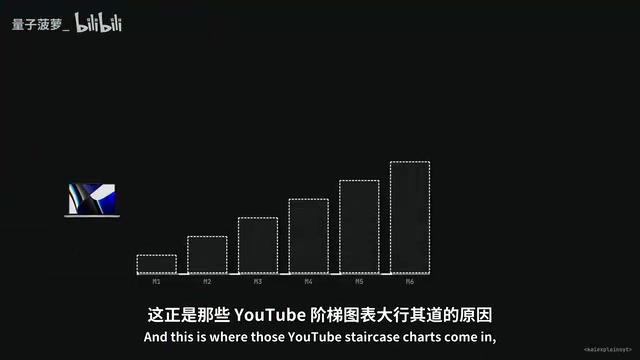
Kai found that the most popular comparison chart was built from formula estimates, not actual hardware tests — the creator openly acknowledged this, since nobody can afford to buy every Mac. This means the chart only models one dimension: read speed.
The staircase shows M1→M2→M3→M4→M5→M6 getting faster each generation, and that's true for processing prompts. But the moment you switch to real-world tests of writing the answer, the staircase falls apart completely.
The llama.cpp GitHub repository has a benchmark thread maintained by real Mac users, all running the same model and same software version and uploading their results. Sorted by decode speed: the 2021 M1 Max writes at 61 tokens/s, while the three-generations-newer 2024 M4 Pro only manages 51 tokens/s — the older chip wins. The M1 Ultra nearly ties the M4 Max. There are even regressions: the M3 Pro gets left behind by the M1 Max.
Bandwidth isn't a headline-grabbing performance figure. "Our new chip has slightly higher memory bandwidth" doesn't sell like "13.5x faster," but bandwidth is the number that determines how "fast" AI feels in everyday use.
Same Name, Different Chip: Are You Getting the "Fast Max" or the "Slow Max"?
There's an even sneakier trap: the same chip name can refer to two completely different chips.
Kai got burned comparing Max chips: the M4 Max can have either 410 GB/s or 546 GB/s of bandwidth, and the box says the same thing either way — the cheaper version writes about 25% slower. The M5 Max similarly comes in 460 and 414 GB/s variants. Most review videos never mention which one they tested.
The M6 plays a similar game with memory: the 16GB M6 has only 153 GB/s of bandwidth — exactly the same as last year's M5. You only get the jump to 170 GB/s when you upgrade to 24GB or more. In other words, Apple's claimed "10% faster than M5" only applies after you've already paid for the upgrade; the base config is essentially paying M6 prices for M5 speeds.
There's another gotcha: the 32-core M4 Max and M5 Max max out at 36GB of RAM, meaning a $2,499 machine with "Max" on the badge literally can't fit a 4-bit 27B model. So whenever someone shares a Max benchmark, the first question should always be: which Max?
The Real M5 Leap: Neural Accelerator
At this point you might think new chips are basically a waste of money for local AI — but that's not entirely fair. One genuine leap did happen: M5.
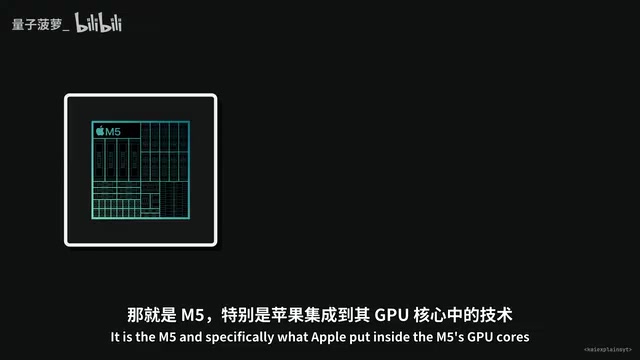
Apple added a matrix computation unit called the Neural Accelerator inside the M5's GPU cores, and it dramatically changed pre-fill speed. In the same llama.cpp thread, the M4 Max processed prompts at 886 tokens/s while the M5 Max hit 3,220 tokens/s — a 3.6x improvement. That's not the carefully curated "13.5x" from Apple's slides, but it's still a massive, real-world gain under identical software.
Interestingly: if you run the M5 Max with a 2023 version of llama.cpp, the pre-fill speed is only around 990 tokens/s — nearly identical to the M4 Max. The Neural Accelerator requires software that "knows it exists" to do its job. It's like having a sports car but only driving in third gear because nobody told you there were higher gears.
Decode speed, however, only improved about 25% from the M4 Max to M5 Max — that's purely bandwidth doing the work. Apple's own machine learning team wrote in a paper that generational improvements in text generation are constrained by memory bandwidth. So the honest conclusion is: when prompts are long (thousands of tokens), the M5 is the first chip where you'll noticeably feel the difference; but if your prompts are short and you care about response speed, older Max chips still hold their own.
AI Agents: The Scenario That Changes Everything
One scenario completely changed how Kai thinks about this debate: AI agents.
Agents are workflows that chain multiple AI calls together — the model calls tools, reads files, runs code. Each call sends the entire context (instructions, all tool outputs, conversation history) in one shot, potentially reaching 30,000 tokens before you've typed a single character.
One user tested this: running a 27B model on an M1 Max with a 32,000-token prompt took over 500 seconds to produce the first output word — that's 8.5 minutes, enough time to brew coffee and come back. On an M5 Max, it takes under a minute; with optimized software, as little as 40 seconds.
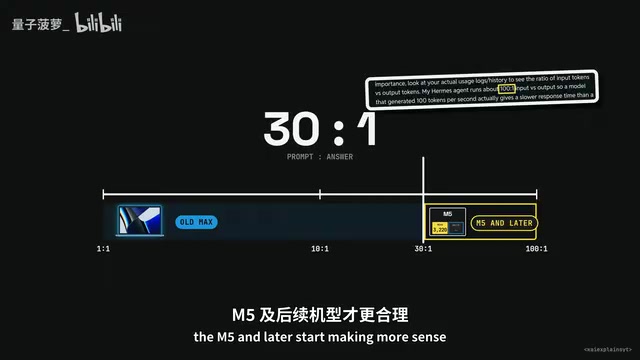
Flip the scenario to regular chat, and older chips still win: a 1,000-token question with a 500-token answer takes about 10 seconds on an M1 Max versus 17 seconds on a base M5 — the four-year-old chip is 70% faster. The tipping point is roughly "30 prompt tokens for every 1 response token": below that ratio, the older Max wins; above it, M5 and later becomes the better deal.
The context window is the maximum number of tokens a model can "see" in a single inference pass. Agent workflows accumulate tens of thousands of tokens because they need to stuff every interaction into this window — tool call results, code execution outputs, intermediate reasoning steps — so the model has the full "action history" at every step. This is fundamentally different from a normal chat, where prompts are typically a few hundred to a few thousand tokens. An agent that's run a dozen tool calls can easily exceed 30,000 tokens. That difference is precisely why pre-fill speed (not decode speed) becomes the real bottleneck in agent scenarios — and it's the root reason the M1 Max can be faster in chat but dramatically slower in agent workflows.
The Right Order for Evaluating a Mac: Memory > Bandwidth > Generation
There's one metric more important than bandwidth or chip generation that almost never gets first billing in any chart — and that's RAM.
Any 16GB Mac, regardless of generation, only has about 12.7GB available for the GPU. A 4-bit 27B model is 16GB — it simply won't fit, even before any context is loaded. If someone shows you a benchmark of a 16GB Mac running a 27B model, it's either running painfully slowly or the data is wrong.
24GB is tight with almost no headroom; 32GB is workable for daily use; 64GB is where things actually get comfortable. So the correct order for evaluating a Mac for local AI is: RAM first, bandwidth second, chip generation third — and almost every chart has this completely backwards.
The Software Gap: Often a Better Deal Than Buying a New Chip
The most surprising thing Kai found: on the same chip with the same model, the performance difference from software alone is staggering.
On the M6, native MLX delivers around 9 tokens/s; switching to multi-token prediction pushes that to 16–19; an engine called Splash reaches 52 tokens/s on short prompts — a six-fold difference from pure software.
The biggest gains come from speculative decoding: a small draft model predicts several tokens ahead, then the large model verifies them in parallel. If the guesses are right, that 16GB memory round trip yields 4–5 tokens instead of one. Some M5 Max users have measured 144 tokens/s — far beyond the theoretical ceiling of around 38.
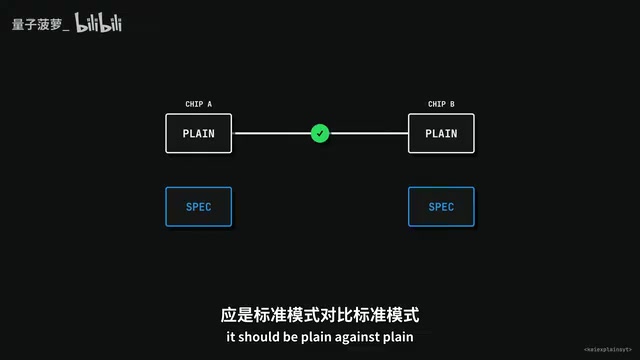
But hit rate depends entirely on what you're asking: one M1 Max user saw a 94% hit rate on coding tasks, but only 19% on prose. And on memory-constrained chips, speculative decoding can actually make things slower — one M5 MacBook Air user saw their speed drop from 7.4 to 3 tokens/s after enabling it. So when comparing benchmarks, you must always compare native-to-native and speculative-to-speculative — never cross the streams.
Speculative decoding is worth explaining a bit more. Traditional decoding generates one token at a time, requiring a full read of the large model's weights for each — this is exactly why memory bandwidth becomes the bottleneck. Speculative decoding introduces a tiny "draft model" (often 1/10th the size of the main model or smaller) that quickly guesses the next 4–8 tokens. The large model then verifies this entire batch in parallel. Verification is parallel computation that costs far less than generating token by token, yet can "confirm" multiple tokens at once. If the draft model guessed right, a single memory read yields multiple tokens of output — effectively multiplying bandwidth utilization. Wrong tokens are discarded without corrupting the output, because the large model's verification ensures correctness. This also explains why hit rate matters so much: coding tasks have high vocabulary repetition and strong patterns, making them easy to predict; prose writing varies wildly and hit rates drop off a cliff.
The Bottom Line: Stop Fixating on the Number After "M"
Kai's recommendations are pretty direct:
- If you're running coding agents (real agentic workflows — frequent tool calls, dozens of loops), the M1 Max genuinely struggles, and the gap is significant. A $1,699 M5 Pro Mac mini processes prompts more than twice as fast as the M1 Max while matching it on decode speed. That's the upgrade worth making.
- If your use case is mainly chat, writing, one-off coding questions, document summarization, or creative work, someone bought a used 64GB M1 Max MacBook Pro for around $1,200 — with 2.35x the bandwidth of a $1,299 32GB M6 Mac mini, more memory, faster decode, and a lower price tag. Its only weakness is slow processing of very long prompts (30,000+ tokens), which most people simply never hit.
One sentence: stop staring at the number after "M." That number tells you roughly how many compute units a chip has, and it's the least accurate predictor of everyday AI response speed. Prioritize RAM first, then bandwidth (and specifically which chip variant you're getting), and only then ask whether you need M5 or later. And before spending any money on new hardware, try a better inference engine — the speedup from software is real, massive, and free.
The latest Mac is often just faster at the one thing you probably never do.
Related articles

Workbuddy for Absolute Beginners: How a Desktop AI Agent Fits Into Real Workflows
A beginner's guide to the Workbuddy desktop AI agent: installation, claiming credits, file management, and building automated workflows—compared with CodeX for fit and cost, helping professionals shift from AI question-askers to AI managers.

OpenAI's New Agent Stack: Computer Use, Decisions API, and Ultra-Fast Workflows
OpenAI Dev Day unveiled a new agent stack: Computer Use outperforms humans, Decisions API delivers ultra-low-latency classification via Luna, Agents API opens the same Computer Use capabilities, and GPT-6.1 Sol costs only one-seventh of Astra. Core updates, benchmark data, and developer insights.

Liang Wenfeng Open-Sources DeepInfo Inference Framework, Takes On U.S. Ban
DeepSeek open-sources its DeepInfo inference framework after its models, featuring GPU/CPU cross-pipelining, small-model prediction with large-model verification, and full Huawei Ascend and NVIDIA chip support—facing the U.S. federal ban head-on. This article analyzes its significance for AI deployment and open-source strategy.