How Jetpack Compose Extends Input Interaction Beyond Touchscreens
Compose extends pointer input to unify trackpads, smart glasses, and more, out of the box.
Based on an Android Developers Summit talk, this article reviews Compose's evolution across input forms. It notes touchscreens are just one input method—keyboards, mice, trackpads, styluses, gamepads, and gesture tracking on smart glasses and XR all matter, and accessibility makes input compatibility essential. It details the six-stage pointer event pipeline (Motion Event conversion, time merging, hit path testing, coordinate transformation, and initial/main/final dispatch), the foundation of all gestures. Key improvements include changing trackpad pointer type from touch to mouse in Compose 1.12, intercepting system "fake fingers" and reinterpreting them as pan/scale events so scaling targets the element under the cursor, and introducing indirect input plus primary directional motion axis for smart glasses to map horizontal swipes to list forward/back. These work out of the box with Foundation gesture detectors and come with new testing APIs.
Why input types are no longer just touchscreens
At the Android Developers Summit, Compose team software engineers Alex Van Nachenberg and Jeremy Walker shared an often-overlooked fact: touchscreens are just one of many ways to input into a mobile app. Physical keyboards, mice, trackpads, styluses, and gamepads have long existed, and touchpads on smart glasses, eye and gesture tracking in XR, and finger and wrist gestures on Wear devices are becoming new input forms.
The two engineers emphasized that you shouldn't assume a device only uses one input method just because it's typically paired with that method. Google Books have built-in trackpads and keyboards, but that doesn't mean these inputs are unique to them—phones, tablets, and TVs can also be connected to physical keyboards, trackpads, or mice, and some TVs even have touchscreens. Another key reason is accessibility: letting users use the input device of their choice and switch at any time is a basic requirement for app accessibility, and in some jurisdictions, keyboard and mouse compatibility behaviors may even be legally mandated.
Compose's design philosophy is: standard components should correctly handle all types of input out of the box, with developers needing to do nothing special; at the same time, it provides enough tools for scenarios with customization needs to adjust behavior. As the underlying platform supports more input types, Compose components will continue to absorb these supports—developers only need to upgrade the Compose version, and app behavior will automatically improve.
The six-stage pointer event processing pipeline
To understand how Compose improves trackpad support, you first need to see the complete journey of pointer events from the system to the app. Alex breaks it down into six stages.
Stage 1: Motion Event enters Compose. Compose is essentially a complex View running in a normal window and Activity, so it first receives the Android platform's Motion Event. Compose translates these events into an internal platform-agnostic representation—Pointer Input Event.
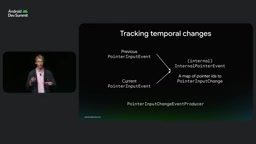
Stage 2: Adding the time dimension. Input often occurs continuously over time, and gestures, velocity tracking, and slop detection all need to understand the state at each point in time. Compose combines the current event with the previous event to generate an internal pointer event with time information, whose core is a mapping from pointer ID to PointerInputChange. PointerInputChange is a public type, and multi-touch means pointers constantly appear and disappear, so this mechanism needs continuous tracking.
Stage 3: Hit path testing. Knowing the event position, you still need to determine who to send it to. Layout nodes in Compose have coordinates, bounds, and shapes, and interactive elements are often nested inside other interactive elements—a button inside a list is a typical scenario. Therefore, an input event generates a complete hit path through all hit nodes. When multiple fingers press simultaneously, multiple hit paths also form a hit path tree that needs to be maintained over time.
Stage 4: Coordinate transformation. Nodes should receive input in their own local coordinate system, avoiding developers having to manually do coordinate math. Compose combines the pointer event with the target node's coordinates to generate the final dispatched public Pointer Event.
Stages 5 and 6: Three-pass dispatch. Event dispatch is divided into three passes: initial, main, and final. Initial goes from ancestors to descendants, suitable for scroll containers to intercept events when they start scrolling and prevent child nodes from continuing to receive them; main is the only pass that goes from descendants to ancestors, and is where main logic like clicks is handled—when clickable elements are nested, child nodes get the first opportunity; final goes again from ancestors to descendants, letting child nodes know that the parent consumed part of the event so they can cancel the click they already started.
This six-stage pipeline is the foundation of all gesture handling—clickable, scrollable, draggable, and custom pointer input are all built on top of it.
Why does Compose's pointer input pipeline need a platform-agnostic internal representation? The root reason is that it needs to run on multiple host environments simultaneously. Although the current main host is the Android View system, Compose's design goals are not limited to a single platform. Translating Android's Motion Event into Pointer Input Event essentially abstracts platform-specific raw events into a set of data structures decoupled from the specific window system, and subsequent hit testing, coordinate transformation, and dispatch are all based on this abstraction. This way, the same set of gesture logic does not need to care whether the event comes from a touchscreen, mouse, or trackpad—it only needs to handle unified pointer identity, position, and state. This is also why new input types (like indirect) can be integrated into the existing pipeline at low cost—it reuses the same event representation and dispatch mechanism, only distinguishing at the semantic layer.
Laptop trackpads: from "fake fingers" to real pointer types
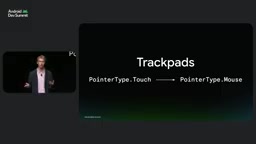
Alex highlighted two trackpad improvements. Before Compose 1.12, trackpad events were reported as type touch, because users were indeed operating the trackpad with their fingers. But users expect it to behave more like a mouse. Compose changed the pointer type from touch to mouse, giving any component that relies on this information a more consistent mouse and trackpad experience—tooltips are a typical example.
More complex are multi-finger gestures. Previously, Compose directly passed through the Android platform's "fake finger" mechanism: during a two-finger pan, the system generates a fake touchscreen finger at the cursor position, moves it by the corresponding distance and direction, and then lifts it. A two-finger swipe up is translated into a fake finger moving up, which in turn triggers the list to scroll down; if the user has enabled reverse scrolling, the system only needs to flip the fake finger's direction. Scaling works similarly—the system generates two fake fingers moving closer together or farther apart.
The problem is that fake fingers may land outside the target element's bounds. When a user pinch-zooms an image, one of the fake fingers' hit paths may not pass through the image, resulting in scrolling instead of zooming, or even dragging the outer scrollable container along. Starting with Compose 1.12 (pan) and 1.13 (scale), Compose intercepts these fake fingers during the event conversion stage, reinterprets them as pan start/pan move/pan end and scale start/scale change/scale end, and sends platform-defined gestures directly to the hit path corresponding to the cursor position. This way, no matter how close the cursor is to the element's edge, scaling correctly applies to the element under the cursor.
These improvements apply by default to foundational components like scrollable and transformable, and upper-layer components using them benefit simply by upgrading Compose. Developers writing custom pointer input modifiers are encouraged to adapt to the new APIs. Compose also added a performTrackpadInput testing API, similar in form to the existing mouse and touch testing APIs, making it easy to verify app behavior under different input devices.
The "fake finger" mechanism is a compromise the Android platform adopted for backward compatibility with older apps: because many early apps only understood touch events, when the system received multi-finger trackpad gestures, it would fake finger movements on the touchscreen so these apps could get basic scrolling and zooming without modification. But this conversion lost the semantics of the original gesture—apps couldn't distinguish between "the user is really touching the screen with a finger" and "the user is doing a two-finger swipe on the trackpad." When finer judgment is needed, such as determining whether zooming should apply to the image under the cursor, the fake finger's landing point may deviate from user intent. The improvements in Compose 1.12 and 1.13 essentially bypass this compatibility conversion: after events enter the Compose pipeline but before hit testing, they restore fake finger sequences to pan and scale gestures with clear semantics, then perform hit testing based on the cursor position rather than the fake finger position, so the gesture target aligns with the user's visual focus.
Smart glasses: navigating a 2D interface with 1D gestures
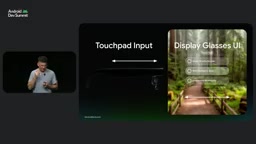
Jeremy Walker took over to describe a very different kind of trackpad—the touch area on the side of smart glasses. It is vertical, very wide, and extremely short, with the Glass UI in front of the user's field of view, content cleanly overlaid in the view, focus on the central element, and what users need is to select, go forward, or go back—not precise screen coordinates.
The Android ecosystem already has models to learn from: TV remote directional keys, gamepad D-pads and joysticks, and keyboard navigation all move between a set of UI elements and select; trackpads paired with TVs use navigation touch, where X/Y coordinates are completely decoupled from the screen and used only for gesture detection—a right swipe is equivalent to pressing the right directional key.
Compose's API design chose a form close to existing pointer events: a new indirect type, structurally identical to touch, containing a list of pointer down/move, but semantically clearly indicating "this is not a direct touch on the screen," but rather a navigation gesture between elements.
The team then discovered another concept was needed: primary directional motion axis. Glasses touchpads are wide and short, and user research shows that the most natural motion is swiping horizontally along the side of the glasses, with the expectation that horizontal swipes drive vertical content movement—forward or backward through a list. So the device can declare its primary axis as horizontal, and Compose maps horizontal swipes to forward/back, which then correspond to the focus system's next/previous. This works out of the box on both vertical and horizontal lists.
Since the device itself knows best about its shape and axis requirements, the team traced this concept back to the platform layer, adding an API for devices to declare this property, while preserving the original TV-oriented touch navigation implementation intact, and adding a field to distinguish glasses input types. For developers, using Foundation gesture detectors automatically gains support; when developing specifically for glasses, you can use dedicated gesture detectors in the Glimmer library to directly get click, forward, and back. On the testing side, since indirect-type Motion Events cannot be constructed programmatically, the team rewrote the communication and queueing mechanism between UI test modules, ultimately providing a performIndirectInput API highly similar to touch testing, with additional parameters for specifying axis and trackpad size.
The indirect pointer type is almost identical in data structure to the normal touch type, both containing sequences of pointer down, move, and up, but the semantic conventions differ: touch means a finger directly contacts a point on the screen, and coordinates are the target position; indirect means input occurs on a surface decoupled from the screen, and coordinates are used only to identify gesture direction and magnitude, not directly corresponding to pixel positions on the screen. This distinction lets Compose provide a separate processing path for navigation-type input without breaking existing touch logic. Combined with primary directional motion axis, devices can declare the dominant axis of their touch surface, and the framework maps 1D swipes to the focus system's next/previous accordingly, rather than requiring apps to interpret raw coordinates themselves. This division of labor—"device declares capabilities, framework does mapping"—allows the same set of gesture detectors to serve multiple forms like TV remotes, gamepads, and smart glasses.
What this means for developers
The two engineers' summary points to three things: when using Foundation gesture detectors, new input types work out of the box; Compose will continue to explore and support new inputs on both the platform and toolkit sides, with work on eye and gesture tracking already underway; testing APIs maintain familiar interface forms, reducing migration costs. For app teams, the most practical action is to upgrade the Compose version and check whether custom pointer input code has adapted to the new pointer types and gesture APIs.
One-line Summary
Compose extends its pointer input system to unify trackpads, smart glasses, and other inputs while keeping them out-of-the-box.
Paragraph Summary
Based on a talk at the Android Developers Summit, this article reviews Compose's evolution across multiple input forms. It first notes that touchscreens are just one input method—physical keyboards, mice, trackpads, styluses, gamepads, and even gesture tracking on smart glasses and XR devices all need to be taken seriously, and accessibility requirements make input compatibility a basic obligation. It then details the six-stage pointer event pipeline: Motion Event conversion, time dimension merging, hit path testing, coordinate transformation, and initial/main/final three-pass dispatch, which is the foundation of all gestures. Key improvements include: starting with Compose 1.12, changing the trackpad pointer type from touch to mouse; intercepting the system's "fake fingers" and reinterpreting them as pan/scale events so scaling correctly applies to the element under the cursor; introducing the indirect input type and primary directional motion axis for smart glasses, mapping horizontal swipes to list forward/back. These improvements work out of the box for developers using Foundation gesture detectors, and come with new testing APIs.
Related articles

AI Comic Drama with WorkBuddy from Scratch: A Step-by-Step Skill Pack Installation Guide
Learn how to create AI comic dramas with WorkBuddy from scratch. This guide covers installation, Skill pack import and invocation, plus a script generation demo with manual revision tips to get you through the first step from script to storyboard.

WorkBuddy Agent Runs the Entire GEO Database Mining Pipeline with a Single Prompt
WorkBuddy agent automates GEO database mining: from data search and curation to batch correction, differential analysis, co-expression networks, feature gene screening, and immune infiltration—a single prompt generates a complete bioinformatics report, greatly lowering the barrier to bioinformatics analysis.

PC Memory Wasted? Hacker News Debates Centralized Data Centers
Hacker News users argue that personal computer memory is wasted and should be centralized in data centers, sparking debate on centralized vs. distributed computing resource allocation. This article analyzes the logic behind the claim, the costs of centralization, and new tensions in memory resource allocation in the AI era.