How Theo Rewrote His AGENTS.md to Double AI Coding Efficiency

Theo spent 6 hours rewriting AGENTS.md and Skills configs to double his AI coding output.
T3 founder Theo reveals how spending six hours rewriting his AGENTS.md and Skills configuration files led to more code shipped than ever before. His methodology includes designing Skill descriptions as trigger keywords rather than documentation, feeding models good/bad contrastive examples, using Agents to audit interaction history across models, and establishing glossaries to eliminate ambiguity — all focused on improving AI communication rather than coding ability.
Well-known developer and founder of the T3 product suite, Theo (t3.gg), recently shared a counterintuitive but highly valuable insight: over the past few days, he "shipped more code than ever before," but the key wasn't writing more business logic — it was spending a full six hours in VS Code editing Markdown files. Specifically, he rewrote his AGENTS.md, CLAUDE.md, and a series of Skills configuration files.
Some background on these files is helpful here. AGENTS.md and CLAUDE.md are a new category of configuration files that have emerged alongside the AI coding Agent ecosystem. AGENTS.md was originally popularized by OpenAI's Codex CLI — a Markdown file placed in the repository root that tells the AI Agent how to understand and operate within a project. CLAUDE.md is Anthropic's equivalent, designed for Claude Code (their command-line AI coding tool). These files are essentially "engineered system prompt management" — they're automatically read and injected into the context window when the Agent starts up, becoming implicit behavioral constraints. Unlike traditional .editorconfig or .eslintrc files, these aren't structured configs parsed by toolchains. They're instruction sets written in natural language for large language models, covering code style, collaboration norms, project architecture, and more.
This isn't about copying his configuration. It's about revealing a systematic methodology for taming AI coding Agents.
Why Markdown Config Files Matter More Than Business Code
Theo admitted that he runs 4-5 machines dedicated to parallel development with T3 Code, and managing Skills distribution and synchronization across those machines once drove him crazy enough to consider building his own system. This 4-5 machine parallel development pattern represents an emerging "Agent cluster" work paradigm in AI programming. In this model, the developer is no longer a line-by-line code executor but a coordinator managing multiple AI Agent instances simultaneously — each Agent might be working on different feature branches, bug fixes, or performance optimization tasks. The bottleneck shifts from "code generation speed" to "Agent management overhead": ensuring all Agents follow consistent coding standards, preventing their changes from conflicting, and efficiently reviewing their output.
But ultimately he abandoned complex solutions and returned to the simplest form: a repo called fleet, filled entirely with Markdown files. Choosing a Git repository over a custom distribution system makes sense because Git already provides version control, change tracking, and multi-machine sync — more reliable and simpler than any custom solution.
He emphasized a core mindset shift — the value of these config files isn't in 'the content itself' but in 'the thinking process'. This is exactly why he deliberately doesn't publish his AGENTS.md:
"Copying these files is like copying someone else's generic code template and using it for everything. You should own this file, edit it, and adjust it to your needs over time."
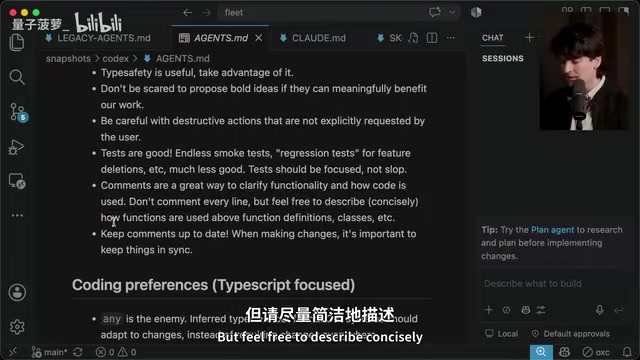
The concept of Skills also deserves explanation. Skills are a modular capability configuration mechanism in T3 Code. Each Skill is essentially a standalone Markdown file containing a description (trigger conditions), instructions (execution directives), and optional tool-call permission definitions. When a user expresses a specific intent in conversation, the Agent checks the description field to determine whether to activate that Skill. Once activated, the full instructions are injected into the context. This design is similar to the Tool concept in LangChain or OpenAI's Function Calling, but implemented in a more lightweight, human-readable way. Skills can be configured at global, project, or user levels and support cross-machine synchronization.
Theo's old global config had gone nearly untouched for two years — just scattered rules like "avoid using any," "don't randomly start dev servers and break my environment," and "prefer bun over pnpm." The new version incorporates extensive content about tone, communication style, and collaboration preferences.
Getting the Model to Match Your Tone Reduces Verbose Output
One interesting technique: Theo opens the file with a first-person introduction — "I'm Theo, you're my Agent, and we're going to work together long-term." He explains that models are good at tone matching — the way you talk to them influences how they respond.
Tone matching is an emergent behavior in large language models, rooted in how they're trained. Because models learn from massive amounts of conversational data during pretraining, they naturally tend to continue generating in the style and register of the input text — what NLP research calls "style-conditioned generation." When Theo opens with a concise, direct first-person introduction, the model treats that language style as an implicit constraint, and subsequent outputs tend toward the same conciseness.
These two seemingly redundant introductory lines actually significantly reduce the verbose output from "overly eager" models like GPT-5 and Opus 5. These models, heavily trained with RLHF (Reinforcement Learning from Human Feedback), tend toward being "overly positive" and "overly verbose" to earn favorable ratings from human evaluators — adding unnecessary disclaimers, repeated confirmations, and over-explanations. Setting a concise conversational tone in the system prompt effectively counteracts this training bias.
The Core of Skills Design: Description Is a Trigger, Not a Manual
Theo shared his most counterintuitive insight — a Skill's description field shouldn't describe what the Skill does; it should contain trigger keywords.
Since the description is inserted into the context regardless of whether the Skill is actually invoked, putting all the details there wastes tokens and may even make the model think "I've read the description, no need to actually invoke it." This touches on a core issue in context window management: Tokens are the basic unit of text processing for LLMs, roughly equivalent to 3/4 of an English word or one Chinese character. Every Agent interaction consumes limited context window space with injected config files, conversation history, and code context. Even with the latest models supporting 200K tokens (Claude 3.5) or 128K tokens (GPT-4o), context space remains a scarce resource in complex programming tasks. Verbose descriptions not only waste token budget but can also cause the model's attention to scatter due to information overload, reducing execution quality of critical instructions — a direct manifestation of the "attention dilution" problem in Transformer architecture.
The correct approach is:
"Use when the user asks to monitor, watch, or babysit a PR" — keep only the magic trigger keywords.
Based on this principle, he split the originally combined "file PR" and "babysit PR" into two separate Skills. With precise keywords, triggering is accurate enough, and he often only needs one of the two functions.
Feed the Model Good and Bad Examples
Theo particularly emphasized that Agents are extremely sensitive to good and bad examples. This approach of "educating" the Agent through contrastive pairs is essentially few-shot learning applied to prompt engineering. LLMs have powerful in-context learning capabilities — you don't need to retrain the model; just provide a few examples in the prompt, and the model can extract patterns and apply them to new tasks. Research shows that providing both positive and negative examples (contrastive examples) is far more effective than positive examples alone, because negative examples help the model define behavioral boundaries and clarify "what not to do."
He had long suffered from terrible PR titles, such as:
- Bad example:
perf: server negotiate per-message deflate on the websocket - Good example:
perf: server cut websocket frame size by 70% with gzipping
The first is technically accurate but full of implementation-detail jargon; the second focuses on quantifiable impact and intuitively understandable methods. This contrast teaches the model an implicit rule: PR titles should convey "why this matters," not "what technical operation was performed."
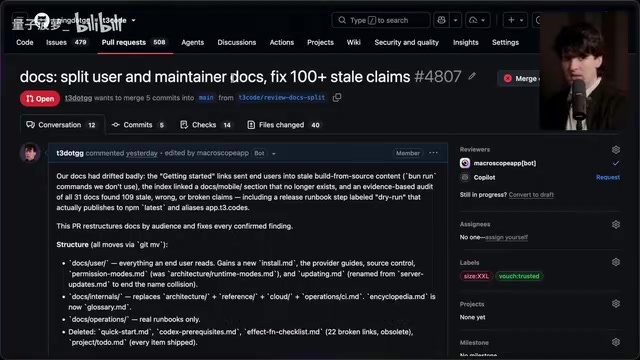
He put these comparisons directly into his Skill, and the Agent immediately understood what "human-readable, explains why it matters" titles look like. His advice: When you find an Agent repeatedly doing something wrong, drop one or two good/bad comparisons into the Skill or global config — it's like seeding the model's weights with what you care about.
He also added one rule that made the biggest difference: PR descriptions should start with a one-liner about "what problem the user's original request was trying to solve," followed by a brief solution overview — never lead with an implementation checklist. This dramatically improved the readability of his subsequent PRs.
Use Agents to Audit Interaction History and Pinpoint Failure Patterns
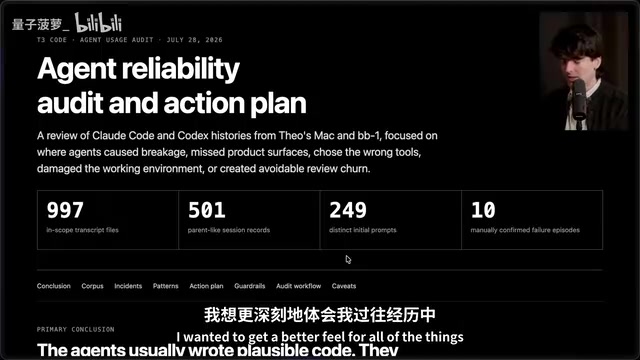
This is the most inspiring part of the entire methodology. Theo didn't rewrite his configs based on gut feeling — he had Agents audit his historical interactions across different models, quantifying and categorizing each model's common failure patterns.
His prompt to the Agent was: "Look at my history with Fable, Opus, and GPT-5.6 on Claude Code and Codex, find the most common mistakes, categorize them by frequency, and tally the hit rate per model."
The results were highly specific:
- Opus 5 frequently "killed the wrong process," often terminating the very T3 Code instance it was running in — even after just two days of use, its misfire count far exceeded Fable's
- Sol (GPT) submitted draft PRs 40% of the time, while other models did so far less frequently
- All models shared common issues like "stopping too early" and "not validating," while "regression errors" were rare but costly
These differences reflect an important reality in today's LLM ecosystem: different models, due to variations in training data distribution, RLHF preference tuning strategies, and tool-call training methods, exhibit systematic behavioral tendencies when executing the same Agent tasks. For example, Opus 5's tendency to "kill the wrong process" may stem from its aggressive execution strategy for shell commands during tool calls; Sol's high rate of draft PR submissions may relate to an over-reinforcement of "cautious behavior" during training. This kind of cross-model behavioral auditing is still in its early stages in the industry, currently relying more on developer experience than systematic evaluation frameworks.
Theo's point: Reading through all the history line by line is painful, but having a group of Agents categorize and analyze it for you is much easier. This is a meta-cognitive approach — using AI to audit AI behavior patterns, which is far more efficient than manually reading chat logs. When you find a thread that went off track, just ask the Agent "Why did you make this decision? What made you think this direction was right?" — the answer often points to outdated or misinterpreted content in the config files.
The Essential Difference Between AGENTS.md and README
Theo repeatedly emphasized a commonly confused boundary: AGENTS.md should be fundamentally different from README.md.
- README is a project introduction for humans and people evaluating whether to use the codebase
- AGENTS.md tells the Agent "how to make changes in the codebase and what it needs to know before making changes"
He did several key things in T3 Code's project-level configuration:
1. Established a Glossary. The first term defined was "you" — referring to the Agent currently reading this file and modifying T3 Code. He also defined we, user, agent, provider, client, environment, project, etc.
This seems simple but actually solves one of the thorniest problems in natural language prompting: referential ambiguity. In a code editor context, "client" could mean browser-side code, an API client library, a desktop app client, or end users of T3 Code; "environment" could mean runtime environment, dev environment configuration, or environment variables. When a model makes incorrect assumptions amid ambiguity, its entire reasoning chain drifts from the expected direction. By pre-defining terms, Theo is essentially building a shared "semantic anchor" system — which aligns perfectly with the "Ubiquitous Language" concept in DDD (Domain-Driven Design). Particularly noteworthy is his definition of "you": explicitly telling the model "you are the Agent modifying the code" prevents role confusion (e.g., the model mistakenly thinking it's a teaching assistant explaining code to humans).
The core purpose isn't to help the Agent understand him — it's to make the Agent describe things to him in the way he wants.
2. Defined "non-negotiable principles." He listed T3 Code's core values: Open at the core, extreme performance, remote-ready, multi-platform support. This isn't marketing copy for humans — it tells the model "if a change would harm any of these, it shouldn't be made."
3. Added "Theo's notes" and escape hatches. He wrote "I like ambitious ideas and simple systems," while also explicitly stating "developer preferences can override anything here" — preventing friction when the Agent's config conflicts with the user's immediate needs.
Two Practical Skill Examples That Changed His Workflow
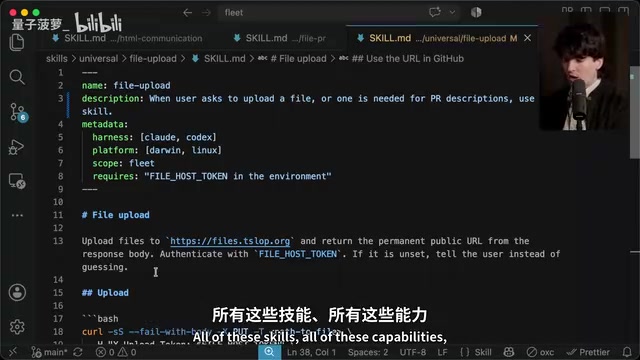
Theo also showcased two previously unrevealed Skills.
File Upload Skill: Lets the Agent upload screenshots, screen recordings, and logs to his self-hosted files.tslop.org, returning a public URL. This means when using the T3 Code mobile app on your phone, you can have the Agent record and upload a new feature demo — just click the link to see actual results running on a real machine, and even embed it in a PR.
HTML Communication Skill (inspired by Anthropic's Thoric): Lets the Agent generate readable HTML documents — plans, specs, UI mocks, reports — and upload them to stable URLs. He uses A/B/C labels for different UI options to enable quick selection.
The end result is that his prompts became extremely short. For example, when adding iOS/Android app entry points to a marketing site, the Agent used the HTML skill to present A/B/C/D mocks. He simply replied: "I want C+D+A combined. File and babysit." — and the entire flow from design to PR was complete.
Core Takeaway: Optimize AI Communication Skills, Not Coding Skills
Theo drove home the soul of the entire methodology at the end:
"I'm not trying to make the model technically stronger. The whole point isn't to make the model better at writing code — it's to make the model better at communicating with me."
When an Agent's output is garbage with no useful context, reading it is torture. All these Skills, configs, and time invested are fundamentally about giving the model the ability to "collaborate better with humans."
His final warning: don't go to his repo and copy-install all his Skills. Just like you wouldn't install every JS package someone else has used. The real value is understanding where your own Agent works and where it fails — only by figuring that out can you write configurations that truly fit your needs.
Related articles

Chain of Thought Isn't Just for AI: How Humans Can Use CoT to Improve Thinking Quality
Chain of Thought isn't just a prompt trick for large models. Starting from a Hacker News discussion, this article analyzes why CoT works for human thinking too, breaks down actionable ways to transfer it, and highlights the key differences between human CoT and machine CoT.
Cloudflare Teams Up with OpenAI: Closi…
Cloudflare Teams Up with OpenAI: Closing the Loop from Vulnerability Discovery to Defense with AI
Cloudflare uses OpenAI Daybreak to investigate security vulnerabilities and generate reviewable remediation plans, while developers use Codex to boost coding efficiency and quality.

Orca Multi-Agent Orchestration in Practice: A Guide to Parallel Collaboration with Claude and Codex
Orca is Stable AI's free open-source agent workbench supporting 34 agents like Claude Code and Codex in parallel. Learn its Git worktree isolation, multi-model orchestration, and mobile management.