How to Choose Among 10 AI Coding Tools: Claude Code, Codex, Cursor, and Trae Compared

A four-tier buying guide to 10 AI coding tools by task type and budget, plus pricing pitfalls.
Based on a Bilibili creator's hands-on experience and the official pricing pages of eight tools, the article frames tool selection around "pick the tool by the job, pick the tier by the budget." It splits options into four tiers: fully automated (Claude Code, Codex), editor-assisted (Cursor, GitHub Copilot, Google Anti-Gravity), Chinese-interface RMB billing (Trae, CoderCN, CodeBuddy), and cheaper-model plans (Kimi Code, Zhipu GLM Coding Plan). It stresses that quota units vary wildly across vendors, so don't compare sticker prices alone, and recommends starting with a zero-budget trial for a month before upgrading.
Title
How to Choose Among 10 AI Coding Tools: Claude Code, Codex, Cursor, and Trae Compared
Meta Description
How to choose an AI coding tool in 2026? This article sorts use cases into "hand the whole job to AI" and "editor-assisted coding," pairs them with zero-budget, everyday, and heavy-usage tiers, and compares the official pricing and ideal scenarios for 10 tools including Claude Code, Codex, Cursor, Copilot, and Trae—plus a quick-selection table and pitfalls to avoid.
Article Content
With AI coding tools popping up everywhere, many developers are stuck on the same question: which one should I actually use, and how much should I pay? One Bilibili creator, drawing on daily experience with Claude Code and Codex plus the official pricing pages of eight other tools, put together a decision table built on "pick the tool by the job, pick the tier by the budget." This article is based on that video and cross-referenced with publicly available information about the various tools to map out a clear buying path.
Ask Yourself Two Questions First
Before choosing a tool, get two things straight: what do you want the AI to do, and how much are you willing to spend per month?
The first type of job is "hand the whole thing to AI": you say one sentence, and it reads the code, edits files, and runs commands on its own—you come back and just check the result. The second type is "watch and edit inside the editor": AI-assisted completion, chat, and edits, with every step visible to you. Budget roughly splits into three tiers: zero budget, $10–20 per month (about 60–160 RMB), and heavy use at $100+ per month (about 500+ RMB).
According to the creator, Claude Code and Codex are the daily workhorses among the 10 tools; the other eight are described based on their official pages, with pricing captured on October 11 and nothing inferred beyond what the pages state.
Tier 1: Let AI Run the Whole Job Itself
The core need in this tier is "you say one thing, AI does the whole job." Claude Code and Codex are the typical representatives.
Claude Code: A Fully Automated Coding Agent in the Terminal
Claude Code works in the terminal, VS Code, JetBrains, desktop, and web—same engine, with configuration and MCP shared across surfaces. The creator recorded a demo: opening Claude Code in an empty folder and saying "build a to-do webpage that can add, check off, and delete items, and persists after refresh," then not touching the keyboard. About 40+ seconds later, the AI had written the code and explained how to open and use it. A follow-up request—"add a button to clear completed items, change only this one spot"—had the AI first read the file, then precisely edit the relevant line and report the scope of changes.
On pricing, the free tier does not include Claude Code. Pro is $17/month billed annually or $20/month billed monthly; Max starts at $100 with 5x or 20x usage options. The official site notes usage limits and that prices may change.

MCP (Model Context Protocol) is an open protocol proposed by Anthropic that lets large models securely connect to external tools and data sources (such as file systems, databases, Git repositories, and third-party APIs). In Claude Code, MCP servers are wired in as configuration entries, enabling the AI to read project context, run searches, or call business interfaces—extending "writing code" into "operating a real engineering environment." Cross-surface consistency means an MCP service you configure in the terminal also works in VS Code, JetBrains, desktop, and web, with no need to set it up again. Note that each enabled MCP service consumes context and call quota, and the official guidance is to disable unused services to save usage.
Codex: Coding Capabilities Inside the ChatGPT Plan
Codex covers desktop app, web, command line, IDE plugins, and cloud, and is included in ChatGPT plans. Free is $0, Go is $8, Plus is $20, and Pro starts at $100 across three tiers of 100/200/500. Plus and above include cloud automated code review and Slack integration. Free and Go use the GPT-6 Luna model; Plus and above can use GPT-6.1 Sol and GPT-6 Luna. The official estimate for Plus is roughly 15 to 160 local messages per 5 hours with GPT-6.1 Sol, though it stresses this is an estimate, not a fixed cap.
The official site also offers five general tips for saving quota: write precise prompts, provide only relevant files, specify output format and length in advance, control the size of agents.me, and disable unused MCP services. In addition, the official page states that GPT-5.5 is being retired from all ChatGPT and Codex plans on October 14, so older tutorials recommending it need updating.
How to choose in this tier: If you're handing whole jobs to AI with a budget around $20, pick either Claude Code Pro or Codex Plus, and switch once you know which feels better.
Cloud automated code review means Codex, at the commit or pull request (PR) stage, has a cloud model automatically inspect changes, flag potential defects, and suggest fixes—like plugging an on-call reviewer into your workflow. Slack integration lets you trigger Codex tasks or receive results directly in Slack channels, which suits team collaboration. Both capabilities start at the Plus tier, meaning they're positioned as team/advanced features rather than entry-level ones; if you only develop solo locally, their practical value is limited, so weigh that when picking a tier.
Tier 2: Watch and Edit Inside the Editor (USD pricing)
This tier targets developers who prefer working in an IDE, with AI completing, chatting, and editing alongside—every change visible.
Cursor
Personal Hobby is free with limited Agent requests; Pro is $20/month; Teams is $40 per person per month. Features include cloud Agents, MCP, GPT skills, Hooks, and the code review tool BugBot; the team tier can share rules, skills, and plugins.
GitHub Copilot
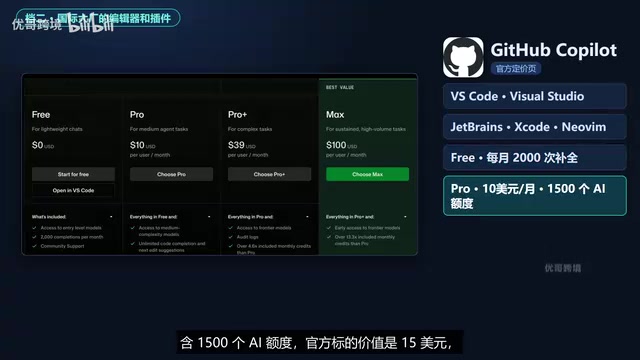
Available as a plugin for VS Code, Visual Studio, JetBrains, Xcode, and NeoVim. Free includes 2,000 completions per month; Pro is $10/month with 1,500 AI credits (officially valued at $15) and can use third-party Agents (namely Claude Code and Codex); Pro+ is $39/month; Max is $100/month. Pro+ and above unlock frontier models, with quota at 4.6x+ that of Pro, and Max at 13.3x+. Verified students, teachers, and maintainers of popular open-source projects can use Pro for free.
"AI credits" is Copilot's unit for metering advanced model calls and Agent requests, distinct from unlimited basic code completion: completions are counted per use (2,000/month on Free), while calling frontier models and running Agent tasks consumes credits. That's why the official site labels Pro's 1,500 credits as "worth $15"—a conversion relative to pay-as-you-go. Once credits run out, you typically wait for a reset or upgrade tiers, which is why Pro+ and Max are labeled in multiples (4.6x, 13.3x+)—heavy users' bottleneck is often advanced model call volume, not completion counts.
Google Anti-Gravity
Personal tier is $0/month with unlimited Tab completion and unlimited command requests, plus basic weekly rate limits. Higher quotas require Google AI Pro or Ultra.

How to choose in this tier: Start with Anti-Gravity on a zero budget; for everyday use, go with Copilot Pro ($10) or Cursor Pro ($20)—Copilot is cheaper and can connect to Claude Code and Codex.
Tier 3: Chinese Interface and RMB Pricing
This tier is also for editor use, but with a Chinese interface and RMB payment support.
Trae (formerly "Tongyi Lingma," now upgraded to CoderCN)
According to the official site, CoderCN offers desktop, IDE, JetBrains plugin, and command line. Personal trial is 0 RMB for two weeks, Professional is 59 RMB/month, Advanced is 169 RMB, and Flagship is 559 RMB. The site marks Quest 3.8 Flash as free for a limited time; Professional includes Quest mode and RepoWiki, and new customers get an extra 2,000 credits on their first subscription.
Trae's official pricing page shows: Free includes 500 credits per month with all features available; membership Lite is 39 RMB for the first month (regular 49 RMB) with 2,000 credits per month, Pro is 69 RMB for the first month with 4,000 credits per month, Pro+ as low as 219 RMB, and Ultra as low as 629 RMB. Members get model discounts: Seed 2.1 at 25% off, GLM and DeepSeekAd V4.1 at 50% off. Cloud task concurrency is 2 for Free and Lite, 10 for Pro, and 20 for Ultra. New users get 4,500 credits on signup.
CodeBuddy (Tencent Cloud)
Covers plugin, IDE, and command line. Personal trial is free for a limited time with 500 credits per month; Standard is 70 RMB/month (regular 99); Advanced is 140 RMB; Flagship is 700 RMB. The page marks 30% off for continuous monthly billing, with credit packs available for purchase from October 10 to October 23.

How to choose in this tier: All three have free tiers at zero cost; for everyday use, Trae Lite (regular 49 RMB), CoderCN Professional (59 RMB), and CodeBuddy Standard (70 RMB) are similarly priced—pick by interface preference.
Tier 4: Switch to a Cheaper Model
This tier isn't strictly an editor but rather coding plans offered by model vendors, where quota and model are the key considerations.
Kimi Code
Offers desktop, command line, and IDE plugin, powered by Kimi K3, with K3 available only on Plus and above. Plus is 79 RMB/month, Pro 159 RMB, and Max 559 RMB. The official site notes that the weekly limit is removed for coding scenarios, total quota has been adjusted, and Plus allows multiple devices to log in and share the same quota.
Zhipu GLM Coding Plan
Not an editor but a model plan; one plan can connect to 20+ coding tools including Claude Code, Codex, and Cursor. Lite is 118 RMB/month (94.4 RMB after the current 20% annual discount), and Pro and Max offer 6x and 14x the usage of Lite respectively. The model is GLM 5.3; Pro and above include a set of curated MCP tools, and Max gets dedicated resource priority during peak hours.
How to choose in this tier: If you already have a tool you like and just want a cheaper model, go with Kimi Code Plus (79 RMB) or GLM Lite (118 RMB) for everyday use, and Kimi Code Max (559 RMB) or GLM Max (1,078 RMB) for heavy use.
How "model plans that plug into coding tools" work: these plans provide endpoints and API keys compatible with the Anthropic/OpenAI interface specs; you replace the base URL and key in Claude Code, Codex, Cursor, and similar tools with the plan's configuration, leaving the tool's interface unchanged while the underlying model becomes GLM. The benefit is that one quota can be reused across multiple tools, usually at lower cost than per-token billing; the trade-off is that feature parity depends on how well each tool supports third-party endpoints—some tool-specific capabilities (such as particular Agent flows or cloud review) may be unavailable, and peak-hour resource guarantees may differ from a direct official connection.
Quota Units Differ—Don't Compare Prices Alone
Each vendor meters usage very differently: Claude and Codex talk about "usage," with Codex also giving per-5-hour message estimates; Cursor counts Agent requests; Copilot uses monthly AI credits (1,500); Anti-Gravity uses rate limits plus quota; Trae and CodeBuddy call them credits (积分); CoderCN calls them Credits; Kimi Code talks about quota; GLM plans use credits and usage multiples. So don't just compare prices—convert based on how you actually use them each day.
The creator also worked out a few combination costs: a zero-cost combo of Anti-Gravity + Trae Free + Codex Free totals 0 RMB; a single subscription starts with either Claude Pro at $20/month or Codex Plus at $20; both together run $40/month; an RMB combo of Trae Lite (regular 49 RMB) plus Kimi Code Plus (79 RMB) totals 128 RMB.
Common Mistakes to Avoid
- Claude's free tier does not include Claude Code; you need Pro.
- Codex's Free and Go use GPT-6 Luna; GPT-6.1 Sol requires Plus or above.
- Kimi Code's K3 model requires Plus or above.
- Trae Lite's 39 RMB is the first-month price; the regular price is 49 RMB.
- CoderCN's trial only includes a two-week Professional trial.
Summary Table
| What you want to do | Zero budget | Everyday ($10–20 / 60–160 RMB) | Heavy use ($100+ / 500+ RMB) |
|---|---|---|---|
| AI runs the whole job itself | Codex Free | Claude Pro or Codex Plus | Claude Max or Codex Pro |
| Watch and edit inside the editor | Anti-Gravity, Cursor, Copilot free tiers | Copilot Pro ($10) or Cursor Pro ($20) | Copilot Max ($100) |
| Chinese interface, RMB payment | Trae, CoderCN, CodeBuddy free tiers | Pick one of the three in the 59–70 RMB range | CoderCN Flagship 559 RMB, Trae Ultra 629 RMB, CodeBuddy Flagship 700 RMB |
| Just want a cheaper model | — | Kimi Code Plus 79 RMB or GLM Lite 118 RMB | Kimi Code Max 559 RMB or GLM Max 1,078 RMB |
If you only remember three sentences: for AI to do the whole job itself, see Tier 1; for watching and editing inside the editor, see Tiers 2 and 3; for just switching to a cheaper model, see Tier 4.
Prices can change at any time; the creator compiled information from official pages on October 11, so please rely on the official sites when actually choosing. Start with the zero-budget column, try one of each for a month, and figure out your real usage before deciding whether to upgrade.
Multi-source cross-verification note: The core information in this article comes from the Bilibili creator's video. The Claude Code and Codex sections are backed by actual usage demos; the pricing and feature descriptions of the other eight tools are based on official pages, and the creator explicitly stated no additional speculation was made. Different sources describe the same tool's pricing consistently, but varying quota units are a widespread phenomenon—take special care when choosing.
Related articles

RAG Getting Started in Practice: From Principles to Building an Enterprise Knowledge Base
Bilibili RAG course highlights: from retrieval-augmented generation principles, document chunking and vectorization, to five accuracy factors and enterprise knowledge base boundaries, with fine-tuning vs RAG selection advice.

AI Model Selection Guide: DeepSeek vs. Qwen3 in Practice
How should AI developers choose models? Based on a Bilibili tutorial, this article breaks down the Function Calling differences between DeepSeek V3 and R1, Qwen3's programmatic thinking mode switching and agent capabilities, and outlines a multi-model learning path and practical selection logic.

Anchoring, Loss Aversion, and Nudges: 5 Psychological Tactics Retailers Use to Make You Spend
Behavioral economics reveals how retailers use anchoring, framing, loss aversion, and nudge theory to manipulate your spending decisions. This article breaks down 5 common psychological tactics and offers counterstrategies like slowing down decisions and setting your own anchors to see through the pricing design behind discounts.