How to Connect GLM-5.3 Flash to Codex: Less Than 1% the Cost of GPT

GLM-5.3 Flash completes the same coding tasks as GPT at less than 1% of the cost.
Zhipuai's GLM-5.3 Flash matches top-tier models on engineering benchmarks like Terminal Bench while costing a fraction of the price — just ¥0.37 vs ¥44 for the same music player task completed by GPT 5.6 Sol. This article walks through connecting GLM-5.3 Flash to Codex via Codex++ or CC Switch, and compares real output quality: GLM is accurate but visually template-like, while GPT proactively extends features with near-deliverable polish. The recommended strategy is a "flagship + budget" model combo to balance quality and cost.
GLM-5.3 Flash: The New King of Cost-Efficiency Benchmarks
ZhipuAI's recently launched GLM-5.3 Flash has been turning heads across multiple benchmarks. According to hands-on testing shared by a Bilibili content creator, the model scored neck-and-neck with Claude Opus 4.8 on the Terminal Bench 2.1 complex terminal task evaluation, and topped the leaderboard on the GDPVL AAVR test for cross-domain professional reasoning.
What's even more compelling is its cost-efficiency in real engineering scenarios. With a success rate comparable to DeepSeekAd V4 Pro, GLM-5.3 Flash costs only one-eighth as much per task. This has prompted many developers to rethink their model selection strategy — performance is no longer the only variable; cost efficiency is becoming the deciding factor.
This article draws on the creator's step-by-step tutorial to walk through the complete process of connecting GLM-5.3 Flash to Codex, and revisits a real-world comparison of its output quality and cost against GPT 5.6 Sol.
Getting Your Zhipuai API Key
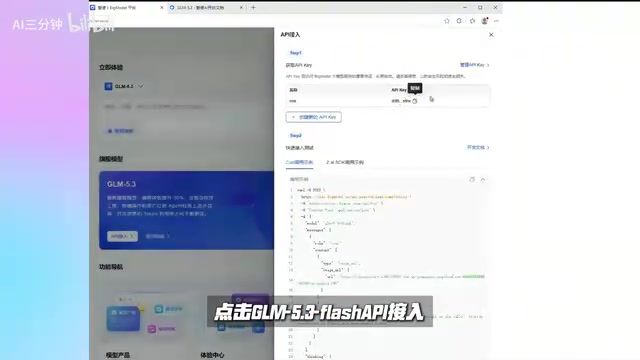
To use GLM-5.3 Flash, you first need to register on the Zhipuai platform and obtain an API key. The process is straightforward:
- Log in to the Zhipuai platform and navigate to the "Models and Developer Services" page
- Open the console, find the API access entry for GLM-5.3 Flash, create an API key, and give it a name
- Copy the generated API key for later use
There's also a hidden perk for new users: upon registration, the platform grants a resource package with 2 million general-purpose tokens — no top-up required. For developers who want to test the waters first, this is essentially zero-cost experimentation.
Connecting the API Key to Codex
Why You Need a Conversion Tool
Codex natively only recognizes OpenAI's API. To make it work with API keys from other providers, you need an adapter. The two most commonly used tools are Codex++ and CC Switch:
- Codex++: The most feature-complete option with the best user experience — ideal if you only use the Codex desktop app
- CC Switch: Compatible with nearly all mainstream agents on the market, including Claude Code — the better choice if you work across multiple tools
Either one works; the right pick depends on your workflow.

Codex is OpenAI's AI coding assistant (i.e., Codex CLI or the Codex desktop app), and its underlying architecture authenticates and routes calls exclusively through OpenAI's official API. Even if a third-party API key looks similar in format, it can't be recognized by Codex directly because the BaseURL and authentication logic differ. Both Codex++ and CC Switch are essentially "proxy middleware": they intercept API requests sent by Codex locally, redirect them to the target provider's endpoint, and handle the protocol format conversion. CC Switch's broader compatibility with agents like Claude Code stems from its implementation of a more universal OpenAI-compatible protocol forwarding layer, rather than a Codex-specific customization.
Method 1: Connecting via Codex++
Open Codex++, go to "Provider Configuration" → "Add Provider", and follow these steps:
- For the name, use the model name directly; set the connection mode to "Pass API"
- Enter the official endpoint URL for GLM-5.3 Flash as the BaseURL
- Paste your API key, and set the upstream protocol to "Chat Completion"
- Click "Provider Doctor" to diagnose the provider — a success message confirms the connection is working
- Fetch the model list from upstream, find the target model name, copy it into the config, save, and click "Use"
Important: After a successful import, do not manually restart Codex. Always use the restart button provided by Codex++ so it launches Codex with the updated login configuration — otherwise the settings won't take effect.
Method 2: Connecting via CC Switch
If you prefer a multi-agent solution, use CC Switch:
- Click the OpenAI icon in the top center (this is the column Codex uses), then click the "+" button in the top right
- Select GLM, paste in your API key — the endpoint URL and model parameters generally don't need to be modified manually
- Open settings in the top left, check the routing section, find the local route, and enable the master switch
- Return to the provider page and enable both the newly added configuration and the routing toggle
- Fully close Codex and relaunch it — the new configuration will only take effect after a fresh start
Once you can select GLM-5.3 Flash inside Codex, the integration is complete.

Real-World Comparison: GLM-5.3 Flash vs GPT 5.6 Sol
Web Development Test
The creator used an identical minimal prompt to have both models build a music player. The results showed clear stylistic differences:
- GLM-5.3 Flash: Followed the prompt precisely, implementing exactly what was specified — nothing more, nothing less
- GPT 5.6 Sol: Proactively added features not mentioned in the prompt, such as a playlist and a draggable progress bar, resulting in a more complete product
Visual polish was where the gap was most apparent. GLM-5.3 Flash's interface still leaned toward a template-like aesthetic, while GPT 5.6 Sol handled color, border-radius, and other details with a level of refinement that approached deliverable quality.

Cost Comparison: Less Than 1% of GPT
The real differentiator is cost. For the same music player task:
| Model | Cost | Time |
|---|---|---|
| GPT 5.6 Sol | ~¥44 | 43 minutes |
| GLM-5.3 Flash | ¥0.37 | Shorter |
GLM-5.3 Flash cost less than 1% of what GPT charged. When the cost gap reaches two orders of magnitude, are minor quality differences still as hard to accept? This is the core proposition that high-efficiency models put to developers — trading a modest quality compromise for an order-of-magnitude reduction in cost.
Terminal Bench and GDPVL AAVR are vertical evaluation suites focused on coding and engineering capabilities. The former emphasizes completing complex, multi-step tasks in real terminal environments; the latter targets cross-domain professional knowledge Q&A and reasoning. Unlike general-purpose benchmarks such as MMLU or MATH, these are much closer to real development scenarios, making their scores more meaningful to engineers. That said, benchmark results reflect model performance on standardized problems. Subjective experience in actual use — such as visual polish and the willingness to proactively extend functionality — typically needs to be verified through real-task comparisons, which is precisely the core value of the hands-on testing section in this article.
Engineering Practice: Balancing Cost and Quality
Based on five years of AI-assisted programming experience, the creator offers a pragmatic recommendation: don't abandon high-end models entirely — combine them strategically.
The approach: keep a subscription to a flagship model like GPT for critical, high-quality deliverable tasks, while pairing it with a cost-efficient model like GLM-5.3 Flash to handle bulk, repetitive, and exploratory "grunt work." This preserves the quality floor for core output while keeping overall token consumption to a minimum.
This "primary + secondary" model combination strategy is increasingly becoming the consensus among AI coding practitioners. Flagship models tackle the hard problems; cost-efficient models handle the volume — finding a dynamic balance between quality and cost.
Conclusion
GLM-5.3 Flash is yet another demonstration of how quickly Chinese large language models are closing the gap on the cost-efficiency front. It matches top-tier models on engineering benchmarks while costing as little as one-eighth to one-hundredth of the price. While it still trails GPT 5.6 Sol on visual polish and proactive feature expansion, for cost-sensitive, high-volume engineering use cases, that tradeoff is entirely worthwhile.
For developers, rather than fixating on which model is "the best," learning to flexibly dispatch different models based on task type may be the more mature engineering mindset for the AI coding era.
Related articles

Vibe Coding Full-Stack in Practice: AI Programming from Beginner to Enterprise Deployment
From Cursor to Claude Code, this Bilibili AI programming course uses four progressive projects to cover full-stack development, open-source secondary development, and team collaboration. The article analyzes the shock to frontend roles, the efficiency shift from 50 people to 5, and the methodology required for enterprise-grade projects.

David Blaine's Global Quest for Real Magic: From South Africa to Japan and India
David Blaine travels to South Africa, Japan, and India in his Do Not Attempt special, documenting Spinning drivers, black mamba rescuers, iaijutsu masters, and ascetics—exploring the boundary between magic and real human极限 challenges.

Is a Touchscreen MacBook Coming? Vergecast Reveals Apple Executive's Response
Vergecast podcast reveals a conversation between a reporter and Apple executive John Ternus about a touchscreen MacBook and Apple Pencil support. Ternus says iPad is the best device for a stylus, while the reporter bets MacBook will eventually support Apple Pencil.