How to Use OpenAI Dot and Codex Together: Delegate to Dot, Pair-Program with Codex

Delegate tasks to Dot, pair-program with Codex — a practical guide from an OpenAI engineer.
OpenAI developer experience team member Dominic Kundal explains how Dot and Codex complement each other. Both run on the same open-source Codex agent framework, but differ fundamentally in interaction mode: Codex is on-demand for deep collaborative coding, while Dot is a proactive personal agent with cross-channel continuity, parallel task orchestration, and background alerting. Dot defaults to research-only and gains execution permissions gradually. The advice: delegate to Dot, pair-program with Codex.
OpenAI developer experience team member Dominic Kundal — who has worked on Codex, GPT, and the Agents SDK — published a detailed post addressing a question that confuses many users: between OpenAI's two products, Dot and Codex, which one should you use? His answer is straightforward: use both.
From "Not Sure It's Useful" to "Can't Live Without It"
Kundal is a heavy Codex user who has invested considerable effort into the platform — building a complete workflow with memory plugins and automations, and setting up a "chief of staff"-style agent to track his ongoing work. Because his existing loop was already well-tuned, he wasn't initially sure where Dot fit in.
After using it for a while, though, he says he can't do without it. The biggest difference is peace of mind — you hand something off and don't have to babysit every step. Dot is a proactive personal agent whose name, appearance, and communication style are all customizable. He named his Dot "Chopper."
His old workflow was tedious: paste a Slack message link into Codex, have it develop a feature, monitor deployment, report back to Slack, then set up a separate automation to track follow-up changes — and repeat the whole process for every new task. Now he just @ his Dot in a Slack thread. Dot picks up the task, replies in the same thread when done, and keeps an eye on subsequent changes on its own.
Same Framework, Different Roles
Dot and Codex run on the same open-source Codex agent framework, and any plugins you've installed work with both. Structurally, Codex is "on-demand" and Dot is "proactive," but they share the same underlying Codex agent — tasks can be dispatched to your local machine, Codex Cloud, or Dot's own cloud computer.
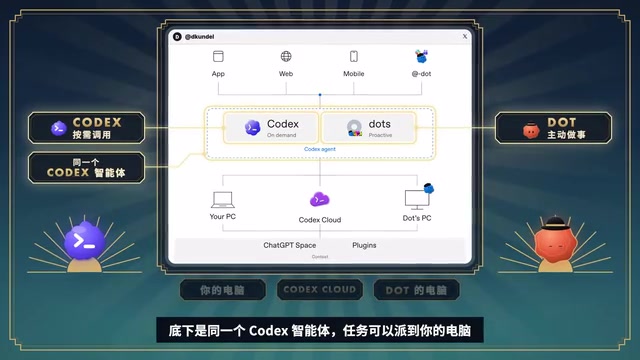
Currently each user can only create one Dot. Kundal actually sees this as a feature: when something comes up, just hand it off — no need to figure out which existing Codex workflow to slot it into. Compared to using Codex directly, Dot differs in three key ways: continuity, orchestration, and proactivity.
The Codex agent framework is OpenAI's open-source programming agent infrastructure. It lets developers extend capabilities via plugins and dispatch tasks to different compute environments. "On-demand" means users must initiate a conversation and explicitly specify a task; "proactive" means the agent can sense environmental changes and take action without being triggered by the user. This architectural difference defines their respective use cases: Codex is better for deep, iterative programming collaboration, while Dot is better for delegating well-defined tasks and having them followed through end-to-end. Sharing the same framework means plugin configurations and workflow knowledge built up in Codex carry over seamlessly — no need to learn a new system from scratch.
Continuity: Pick Up the Conversation Anywhere
A colleague reports a bug in Slack, he forwards it to Chopper, and Chopper starts gathering information and working on it. During his commute he calls Chopper to continue the discussion — or switch topics entirely. Back at his desk he picks it up again on the desktop client. It's always the same Dot, like continuing a conversation with a friend or family member in a new location — no need to recap from the beginning.
Multiple channels can even run simultaneously: while a call is ongoing, Chopper can send him things to look at, he can type a reply or drop a link, and the call keeps going.
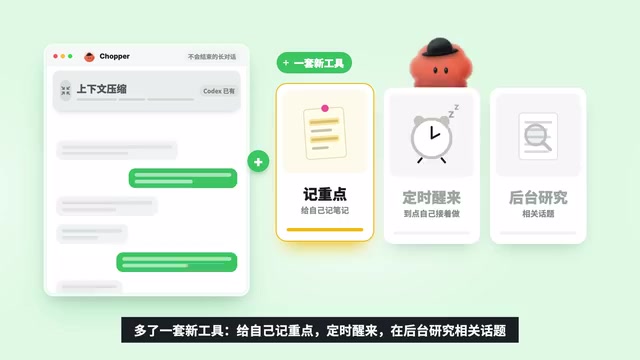
To manage these "never-ending" long conversations, Dot adds a new layer of tooling on top of Codex's existing context compression: taking its own notes on key points, setting timed wake-ups, and researching related topics in the background. It gradually learns the details of his work and his colleagues, making him more comfortable handing things off. Dot can also read ChatGPT's memory and conversation history and use already-connected plugins — so anyone who's used Codex doesn't have to start from zero.
Orchestration: Handle Multiple Things While Chatting
Because there's only one Dot, it needs to carry on a conversation while advancing multiple tasks in parallel: spinning up sub-agents and standalone tasks, then pulling the results back in. Dot has its own cloud computer and browser, can log into websites and take actions, and can even use pre-installed professional software like Blender. Programming tasks can go to Codex Cloud or be dispatched to the local machine.

Cloud tasks keep running after he closes his laptop; local tasks require the machine to be on, but the upside is access to full local context, including an already-logged-in browser. His habit is to push backend changes and small copy edits to the cloud and keep large frontend changes local — over time Dot learns these preferences and routes automatically. When an idea strikes on the road, he calls Dot and describes it while Dot simultaneously opens a Codex Cloud task. Later he can open that thread and iterate directly with Codex, or let Dot keep going.
Proactivity: Waiting for "You're Good to Try Again"
This is what Kundal sees as Dot's biggest differentiator. Chopper works in the background to connect information across different apps — a new Slack message, or a decision in meeting notes, might relate to something they discussed last week, and it surfaces the connection unprompted.
Once he asked Chopper to follow a PR all the way to production and confirm when a fix was ready to revisit. He didn't have to keep checking — he just waited for the message: "You're good to try again." Another scenario illustrates it even better: on the day of an event, he was checking Slack to see whether a keynote-period incident would affect his demo. Dot also caught a separate incident he hadn't noticed, cross-referenced the talk content, the incident details, and his schedule, and reminded him to re-test the relevant steps with a demo account. Seeing on his calendar that he was about to leave for his commute, Dot suggested moving local tasks to the cloud so they'd keep running while he was in transit.
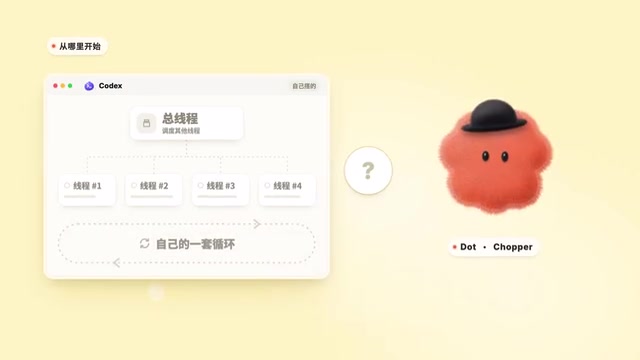
Another engineer on the team has gone even further: he's authorized his Dot to monitor a feedback channel, triage issues, kick off Codex tasks to fix them, check CI results, handle failures, and only escalate when something big comes up. These capabilities already exist in Codex — Dot can pick up seamlessly from wherever things left off.
"Proactivity" in the agent space is typically described as proactive agency or event-driven agent behavior — the agent doesn't wait for user commands but continuously listens for external signals (Slack notifications, calendar events, CI status changes) and independently decides whether to act or alert the user. This is fundamentally different from the traditional request-response interaction model, where the user is the sole initiator and the agent is just a tool. In proactive mode, the agent becomes a continuously running collaborator that can connect information scattered across different apps and surface problems the user hasn't noticed. Implementing this requires persistent context storage, cross-app data read permissions, and background task scheduling — which in turn creates elevated permission management needs, which is why the article emphasizes the importance of drawing clear permission boundaries.
From Conservative to Delegating: Trust Is Built Gradually
By default, Dot only does research — it doesn't take actions. The more you hand off, the better it understands how it can help, and trust builds accordingly. You can let it do more without checking in first, or use custom rules to specify "what it must ask you before doing."
Kundal is also candid: if you've already built your own well-tuned loop, or have a "meta-automation" orchestrating other existing workflows, you might not notice the difference right away. But for now, Dot doesn't consume ChatGPT usage quota and is essentially unlimited (unless it delegates to local Codex or Codex Cloud) — which makes it a low-risk thing to try.
The "default research-only, no actions" mode corresponds to the industry-standard read-only or suggest-only pattern: the agent only collects and analyzes information until explicitly authorized, never writing to external systems. As users grant permissions incrementally, the agent gains execution capabilities — submitting code, sending messages, modifying files, etc. This progressive authorization model is a key principle of safe agent design, aimed at limiting the blast radius if an automated action goes wrong. "Custom rules" function like a policy layer on top of the platform's built-in safety measures, letting users define approval thresholds for specific scenarios — for example, "any action touching production must be confirmed first" — so each person can find the right balance between convenience and control for their own workflow.
Getting Started
Set up Dot in the ChatGPT desktop app, connect it to your local Codex, and have it open Codex tasks on your behalf. From there, start with three things:
- Demonstrate something you do regularly: Pick a recurring task where you know what a good outcome looks like. Walk Dot through it, dial it in together, then hand it off — and be clear about how far it should go on its own. Kundal calls this the "anti-to-do list."
- Have it watch bugs: Let Dot monitor your assigned bugs and handle them directly.
- Draw clear permission boundaries: Specify what it can do on its own and what needs your sign-off. You can codify this as custom rules, layered on top of app permissions and built-in safety measures.
His summary is clean: delegate to Dot, pair-program with Codex. When he wants to dig into a problem together with AI, he still goes straight to Codex. Most of the time, though, he hands ideas and tasks to Dot and lets go — it's faster, and a whole lot lighter.
Related articles

Chain of Thought Isn't Just for AI: How Humans Can Use CoT to Improve Thinking Quality
Chain of Thought isn't just a prompt trick for large models. Starting from a Hacker News discussion, this article analyzes why CoT works for human thinking too, breaks down actionable ways to transfer it, and highlights the key differences between human CoT and machine CoT.
Cloudflare Teams Up with OpenAI: Closi…
Cloudflare Teams Up with OpenAI: Closing the Loop from Vulnerability Discovery to Defense with AI
Cloudflare uses OpenAI Daybreak to investigate security vulnerabilities and generate reviewable remediation plans, while developers use Codex to boost coding efficiency and quality.

Orca Multi-Agent Orchestration in Practice: A Guide to Parallel Collaboration with Claude and Codex
Orca is Stable AI's free open-source agent workbench supporting 34 agents like Claude Code and Codex in parallel. Learn its Git worktree isolation, multi-model orchestration, and mobile management.