How to Write MiniMax H3 Prompts? One Skill Does It All

Master MiniMax H3 video prompts with six core elements and the ProMate Skill auto-generator.
MiniMax H3 video prompts work best when structured like shooting scripts rather than plain-language descriptions. This article breaks down the six core elements — character, scene, action, camera, timeline, and sound — and introduces the ProMate Skill tool that auto-generates professional storyboard-level H3 prompts from a single sentence. A/B testing confirms structured prompts deliver noticeably better camera work, character consistency, and pacing.
MiniMax H3, the open-source video model, has been available for a while now, but many users are still stuck on a fundamental question: How exactly should I write prompts? While the official documentation provides prompt guidelines, the structure is relatively complex and not beginner-friendly. B-site (Bilibili) creator Aike addressed this pain point by organizing the official rules into a dedicated H3 prompt Skill (ProMate) and validated its effectiveness through extensive A/B testing. This article, based on his findings, breaks down the core logic and practical methods for writing H3 prompts.
Video Prompts Aren't Essays — They're "Shooting Scripts"
When most people first use a video model, they naturally write out a plain-language storyline. For example, a scene like this: early morning, two people in a shared apartment's living room discussing something strange; the guy pulls out his phone to verify the girl's identity, only to discover that all the contacts, chat history, and photos belong to someone else; they end up staring at each other in shock — topped off with "cinematic feel, keep characters consistent, no subtitles."
This kind of prompt actually conveys the plot quite clearly, and H3 can indeed generate something from it — the storyline is roughly correct, and the characters know when to speak. But here's the problem: how to cut between shots, who to frame first, where characters should stand, what framing to use for each line of dialogue — none of this information is given to the model, so it can only "improvise."
The creator's core insight is genuinely illuminating: a video model prompt is essentially not an essay — it's more like a shooting script written for a director, cinematographer, and actors. What you need to tell the model isn't "what happened," but "how this should be filmed."
The Six Core Elements of H3 Prompts
What seems like a complex MiniMax prompt can actually be broken down into six components: Character, Scene, Action, Camera, Timeline, and Sound.
Character & Scene: Define "Who" and "Where" First
If you have reference images, explicitly tell the model who is in image one and who is in image two — what they look like, what they're wearing. Facial features and hairstyle must remain consistent. For scenes, don't just write "in the living room" or "in a classroom." It's best to add character positioning — for example, the girl stands in the center of the living room while the guy stands beside the sofa. If you don't specify this, the model will arrange spatial relationships on its own, and the results are often unpredictable.
Action & Camera: Tell the Model "How to Shoot"
Take the same line, "the guy pulls out his phone." You could just write that, or you could break it down further: start with a close-up of the guy, he pauses for a moment, pulls out his phone and looks down at it, then cut to a close-up of the girl as she starts getting nervous. The plot hasn't changed at all, but suddenly the model "knows how to film it." This is the critical leap from plain language to professional prompts.
Timeline: Break It Down Second-by-Second Like a Storyboard
The timeline is one of H3's most useful features. You can directly specify: what to shoot from 0 to 2.5 seconds, what to shoot from 2.5 to 5 seconds, and which shot to cut to from 5 to 7 seconds. This way, a roughly 10-second video can be broken apart like a storyboard, frame by frame — you can even precisely dictate what happens each second.
Sound: Often Overlooked but Critically Important
If someone speaks in the video, specify who's talking, what they say, and in what tone. You can also add ambient sounds like footsteps, phone notification chimes, or rustling noises — and even explicitly request "no background music."
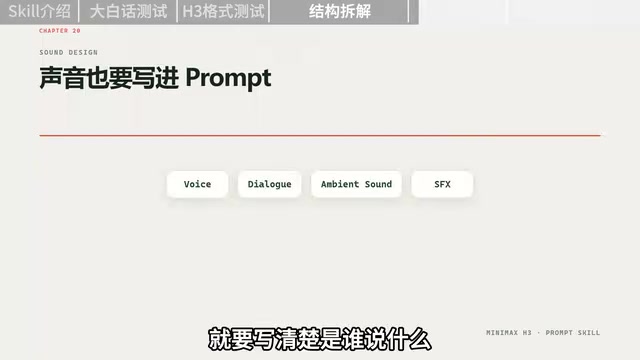
To summarize, a complete H3 prompt essentially answers: Who, where, doing what, how the camera sees it, when sounds occur, and what we hear.
A/B Testing: Same Story, Two Approaches
To validate the value of structured prompts, the creator ran a controlled experiment. Both videos used the exact same storyline — the only difference was how the prompt was written.
- Video One (Plain Language Version): The plain-language storyline was fed directly to H3. The result had the plot mostly correct, but camera work was entirely left to the model's guesswork.
- Video Two (Structured Version): The same storyline was fed into the ProMate Skill, which automatically organized it into character references, character positioning, storyboard timeline, shot framing, character actions, dialogue, sound, and various consistency constraints before handing it to H3 for generation.
The second video was noticeably more professional in camera language, character consistency, and narrative pacing. The creator emphasized that the point isn't about making prompts "longer" — it's about telling the model in advance what it would otherwise have to guess. This reinforces a core principle: minimize what the model has to guess.
Three Key Features of the ProMate Skill
While the rules themselves aren't difficult, manually writing such lengthy prompts before every video upload is genuinely tedious — which is exactly why the creator developed this Skill. It offers three main capabilities:
Feature 1: Generate T2V Prompts from a Single Sentence
Don't know how to write prompts at all? No problem. Just tell it something like "a girl runs into her ex-boyfriend at a convenience store late at night, and they both pretend not to recognize each other." The Skill will automatically fill in character details, scene, positioning, actions, camera work, timeline, and sound to generate a complete H3 prompt.
Feature 2: Cross-Model Format Conversion
If you already have a prompt — whether copied from somewhere online or written for another video model like Jimeng — you don't need to rewrite it. Just paste it in and ask it to "convert to MiniMax H3 format." It preserves the original content and creative intent while reorganizing everything according to H3's structure.
Feature 3: Reference Video Deconstruction
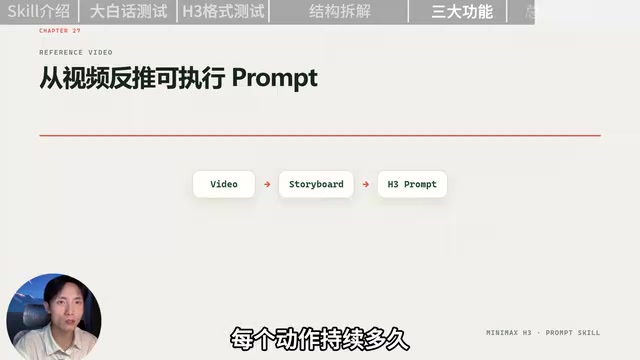
This is what the creator considers the most practical feature: if you don't even have a prompt and just came across a video you liked, simply drop the video in. The Skill will first deconstruct each shot's framing, camera movement, character actions, transition timing, and action duration, then reorganize everything into an H3-formatted prompt.
You Handle the Ideas, the Skill Handles the Translation
The creator offers an important reminder: what truly matters is never about making prompts as long as possible — it's about telling the model what it needs to know while cutting out irrelevant filler. The notion of "thesis-level prompts" is just a joke. The core objective has always been one thing — minimize what the model has to guess.
For users just getting started with H3, there's no need to memorize a bunch of prompt formulas. Just remember one thing: You're responsible for deciding what to shoot; the Skill is responsible for translating it into filming language that H3 understands. The Skill is open-source and available for anyone interested to try. For video creators, the value of tools like this lies in lowering the barrier to professional camera language as much as possible, allowing creative visions to be realized more fully.
Related articles

Chain of Thought Isn't Just for AI: How Humans Can Use CoT to Improve Thinking Quality
Chain of Thought isn't just a prompt trick for large models. Starting from a Hacker News discussion, this article analyzes why CoT works for human thinking too, breaks down actionable ways to transfer it, and highlights the key differences between human CoT and machine CoT.
Cloudflare Teams Up with OpenAI: Closi…
Cloudflare Teams Up with OpenAI: Closing the Loop from Vulnerability Discovery to Defense with AI
Cloudflare uses OpenAI Daybreak to investigate security vulnerabilities and generate reviewable remediation plans, while developers use Codex to boost coding efficiency and quality.

Orca Multi-Agent Orchestration in Practice: A Guide to Parallel Collaboration with Claude and Codex
Orca is Stable AI's free open-source agent workbench supporting 34 agents like Claude Code and Codex in parallel. Learn its Git worktree isolation, multi-model orchestration, and mobile management.