How Uber Solved MCP's Biggest Context Problem with Omni MCP

Uber's Omni MCP uses four meta-tools to keep 5,000+ tools out of an AI agent's context window.
When Uber's internal MCP tool count ballooned to 5,000+ across 800+ servers, the traditional "list all tools first" approach consumed the model's entire context before a single task began. Omni MCP is Uber's proxy server solution: it exposes just four meta-tools (discover server, discover tools, get tool schema, invoke tool) so agents load only what they need, step by step. A registry manages the tool catalog as the control plane; a gateway handles invocations, enforces fine-grained permissions per caller type (human, service, or agent), and applies PII redaction per tool. Oversized responses are handled via response projection (pre-declaring needed fields) or file-based filtering in code mode. Uber has not published token savings figures, though a comparable Anthropic example achieved 98.7% compression.
The Problem: 5,000 Tools Blowing Up the Context Window
MCP (Model Context Protocol) has become the standard way AI agents invoke tools — but as tool counts scale up, a sharp problem emerges: an agent with 5,000 tools runs out of context before it even reads your task.
Uber reports having over 5,000 MCP tools distributed across more than 800 servers. Context is the total amount of text a model can process at once. If you manually configure hundreds of servers the traditional way, the tool listing alone will blow past that limit.
In the standard MCP flow (per the November 25, 2025 spec revision), the client lists tools, the model picks one, and the client invokes it. Each tool definition includes a name, description, and input schema — a brief spec of what fields the tool accepts. The problem: that listing step pushes every single definition into the context window. At Uber's scale, that means thousands of definitions flooding in at once.
Worse, MCP has no native cross-server search. As Uber notes, an agent must already know which server to talk to before it can ask what tools are available there. It's a chicken-and-egg deadlock.
MCP (Model Context Protocol) is an open protocol proposed by Anthropic in late 2024, designed to provide a unified standard for communication between AI models and external tools and data sources. The design philosophy resembles USB-C: as long as a tool conforms to the MCP spec, an agent can invoke it using the same interface regardless of vendor. The protocol defines three core primitives: tools (executable actions), resources (readable data), and prompts (predefined templates). In tool-calling scenarios, clients retrieve complete definitions for all tools on a server via the
tools/listinterface — each definition includes a name, natural-language description, and JSON Schema input spec. This works fine when tool counts are small, but the protocol has no native support for pagination, lazy loading, or cross-server search. When tool counts scale to enterprise levels, the "list everything first" assumption becomes a hard bottleneck.
Omni MCP: Four Meta-Tools That Rewrite the Rules
Uber's answer is Omni MCP — a proxy server that sits between agents and all other servers. It exposes exactly four meta-tools (tools for discovering and invoking other tools).
Agents use them in sequence: discover server → discover tools → get tool schema → invoke tool. The core idea: only what the agent explicitly requests ever enters the context. The agent never sees the full tool definition catalog.
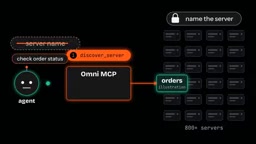
Let's walk through a hypothetical request. Suppose an agent needs to check the status of a food delivery order:
Step 1: Discover Server
The agent sends an intent-expressing query — say, "check order status" — and the tool returns a matching server. The key insight: the agent doesn't need to name the server upfront, which breaks the deadlock described earlier.
Uber's writeup doesn't explain how discover server ranks servers — it could be keyword matching or semantic comparison via a model. That choice directly affects the quality of step one.
Step 2: Discover Tools
The agent specifies the server returned in step one, and the tool returns a list of tools on that server. Responses likely include a short description per tool, since the agent needs to choose from them. Uber uses an LLM to auto-generate "agent-friendly" descriptions for discovered tools — description quality matters here, because poor descriptions lead the agent to the wrong tool.
Step 3: Get Tool Schema
The agent selects a tool and requests its JSON schema. Standard MCP definitions already carry the same input descriptions, but now the agent loads one schema instead of thousands. Rather than guessing field names, the agent reads them directly from the schema.
Step 4: Invoke Tool
The agent fills in parameters from the schema and makes the call. The request reaches the service that owns the tool, and the result comes back to the agent. None of the rest of the catalog is needed at this point.
Count what actually entered the context: one server, one tool list for that server, one schema, one result. The other 5,000+ tools never touched the context window.
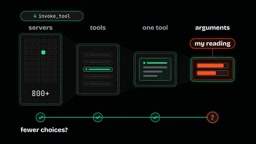
Each step narrows the decision space — first to a server, then to a specific tool on that server, then to filling in parameters. A useful heuristic for evaluating designs like this: ask whether each step leaves fewer choices for the next step.
Under the Hood: Registry, Gateway, and Access Control
Uber's system has two other key components. The registry is the control plane — it holds the tool catalog and tracks what tools exist. The gateway is the data plane — it handles actual invocations. The article doesn't detail exactly how these two relate to Omni MCP.
The gateway translates an MCP call into one of three protocols — HTTP, gRPC, or t-channel — then hands off execution to Motley (Uber's service mesh sidecar, a helper process that runs alongside each service).
The catalog gets populated via two paths: native MCP servers are queried directly with list tools; for other services, a tool called autocrawler reads interface definition files written in protobuf or Thrift. Autocrawler also uses an LLM to write friendly descriptions for discovered tools, then registers each one — disabled by default.
Uber is explicit about this: every MCP server and tool starts in a disabled state and must be explicitly reviewed and enabled by the responsible team. The machine writes the text; humans make the decision. That review is separate from access control.
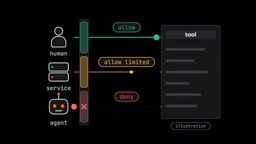
On the permissions layer, the gateway uses Uber's internal access control system to enforce what they call "charter policies." Rules are set per server, with individual tools able to override them. More granularly, policies depend on who's calling — the gateway detects whether the caller is a human, a service, or an agent, and the same tool can have different rules for each caller type. Authorization and PII redaction are both applied per tool.
The article doesn't clarify whether discover tools filters results by caller permissions or tool enable status — though logically it should do both, preventing agents from selecting tools they can't call before a call is even attempted.
Protobuf (Protocol Buffers) and Thrift are two mainstream interface definition languages (IDLs) commonly used to describe contracts between microservices. Protobuf was developed by Google; Thrift by Facebook (now Meta), and Uber has historically relied heavily on Thrift. Autocrawler parses these IDL files to "understand" what methods a service exposes and what their parameter types are, then uses an LLM to convert those machine-friendly interface signatures into natural-language descriptions for semantic matching during discovery. This "IDL → LLM description → tool registration" pipeline means that any service with existing interface definitions can join the Omni MCP ecosystem without modification — significantly reducing migration costs for legacy services. The sidecar pattern (used by Motley) is a standard service mesh deployment approach where a helper process is co-deployed alongside the main service in the same container group, handling cross-cutting concerns like traffic routing, authentication, and observability without the main service needing to be aware of the underlying infrastructure.
The Second Problem: Oversized Responses
The discovery mechanism solves the context problem before a call, but there's still a risk after: an oversized response can blow up the context just as badly. Uber has two mitigations.
The first is response projection. The agent declares which fields it wants before receiving a result. In the order example, the agent requests only the status field rather than the full order record. The gateway strips everything else before the model reads it.
The second targets shell agents via code mode. Shell agents work through a terminal, using a CLI tool called aifx to invoke MCP tools with commands including list, search, and call. Agents can chain calls in a single command, write output to files, then use grep to search those files and load only the relevant parts into context.
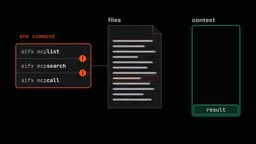
Suppose a call returns a long list of orders: the output is written to a file first, grep finds the specific order the agent needs, and only that entry enters the context. The file holds the complete result; the context holds only the match. Worth noting: Uber only describes the file approach for code mode. How Omni MCP handles oversized results in general — truncation, size limits, or file offloading — isn't addressed in the article.
Response projection is conceptually similar to GraphQL's field selection mechanism: the caller declares at request time which fields it needs from the response body, and the service or middleware layer trims everything else before returning. This shifts the responsibility for "reducing noise" from the model side to the gateway side, avoiding the waste of a large JSON payload entering the context only to be ignored. In practice, the gateway needs to perform a structured filter on the call result before forwarding it — which requires the tool's return format to be predictable (typically a JSON object). Tools that return unstructured text or binary content are harder to handle this way. Notably, projection fields are declared dynamically by the agent at call time, meaning the agent must already have enough understanding of the return structure from the schema step to accurately specify which fields it needs — further underscoring the importance of schema description quality in step three.
How Much Does It Actually Save? An Honest Gap
Here's a caveat worth flagging: Uber has not published any measured token savings, latency numbers, or percentages. Any figure you see attributed to Uber's system is speculation.
For comparison, Anthropic described a similar approach on November 4, 2025 — lazy-loading tool definitions and filtering results in code — with an example compressing 150,000 tokens down to 2,000, a 98.7% reduction. But that's an example from a different system, not a measurement of Uber's gateway. It shows what one example achieved; it says nothing about Uber's actual results.
When This Design Makes Sense
The full loop can be summarized as: discover, list, fetch, call. The gateway enforces permissions on the request path. Projection and file mechanisms keep large results out of context.
If you're running many MCP servers, this design is worth exploring. But the first step is measuring your tool listing: count how many tokens your tool catalog consumes before the first task begins, then compare that to your model's context size. That gap is what a design like Uber's reclaims for the client.
Conversely, if you're running a single server with a small number of tools, stick with standard listing — four steps means more round trips, and that overhead may not be worth it.
Before you build, settle three questions: Does the discovery step hide tools the caller isn't authorized to use? At which step is authorization enforced? How does the gateway handle oversized results? Work those out first, then build.
Related articles

Chain of Thought Isn't Just for AI: How Humans Can Use CoT to Improve Thinking Quality
Chain of Thought isn't just a prompt trick for large models. Starting from a Hacker News discussion, this article analyzes why CoT works for human thinking too, breaks down actionable ways to transfer it, and highlights the key differences between human CoT and machine CoT.
Cloudflare Teams Up with OpenAI: Closi…
Cloudflare Teams Up with OpenAI: Closing the Loop from Vulnerability Discovery to Defense with AI
Cloudflare uses OpenAI Daybreak to investigate security vulnerabilities and generate reviewable remediation plans, while developers use Codex to boost coding efficiency and quality.

Orca Multi-Agent Orchestration in Practice: A Guide to Parallel Collaboration with Claude and Codex
Orca is Stable AI's free open-source agent workbench supporting 34 agents like Claude Code and Codex in parallel. Learn its Git worktree isolation, multi-model orchestration, and mobile management.