I Tested 12 Claude Code Token-Saving Tools: The 90% Savings Claim Is a Myth

After 12 real-world tests: Claude Code's 90% token savings claims are largely hype — three free habits beat every plugin.
The author systematically tested popular Claude Code token-saving tools and found the actual savings far smaller than the advertised "90%" — because an irreducible cost floor exists from system prompts, context replay, thinking overhead, and cache expiration. RTK's terminal summarization barely moved the bill; the only tools that worked — Anthropic's official plugin (~13%) and Ponytail (~10%) — did so by reducing execution steps. Graphify excels at navigating large unfamiliar codebases but couldn't be confirmed to save tokens. The most cost-effective strategies are three free habits: use /clear per task, /rewind on errors, and pick your model upfront.
A flood of tools on the market claim they can save you up to 90% of your token consumption in Claude Code. Many people — including the author of this article — have been drawn in by such promises and even recommended them to others. But after running the same task through real-world tests 12 times, the conclusion was surprising: the room for savings is far smaller than advertised. This article breaks down the key findings from those tests, explains where tokens actually go, which tools genuinely work, and three habits you can adopt right now without installing a single plugin.
Why Tokens Burn So Fast
To understand where savings are possible, you first need to understand how Claude Code works. You pay per token — and the key is that Claude has no memory of your conversation. Every time you send a request, it re-reads the entire conversation from scratch, like a colleague who reviews the whole chat history before answering every single message.
More importantly, one request is rarely a single action. Ask it to add a button to your app, and Claude has to find the right location, open the file, make the change, and verify it worked — each of these is a step, and each step re-reads the entire conversation. A simple request might involve 15 to 20 steps. This repeated re-reading is the main cost driver, far outpacing the content Claude actually writes.
This leads to one hard truth: to spend fewer tokens on the same task, there are only two paths — either make what it re-reads shorter, or reduce the number of steps it takes to finish. Any tool that actually works is fundamentally doing one of these two things.
This mechanism is technically known as "context window replay." Claude Code is built on a large language model's autoregressive inference architecture — the model itself is stateless and has no persistent memory. Every inference must take the full context sequence as input. Claude Code does include an engineering-level optimization called prompt caching, which stores recent conversation content in a fast cache to reduce the cost of repeated reads compared to full recomputation. But this only affects the unit price — it doesn't reduce the total number of tokens that need to be processed. Each agentic step is essentially a separate API call, and the inputs and outputs of all previous steps get concatenated into the new context. This means the relationship between step count and cumulative token consumption is superlinear: the more steps there are, the larger the input token base for each subsequent step, and the cost accelerates.
The "Floor" You Can't Eliminate
Before discussing tools, there's a portion of overhead that no tool can eliminate.
First, Claude Code launches with a built-in "backpack": its own system instructions and tool definitions occupy over 20,000 tokens before you type a single character, and they travel with every message. The only thing you can trim is what you add — like overly long instruction files or connectors. If your instruction file runs several pages, those pages ride along with every message.
Second, the re-reading mechanism is baked into how Claude Code works — you can't turn it off, only shorten what gets re-read. Third, Claude "thinks" before responding, and thinking costs tokens. You can ask it to think less on simple tasks (editing text, renaming files) and more on complex ones, but you can't eliminate thinking entirely. Fourth, Claude stores conversations in a cheaper fast cache — but only for about an hour. Step away for lunch and come back, and it has to reprocess the whole conversation from scratch.
So the first conclusion is: the room for savings is smaller than it looks, and there's a floor that nobody can take away. When a tool promises 90% savings, it's worth asking — 90% relative to what?
The Truth Behind "Save 90%": Saving on Coffee While Rent Is the Real Bill
RTK is a popular tool that summarizes terminal output so Claude reads less. The idea is sound — terminals are indeed a significant cost driver — and its counter shows "millions of tokens saved."
But when JetBrains measured across hundreds of tasks, the actual bills told a different story: when Claude was thinking less, costs went up slightly; when thinking more, they were roughly flat. The reason is that RTK only summarizes a small fraction of what gets re-read. To use the author's analogy — it's like saving money on coffee when rent is the real line item on the bill. What it does, it does well — the terminal output is shorter and cleaner — but saving on a small leak doesn't make a dent when the whole "tank" is this large.

Two Tools That Actually Reduced Costs
Two tools did measurably reduce costs, and they share one thing in common: they get Claude to take fewer steps.
Anthropic's official plugin: Teaches Claude to navigate directly to a named section of code — like an editor would — instead of opening files one by one and hoping for the best. Software company Marmelab measured roughly a 13% reduction after comparing multiple tools. It can be installed directly within Claude Code by programming language. Best for: projects with a lot of files where Claude keeps wasting time searching. Not worth it for: projects with only 4 files, or when you're mainly using it for documentation rather than code.
Ponytail: Nudges Claude to prefer the simplest solution and avoid over-engineering small requests. JetBrains measured roughly a 10% reduction, with no degradation in output quality. Best for: prototypes, internal tools, and first versions of an app where simplicity is exactly what you want. Not ideal for: systems that need to handle high concurrency, where you want Claude to think through all edge cases even if it costs more.
10% and 13% are genuinely useful — but they're not 90%. And both work by reducing steps.
Graphify: Great Tool, Wrong Reason to Install It
The author had personally recommended Graphify before, so it went on the test bench this time too. It reads an entire project and draws a map — an open-source CRM with over 800 files got turned into a graph with 3,000 interconnected nodes grouped by application area in just 5 seconds. Click any node and you can see what it connects to and which file it lives in. For understanding an unfamiliar project or quickly locating something, it's outstanding.

But Graphify became famous for a different promise: dramatically saving tokens. So the author ran a proper test — adding a "source" field (LinkedIn, website, or referral) to contacts in the CRM. Four runs without Graphify, four with it installed, and four where Claude was explicitly instructed to use it.
The results were telling: without Graphify, the average was 1.5 million tokens; with it installed (but not actively called), it came in at 1.2 million — but in those 4 runs, Claude never actually used it and went straight to reading files, so that dip had nothing to do with Graphify. When Claude was explicitly told to use it, it queried the graph several times per task and cost around 1.35 million tokens — roughly the same.
More critically: the same task, with nothing installed, cost 1.1 million tokens one time and over 2 million another — nearly double — doing exactly the same thing. This is normal, because Claude doesn't always take the same route: sometimes it finds the file immediately, sometimes it takes a detour and runs an extra check it didn't bother with before. So the author was honest: based on his testing, he couldn't claim Graphify saves you money — and others who have measured it reached the same conclusion.

That doesn't mean it's useless — it just shines elsewhere: when a client hands you an app you've never touched, opening the map for a minute gives you a clear picture of core areas and connections. Before touching something sensitive like a "sales pipeline," ask it which files would be affected to avoid quietly breaking things. Or use the map to explain a project to a colleague or client instead of walking through a pile of folders. Best for: large projects, projects you didn't write, and situations where you need to understand or explain the architecture. Not worth it for: small projects Claude can navigate in two steps, or simply to save money. Also: regenerate the map when the codebase changes significantly — don't work from a stale one.
The Three Free Habits That Actually Work
The most effective approaches turn out to be the simplest ones — and they don't require installing anything.
One task, one conversation. When you finish one thing and start another, type /clear to start fresh — it's free. This way Claude doesn't drag all the previous content into every new message. If you're done with the contact form and moving on to the invoice module, it doesn't need to re-read everything about the form. Worried about losing progress? Have Claude write a file summarizing what's done and what's next before you clear.
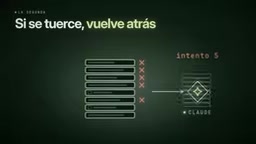
When things go wrong, use /rewind instead of pushing forward. If a task goes off the rails, don't keep wrestling with it in the same conversation. Roll back to the point before things broke, and save the cost of re-reading all those failed attempts. It's a common pattern: ask it to do something, it fails; ask it to fix it, still wrong; by the fifth attempt, the conversation is stuffed with failed records that get re-read with every message. Better to rewind and rephrase.
Choose your model and thinking level at the start — don't switch mid-conversation. Every time you switch models mid-conversation, Claude has to reprocess the entire context. Sonnet works great for everyday tasks; save Opus for the hard stuff. If you're designing an entire database schema, open with Opus. If you're changing text and colors, open with Sonnet. The key is deciding at the start and not jumping back and forth.
Before installing anything, measure first: use /usage to see where consumption is going, and run the same task at least twice before and after — because as the tests showed, a single run proves nothing.
/clearand/rewindare both built-in slash commands in Claude Code — no plugins required./clearcompletely resets the current conversation context, equivalent to starting a brand-new session; the next message you send will only carry the system prompt and your new input, with zero history./rewindworks like checking out a historical commit in version control: it rolls the context back to a specific historical message node and erases all input and output generated after that point — including failed attempts and wrong turns. Both commands fundamentally shorten the content Claude needs to re-read on its next turn, acting directly on the single largest source of token consumption. That's why they offer the best cost-efficiency of any optimization approach.
Final Thoughts
It's easy to get swept up in the hype: you see a tool with thousands of stars, a video promising 90% savings, and you just install it. The author fell for it too. Tools can help, but the room for savings is smaller than it looks because there's a floor nobody can take away. What actually saves money is getting Claude to re-read less and take fewer steps — and that usually comes from better habits, not a new plugin.
Background note: Anthropic officially refers to this pre-filled content as the "system prompt," which contains Claude Code's role definition, safety rules, JSON schema descriptions of callable tools (such as reading/writing files, executing terminal commands, searching code, etc.), and various built-in constraints. The tool definitions alone are substantial — each tool's name, description, parameter types, and enum values must be described in structured text, and a dozen-plus tools easily adds up to thousands of tokens. While prompt caching reduces the repeated computation cost for this content (Anthropic currently charges roughly 10% of the normal read price for cache hits), the cache has a validity window of only about 5 minutes to 1 hour. After expiration, the content must be re-written to cache and billed at full price once. This explains why the first message after resuming an interrupted session is noticeably more expensive than subsequent ones.
Related articles

How Big Can Stars Really Get? The Physical Limits of the Largest Stars
Red supergiants are the largest stars by volume, with radii up to 2,000 times the Sun, engulfing the inner solar system. But there is no precise upper limit on stellar size—models predict up to 15,000 solar radii. The most massive blue stars are far smaller than red supergiants—biggest and heaviest are two different things.

Apple HomeView Smart Display Full Feature Breakdown: Wall-Mount or Desktop, $299
Apple launches HomeView, a $299 smart display with wall-mount and desktop options, 12MP camera for facial recognition, smart home control, music playback, and recipe step-by-step cooking. Full breakdown of watch faces, apps, privacy, and cooking integration.

Where Did the Promised New Studio Go? Craft Computing Answers After Five Years
Craft Computing's host responds to viewer questions: the new studio promised five years ago was shelved as construction costs soared from $30,000 to $75,000, and was replaced by a 168-square-foot garage conversion.