Ideogram 4 Fully Automated Workflow: Run Locally with Just 8GB VRAM, No Complex Prompts Needed

Automated ComfyUI workflow runs Ideogram 4 locally with 8GB VRAM — no complex prompts needed.
This guide presents a fully automated ComfyUI workflow for Ideogram 4 powered by Qwen2.5 VL-8B. Users simply input a plain-language description and select an aspect ratio — the workflow handles structured JSON prompt generation and image output automatically. With an image reverse-engineering mode and only 8GB VRAM required, it makes Ideogram 4's powerful aesthetics and text rendering accessible to everyone.
Introduction: Great Models Shouldn't Be Gatekept by Complex Prompts
Ideogram 4 (also known as Ideo 4) has attracted significant attention shortly after its release, thanks to its outstanding visual quality. Its aesthetic expression, atmosphere creation, and design sensibility are fully on par with Midjourney. The problem, however, is that the official prompt template is structurally complex with numerous fields — many users give up before they even start generating images.
This article introduces a fully automated workflow solution based on ComfyUI that eliminates the need to study JSON-formatted structured prompts. Simply enter a brief description in plain language and select an aspect ratio, and the workflow automatically handles prompt optimization, format conversion, and image generation. Best of all, the entire solution runs locally with just 8GB of VRAM.
Core Advantages of Ideogram 4
Outstanding Aesthetics and Atmosphere
Ideogram 4's most distinctive feature is its aesthetic expressiveness. The images it generates aren't bland or unremarkable — they easily convey a strong sense of atmosphere. The lighting, composition, color tones, and overall visual character all carry a quality reminiscent of Midjourney.
Ideogram 4 particularly excels at producing a "premium feel" in photography-style, cinematic, and design-oriented visuals. Poster design, brand visuals, and cinematic character portraits are its comfort zone.
That said, if you're looking for heavily retouched influencer-style portraits — with perfectly smooth skin and highly standardized facial features — Ideogram 4 may not be the best choice. Its human renderings lean toward realism, preserving skin texture and avoiding over-beautification. This is a matter of preference: users who appreciate natural photographic aesthetics will find it appealing, while those seeking polished portrait perfection may find it lacking.
Industry-Leading Text Generation
The Ideogram series has always been known for its text generation capabilities, and Ideogram 4 continues this tradition. As most people know, the majority of AI image generation models struggle badly when text appears in images — garbled characters, missing letters, distorted letterforms, and broken layouts are the norm. The technical reason behind this is that image generation models fundamentally create in pixel space, where their learning of visual patterns far exceeds their understanding of character symbol systems. Every letter has strict stroke structures and spatial proportions, and diffusion models easily introduce deviations in these details during the denoising process, especially when text overlaps with complex backgrounds. The Ideogram team made targeted optimizations in training data and model architecture for text rendering, achieving a significant breakthrough on this challenge.

Ideogram 4 achieves notably higher success rates with English short phrases, titles, brand slogans, and poster copy. It's particularly well-suited for creating posters, covers, product promotional images, and social media graphics with text. Of course, Chinese text or longer text content still requires multiple attempts and isn't 100% accurate.
Ideogram 4 Structured Prompts Explained
Before introducing the workflow, it's important to understand Ideogram 4's prompt writing logic. Unlike traditional "one-sentence descriptions," Ideogram 4 recommends using JSON-formatted structured prompts — think of it as an "image generation specification sheet."
JSON (JavaScript Object Notation) is a lightweight data interchange format that organizes data in key-value pairs, supports nested structures, and is both machine-parseable and reasonably human-readable. In AI image generation, traditional prompts are natural language text that the model must interpret on its own to understand semantic hierarchy. Structured JSON prompts, however, break down the image description into multiple explicit fields — such as subject, style, composition, and color — allowing the model to understand requirements across each dimension more precisely, significantly improving the consistency between generated results and user expectations. The trade-off is a much higher barrier to entry, as users need to master both JSON syntax rules and the meaning of each field.
Three Core Modules
A complete Ideogram 4 JSON prompt consists of three main parts:
Part 1: High Level Description — A single sentence summarizing the core content of the entire image. For example: "A young woman with long hair sitting on a giant caramel-colored bucket bag, with a soft, romantic fashion advertising atmosphere."
Part 2: Style Description — Controls the overall style of the image. You might write "fashion advertising feel, soft sunset light, realistic photography, warm tones," etc. There's an important rule here: use photo for photographic styles, and art style for illustrations, 3D, poster designs, and other non-photographic effects — never use both simultaneously. This design reflects Ideogram 4's internal distinction between different visual paradigms. Photography styles and artistic styles differ fundamentally in training data distribution, texture generation strategies, and color mapping logic. Mixing them causes the model to conflict between the two styles, producing unstable results.

Part 3: Compositional Deconstruction — Precise control over image structure, including:
- background: Background environment description
- elements: List of main elements in the image
- bbox: Element position boxes using a 0–1000 coordinate system to specify element positions within the image. Bbox (Bounding Box) is a fundamental concept in computer vision, used to define the position and size of rectangular regions on a 2D plane. In this coordinate system, (0,0) represents the top-left corner and (1000,1000) represents the bottom-right corner. Each bbox is defined by four values specifying the coordinates of the top-left and bottom-right corners. By assigning a bbox to each element in the image, users can precisely control the position and proportion of characters, objects, text, and other elements, evolving image generation from "rough description" to "precise layout."
- color palette: Color scheme control
The clearer the structure, the more stable and predictable Ideogram 4's output becomes. But manually writing these JSON fields is obviously not beginner-friendly — which is exactly the problem the automated workflow solves.
ComfyUI Fully Automated Workflow Guide
ComfyUI is a node-based image generation workflow editor designed specifically for Stable Diffusion and its derivative model ecosystem. Unlike traditional WebUI interfaces, ComfyUI uses a visual node-and-wire approach to build generation pipelines, where each node represents an independent functional module — such as model loading, prompt encoding, sampler configuration, and image post-processing. Users can drag, drop, and connect nodes to freely compose complex generation pipelines, enabling conditional branching, loop generation, multi-model chaining, and other advanced features. The greatest advantage of this modular architecture is flexibility and reusability: a well-designed workflow can be exported and shared, and other users can import and use it directly without understanding the underlying implementation details.
Core Operations: You Only Need to Do Two Things
After opening the workflow, users only need to interact with two elements: prompt input and aspect ratio selection. All other parameters can remain at their defaults.
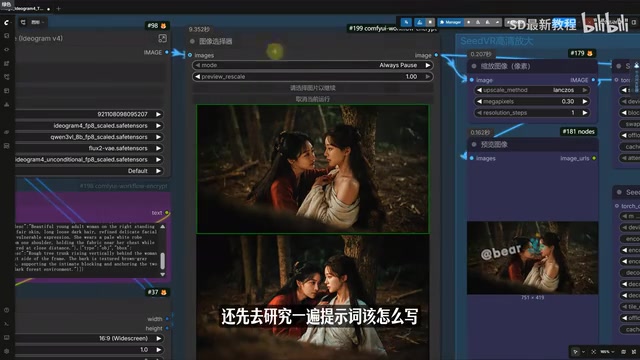
The workflow logic is as follows: the user enters a simple description in plain language (for example, "Two women in ancient Chinese costumes facing each other intimately under a tree in a dark forest. The woman in red gently leans toward the woman in white. Soft moonlight creates an ambiguous, tension-filled ancient fantasy atmosphere"), and then Qwen2.5's VL-8B text model and image vision encoder automatically convert this description into the structured JSON prompt format required by Ideogram 4.
Qwen2.5 VL-8B is a multimodal large language model developed by Alibaba Cloud's Tongyi Qianwen team, belonging to the Vision-Language (VL) variant of the Qwen2.5 series. "8B" indicates approximately 8 billion parameters, which is a medium-to-small scale for large language models. However, through high-quality training data and optimized model architecture, it demonstrates capabilities exceeding similarly-sized models in text understanding, image recognition, and cross-modal reasoning. The VL version features both a text encoder and a visual encoder, enabling it to understand image content and generate corresponding text descriptions, as well as analyze images based on text instructions. In this workflow, it serves two key roles: first, converting the user's natural language description into structured JSON prompts; second, extracting visual features from reference images and generating corresponding prompts in the image reverse-engineering mode.
Once the conversion is complete, the prompt is passed directly to the sampler to begin image generation. Throughout the entire process, prompt optimization, formatting, and structural conversion are all handled automatically by the workflow — users don't need to understand JSON syntax or memorize field rules.
Image Reverse-Engineering Mode: No Prompt Writing Required at All

If you don't even want to write a text description, the workflow also offers an image reverse-engineering mode. Here's how it works: replace the original prompt conversion instruction with the image reverse-engineering prompt instruction, remove the manual prompt section, and insert a reference image. The workflow will automatically reverse-engineer a structured prompt from the reference image and proceed with image generation. The technical foundation of this feature is Qwen2.5 VL-8B's visual encoder — it performs multi-level feature extraction on the input image, identifying the main subjects, spatial layout, color distribution, lighting conditions, and overall style, then converts this visual information into structured text descriptions that conform to Ideogram 4's format requirements.
Real-World Performance with 8GB VRAM
The Qwen2.5 VL-8B model used in this solution is only about 8GB in size, but the visual quality it produces at this scale is genuinely impressive. It's not one of those massive models weighing tens or even hundreds of gigabytes, yet it still delivers rich visual variety — whether it's portrait photography, product posters, or dreamlike, commercial, or realistic styles, it produces fairly complete visual results.
VRAM (Video RAM) is high-speed memory dedicated to graphics and compute tasks on the GPU, and it's one of the most critical hardware bottlenecks when running AI models. Mainstream consumer GPUs like the NVIDIA RTX 4060 come with 8GB of VRAM, the RTX 4070 Ti with 12GB, and the professional-grade RTX 4090 with 24GB. The ability to run this solution on 8GB of VRAM is primarily thanks to quantization compression techniques (such as INT4 or INT8 quantization, which compress model weights from 32-bit floating-point numbers to 4-bit or 8-bit integer representations, dramatically reducing VRAM usage within an acceptable range of precision loss), as well as ComfyUI's efficient VRAM management mechanisms — including chunked model loading and attention mechanism optimizations (such as xformers or Flash Attention). This means that average users with mid-range GPUs can complete the entire pipeline from prompt generation to image output locally, without relying on cloud APIs or high-end hardware.
More importantly, the output isn't just at the "it can generate images" level — it possesses genuine aesthetic quality: lighting, color, atmosphere, and realistic texture all perform well. For local deployment or low-VRAM users, this combination offers remarkably high practical value.
Additionally, Qwen2.5 has strong Chinese language understanding capabilities, so users don't need to translate their descriptions into English every time — writing directly in Chinese yields good generation results, further lowering the barrier to entry. This is thanks to the large volume of high-quality Chinese corpus used during Qwen2.5's pre-training phase. Its Chinese semantic understanding ranks among the best in open-source models of the same tier, accurately capturing subtle semantic differences and rhetorical intent in Chinese descriptions.
Conclusion
Ideogram 4 is a high-quality model with strong aesthetic expressiveness and stable text generation, but the complexity of its official prompt template has deterred many users. Through this fully automated ComfyUI workflow based on Qwen2.5 VL-8B, users only need to enter a simple description or provide a reference image to automatically generate structured prompts and output images. The low barrier of running locally with just 8GB of VRAM makes Ideogram 4's powerful capabilities accessible to a much wider audience. For creators who frequently need to produce posters, brand visuals, or text-based design graphics, this solution is well worth trying.
Key Takeaways
Related articles

DeepCell: One-Click AI Generation of Documents, Spreadsheets, and Slides
DeepCell tops Product Hunt with one-click generation of documents, spreadsheets, and slides, using the .deepcell format for linked updates, designed for System 2 tasks like modeling and sales reviews.

Doneas: 15-Minute Daily Accountability Calls That Keep Indie Developers From Procrastinating
Doneas is a daily accountability tool for indie developers: plan tasks on Monday, join a 15-minute call with five builders each day, and log deliveries on a public progress page. This article analyzes its core mechanics, effectiveness, and potential issues around retention and matching.

Fastlane 2.0: Fully Automated AI Ad Campaigns, From Creative to Optimization
Fastlane 2.0 is an AI ad automation tool: enter your website and it learns your brand, generates video and image ads, and runs and optimizes them on Meta, TikTok, Instagram, and YouTube.