iglass: Bringing Liquid Glass Aesthetics to the Terminal with iTerm2 and Ghostty Themes

Open-source iglass theme brings macOS 26 Liquid Glass style to iTerm2 and Ghostty.
iglass is a free, open-source terminal theme for iTerm2 and Ghostty on macOS and Linux, bringing macOS 26's Liquid Glass design language to the command line. It offers four glass levels, eight accent colors, and light/dark modes; true translucency only fully renders in Ghostty on macOS 26. Every color is contrast-checked for readability, and any change can be rolled back with one command.
Terminal beautification is often overlooked, but developers who face a command-line interface every day actually have higher expectations for their visual experience. The newly launched iglass project on Product Hunt aims to bring the Liquid Glass design language introduced in macOS 26 to iTerm2 and Ghostty — and it's completely free and open source.
What Is iglass?
iglass is a theme designed specifically for iTerm2 and Ghostty, supporting macOS and Linux. Its core selling point is "true Liquid Glass" — on macOS 26, Ghostty users get a translucent glass texture consistent with the system's native style. According to its Product Hunt page, iglass offers four glass levels, eight accent colors, and supports both light and dark modes.
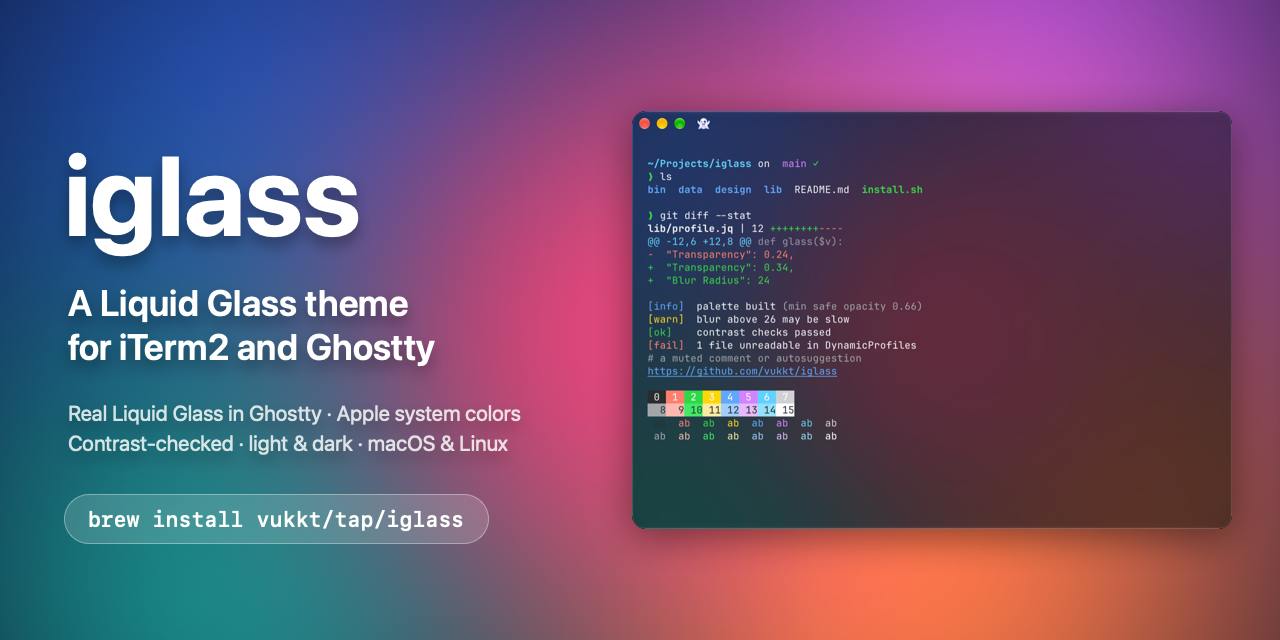
The project was developed by Vuk Topalović and released as open source. It currently has 70 votes on Product Hunt, ranking 19th for the day.
Liquid Glass is an interface design language Apple introduced in macOS 26 (codenamed Tahoe). Its core is simulating the translucency, refraction, and light-and-shadow effects of real glass, giving interface elements like windows, toolbars, and sidebars a sense of depth. This design language extends from the "Liquid Glass" style of iOS 26 and emphasizes a transparent separation between content and interface. For third-party apps and terminal emulators, achieving a glass texture consistent with the system's native look requires calling the system-provided material API or following the corresponding visual effect specifications. As a result, such effects typically can only be fully realized on newer macOS versions, while older systems or non-macOS platforms often fall back to ordinary transparency or solid-color backgrounds.
Design Details: More Than Just Good Looks
iglass does a lot of careful work beyond the visuals. The official description emphasizes that "every color has been contrast-checked," meaning the theme pursues a glassy translucency without sacrificing the readability of terminal text — a crucial point for developers who stare at a screen for long periods.
Another commendable design feature is reversibility: every change can be rolled back with a single command. This "risk-free trial" approach lowers the barrier for users to try it out and reflects the developer's understanding of terminal configuration safety.
Contrast checking refers to calculating the brightness ratio between foreground text color and background color according to standards such as WCAG (Web Content Accessibility Guidelines), which generally requires a ratio of 4.5:1 for body text and 3:1 for large text to be considered readable. For terminal themes, this step is especially important: translucent backgrounds cause the actual base color to vary with the wallpaper and window layers. If the color scheme hasn't been verified, light gray text on a light wallpaper may become hard to distinguish. iglass claims to have performed contrast validation on every color, meaning its color scheme was adapted during the design phase for different background brightness levels rather than tuned purely by feel.
Compatibility and Use Cases
iTerm2 is a veteran terminal emulator on macOS with a large user base; Ghostty is a rising newcomer known for performance and native experience. iglass covers both and is also compatible with Linux, reaching a substantial portion of the developer community.
The rendering of glass effects depends on the terminal's own support for background transparency. According to the description, the true Liquid Glass effect is only available in Ghostty on macOS 26, while other environments may present as an ordinary transparent theme.
Ghostty is an open-source terminal emulator led by HashiCorp founder Mitchell Hashimoto, with version 1.0 released in late 2024. Written in Zig, it focuses on native platform integration and rendering performance. On macOS, it uses the system's native UI frameworks to draw its windows, which allows it to better inherit system-level visual effects — this is the technical reason why iglass's true Liquid Glass effect is currently only available in Ghostty on macOS 26. By comparison, iTerm2 has a long history and a mature plugin and configuration ecosystem, but its window rendering is entirely its own, and support for new system material APIs typically lags. The two have complementary positioning: Ghostty emphasizes performance and a native feel, while iTerm2 emphasizes customizability. Covering both allows the theme to reach a broader user base.
The Value of Open-Source Themes
Terminal themes may seem niche, but they are an interface developers interact with frequently every day. iglass provides a finely tuned color scheme as open source, saving users the time of tinkering on their own. The two features of contrast checking and one-command rollback show that it's not merely a visual toy but something that considers real-world reliability and maintainability.
For macOS users pursuing desktop aesthetic consistency, iglass offers a low-cost way to make the terminal blend into the system's design language. The project is open source on GitHub, and interested users can get it and try it out directly.
One-line Summary
Open-source theme iglass brings the Liquid Glass style of macOS 26 to iTerm2 and Ghostty.
Paragraph Summary
iglass is a free, open-source terminal theme designed for iTerm2 and Ghostty, compatible with macOS and Linux, aiming to bring the Liquid Glass design language introduced in macOS 26 to the command-line interface. It offers four glass levels, eight accent colors, and supports light and dark modes; the true translucent glass texture is only fully rendered in Ghostty on macOS 26, while other environments fall back to an ordinary transparent theme. Beyond visuals, iglass emphasizes that every color has been contrast-checked to ensure text readability and supports rolling back any change with a single command, lowering the risk of trying it. Developed by Vuk Topalović, the project is open source on GitHub and has 70 votes on Product Hunt, ranking 19th for the day.
Related articles

How Did Da Vinci Prove the Sun Is Hot? A Neglected Chapter in Science History
How did da Vinci use a concave mirror experiment to overturn Aristotle's cold sun theory? This article traces this neglected chapter in science history, revealing the embryo of scientific thinking in the 15th century and da Vinci's cold observations on solar heat and the nature of life.
SharpLogic: Formalizing Bug Detection for LangGraph Routing Graphs with k-CNF
SharpLogic, an open-source project, maps LangGraph-style multi-agent routing and retry graphs to k-CNF, using a Rust kernel to count deadlocks and failing paths (#F counting), offering a Python AgentGuard hook and CLI for pre-release formal gate checks. This article analyzes its principles, its complementary relationship with evals, and the community's concern about modeling costs.
PPO Training of a Franka Robotic Arm for Pick-and-Place: A Reinforcement Learning Starter Project
A reinforcement learning project using PPO to train a Franka Panda robotic arm for pick-and-place in PyBullet, covering tech stack choices, task design challenges, and future text/voice command interaction plans—a good reference for beginners.