Imagen 3 vs GPT Image 1: 8 Real Prompts Tested with Actual Cost Breakdown

66 API calls, $4.36 spent: a reproducible cost and capability showdown between Imagen 3 and GPT Image 1.
Tester Anass Kartit ran the same 8 prompts through Google Imagen 3, Imagen 3 Flash, Imagen 3 Pro, and OpenAI GPT Image 1 (Standard/Quality), recording actual costs and times for all 66 calls. The counterintuitive finding: GPT Image 1 at high quality ($0.0326/image) is cheaper than Imagen 3 ($0.0418) despite higher resolution. The two models use fundamentally different billing logic — Google charges by pixel, OpenAI by detail tier. OpenAI wins 3–2 on quality, but Google excels at thumbnails and portraits. The tester recommends choosing by task and validating with your own prompts.
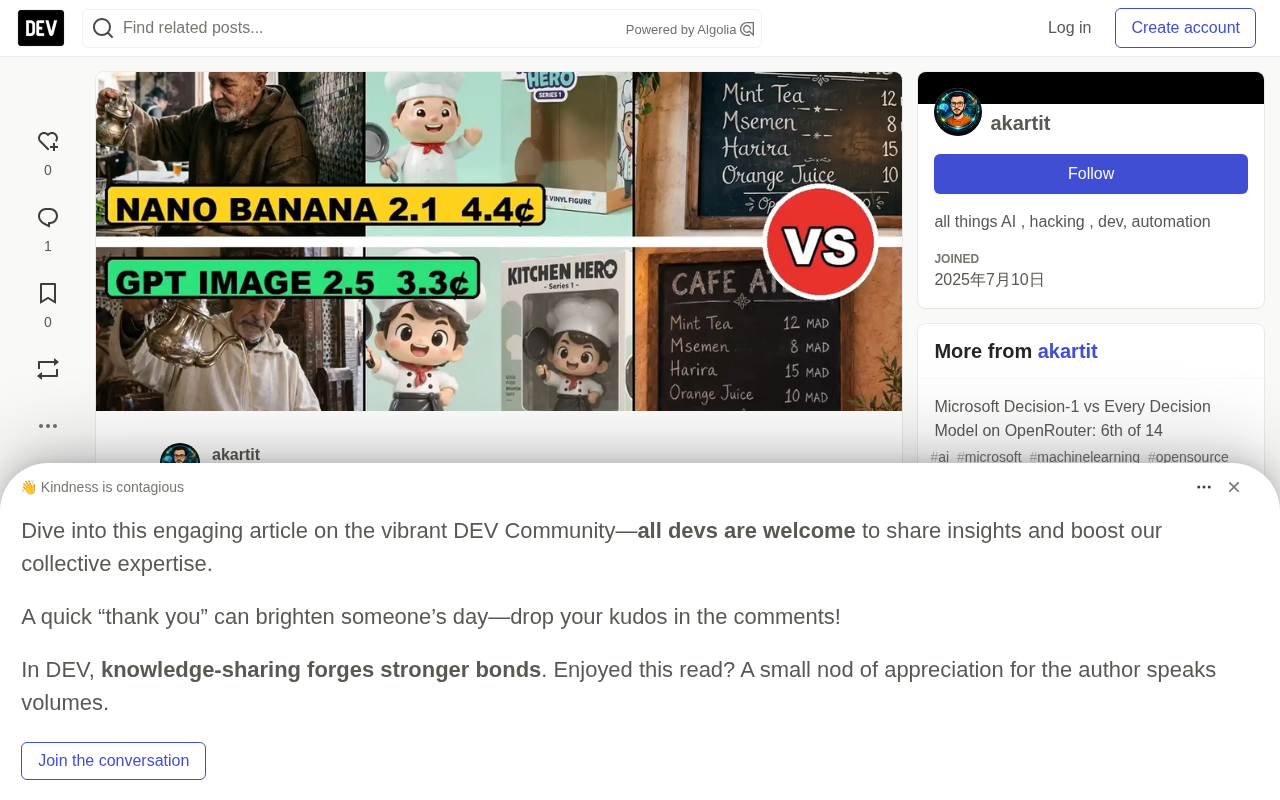
Two tech giants' latest AI image models go head-to-head: Google's Imagen 3 and OpenAI's GPT Image 1. Independent tester Anass Kartit ran the same 8 prompts through both models — plus Imagen 3 Flash, Imagen 3 Pro, and GPT Image 1's Standard and Quality variants — recording only the first-generation result along with the exact cost and time for every single API call.
The value here isn't about which model looks "prettier." It's a reproducible cost audit with real money on the line: 66 total calls, $4.36 spent, including 12 discarded images.
Core Finding: Which Model Is Actually Cheaper?
Here's a counterintuitive result: the model expected to be "half the price" isn't the cheapest one on the bill.
At their respective default settings, GPT Image 1 at high quality costs just $0.0326 per image, while Imagen 3 costs $0.0418 per image — and GPT's output resolution (1536x864) is actually larger. Here's the breakdown:
| Model | Cost per Image (1K/high) | Avg. Generation Time |
|---|---|---|
| GPT Image 1 (high) | $0.0326 | Standard 16.9s / Quality 29.9s |
| Imagen 3 | $0.0418 | 15.0s |
| Imagen 3 Flash | $0.0684 | 10.3s |
| Imagen 3 Pro | $0.1389 | 17.2s |
There's an important methodological difference to flag here: Google's costs were calculated, not deducted — the tester multiplied the token counts returned by the Gemini API by the published list price. OpenAI's costs, by contrast, are the actual usage.cost values charged by OpenRouter. In other words, the two columns don't come from equivalent sources, and Google's estimates include "thinking" token consumption.
Take a single Imagen 3 thumbnail as an example: 54 input tokens + 1,085 text and thinking tokens + 1,120 image tokens, totaling $0.0418 at per-million-token pricing. The image tokens alone account for just $0.0336 — the rest is thinking overhead. This explains why Imagen 3, despite its image tokens being nominally "half price," only comes out about 39% cheaper than Imagen 3 Flash per image rather than a full 50%.
How Resolution and Quality Tiers Affect Pricing
The two models have fundamentally different billing logic — a critical distinction for real-world cost control.
Google charges by pixel: Imagen 3 from 1K to 4K doubles the resolution and the price along with it ($0.042 / $0.060 / $0.122), with 4K output reaching 5504x3072.
OpenAI charges by detail level: GPT Image 1 returns the same file dimensions (1536x864) across all five quality tiers from low to max — you're paying for precision, not pixel count. The price range is dramatic: as low as $0.0039 on the low tier, up to $0.1297 on max.
The cheapest single image in the entire test was GPT Image 1 on low ($0.0039). The most expensive was Imagen 3 Pro at 4K ($0.2443). There's also an interesting quirk: Imagen 3 Pro at 2K was actually slightly cheaper than 1K ($0.1379 vs. $0.1389), because that particular call involved less thinking and consumed fewer thinking tokens.
For high-volume generation scenarios, GPT Image 1's low-tier price of under half a cent per image may be the biggest surprise in this entire test.
Understanding this billing difference requires knowing the underlying design philosophies. Google's pixel-based pricing is essentially linear charging for compute resources — generating a 4K image involves roughly 16× the pixels of 1K, and costs scale accordingly. OpenAI's "quality tier" pricing maps to the number of denoising diffusion iterations or sampling precision: the low tier converges quickly with fewer steps, producing smaller file sizes and less detail; the max tier applies more compute at the same resolution to enhance texture and reduce artifacts. This means cost control strategies differ entirely: for Google users, reducing output resolution is the most direct lever; for OpenAI users, switching to the low tier in scenarios that don't require fine detail (draft previews, bulk thumbnails) can cut per-image costs to less than one-tenth of the high tier.
8 Prompts Tested: Who Won Which Round?
The final score is OpenAI leads 3–2, with 3 draws. But as the tester repeatedly emphasizes, the best model depends on the task — not this scoreboard.
Google's Two Wins
Documentary-style portrait: All three Google models produced a film-like quality with wrinkles and soft window light, resembling real 35mm photography. GPT Image 1's two versions both came out brighter and — without being asked — added a red fez hat to the elderly subject.
YouTube thumbnail: All five models correctly spelled "HALF PRICE?" and "$0.03". But Standard drew real company logos on the laptop (not wanted for a thumbnail), and Imagen 3 Flash spontaneously added a price. Imagen 3 was the cleanest result, with legible text on the phone, at just 4 cents per image.
OpenAI's Three Wins
Plastic toy in packaging: Imagen 3 drew the box empty. Both GPT Image 1 versions placed a shiny chef figurine inside the box, like a real shelf product.
School poster: All five spelled correctly, but Imagen 3 Flash rendered the poster as a narrow strip in the center of a wide frame, while Standard filled the entire frame with precisely four steps.
Outfit editing: Standard's cream-white suit was more realistic, with rounded lapels and a pocket square (6 cents). Imagen 3 completed it for 4 cents but with simpler lapel styling.
Two Draws
The product ad and "restore old photo" prompts ended without a winner. The restoration task in particular exposed a shared weakness: Google preserved the background but darkened the skin tone; OpenAI preserved the skin tone but painted an entirely new blue background — both violated the "keep everything else the same" instruction. On text rendering, all five models correctly wrote out a 5-line chalk menu, with Imagen 3 even adding a French accent mark to "CAFE."
API Call Reference
The tester published the full calling methods for easy reproduction.
Imagen 3 (Gemini API): A single generateContent call with responseModalities: ["IMAGE"]. Images are returned as base64 in inlineData, token counts appear in usageMetadata. imageSize supports 1K/2K/4K. Swap the model ID to switch to Imagen 3 Flash (gemini-3.1-flash-image) or Pro (gemini-3-pro-image). For image editing, place the reference image at the front of the parts array.
GPT Image 1 (OpenRouter): Call via POST /api/v1/images — note that the chat completions endpoint rejected these image models during testing. quality supports five tiers from low to max. For editing, pass reference images via input_references (URL or base64, up to 16 images). The tester's warning: if you don't specify aspect_ratio on the first call, you may get 3:2 instead of the expected 16:9 — this caused 12 wasted images that had to be regenerated.
It's also worth noting that the two APIs handle image editing (image-to-image) differently under the hood. The Gemini API's editing approach places the reference image alongside the text prompt in the same parts array; the model processes the input multimodally within a standard generateContent request, with no separate "edit" endpoint. GPT Image 1 uses a dedicated input_references field for reference images (URL or base64, up to 16), treating them as style or content references rather than strict pixel-level source material. This architectural difference explains why both struggled to "keep everything else the same" in the photo restoration task — both are essentially constrained regeneration, not true localized pixel inpainting.
Recommendations
Match the tool to the task — don't just chase the scoreboard:
| Use Case | Recommended | Tested Cost |
|---|---|---|
| YouTube thumbnails with text | Imagen 3 | $0.042 (1K) |
| Photorealistic portraits | Imagen 3 Pro | ~$0.14 (1K) |
| High-volume, low-cost generation | GPT Image 1 (low) | $0.0039 |
| Product shots / toys / posters / outfit editing | GPT Image 1 Standard (high) | $0.0326 (editing $0.061) |
If you go with GPT Image 1, use the Standard version — same price per tier as Quality, but nearly twice as fast.
A Few Necessary Caveats
The rigor of this test lies in its clearly stated limitations: each prompt was run once with only the first result kept, no rerolls; Google's costs are estimates, not actual charges; the "default settings" for each (Google 1K vs. OpenAI high) aren't equivalent baselines; and scoring is entirely subjective with no automated evaluation. Costs also fluctuate with thinking token usage (Imagen 3 ranged from $0.0410 to $0.0473 per image), and speed variation is even more pronounced — one discarded Standard call took 144.5 seconds.
As the tester concludes: both companies have built excellent tools, and the gap between them is now just a cent or two. Pick by task, then test with your own prompts — because n=1 is still just n=1.
Related articles

@ai-sdk/vue 3.0.306 Patch Release Syncs with [email protected] Update
@ai-sdk/vue 3.0.306 released, synced with [email protected]. A routine patch release for the Vercel AI SDK ecosystem with no public API changes; the Vue adapter layer stays version-aligned with the core package.

Gemini 4 Argon API Launches: The Era of Million-Token Output Begins
Google launches Gemini 4 Argon with sparse MoE architecture, up to 1M output tokens, and a 68.90% Vals Index score, available across API, AI Studio, and the Gemini app.

DukaanAI: Turning Product Photos into Inventory Lists with Open-Source AI
DukaanAI is an AI inventory tool for small retailers that turns product photos into inventory entries using the open-source Gemma 3 model, with local inference, editable fields, and CSV export.