Interactive AI Avatars: A Complete Technical Breakdown of the Next Generation of Website Interaction
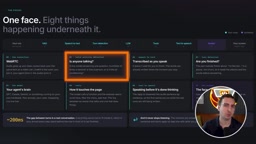
How to give your AI agent a real-time talking face that can also control your website UI.
This article breaks down the real-time architecture behind interactive AI avatars embedded in websites. The key innovation: the avatar isn't just decorative — it acts as an interactive agent that controls the UI directly, filtering menus and placing orders. The pipeline covers WebRTC transport, VAD, STT, turn detection, LLM reasoning, tool calls, TTS synthesis, and face rendering via Synthesia. Developers only need three files: a token server, an AI agent, and a frontend page. Since the avatar only consumes an audio stream, adding a face to an existing agent takes just a few lines of code.
From Chat Box to a Talking Face: The Next Step in Website Interaction
Almost every website today offers one-directional interaction — you read, you type, then you wait for a response. Whether it's a chat widget, a form, or an FAQ page, the experience never really escapes the "read and write" loop. But a new interaction paradigm is emerging: give AI a real face and voice, and let users simply speak instead of endlessly scrolling to find what they need.
In one restaurant website demo, an interactive avatar named "Ava" isn't just answering questions — it's actively controlling the interface. When a user says "Create an order with all the vegetarian dishes," it adds focaccia, squash, burrata, celeriac, pavlova, and chocolate all at once, scrolls through different menu sections, and even creates reservations. This means the avatar isn't just a decorative face — it's an interactive agent capable of changing the UI in real time.
Behind experiences like this lies a carefully engineered real-time architecture. This article breaks down how it works, the components involved, and how to build it with surprisingly little code.
The Entire System Revolves Around One Core Problem: Speed and Latency
The key to understanding avatar systems is understanding why they're so sensitive to latency. In natural conversation, the gap between one person finishing and another starting is around 200 milliseconds. If an AI takes 3, 5, or even 10 seconds to reply in a chat window, most people don't mind. But if a face stares at you for 10 seconds without saying anything, the entire experience falls apart — it just feels completely broken.
That's why every component in this architecture is designed for speed, and most components start working before the previous one has finished. This "think while speaking" pipeline approach is what makes an avatar feel natural.
The Complete Component Pipeline
From connection to the final rendered face, the full chain includes the following stages:
- Connection (WebRTC): Handles audio and video stream transport — the same technology used by Zoom and other video calls. The system establishes a "room" managed by LiveKit, with three participants: you in the browser, the AI agent, and the avatar.
- VAD (Voice Activity Detection): A small model-like component that answers "is someone speaking right now?" hundreds of times per second, distinguishing real speech from air conditioning hum and background noise.
- Speech-to-Text (STT): Transcribes what you say in real time and sends it to the language model. In specialized domains like medical clinics or auto repair shops, this also needs to handle domain-specific terminology.
- Turn Detection: An often-overlooked component. If you say "I'd like..." and then pause to think, the model shouldn't immediately cut in. A dedicated model handles the judgment of whether the person has actually finished speaking.
- LLM: The "brain" of the agent — GPT, Claude, or Gemini — responsible for generating text responses or making tool calls.
- Tools: Plugged into the model to let it know what actions it can take. This is also how the avatar controls the page, and it's exactly what makes it feel alive rather than just another voice interface.
- Text-to-Speech (TTS): Converts the model's response into audio in real time. It must stream token-by-token into speech — it can't wait for the full response to be generated.
- Avatar: Rendered by Synthesia. It needs a realistic real-time face and must sync text to audio and lip movement in real time to stay in perfect alignment.
WebRTC (Web Real-Time Communication) is an open standard that allows browsers to establish direct peer-to-peer audio and video connections without plugins or media relay servers. It has built-in echo cancellation, noise suppression, and adaptive bitrate features, and serves as the underlying infrastructure for video conferencing products like Zoom and Google Meet. In an avatar system, WebRTC acts as the "carrier" — delivering PCM audio captured from the microphone to the agent in real time, and streaming Synthesia-rendered video frames back to the browser, typically with transport latency under 50 milliseconds. LiveKit is an open-source WebRTC server framework that solves the complexity of room management, signaling negotiation, and media routing in multi-participant scenarios, allowing developers to use SDK calls instead of wrestling with low-level protocols.
Four Real Components: The Architecture Is Actually Simple
To build a genuinely functional AI avatar, you only need to write three things yourself: a webpage that hosts the avatar, a tiny token server, and the AI agent itself. The other two pieces — LiveKit and Synthesia — are external services you connect to, and they handle the bulk of the complexity.
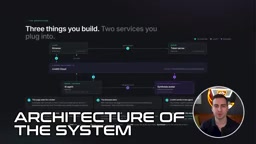
The best way to think about it is as a video call. LiveKit is "the call" — handling room management, audio/video streams, and routing between participants. There are three participants in the room: the browser client, the AI agent, and the Synthesia avatar.
The Complete Data Flow
The full process breaks down into five steps:
- Client requests a token: The webpage can't join a room directly — it requests an access token from the token server (a small Python service). All secrets are stored server-side, so this step must happen on the backend. The token also tells LiveKit which agent to bring into the room.
- Browser joins the room: With the token in hand, the page joins the LiveKit room and starts sending microphone audio. The entire client is roughly 30 lines of code — play the Synthesia video, respond to messages, push microphone audio into the room.
- LiveKit dispatches the agent: The Python agent runs on its own server, waiting to be called in. Once the room opens, the agent hears the microphone audio and starts running the STT → LLM → TTS pipeline.
- Agent hands audio to Synthesia: Using a LiveKit plugin with a few lines of code, audio is redirected to Synthesia's avatar service instead of being played directly into the room.
- Avatar joins the call: Synthesia renders the face, performs lip sync, and publishes a video stream as an independent participant. The browser sees it just like another person on the call. When the agent calls a tool (like filtering a menu), it sends a small message through the room back to the browser to control the UI.
One key fact: the avatar doesn't care who generated the words. All reasoning happens in your agent — the avatar only receives audio. So if you already have an AI agent, giving it a face is essentially just three or four lines of code.
The token server pattern is extremely common in real-time communication systems, and its core value lies in "credential exchange for permission" — a clean security separation. JavaScript code in the browser is fully visible to anyone; if you embed your LiveKit API key directly in the frontend, anyone can extract and abuse it, running up unlimited bills or injecting malicious behavior. The token server is the only trusted party holding the secret key. After authenticating requests server-side, it issues a short-lived JWT (JSON Web Token) encoding the user identity, permitted room name, and specific permissions like read/write track access. When LiveKit receives this token, it only needs to verify the signature — no need to consult the original API key. This pattern of "keys never leave the server, frontend only holds short-lived credentials" is the standard security practice in modern real-time communication systems.
About the Face: What Synthesia Does
The face rendering is handled by Synthesia, one of the largest AI video platforms in the world, used by over 90% of Fortune 100 companies. Its core product: input a script, get a realistic AI presenter video. The platform offers 240+ stock avatars (plus custom options), over a thousand voices, and can translate videos into 160+ languages.
In the past, these avatars were pre-recorded. The new "Interactive Avatars" make them real-time — same visual quality, but rendered live and available for direct conversation.
There are two ways to use it. Non-developers can use Synthesia's built-in "roleplay sessions" to set up scenarios like sales calls or difficult customer conversations, practice out loud with the avatar, and receive feedback. Developers use the API — which is essentially a LiveKit plugin, billed per minute at roughly $0.12, with a free tier included. There are even dedicated skills for Claude Code and Cursor that automatically handle the configuration.
The Actual Code: Three Core Files
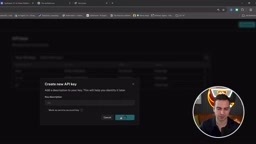
To get started, you need a LiveKit project and a Synthesia account — both offer free tiers. After creating a project in LiveKit, navigate to API Keys in settings to generate a new key. You'll get three environment variables you can copy directly. In Synthesia's developer tab, create an API key and make sure to grant it interactive avatar permissions.
The code breaks down into three main files:
- server.py: The token server — responsible for serving the webpage and issuing tokens to join the LiveKit room. Two routes: one generates the token, one renders the site.
- agent.py: The most complex piece. Import the Synthesia plugin, load configuration, name the agent (must match server.py), specify the avatar ID and voice, and write the prompt or instructions. In the demo, the prompt tells the avatar about the menu and available options; you can also wire in tools, RAG, and more. The file defines tools like
show_section,filter_menu,focus_dish, andadd_to_orderfor the model to call, then creates an agent session specifying STT, LLM, TTS, and turn handling — and connects Synthesia as a plugin in just a few lines. - index.html: The frontend connects to the token server, subscribes to the video stream, pushes audio tracks, and listens to room events to communicate between frontend and backend, updating or highlighting the UI in response.
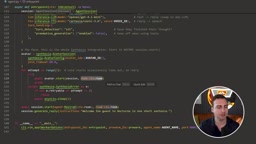
The core logic of agent.py can be summarized as: create session → connect avatar → avatar attempts to join room → start session and begin listening → make it speak. The avatar typically joins the room within a few seconds; just set up a timeout and error handling.
In the demo, when a user asks "What's the most expensive dessert?", the avatar responds almost instantly with "It's the chocolate," while simultaneously calling a tool in the background to highlight the dish and scroll the page. Once the user clicks stop, they're immediately removed from the room — stopping both billing and listening.
Will This Be the Future of Website Interaction?
It's worth noting that the barrier to entry here is much lower than you might expect. If you already have LiveKit configured, you just need to install one plugin. Or you can hand off the task to your coding agent using the Synthesia skill — it'll automatically wire up the LiveKit room, add the plugin, and update all the configuration for you. That's exactly what the demo author did; no code was written by hand.
LiveKit is fully open source — you can modify any part of it and self-host, without depending on the official provider. The avatar, voice, and model are all swappable and customizable.
From a technical perspective, interactive avatars combine "voice conversation" and "UI control" in a way that transforms websites from passive information displays into active, conversational services. Whether this will truly become the future of website interaction remains to be seen, but this real-time pipeline architecture offers a remarkably complete and deployable blueprint for "speaking instead of clicking."
The biggest challenge facing interactive avatars today isn't technical feasibility — it's user acceptance and scenario fit. Researchers describe the discomfort triggered by virtual faces that are almost-but-not-quite realistic as the "Uncanny Valley" effect: when subtle flaws appear in facial expressions, blink frequency, or lip sync, the result is actually more unsettling than an obviously cartoonish avatar. Beyond that, not every use case is suited to voice interaction — noisy environments, public spaces, or situations where the user simply can't speak out loud all create friction. From a commercial deployment standpoint, at roughly $0.12 per minute of rendering, a site with ten thousand daily active users averaging three minutes of interaction could face tens of thousands of dollars in additional monthly costs. This makes the experience better suited, at least in the near term, to high-value sales or service scenarios rather than general-purpose websites.
Related articles
LangGraph Crash Course: Building Enterprise-Grade AI Agents and Workflows from Scratch
LangGraph crash course: learn its independence from LangChain, MIT license, FastAPI high-concurrency deployment, human approval, and memory storage for enterprise AI agents.

Building an AI Customer Service Agent from Scratch: A 92% Intent Recognition Case Study
A Bilibili case study: building an AI customer service agent from scratch with BERT intent recognition, dialogue state tracking, hybrid vector retrieval, and a weighted handoff model—raising intent accuracy from 65% to 92%, 78% conversation completion, handling 100K conversations daily.
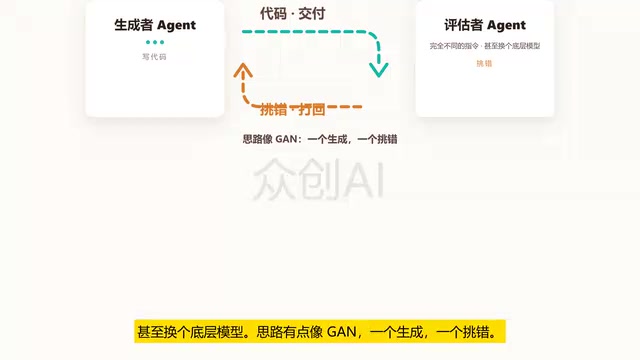
Loop Engineering: An Engineering Paradigm for AI That Writes Code and Merges PRs Autonomously
Loop Engineering is transforming AI development pipelines: Stripe's Minions system merges over 1,300 machine-generated PRs weekly. This article breaks down Loop Engineering's five core actions, six components, five failure modes, and three safety disciplines, explaining why independent evaluators, state files, and budget caps matter more than full automation.