Is Codex Eating Up Your Mac's Disk Space?

A low-traffic HN post reveals the hidden problem of AI coding tools quietly accumulating large disk usage locally.
Starting from a low-information Hacker News post titled "Codex is EATING my Mac's disk space," the article points out that the disk footprint of local AI coding tools is becoming an overlooked hidden cost. The author analyzes two main causes: first, model files and vector indexes—medium-sized models easily take up several GB, vector databases balloon quickly when indexing large codebases, and they are often stored in hidden directories; second, the snowball effect of caches and logs, which can accumulate to tens of GB under high-frequency use and aren't cleaned by default. The article provides concrete steps for investigating cache directories and large log files using commands like du and find, and reminds readers to develop the habit of regularly checking disk usage. Finally, it notes this reflects a larger trend: the resource overhead of AI tools is shifting from negligible to needing management, tool vendors should improve caching policies and usage visibility, and users need to recognize that the efficiency dividend isn't free.
An unremarkable HN post that hits a pain point of AI coding tools
A rather alarming post appeared on Hacker News titled "Codex is EATING my Mac's disk space." The post itself has only 3 points and 1 comment—very little information—but the problem it points to deserves the attention of every developer using an AI coding assistant: the disk footprint of local AI tools is becoming an overlooked hidden cost.
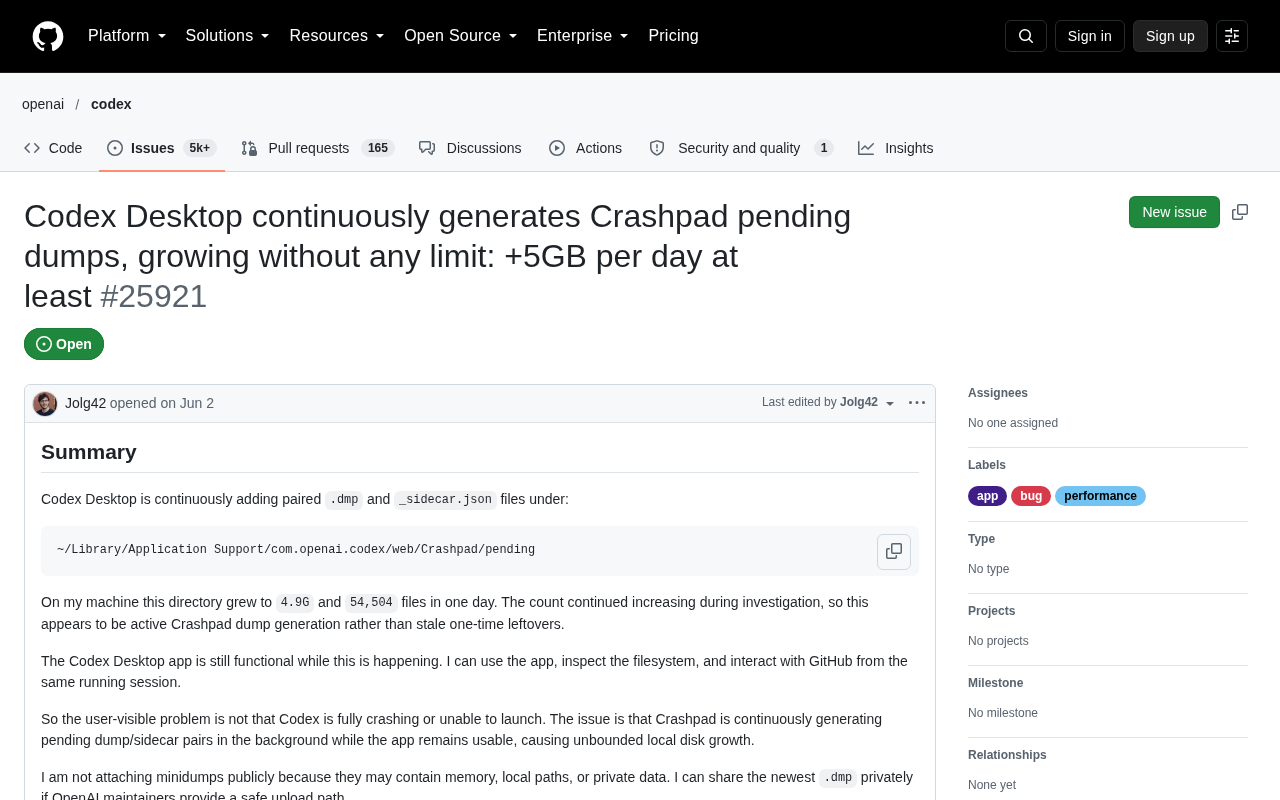
Since the original post provides no technical details, we can't confirm whether the bloat is caused by cache files, model weights, accumulated logs, or index databases. But the word "Codex" itself says enough: whether it refers to the local cache of OpenAI's Codex model or some AI coding tool of the same name, these tools share a common trait—they leave a large amount of "invisible" data on your local machine.
Why AI coding tools quietly eat up disk space
Model files and vector indexes
Modern AI coding assistants typically need to store model files or embedding vector indexes locally. A medium-sized code completion model easily takes up several GB, and vector databases also balloon quickly when indexing large codebases. These files are often stored in hidden folders in the user directory, making them hard for ordinary disk cleanup tools to find.
Vector Index: To enable semantic search or context retrieval across large codebases, AI coding assistants usually pass code snippets to an embedding model, which converts them into high-dimensional vectors that are then stored in a vector database (such as FAISS, Chroma, or LanceDB). The vectors themselves are floating-point arrays—a single 768- or 1536-dimensional vector takes up several KB. A repository with hundreds of thousands of files can easily generate millions of vectors, and with the extra overhead of index structures (HNSW graphs, inverted lists, etc.), it's not uncommon for these to occupy anything from a few GB to tens of GB. This data is often placed in hidden directories, and because rebuilding the index is costly, tools usually don't delete it proactively—making it a hidden heavyweight in disk usage.
The snowball effect of caches and logs
During operation, AI tools cache large amounts of context, conversation history, and inference logs. The cache for a single request may be only a few hundred KB, but over time—especially in high-frequency usage scenarios—this cache can grow to tens of GB. What's worse, many tools don't automatically clean up old caches by default.
Why caches aren't cleaned by default: Most AI tools design their caching with "hit rate first" as the goal—retaining old caches reduces repeated model calls and network requests, thereby lowering latency and API costs, so cleanup policies tend to be conservative or even disabled by default. Logs, meanwhile, are often used for debugging, auditing, and performance evaluation, so tool vendors tend to keep them long-term. The dilemma for users is that these directories have unintuitive names and are scattered across ~/Library/Caches, ~/.cache, application support directories, and elsewhere, and the system's built-in "Storage" panel struggles to attribute them to specific apps—so the problem is only discovered when the disk warning appears.
How to investigate and respond
If you suspect your Mac's disk is being occupied by an AI tool, you can investigate with the following steps:
- Use
du -sh ~/Library/Caches/*to check the space used by cache directories - Check common hidden directories like
~/.codexand~/.cache - Use
find ~ -name "*.log" -size +100Mto locate large log files - Look for cache cleanup options in the tool's settings, or manually delete known cache directories
For developers, a more fundamental solution is to develop the habit of regularly checking disk usage when using AI coding tools, rather than waiting until the system warns of "insufficient disk space" to deal with it.
Command notes and safety tips: du -sh ~/Library/Caches/* summarizes sizes by directory, where -s means show only the total and -h means human-readable units; if the output is too long, add | sort -rh | head -20 to see only the top 20 largest items. In find ~ -name "*.log" -size +100M, +100M means files larger than 100 MB. Before manually deleting anything, confirm which directory it belongs to: deleting model weights or vector indexes will cause them to be re-downloaded or rebuilt on next startup, which takes time and may incur data charges; deleting files currently in use by a process may also cause errors. A safer approach is to quit the relevant application first, then clean up clearly identified cache subdirectories, and check whether the tool offers an official command like cache clean.
A bigger signal
Although this post contains limited information, it reflects a larger trend: as AI tools become more deeply embedded in development workflows, the resource overhead they bring (disk, memory, battery) is shifting from "negligible" to "needs managing." While AI coding tools boost efficiency, they are also quietly shifting costs onto users' hardware.
For tool developers, this is a product experience issue—default caching policies, automatic cleanup mechanisms, and the visibility of disk usage should all be taken seriously. For users, it's a reminder: the efficiency dividend of AI tools isn't free. A regular disk checkup may be more useful than installing another cleanup app.
Related articles

WorkBuddy Full Guide: How an AI Coworker Takes Over Workplace Automation
What is WorkBuddy? This article analyzes the core capabilities of this full-scenario AI agent: autonomous execution with deliverable results, local file processing, multi-agent parallelism, and workplace automation workflows, helping you judge its essential difference from ordinary AI chat tools.

The Truth About AI Agents: A Hundred Lines of Code + an LLM, Deconstructing the Agent's Underlying Logic
AI agents aren't a new AI species—just a language model plus tools, a loop, and a goal. Here's the underlying logic: how 100 lines of Python hit a 75% fix rate, why the harness beats the model, and Gartner's "agent washing."

AI Agent Deployment: Three Things Developers Should Do
AI Agent deployment doesn't require rushing into multi-agent systems. This article outlines an actionable deployment path and engineering acceptance thresholds for developers, covering human baselines, bounded single-agent scope, and a controlled code-modification loop.