iSurge: An All-in-One Mac Monitoring Tool for the Notch

iSurge brings system monitoring, volume control, and disk cleanup into the Mac notch for a one-time $14.99.
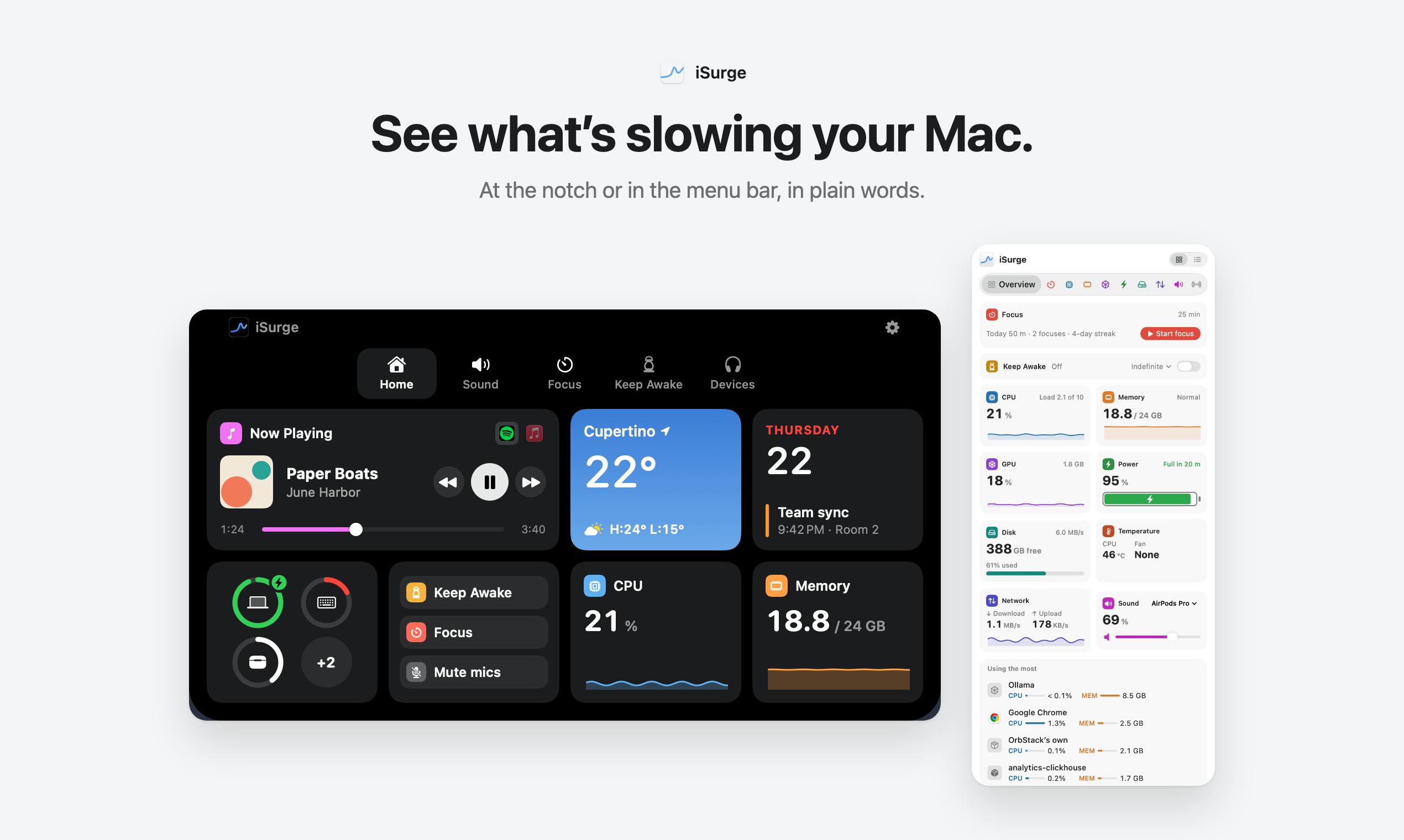
iSurge is an activity monitoring tool that integrates multiple practical features into the Mac's notch area, letting users view real-time system status, adjust per-app volume and microphone, clean disks, uninstall software, and access built-in developer tools for ports, projects, and Homebrew—plus a focus timer and Keep Awake—without switching apps. It uses a one-time purchase model at $14.99, or $10.99 with the discount code PHPROMO20, and requires no account. It targets Mac users who want one tool to handle multiple small needs, especially developers and productivity enthusiasts. It received 84 votes and ranked 9th on Product Hunt, a moderate response indicating that the notch information panel idea is appealing, though balancing feature richness with interface simplicity remains a challenge.
Mac users often juggle multiple tasks at once, and operations like system resource monitoring, volume adjustment, and disk cleanup usually require switching between different apps. iSurge aims to change that by integrating a variety of practical features into the Mac's notch area, letting users access key information without leaving their current workflow.
Core Features: More Than Just Activity Monitoring
iSurge positions itself as an "activity monitor," but its capabilities go far beyond that. According to its Product Hunt listing, it displays real-time system status in the notch area so users can stay informed about their Mac's condition at any time. It also supports adjusting the volume and microphone for each app individually, which is very useful for users who need fine-grained control over audio output.
Disk cleanup and uninstaller features help users keep their system tidy. For developers, iSurge includes built-in development tools for ports, projects, and Homebrew, making it easy to quickly view and manage the development environment. A focus timer and a Keep Awake feature round things out by addressing both productivity and the need to keep the system awake.
Homebrew is the most popular package manager on macOS; developers use the command line to install, update, and uninstall various development tools and dependency libraries. iSurge's built-in Homebrew-related tools mean users can view installed packages, check for available updates, or perform basic management operations without opening a terminal—reducing context switching for programmers who habitually build their development environments with Homebrew.
The Keep Awake feature prevents the system from sleeping or turning off the screen, ensuring that long-running tasks (such as downloading large files, rendering video, or running tests) are not interrupted. macOS's built-in caffeinate command achieves a similar effect, but iSurge makes it graphical and integrates it into the notch panel, lowering the barrier to use.
Pricing and Positioning
iSurge uses a one-time purchase model priced at $14.99, and with the discount code PHPROMO20 you can get it for $10.99. No account is required, which to some extent reduces users' privacy concerns.
Judging from the pricing and feature combination, iSurge targets Mac users who want to solve multiple small needs with a single tool, especially developers and productivity-tool enthusiasts. It tries to provide enough information within the limited space of the notch while keeping operations convenient.
A one-time purchase (lifetime license) is the opposite of a subscription model: users pay once and can use the current major version permanently, usually without future major-version upgrades. For small utility apps, a one-time purchase lowers the user's decision cost and avoids long-term subscription fatigue, but it also means the developer's revenue depends on continuously acquiring new users rather than retention. The $14.99 price sits in the mid-to-low range for Mac productivity tools, and the discount code further lowers the barrier to trying it out, suggesting that iSurge leans toward a high-volume, low-margin strategy to quickly expand its user base.
Market Response and Reflections
On Product Hunt, iSurge received 84 votes and 7 comments, ranking 9th. This result shows it has attracted interest from some users, but it is still far from being a breakout hit. How to make use of the notch has long been a topic of discussion among Mac users, and iSurge offers one idea: turn the notch into an information panel. However, how to present information without disturbing the user, and how to balance feature richness with interface simplicity, are questions that tools like this need to keep exploring.
For developers, iSurge's integrated development tools may be a draw; for ordinary users, disk cleanup and volume control may be more practical. But ultimately, whether users are willing to pay for these features depends on whether they can truly improve everyday efficiency.
iSurge's emergence reflects a trend among Mac utility apps: moving from single-purpose features toward multi-functional integration, and making full use of system characteristics (such as the notch) to create a differentiated experience. Whether it can establish a foothold in the highly competitive productivity-tool market remains to be seen.
Product Hunt is a global community for launching and discovering new products, ranking the products launched each day by user votes. 84 votes and 9th place is a mid-to-upper exposure result: enough to make the day's leaderboard and gain some traffic, but still a clear gap from top products that routinely get hundreds or thousands of votes. Product Hunt rankings reflect community attention on launch day more than long-term market performance, so this data should be seen as an early signal rather than a final conclusion.
Related articles

The Truth About AI Coding: Code Output Soars, So Why Is Delivery Still Hard to Speed Up?
Engineering leaders from Databricks, Uber, and Google Maps discuss AI coding's real impact: code output soars but delivery bottlenecks shift, code review faces rethinking, and enterprises begin fine-grained token governance.

A New Paradigm for Text Editing in Compose: TextFieldState Replaces the Old API
Jetpack Compose introduces the TextFieldState API to fix dropped characters and cursor jumps from async input. The old value/onValueChange callbacks will be deprecated in 1.13. This article covers InputTransformation, OutputTransformation, four state hoisting patterns, and new formatted text editing capabilities.

Remote Compose: A New Document-Driven Paradigm for Cross-Platform UI on Android
Remote Compose transmits compact binary documents instead of screen pixels, enabling efficient UI rendering on remote surfaces like Wear OS and widgets. This article covers its document creation API, expression animations, size optimization techniques, and Wear OS progress.