Jarq: The Mac Text Assistant That Translates and Rewrites Right at Your Cursor

Jarq brings AI translation and rewriting directly to your Mac cursor, with no copy-pasting or app switching.
Jarq is a system-level AI writing assistant for Mac built around one core idea: in-place replacement. Select text in any app, press a shortcut, and it instantly translates, shortens, fixes, or rewrites — no switching windows or pasting required. It also features cross-language voice dictation in 13 languages, letting you speak in your native tongue and output text in another language right at the cursor. On privacy, Jarq uses cloud AI models but claims it doesn't retain user text on its own servers, storing history locally instead. Pricing includes a free tier with 5 daily operations and a Pro plan at $39/year, with a 14-day no-credit-card trial. Its value isn't technical novelty — it's the seamless embedding of AI into everyday writing flow.
When AI Writing Tools Return to the Cursor Itself
When working with text on a Mac, most of us are stuck in a tedious loop: copy text, switch to a translation or AI tool, paste, wait for results, then copy back. These repetitive actions drain focus every single day. Jarq, a newly launched Mac productivity tool, aims to break that cycle — by bringing text-processing power directly to wherever your cursor is.
According to Product Hunt data, Jarq launched with 83 upvotes, ranking 10th for the day, and was categorized under Mac, Productivity, and Writing. The developer is Birzhan Abishev.
Core Capability: Select, Press, Replace in Place
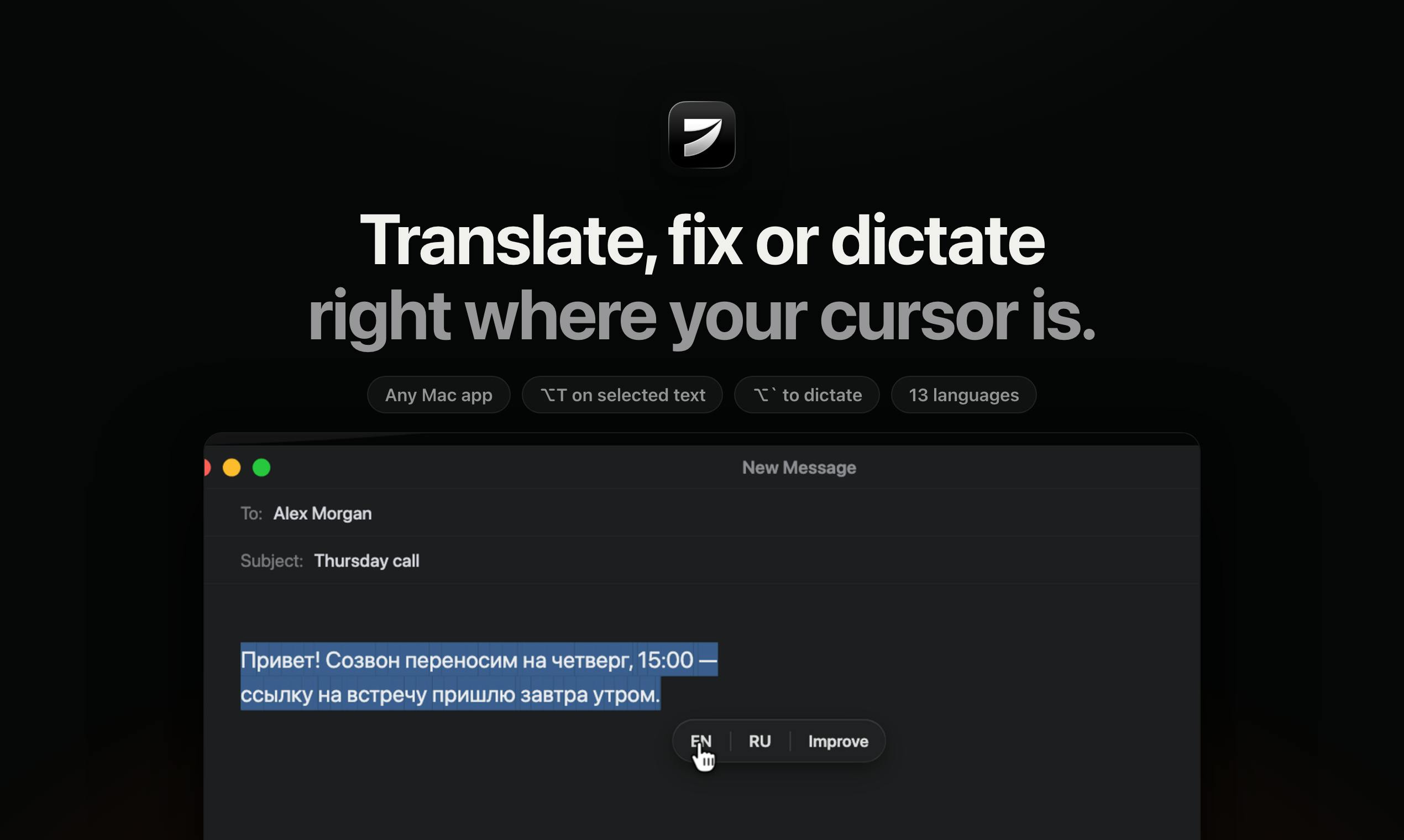
Jarq's product philosophy can be summed up in one sentence: wherever your cursor is in any Mac app, that's where text processing happens.
It offers four core text operations — Translate, Shorten, Fix, and Rewrite. The workflow is straightforward: select a piece of text, press a preset keyboard shortcut, and the selected content is replaced in place with the processed result. No new tabs, no copy-pasting required.
This "in-place replacement" interaction design is what sets Jarq apart from traditional AI writing tools. Most similar products require users to work within a separate interface, whereas Jarq embeds its capabilities directly into whatever context you're already writing in — whether that's an email client, a notes app, or a code editor.
Voice Dictation and Cross-Language Input
Beyond text processing, Jarq also has a built-in voice feature. Press ⌥` and you can dictate in one language and get clean text output in another, right at your cursor. That means you can speak in your native language and have it generate polished English — or any other target language — inline.
The tool currently supports 13 languages across both translation and cross-language dictation. For people who frequently work in multilingual environments — international team communications, multilingual content creators — this ability to "speak one language, write another" has real practical value.
Cross-language voice dictation is typically implemented in two stages: Automatic Speech Recognition (ASR) first converts speech into source-language text, which a translation model then converts into the target language. Modern multilingual large models like Whisper can merge these two steps into an end-to-end pipeline, generating target-language text directly from speech and reducing accumulated intermediate errors. Jarq hasn't officially disclosed its specific implementation, but this kind of "speak Chinese, output English" capability is clearly valuable for non-native English professional writers — it bypasses the cognitive overhead of composing in a second language, letting users focus on content while the tool handles the language conversion.
Privacy Approach: Cloud AI with Local History
Jarq's approach to privacy is worth paying attention to. The tool explicitly states that it uses cloud-based AI models to process text and voice content, meaning data passes through a third-party AI service.
However, Jarq emphasizes two things: first, Jarq itself does not retain user text on its own servers; second, usage history is stored locally on the user's Mac. This design strikes a compromise between convenience and privacy — it's not a fully local tool with zero data transmission, but compared to many cloud services that directly store user content, it reduces the risk of long-term data retention.
For users handling sensitive information, the "uses cloud AI models" aspect still warrants careful consideration, since text must be transmitted to the cloud at the moment of processing.
By "cloud AI model," we mean that text data is sent over the network to a third-party AI provider's servers (such as OpenAI, Anthropic, etc.) for inference, and the result is returned to the local app. The alternative is a "local model" approach — where model weights run directly on the user's device and data never leaves the machine. The advantage of cloud-based solutions is stronger model capability and no computational cost burden for the developer, but the trade-off is that every operation involves a data transmission: the content of the text is technically visible to the AI provider at the moment of processing. For sensitive use cases involving commercial contracts, personal medical records, or financial information, users should review the data processing agreements of the specific AI provider Jarq connects to, and assess whether that provider uses user inputs for model training or log retention.
Pricing Strategy: Light Free Tier Plus Affordable Subscription
Jarq uses a relatively accessible pricing structure:
- Free tier: 5 operations per day — suitable for light, exploratory use
- Pro: $4.99/month, or $39/year
- Trial: 14-day Pro trial with no credit card required
The 5 free daily operations is a conservative limit — more of a feature preview than a sustainable free option. But $39 per year is a low barrier for a high-frequency productivity tool, and the no-credit-card trial further reduces the decision cost for prospective users.
It Solves a Real, Everyday Pain Point
Jarq isn't a technically groundbreaking product — it relies on existing cloud AI models under the hood. Its value lies in the polish at the interaction layer: seamlessly embedding AI text capabilities into system-level cursor operations, eliminating the friction of context switching.
This category of "system-level AI assistant" is emerging as a direction for Mac productivity tools: rather than asking users to adapt to an AI tool's interface, the idea is to let AI capabilities disappear into everyday workflows. For users who spend significant time processing, translating, and polishing text each day, a design that reduces operational steps can make a real difference in efficiency.
That said, competition is stiff — the system's built-in writing tools, other AI plugins, and browser extensions are all competing for the same use cases. Whether Jarq can carve out a lasting niche on the strength of in-place replacement and cross-language dictation remains to be seen.
Related articles

Chain of Thought Isn't Just for AI: How Humans Can Use CoT to Improve Thinking Quality
Chain of Thought isn't just a prompt trick for large models. Starting from a Hacker News discussion, this article analyzes why CoT works for human thinking too, breaks down actionable ways to transfer it, and highlights the key differences between human CoT and machine CoT.
Cloudflare Teams Up with OpenAI: Closi…
Cloudflare Teams Up with OpenAI: Closing the Loop from Vulnerability Discovery to Defense with AI
Cloudflare uses OpenAI Daybreak to investigate security vulnerabilities and generate reviewable remediation plans, while developers use Codex to boost coding efficiency and quality.

Orca Multi-Agent Orchestration in Practice: A Guide to Parallel Collaboration with Claude and Codex
Orca is Stable AI's free open-source agent workbench supporting 34 agents like Claude Code and Codex in parallel. Learn its Git worktree isolation, multi-model orchestration, and mobile management.