Jetpack Compose Progressive Blur API: Bringing Spatially Varying Visual Depth to UI

Jetpack Compose launches Progressive Blur API, enabling spatially varying blur radius through a single modifier.
Jetpack Compose adds the Progressive Blur API, allowing developers to vary blur radius spatially across any composable surface via a concise modifier block, turning blur from a global constant into a position-adjustable visual variable. The API includes three preset modes—linear sequences, multi-stop sequences, and radial gradients—and supports arbitrary shader-driven blur radius, covering needs from simple scroll masks to custom mathematical function distributions. Compared to previous complex implementations with stacked blur layers or bitmap masks, the new API significantly reduces boilerplate code and enhances design flexibility for UI hierarchy and depth expression. It suits immersive interfaces like media players, stacked cards, and scroll parallax, and integrates seamlessly with Compose's existing animations, gestures, and state management.
The Jetpack Compose UI toolkit has gained another powerful tool—the Progressive Blur API. It allows developers to vary the blur radius spatially across any composable surface through a single concise modifier block. This means blur is no longer a global constant but a visual variable that can be adjusted by position, opening up new possibilities for expressing UI hierarchy and depth.
From Uniform Blur to Spatially Varying Blur
Traditional blur effects typically apply a uniform radius to an entire component. While this can visually create depth of field or a frosted-glass feel, it lacks directionality and gradual transitions. The core innovation of progressive blur lies in "spatial variation": the blur intensity can increase or decrease linearly along an axis (vertical or horizontal), or be distributed according to multi-stop sequences or radial gradients. This capability brings the figure-ground relationships between UI elements closer to real-world optical phenomena—for example, backgrounds gradually blurring in the distance while foregrounds remain sharp and crisp.
According to an introduction Google published on YouTube, the API's design goal is to cover the vast majority of gradient blur needs "with one elegant modifier block." Developers can achieve smooth transition effects without manually composing multiple blur layers or resorting to shader scripts.
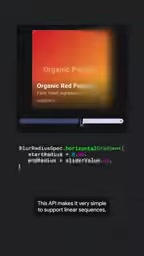
Modifier is a core mechanism in Jetpack Compose for decorating or modifying the behavior of composables. It uses a chained call approach, allowing developers to add backgrounds, padding, click events, drawing effects, and more to UI elements with declarative syntax. A Modifier is essentially an immutable chain of data structures, and the Compose runtime applies these modifications sequentially during the layout and drawing phases. The Progressive Blur API is implemented precisely through a Modifier.blur()-style extension function: developers simply call this modifier on a composable and pass in gradient parameters, and the blur radius for each pixel is dynamically computed during the drawing phase. This design decouples the blur effect from the component's lifecycle, enabling it to automatically respond to recomposition and state changes while remaining compatible with other Compose modifiers (such as clip and graphicsLayer).
Supported Blur Sequence Types
The Progressive Blur API includes several built-in gradient modes out of the box:
- Linear sequences: A blur radius that varies uniformly along a single direction (vertical or horizontal), ideal for creating scroll masks that are sharp at the top and blurred at the bottom.
- Multi-stop sequences: Allow defining multiple key positions for the blur radius, creating non-linear transition rhythms—such as a focus effect that is sharp in the middle and blurred at both ends.
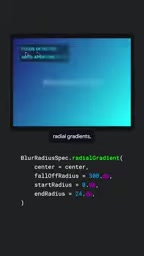
- Radial gradients: Blur variation that radiates outward from a center point, useful for simulating lens flare or center-focus visual guidance.
These modes cover common UI depth expression scenarios, and all are accomplished through declarative modifiers, consistent with Compose's programming model.
Multi-stop sequences borrow the concept of multiple color stops from CSS linear-gradient. In the Progressive Blur API, developers can specify multiple "stops," each containing a position ratio (between 0 and 1) and a corresponding blur radius value. The system interpolates between adjacent stops, forming a piecewise linear blur transition curve. For example, setting [0.0, 0.dp], [0.5, 20.dp], [1.0, 0.dp] achieves a focus effect that is blurred in the middle and sharp at both ends. Compared to simple linear sequences, multi-stop sequences can express non-monotonic blur variations (such as increasing then decreasing), more flexibly adapting to complex UI scenarios like edge fade-out on each card in a stacked card layout. This mode is typically implemented by computing each pixel's blur radius through a lookup table or piecewise function, with performance overhead scaling linearly with the number of stops.
Driving Blur Radius with Arbitrary Shaders
When the preset linear or radial gradients don't meet requirements, the API offers a lower-level extension point: any shader can be used to drive the blur radius. This means the blur intensity can be distributed according to custom mathematical functions, noise textures, or dynamic data, greatly enhancing creative freedom. For example, you can generate wavy blur bands based on screen coordinates, or have the blur radius change in real time with the user's interaction position.
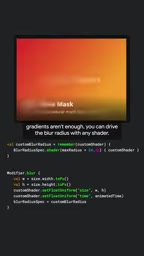
Shader in graphics programming is a program running on the GPU that controls properties such as pixel color, lighting, or position. In Compose, shaders are typically accessed through APIs like RuntimeShader (Android 13+) or ShaderBrush, allowing developers to write custom per-pixel logic using AGSL (Android Graphics Shading Language). The Progressive Blur API uses shaders as the driving source for blur radius, meaning the blur intensity is no longer limited to preset linear or radial functions but can vary per pixel based on arbitrary mathematical expressions, noise functions, or texture sampling results. For example, developers can write an AGSL shader that generates wavy blur bands based on the sin function of screen coordinates, or associate the blur radius with the distance from the user's touch position to achieve real-time interactive blur. This provides low-level flexibility for advanced visual effects (such as dynamic depth of field or fluid-simulation backgrounds), but requires developers to have some knowledge of graphics programming.
Significance for UI Design
Progressive blur is more than just a technical feature—it changes how we think about designing interface hierarchy. In the past, achieving similar effects often required stacking multiple blur layers, manual clipping, or using bitmap masks, resulting in complex code and hard-to-control performance overhead. Now, a single modifier can express rich spatial blur semantics, reducing boilerplate code and making communication between designers and developers more direct—blur is no longer "add a blur" but "gradually blur in a certain direction."
For interfaces that need to create immersion—such as media players, stacked cards, scroll parallax, or dialog backgrounds—this API can significantly enhance visual refinement. At the same time, because it's implemented at the Compose level, it integrates seamlessly with existing animations, gestures, and state management.
How to Get Started
Google recommends that developers consult the official documentation for detailed usage of Progressive Blur and refer to the Compose 113 blog post for more new feature introductions. The API is available with the latest Compose version, and developers can gradually introduce it into existing projects—starting with simple linear blur and progressively moving to complex effects driven by custom shaders.
Overall, the Progressive Blur API encapsulates spatially varying blur capabilities as a declarative tool, lowering the barrier to implementing advanced visual effects. It's a solid enhancement to Compose UI's expressive power.
Related articles
Family-Shared 2FA Codes: A New Balance Between Security and Convenience
Tech blogger Terence Eden proposes family-shared 2FA codes, sparking Hacker News debate. This article analyzes the convenience and security risks of shared two-factor authentication, explores the product design gap in family account management, and offers practical scenario-based advice.
Trump-Backed Crypto Token WLFI Plummets Over 90%: The Bursting of the Political Concept Coin Bubble
Trump-backed crypto token WLFI has plunged over 90% from its all-time high. This article analyzes the bubble logic, structural risks, and investor takeaways of political concept coins.

Early Cyber Monday 2026 Gaming Laptop Deals: How to Get the Most GPU for the Least Money
How to pick early Cyber Monday 2026 gaming laptop deals: Nvidia hasn't launched a new GPU since 2025, new models are just CPU upgrades amid rising RAM prices, and GTA VI's release is still uncertain. This article explains how to get the most GPU for the least money, avoid memory premiums, and offers buying strategies for different gamers.