Jetpack Glance + Remote Compose: Wear OS Tiles Evolve into Widgets

Wear OS Tiles evolve into Wear Widgets built on Jetpack Glance and Remote Compose, unifying the phone and watch widget ecosystem.
Google is officially evolving Wear OS Tiles into Wear Widgets, built with Jetpack Glance and sharing the same underlying infrastructure as phone widgets. Remote Compose aligns closely with Jetpack Compose, using Remote-prefixed components, actions instead of lambdas, reusable Material 3 theming, and UI decoupled from the app process. Migration offers dual-service (recommended) and single-service strategies, with backward compatibility to Wear 4, plus Compose Preview support and a tiles-to-widgets AI migration skill.
Title
Jetpack Glance+Remote Compose:Wear OS Tiles Evolve into Widgets
Meta Description
Wear OS Tiles are officially evolving into Wear Widgets, built on Jetpack Glance and Remote Compose, sharing infrastructure with phone widgets. This article breaks down the dual-service and single-service migration strategies, the Remote Compose code model, Compose Preview layout validation, and the official AI migration tool.
Article Content
Wear OS's interaction paradigm is undergoing a fundamental restructuring. Google is officially evolving the previously full-screen Tile into Wear Widgets, bringing them into the unified Android Widgets ecosystem—sharing the same Jetpack Glance infrastructure with phone widgets. Frank Choi, who leads Glanceable Experiences, and Yuri Shumka, an engineer focused on Remote Compose, fully unpacked the migration path, code model, and toolchain in a technical talk.
From Tiles to Widgets: An Ecosystem-Level Unification
In the past, Wear OS Tiles used Proto Layout, a library built specifically for watch tiles, with a technology stack entirely separate from phone widgets. Now, Wear Widgets are built with Jetpack Glance, meaning developers can use the same mental model to cover "out-of-app" experiences on both phones and watches.
The new UI framework Remote Compose underpins this change. It brings declarative APIs to remote UI scenarios, highly aligned with Jetpack Compose, while bringing modern graphics capabilities and responsive layouts to widgets, with performance and power efficiency in mind. More importantly, Remote Compose decouples UI from the app process—according to the talk, components are securely serialized and can be rendered across a wide range of Android devices.
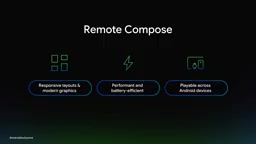
The direct benefit of this decoupling is that developers can bring rich interactive experiences to almost all supported remote interfaces with minimal extra work. For teams long constrained by a dedicated layout system on the Wear platform, this is a clear infrastructure upgrade.
Jetpack Glance is Google's declarative UI toolkit for building App Widgets. It is based on the Jetpack Compose runtime and compiler, but specially adapted for remote UI scenarios (such as home screen widgets). The core value of Glance is that it lets developers build widgets with a Compose-like syntax, and serialize the UI description through an intermediate representation handed off to the host for rendering, rather than directly manipulating RemoteViews. Previously, Wear OS Tiles relied on Proto Layout, separate from the phone widget technology stack; after switching to Glance, phone and watch widgets share the same API model, theming system, and toolchain, making cross-platform reuse possible.
Proto Layout is the dedicated layout library Wear OS previously used to build Tiles, employing a protobuf-based layout description and expression binding mechanism. It was optimized for watch tile sizes and refresh rates, but differs significantly from the Jetpack Compose programming model—high learning cost and a closed ecosystem. As Wear Widgets move to Jetpack Glance, Proto Layout enters legacy status, and existing tile code needs to be migrated to Remote Compose implementations via migration skills or manual rewriting.
Two Container Sizes, Aligned with the Phone Widget Mental Model
To make migration as smooth as possible, Google introduced two standard container sizes, small and large, corresponding respectively to the 2x1 and 2x2 grid formats developers are familiar with in phone widgets. This alignment is no coincidence—it is deliberately designed to reduce the cognitive burden on cross-platform developers.
The platform-level presentation is also changing. Starting with Wear 7, on devices from some hardware manufacturers, Wear Widgets appear in a vertically scrolling tray alongside widgets from other apps. The talk demonstrated actual results on a Samsung Galaxy Watch. The platform architecture itself is ready for the vertically scrolling tray, awaiting broader manufacturer adoption.
Developers need not worry about abandoning existing users. The Jetpack Glance Wear API is backward compatible to Wear 4. On older devices that only support the horizontal tray, the system handles adaptation automatically—developers simply declare in code that they wish to support full-screen mode, and the system presents the large widget as a traditional full-screen tile.
Migration Strategy: Dual-Service or Single-Service
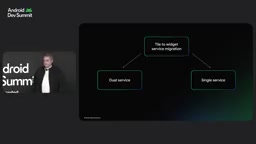
If building a new Wear Widget from scratch, you only need to define a Glance Wear Widget service and build the UI with Remote Compose. But for apps with existing live tiles, both the service and data layers need migration. The talk presented two paths:
- Dual-service (recommended): Keep the existing tile service for older Wear OS versions, while adding a new Glance Wear Widget service targeting Wear 7 and above. Clear responsibilities, with no impact on older device behavior.
- Single-service: Create a Glance Wear Widget service that handles both protocols, translating the widget into a tile on older devices in compatibility mode. Leaner codebase, but the compatibility layer is your responsibility.
Both approaches cover all users; the difference lies only in the long-term maintenance code shape. The Android developer website has published detailed documentation explaining when each applies.
The Remote Compose Code Mental Model
The UI layer migration is essentially a mental model shift. Proto Layout was a one-off solution built specifically for Wear tiles, whereas Remote Compose shares the same core compiler and runtime as Jetpack Compose UI, and deliberately aligns with the syntax of Compose UI libraries like Foundation and Material 3.
The differences are reflected in naming and interaction primitives: Box, Column, Text become RemoteBox, RemoteColumn, RemoteText; the familiar Modifier and Boolean have corresponding types RemoteModifier and RemoteBoolean in remote scenarios; lambdas are replaced by actions—developers declare an action, such as launching a PendingIntent, calling a service, or updating a value, rather than writing executable code directly inside a closure.
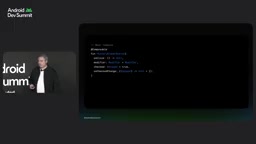
The talk used a Material 3-based switch button for comparison: on the left is the standard Wear Compose component, on the right is the Remote Compose version. The patterns are highly similar, and the final rendered interaction animation is almost indistinguishable. The theming system is also aligned—Material 3 color schemes can be applied directly to Remote Compose components, keeping widgets consistent with app branding. Additionally, the library provides a full set of ready-to-use Remote Compose components designed specifically for widgets, and existing Wear Material 3 designs (including Figma assets) can be adapted to widgets with relative ease—a familiar path for both engineers and designers.
The key difference between Remote Compose and standard Jetpack Compose lies in where it runs: standard Compose UI is composed and rendered within the app process, whereas UI built with Remote Compose is serialized into an intermediate representation, handed off to a host process (such as the watch system UI) to deserialize and render. This "UI decoupled from process" design means components cannot directly hold object references from the app process, nor execute arbitrary code inside lambdas. Therefore Remote Compose replaces lambdas with actions: developers declare an action (such as launching a PendingIntent, calling a service, or updating a value), which the system triggers on the host side and calls back to the app process. Similarly, types like RemoteModifier and RemoteBoolean are remote-safe replacements for standard Modifier and Boolean, ensuring all UI descriptions can be serialized and transmitted. Understanding this constraint is core to mastering the Remote Compose programming model.
Compose Preview: Layout Validation Without a Real Device
Widgets depend on OEM-specific container constraints, including size, shape, padding, and corner radius. To address this, Google added Compose Preview support for Wear Widgets: a parameter provider is added on top of the standard preview annotation to inject these configurations.
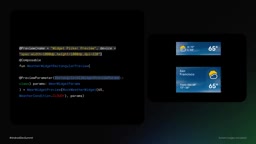
The library ships with preview parameter provider implementations matching real Wear OS devices, letting developers quickly verify layout behavior across multiple hardware shapes. These previews can also be used to generate the static images needed for the on-device widget picker—the library provides a rectangular preview shape parameter that simulates the full uncropped rectangular container.
In practice, the Horologist Media Sample app has been updated with a media widget demonstrating this API, including both small and large versions. On GitHub you can compare the legacy Proto Layout code side by side with the new Remote Compose implementation.
Compose Preview's parameter provider is an extension of Jetpack Compose's preview mechanism: through the @PreviewParameter annotation, developers can inject a set of parameters into a preview function, thereby rendering multiple variants simultaneously in Android Studio. In the Wear Widgets scenario, Google ships provider implementations matching real Wear OS devices, where each parameter corresponds to a combination of OEM container constraints (size, shape, padding, corner radius). This lets developers verify widget layouts across square, round, and other watch faces in the IDE without connecting a real device one by one, and export static images for the on-device widget picker.
Accelerating Migration with AI Tools
The talk concluded with a practical tool: a tiles-to-widgets migration skill published on GitHub, usable with the agent of the developer's choice, or added directly to Android Studio via the Android CLI. This continues the approach of embedding AI assistance into the development workflow, and is especially meaningful for teams needing to batch-process existing tile code.
What This Evolution Means
From a technology-choice perspective, Wear Widgets is not yet another platform-specific API—it brings Wear back to the Jetpack Compose mainstream. For Android developers already familiar with Compose, the learning curve is compressed to the level of "adding a Remote prefix to familiar components"; for design teams, reusing Material 3 assets lowers cross-platform adaptation costs.
The complexity of migration falls primarily on the service layer rather than the UI layer: the choice between dual-service and single-service tests a team's trade-off between future maintenance costs and compatibility scope. Google recommends dual-service, essentially trading code redundancy for certainty in older device behavior.
Furthermore, Remote Compose's design of serializing UI and decoupling it from the process hints at a longer-term direction—the same set of components can in the future render to more remote interfaces, not just watches. The talk's phrasing of "covering almost all supported remote interfaces with minimal effort" points precisely to this portability.
For teams currently maintaining Wear tiles, migration can start now with the getting-started guide on the Android developer website; for Android developers who have not yet entered Wear, this API that shares infrastructure with phone widgets significantly lowers the barrier to entry.
One-line Summary
Wear OS Tiles evolve into Wear Widgets built on Jetpack Glance and Remote Compose, unifying the phone and watch widget ecosystem.
Paragraph Summary
Google is officially evolving Wear OS Tiles into Wear Widgets, built with Jetpack Glance and sharing the same underlying infrastructure as phone widgets. The new UI framework Remote Compose underpinning this change is highly aligned with Jetpack Compose: components are prefixed with Remote, lambdas are replaced by actions, Material 3 theming can be reused directly, and UI is decoupled from the app process. Migration offers dual-service (recommended) and single-service strategies, with the Jetpack Glance Wear API backward compatible to Wear 4, automatically degrading to full-screen tiles on older devices. Compose Preview support is added via parameter providers injecting OEM container constraints, and a tiles-to-widgets migration skill is released to accelerate migration with AI.
Related articles

Anthropic IPO Explained: Fuel for the AI Boom or the Spark for a Bubble?
Anthropic files for an IPO under ticker ANT. Breaking down the prospectus: 80% of revenue from usage-based pricing, $72B of an $80.7B net loss being non-cash charges, 900% net revenue retention, and how past IPOs like SpaceX performed on day one and over three years — answering the AI bubble question.

Will AI Kill the Research Paper? Mathematicians Offer a New Answer
Mathematicians on the Lex Fridman podcast discuss whether AI will kill research papers—from journal review pressure to Lean formal verification, GitHub open source fatigue to Mathlib's crowdsourcing model, exploring the evolution of academic contributions and the future of mathematical knowledge verification.

Enterprise LLM Development: From RAG to Multi-Agent in Practice
A course breakdown of enterprise LLM application development: from prompt engineering and RAG to multi-agent engineering practice and FDE project delivery, helping developers understand why Agent technology is a key focus for enterprise deployment and learn systematically to avoid detours.