Jetpack Navigation3 Type-Safe Deep Links in Practice

Nav3's deep link API uses type-safe matchers to parse URIs into NavKeys and lazily build synthetic back stacks.
Jetpack Navigation3 gives developers backstack control and deep link responsibility. Google shared the Nav3 deep link API design: recipe-to-API graduation, DeepLinkRequest/DeepLinkMatcher/URIDeepLinkMatcher with Kotlin Serialization for type-safe NavKeys, maxOrNull best-match selection, custom DeepLinkSerializer or matchArguments preprocessing, lazy withBackStack synthetic back stacks, and KMP common-code sharing.
Title
Jetpack Navigation3 Type-Safe Deep Links in Practice
Meta Description
A deep dive into the Jetpack Navigation3 type-safe deep link API: from DeepLinkRequest and URIDeepLinkMatcher to Kotlin Serialization parsing, lazy construction of synthetic back stacks, and custom serialization with KMP cross-platform sharing.
Article Content
Jetpack Navigation3 hands control of the backstack to developers by design. This compose-first approach makes navigation logic more flexible, but it also shifts the responsibility for handling deep links onto developers. In a technical talk, Ian Lake, Engineering Manager on Google's Jetpack Architecture team, and Clara Fogh, tech lead for Nav3, broke down the design of the Nav3 deep link API: how to parse a type-safe NavKey from a URI, and how to build a sensible synthetic back stack for deep links.
The Design Philosophy of the Deep Link API: From Recipe to Official API
A core goal of the Nav3 team is to "stay out of the way." When developers raise a new request, the team prefers to first write a recipe—a guide explaining how to implement the feature without changing the library itself—rather than immediately adding a new API. The Nav3 recipes repository on GitHub has accumulated more than 35 common use cases, covering scenarios such as multiple back stacks and bottom sheets.
The deep link recipe existed as early as the Nav3 1.0 release, because the team knew it was important to many developers. But a recipe means copying and pasting a bunch of helper methods into your project, so the team started a process called "graduation": evaluating what the API should look like if these helpers became part of Nav3. Ian Lake noted that he had written deep link implementations for both Nav2 and Nav3, plus the version in the recipes, iterating three times in total—all to make the API fit naturally with Nav3's compose-first style.
The benefit of graduation is that there's no forced migration: developers who already copied the recipe code can keep using it, while new projects can use the polished official API directly.
Recipe is a lightweight form of knowledge output commonly used by the Jetpack library team: it's a standalone guide or sample code showing how to implement a common need using only the library's public APIs, without waiting for the library itself to add features. Recipes are usually hosted in GitHub repositories, presented as documentation plus runnable code, and developers can copy the helper methods directly into their projects. The value of this approach is that it responds quickly to community feedback, validates whether a need is widespread, and avoids prematurely locking experimental APIs into the library's stable interface. When a recipe is used repeatedly and the need is clear enough, the team starts the graduation process to upgrade it into an official API—which means redesigning the interface shape, considering backward compatibility and KMP support, and going through multiple rounds of internal review. So recipes and official APIs aren't replacements for each other; they coexist: old code keeps working, and new projects get more complete official support.
From Intent to NavKey: The Core Pipeline of Type-Safe Matching
After a user taps a web URI, the Android framework requires the app to declare an intent filter for each supported deep link. The really interesting part happens after the deep link triggers the Activity launch.
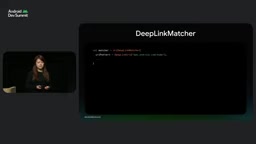
Nav3 wraps deep link input in a KMP-compatible DeepLinkRequest class, which on Android can be constructed from an Intent. The next question is: given a request, how do we know which NavKey to put in the back stack? DeepLinkMatcher takes on this job; it receives the request and outputs a match result, which includes the matched NavKey.
For web URIs, URIDeepLinkMatcher encapsulates all the conversion logic. Its first parameter is the URI pattern. Take the ADS app as an example: a deep link to the home screen can use an exact URI match, and by omitting the http scheme it matches both http and https. To deep link to a specific ADS session, the URI contains a session ID that needs to be extracted; here the pattern uses curly braces as placeholders, and the placeholder name must match the NavKey property name so the decoder can map it correctly.
URIDeepLinkMatcher uses Kotlin Serialization to deserialize the input URI into a NavKey instance via a Kotlin decoder, so you also need to pass the NavKey's serializer to the matcher.
Kotlin Serialization is Kotlin's official serialization framework. Through a compiler plugin, it generates serializers for classes annotated with @Serializable, supports multiple formats such as JSON and Protobuf, and is a first-class citizen of Kotlin Multiplatform. In the Nav3 deep link scenario, it serves as the bridge between a URI string and a NavKey data class: URIDeepLinkMatcher treats the placeholder values in the URI as field inputs and hands them to a Kotlin Serialization decoder to deserialize into a NavKey instance. The reason placeholder names must match property names is that the default decoder matches by field name; if the names don't match, you need a custom DeepLinkSerializer to explicitly specify the serial name. Kotlin Serialization provides out-of-the-box support for primitive types (boolean, integer, floating point, enum), and throws an exception on parse failure, which the matcher catches and returns null for, achieving automatic "unparseable means no match" semantics. Optional parameters are expressed through property default values, and the decoder falls back to the default when a field is missing.
Multiple Deep Links and Best Match Selection
Multiple deep links should be written as multiple matchers, one per deep link. For example, the session key might have two URI patterns—an old newsletter pattern and a regular web URI—plus the home screen deep link; the three matchers go into the same list, and matching iterates over the list calling match on each, filtering out empty results with mapNotNull.
In most cases only one match in the list is non-null, but there are scenarios with multiple valid matches: for instance, adding a keynote page that reuses the session URI pattern but replaces the ID placeholder with a static keynote path. The same request would then match both the session key (with ID equal to keynote) and the keynote key. Since match results implement comparable, you can use maxOrNull to pick the best match among all valid matches, while also handling the case where nothing matches.
A static matcher list is only good for a lightning-talk demo. In real projects, screens may be spread across multiple modules, and teams expect those modules to contribute their entries to a global matcher list through the DI system. According to Ian Lake, the Hilt, Metro, and Koin examples in the recipes repository have all been updated to include deep link support.
Handling "Ugly" Deep Links: Custom Serialization and Preprocessing
Kotlin Serialization provides a solid foundation: primitive types like booleans, integers, floating point, and even enums work out of the box, and if a deep link value can't be parsed into the target type, matching automatically fails and returns null. Optional parameters can be handled with property defaults.
The team deliberately decoupled the structure of the web URL from the type-safe class representing the match result, because URLs may be maintained by other teams. In reality there are many troublesome deep links—for example, ones carrying base64-encoded images or stuffed with JSON blobs. When you need to extract information from a URL you can't change, Nav3 offers two paths.
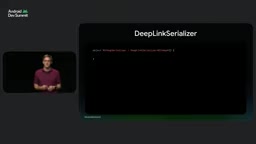
The first is to extend the DeepLinkSerializer class to precisely control how a given parameter is deserialized from a string into a type-safe property. You need to implement three methods: choose a unique serial name, implement deserialize (receive the string from the web URL and construct the object), and implement serialize (the reverse operation, used when the same key appears in scenarios like rememberNavBackStack). [Screenshot here] Then apply the custom serializer to the property of the special type, and WebURIDeepLinkMatcher handles the rest.
The second is to preprocess before the data enters Kotlin Serialization—subclass URIDeepLinkMatcher and override the matchArguments method. The input is the raw strings corresponding to all placeholders in the URI path, and you can edit these values before calling super.matchArguments. For example, when facing a JSON blob where you actually only need the session ID, this lets you bypass complex serialization logic.
Synthetic Back Stacks: Lazy Construction That Balances Experience and Performance
A back stack with only one navigation key doesn't necessarily give a good user experience. To ensure correct back behavior, you need a synthetic backstack—keys the user never navigated to manually, but which they would pass through if they had navigated manually. For example, when tapping a notification about an upcoming session, the user is taken straight to that session, but when they hit the system back button, they probably expect to go to the home screen first and then exit to the launcher; that home screen becomes part of the synthetic back stack.
Here there are two competing requirements: different deep links need different synthetic back stack logic (adding the home screen to every deep link isn't enough for a deep link pointing to a settings subpage); and every millisecond of delay costs real money, so you can't eagerly compute the back stack for every match result.
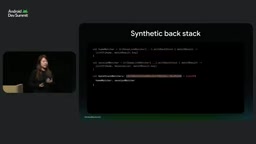
After a few rounds of trial and error, the team found the balance point: regardless of the matcher type, you can call withBackStack to lazily construct the back stack based on a given match result. Each matcher has its own withBackStack call. If all matchers do this, you get a list of back stack matchers, and the final match result is a BackStackMatchResult—a subclass of the match result that adds a backStack property, i.e. the full back stack generated by the withBackStack lambda. This layering completely decouples the matcher's internal logic from custom back stack logic.
Filters, Static Matching, and KMP Sharing
Nav3 also offers some practical capabilities. You can add filters to any matcher to short-circuit matching logic based on action, MIME type, or custom conditions—this happens before any URI parsing or Kotlin Serialization, effectively saving overhead.
For scenarios where you get a key without parsing but still want filters, there's StaticKeyDeepLinkMatcher, suitable for deep links that only handle action or MIME type, such as a photo editing app that can open JPEG images. Deep link requests also support attaching custom extras, and both custom filters and DeepLinkRequest subclasses can use them in their logic—for example, mixing in an A/B testing framework or external signals—and extras have a fully type-safe API.
It's worth noting that almost all of the above logic lives in Nav3's common KMP code, so matcher and back stack logic can be shared across platforms. The team also integrated the deep link API into the DI recipes and the nowinandroid sample app; developers who are interested can explore further in the Nav3 recipes repository.
KMP (Kotlin Multiplatform) allows the same Kotlin code to compile to multiple target platforms such as Android, iOS, JVM, and JS. Common code lives in the commonMain source set, and platform-specific implementations are provided through the expect/actual mechanism. Nav3 places core logic such as deep link matching and back stack construction in common KMP code, meaning these logic paths don't depend on Android's Intent or URI classes but use KMP-compatible abstractions (like DeepLinkRequest). On Android, DeepLinkRequest can be constructed from an Intent; on other platforms, it can be constructed from that platform's deep link representation. This way, the matcher list, lazy withBackStack construction, filter short-circuiting, and other logic can be reused across platforms, and only the outermost platform entry points (such as Android's intent filter declarations and Activity launch) need platform-specific code. For multiplatform projects that want to push navigation logic down into a shared layer, this is especially important.
One-line Summary
Nav3's deep link API uses type-safe matchers to parse URIs into NavKeys and lazily construct synthetic back stacks.
Paragraph Summary
Jetpack Navigation3 hands backstack control to developers, and with it the responsibility for deep links. The Google team shared the design of the Nav3 deep link API: the graduation process from recipe to official API; using DeepLinkRequest, DeepLinkMatcher, and URIDeepLinkMatcher with Kotlin Serialization to parse URI placeholders into type-safe NavKeys; multiple deep links mapping to multiple matchers, with comparable match results and maxOrNull for best-match selection; custom DeepLinkSerializer or overridden matchArguments preprocessing for troublesome URLs; synthetic back stacks lazily constructed via withBackStack, balancing per-deep-link custom logic with launch performance; and core logic in common KMP code for cross-platform sharing.
Related articles

AI Comic Drama with WorkBuddy from Scratch: A Step-by-Step Skill Pack Installation Guide
Learn how to create AI comic dramas with WorkBuddy from scratch. This guide covers installation, Skill pack import and invocation, plus a script generation demo with manual revision tips to get you through the first step from script to storyboard.

WorkBuddy Agent Runs the Entire GEO Database Mining Pipeline with a Single Prompt
WorkBuddy agent automates GEO database mining: from data search and curation to batch correction, differential analysis, co-expression networks, feature gene screening, and immune infiltration—a single prompt generates a complete bioinformatics report, greatly lowering the barrier to bioinformatics analysis.

PC Memory Wasted? Hacker News Debates Centralized Data Centers
Hacker News users argue that personal computer memory is wasted and should be centralized in data centers, sparking debate on centralized vs. distributed computing resource allocation. This article analyzes the logic behind the claim, the costs of centralization, and new tensions in memory resource allocation in the AI era.