Jimeng Agent for AI Short Drama / Manga: A Full Production Walkthrough for Absolute Beginners

A zero-cost, 7-stage AI short drama pipeline using Doubao, Jimeng Seedream/Seedance, and CapCut.
This article summarizes the first lesson of a beginner-focused AI manga/short drama production course. The toolchain is simplified to three China-accessible tools — Doubao (scripting), Jimeng Seedream/Seedance (image and video generation), and CapCut (editing) — with near-zero cost entry via Doubao desktop app credits. The full pipeline is broken into seven stages: script, storyboard, character design, scene compositing, video generation, voiceover, and editing, with key practical tips for each. The course emphasizes transferable methodology over specific tools.
AI short dramas and manga-style videos have become one of the hottest content creation niches — but many aspiring creators are stopped at the door by tool barriers: access issues, complex software, and high costs. A beginner-friendly course series launched by a Bilibili creator offers a more accessible approach: use three tools — Doubao, Jimeng, and CapCut — to walk through the entire AI video production pipeline while keeping the learning cost as close to zero as possible.
This article is based on the first lesson of that course. It breaks down the tool selection, production pipeline, and key practical tips behind this zero-barrier, end-to-end workflow — helping you understand exactly what goes into producing an AI short drama from start to finish.
Why Start Over with a "Beginner's Course"
The creator openly admits that previous courses covered more advanced tools like ChatGPT, Midjourney, and ComfyUI. The feedback, however, was clear: most students couldn't keep up with the hands-on parts. The reason was straightforward — those tools come with multiple barriers around network access and prerequisite knowledge. No matter how basic the instruction, learners struggled to reproduce the steps on their own machines.
So the creator completely simplified the toolchain and switched to a combination that anyone in China can access directly. The real value of this approach: even if you eventually enter a professional environment where the company uses different models, platforms, or third-party APIs, you can transfer your skills quickly — as long as you've internalized the complete workflow and the underlying logic. In other words, the course teaches methodology, not specific tools.
The Three-Tool Stack and the "Near-Zero Cost" Approach
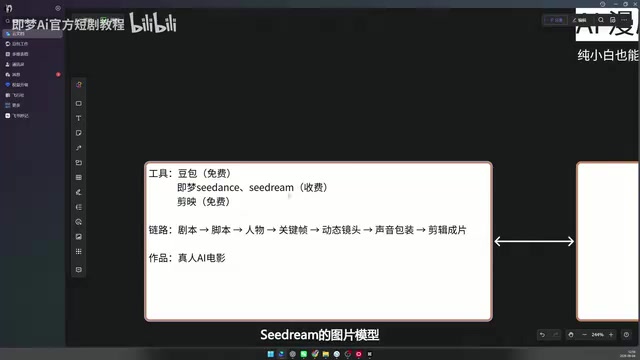
The entire course requires only three tools:
- Doubao: A large language model (LLM) for writing scripts and screenplays
- Jimeng: Provides the image model Seedream (characters and scenes) and the video model Seedance (dynamic shots)
- CapCut: Handles the final editing and compositing
All tools are free except for Jimeng's Seedance video model and Seedream image model, which require payment. The key to saving money: both paid models can be accessed directly inside the Doubao desktop app.
At the time of recording, Doubao had just launched its Agent mode ("Doubao Work"), and the platform was running a promotion offering 30 days of Standard membership for free. Students could claim three months of back-to-school credits, and regular users could get 30 days of free credits simply by downloading and updating the desktop app. The creator's demo account had credits valid through September 25th. With these credits, you can generate images with Seedream 5.0 Pro/Lite and create videos with Seedance 2.0/2.5 — making it essentially free to learn under current conditions.
Worth noting: even though Seedance 2.5 was already available, the course recommends sticking with 2.0 — the goal is to minimize cost while still delivering acceptable quality.
The Full Production Pipeline: From Script to Finished Video
The course spans 7 lessons, and its core goal is to clearly break down the complete production pipeline for AI manga / short dramas. The creator specifies that the target here is a true AI cinematic film (not a standard short drama), so the quality bar is set higher. A cinematic PV titled Immortal Island Chapter was produced for the course as the target output, with the first half being completed during this course.
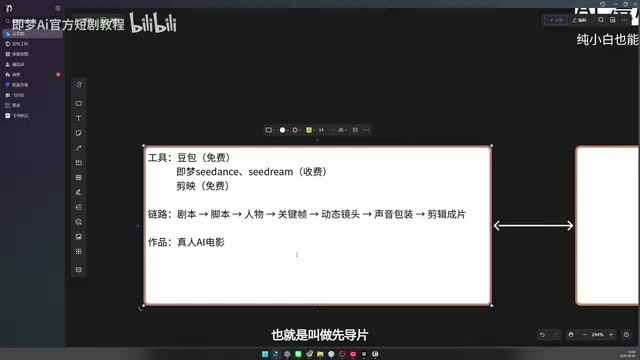
The full pipeline can be broken into several key stages:
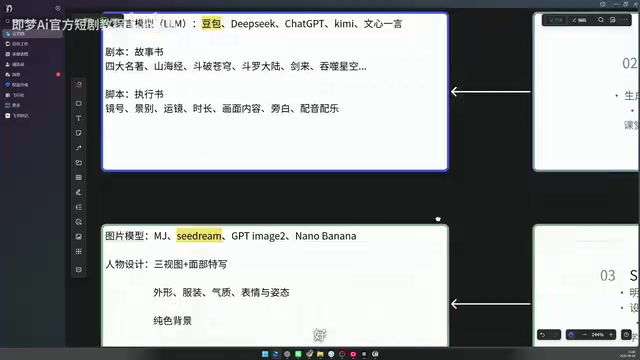
Script and Storyboard Design
Whether you're making a manga-style video or a live-action short drama, the logic behind the script and storyboard is the same — the only difference comes later in the character design and generation stages.
- Script: Think of it as a novel or storybook — it gives the creator a holistic understanding of the entire video. The creator uses examples like Battle Through the Heavens and Swallowed Star, both adapted from novels into Chinese animation, to illustrate that the original novel essentially serves as the "script."
- Storyboard: This is the execution document. For AI video production, it should include at minimum: shot number, shot size, camera movement, duration, visual content, narration, and audio/music cues — so anyone executing the AI prompts can immediately understand what to do and how to write the prompt.
One practical tip for the early planning stage: you only need to evaluate one thing — whether a given shot is appropriate to produce with a live-action human character.
Shot size (景别) is a foundational but critical concept in storyboarding. It refers to the range of the frame determined by the distance between the camera and the subject. Common shot sizes, from widest to closest, include: Extreme Wide Shot (showing broad environments), Full Shot (full body with scene context), Medium Shot (from the waist up, commonly used in dialogue), Close-Up (from the chest up, emphasizing expression and emotion), and Extreme Close-Up (focusing on a detail such as the face or hands). In AI video storyboards, the choice of shot size directly affects how you write the prompt — different shot sizes demand very different requirements for how much of the frame the character occupies and how blurred the background should be. Camera movement (运镜) refers to how the camera moves: push-in (moving toward the subject), pull-out (moving away), pan (horizontal sweep), tracking shot (following a moving subject), and so on. In video models like Seedance, camera movement must be explicitly described in natural language — it is a key tool for controlling the dynamic feel of a shot and the pacing of the narrative.
Character Design
This stage moves into the image model. Options include Midjourney, Seedream, GPT Image, Nano Banana, and others — the course uses Seedream throughout. The creator emphasizes the importance of distinguishing between Jimeng's two models: Seedance is the video model; Seedream is the image model.
Character design only needs to produce a full-body three-view sheet (front, side, back) and a facial close-up, covering details like appearance, clothing, temperament, expressions, and posture. One easily overlooked detail: the background must be a clean, solid color — otherwise it will interfere with character reference work in later stages.
Scene Generation and Character Compositing
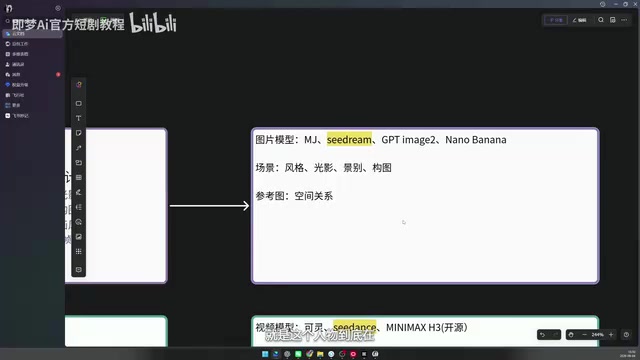
In lesson four, key prompts are extracted from the script and storyboard to generate scenes, with the core objective being a convincing composite of characters within scenes. This is still an image generation step, again using Seedream.
For scenes, pay attention to style, lighting, composition, and shot size. For reference images (key frames), the critical focus is spatial relationships — where exactly the character is positioned within the scene, and how two characters occupy the frame.
Video Generation
All the images generated in previous steps serve as reference images for video generation. The dominant approach right now is universal reference mode, used in both Seedance 2.0/2.5 and the open-source model MiniMax. Two key tips: write prompts in clearly segmented sections; and label each reference image with the @ symbol so the model can interpret them more accurately.
In specific cases where a shot involves a clear, predictable movement trajectory and you can generate both the starting and ending frame, the creator recommends switching to first-and-last-frame mode — because universal reference is essentially AI imagination, while first-and-last-frame mode defines an explicit movement path.
Universal reference mode and first-and-last-frame mode are the two core generation paradigms in mainstream AI video tools. Universal reference (also called single-frame reference or image-to-video) means the model takes one static reference image as a starting point and freely extrapolates subsequent motion — flexible, but with uncontrollable movement trajectories. First-and-last-frame mode requires the user to provide both the opening and closing frame; the model interpolates between the two defined states, enabling precise control over the start and end positions of objects or characters. Each mode has its place: universal reference suits shots that need natural, organic motion (leaves rustling in the wind, subtle facial expressions); first-and-last-frame mode is better for shots with explicit displacement or action trajectories — for example, a character walking from the left side of the frame to the right, or a camera pushing from a medium shot into a close-up. Both MiniMax and Seedance support these two modes.
Voiceover and Music
Many video models now support built-in background music. Voiceover — especially narration — requires a consistent voice throughout the film. To achieve this, you need a suitable voice cloning source and a ComfyUI workflow to do the cloning. The creator stresses that ComfyUI shouldn't be intimidating here — it's a pre-configured workflow under the hood that uses a single open-source voice cloning model called TTS2, which delivers solid results. The ready-to-use workflow will be provided directly to students when that lesson is covered.
ComfyUI is an open-source, node-based workflow framework for AI image and multimedia generation. Users build custom generation pipelines by connecting different functional nodes (model loading, prompt input, samplers, etc.) without writing any code. The learning curve is relatively steep, but its strength lies in high customizability and broad support for open-source models. TTS2 (Text-To-Speech 2) mentioned here is an open-source voice synthesis and cloning model that can convert any text into speech closely matching a target voice, given only a small sample of that voice. In AI short drama production, voice cloning is essential for maintaining consistent narration and character voice timbre throughout the entire film — if each audio segment is generated separately, the voice tone tends to drift noticeably. The creator will provide a pre-configured ComfyUI workflow so students don't need to build the node graph from scratch, significantly lowering the barrier to entry.
Editing and Compositing
The final step uses CapCut to complete the edit — cutting redundant footage, controlling shot pacing, and more. This is saved for lesson seven.
Who Is This Course For?
By design, this course targets people who have zero experience with AI video production and have been turned away by tool barriers. Using Doubao + Jimeng + CapCut — all directly accessible without a VPN — and leveraging official free credits, it removes the biggest pain point: not being able to follow along in practice.
More importantly, the course breaks the production process into seven clearly defined stages: script → storyboard → character design → scene compositing → video generation → voiceover → editing. Even if you later switch to more advanced models or third-party APIs, this workflow framework remains fully applicable. For creators looking to break into the AI short drama and manga space, building a solid understanding of the complete pipeline first — then refining each stage gradually — is the more sustainable path forward.
Related articles

Workbuddy for Absolute Beginners: How a Desktop AI Agent Fits Into Real Workflows
A beginner's guide to the Workbuddy desktop AI agent: installation, claiming credits, file management, and building automated workflows—compared with CodeX for fit and cost, helping professionals shift from AI question-askers to AI managers.

OpenAI's New Agent Stack: Computer Use, Decisions API, and Ultra-Fast Workflows
OpenAI Dev Day unveiled a new agent stack: Computer Use outperforms humans, Decisions API delivers ultra-low-latency classification via Luna, Agents API opens the same Computer Use capabilities, and GPT-6.1 Sol costs only one-seventh of Astra. Core updates, benchmark data, and developer insights.

Liang Wenfeng Open-Sources DeepInfo Inference Framework, Takes On U.S. Ban
DeepSeek open-sources its DeepInfo inference framework after its models, featuring GPU/CPU cross-pipelining, small-model prediction with large-model verification, and full Huawei Ascend and NVIDIA chip support—facing the U.S. federal ban head-on. This article analyzes its significance for AI deployment and open-source strategy.