Juggler: A Visual AI Coding Workbench That Makes Agent Calls Transparent and Controllable
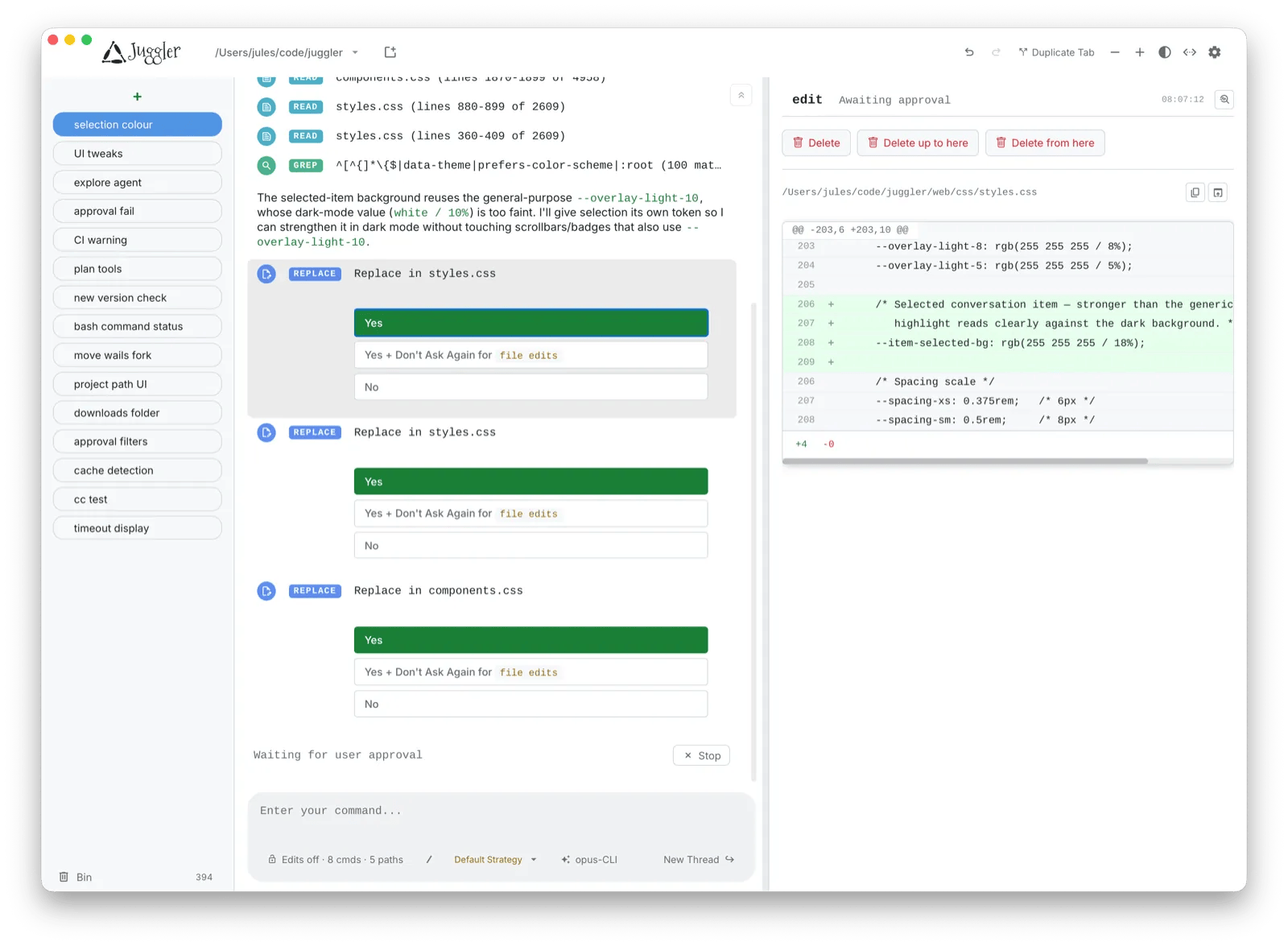
Juggler visualizes AI coding Agent workflows in a Finder-style multi-column desktop workbench.
Juggler is an open-source visual AI coding Agent workbench built by Julian Storer, distributed as a single Go binary with zero dependencies. It borrows macOS Finder's multi-column layout to display tool calls, approval flows, thread structure, and raw context side by side — making Agent behavior observable and auditable. It supports conversation branching into sub-threads for parallel exploration, and every tool is implemented as a JavaScript plugin for high extensibility. Juggler's core philosophy is the inverse of most AI coding tools: it deliberately exposes complexity rather than hiding it, targeting developers who want fine-grained control over Agent behavior.
AI coding assistants are becoming part of every developer's daily workflow, yet most interactions still rely on linear chat windows. Key processes like tool calls, approval flows, and context management are often buried inside a black box — making it hard for developers to see what an Agent is actually doing. The open-source project Juggler aims to change that by spreading the full workflow of an AI coding Agent across a visual desktop workbench.
What Is Juggler
Juggler, built by developer Julian Storer, is positioned as a "visual harness for AI coding Agents." It's a desktop workbench tool with one core goal: making the Agent's execution process visible and controllable instead of opaque.
The project launched on Product Hunt under the tags "Open Source," "Developer Tools," and "Artificial Intelligence," earning 78 upvotes and ranking 15th for the day. It's completely free and open-source, distributed as a single Go binary — meaning installation and deployment carry virtually no dependency overhead, making it highly developer-friendly.
A Finder-Style Interface
Juggler's most distinctive design choice borrows from macOS Finder's column view. Tool calls, approvals, thread structure, and raw context are laid out side by side across multiple columns.
The value here is transparency. In traditional chat-based AI coding tools, which tool an Agent called, what permissions it requested, and what context it relied on all get buried in the conversation flow and are difficult to trace. Juggler breaks this information apart using a spatial column layout, letting developers browse each step of the Agent's actions like navigating a file system. For scenarios that require auditing Agent behavior or debugging complex tasks, this visual structure significantly lowers the cognitive load.
Conversation Branching and Sub-Threads
Juggler supports forking conversations into sub-threads. This is a genuinely practical capability in AI coding: when you want to try an alternative solution without disrupting the main conversation, or need to explore a specific detail separately, branching lets you pursue multiple paths in parallel without repeatedly rolling back or creating new sessions.
This tree-structured conversation model fundamentally separates "exploratory attempts" from "main-line progress." Developers can keep the main thread clean while freely experimenting in sub-threads — a concept that will feel familiar to anyone who uses Git branches.
From a technical standpoint, this tree-based session structure requires solving the problem of context isolation. Each inference from a large language model depends on a complete context window, and branching means different sub-threads each maintain their own independent message history without contaminating one another. For models with limited context length, branching also has a hidden benefit: sub-threads can focus on a narrower problem domain, preventing the accumulating conversation in the main thread from consuming the token budget and allowing the model to maintain higher attention density on subtasks. This mirrors the software engineering principle of "separation of concerns" — encapsulating different experimental intentions in their own scopes rather than mixing all attempts into a single message stream.
Plugin Architecture: Every Tool Is a JavaScript Plugin
Another key design in Juggler is extensibility — "every tool is a JavaScript plugin." This means developers can write custom tools in JavaScript to extend the Agent's capabilities, rather than being locked into built-in functionality.
This plugin architecture lowers the barrier to extension. JavaScript has a vast ecosystem and a huge developer base, so using it as the plugin language means a large number of existing libraries and logic can be reused directly. For teams looking to integrate an AI Agent into their specific workflows, this openness may hold more long-term value than the tool's initial built-in features.
From an implementation perspective, Juggler's host program is written in Go while choosing JavaScript as the plugin language — a combination that's not uncommon. Go handles high-performance low-level scheduling and binary distribution, while JavaScript executes user scripts in a sandbox through an embedded runtime (such as Goja or V8 bindings). This layered "Go shell + JS script" architecture preserves the host's stability and portability while giving plugin developers a familiar dynamic language environment. Similar patterns appear in Cursor's extension mechanism and certain MCP (Model Context Protocol) client implementations. In practice, this means you can use fetch to call external APIs, pull in npm logic snippets, or wrap existing business scripts directly as Agent tools — no need to learn a new DSL or recompile the host.
Positioning and Significance
As a product, Juggler takes a path that diverges from the mainstream. Most AI coding tools today pursue "hiding complexity and letting AI automate as much as possible," while Juggler does the opposite — it emphasizes exposing complexity and keeping developers in control. It feels more like a tool for experienced developers and power users of Agents: people who want to understand, audit, and fine-tune Agent behavior.
The combination of free, open-source, and single-binary also lowers the cost of trying it out. For developers focused on AI Agent observability or building their own Agent workflows, Juggler offers a compelling perspective: instead of treating AI as a black box, lay every step out on the table where you can see it clearly.
Of course, as a newly released open-source project, information about Juggler is still relatively limited. Real-world stability, plugin ecosystem maturity, and compatibility with mainstream Agent frameworks all remain to be validated through actual use. Interested developers can learn more through its Product Hunt page.
Related articles

AI Comic Drama with WorkBuddy from Scratch: A Step-by-Step Skill Pack Installation Guide
Learn how to create AI comic dramas with WorkBuddy from scratch. This guide covers installation, Skill pack import and invocation, plus a script generation demo with manual revision tips to get you through the first step from script to storyboard.

WorkBuddy Agent Runs the Entire GEO Database Mining Pipeline with a Single Prompt
WorkBuddy agent automates GEO database mining: from data search and curation to batch correction, differential analysis, co-expression networks, feature gene screening, and immune infiltration—a single prompt generates a complete bioinformatics report, greatly lowering the barrier to bioinformatics analysis.

PC Memory Wasted? Hacker News Debates Centralized Data Centers
Hacker News users argue that personal computer memory is wasted and should be centralized in data centers, sparking debate on centralized vs. distributed computing resource allocation. This article analyzes the logic behind the claim, the costs of centralization, and new tensions in memory resource allocation in the AI era.