Kilo Code Is Free to Install but Charges for API: Cost Estimation and Configuration Guide

Kilo Code is free software but models are billed per token—estimate costs before scaling up.
Kilo Code is an open-source AI coding agent with a VS Code extension and CLI; installation is free, but models are billed per token. The article covers setup, `/connect` provider configuration, `kilo auth` credential management, and a reusable cost formula. Using 10M input and 2M output tokens, Gemini 4 Argon costs $40 during the discount period and $80 after the December 1 price change. Per-token billing is not always better than a subscription.
Kilo Code Is Free to Install but Charges for API: Cost Estimation and Configuration Guide
Kilo Code is an open-source AI coding agent available as both an editor extension and a command-line tool. The installation itself is completely free. But the word "free" easily creates misunderstanding: the AI models you connect to are still billed by token, and creating an API key does not automatically make paid models free. Understanding this distinction matters far more than fixating on the "free" headline.
Based on a hands-on walkthrough from the YouTube channel Model Lab, this article outlines Kilo's configuration paths and billing logic, and provides a reusable cost estimation method to help you do the math before you start.
What Is Kilo Code: Two Forms of an Open-Source Agent
Kilo positions itself as an open-source coding agent, offering both a VS Code extension and a CLI path. It supports multiple models and providers, but compatibility and account permissions vary by provider.
On the access side, BYOK (Bring Your Own Key) is one of the core options—you use your own provider credentials to access supported models. There are also routes such as platform-managed billing and local models. Open source does not mean fully managed and free, and this needs to be clear upfront when choosing a solution.
BYOK (Bring Your Own Key) means the user applies for an API key directly from a model provider (such as Google, OpenAI, or Anthropic) and enters it into a third-party tool to call the model. In this model, the tool itself does not resell tokens; fees are settled directly with the provider, so unit prices are usually more transparent and closer to official pricing. In contrast, platform-managed billing means the tool vendor purchases model capacity centrally and resells it to users in the form of credits or plans—more convenient, but markup and quota rules need to be read carefully. A third route is local models, running inference locally through runtimes such as Ollama. Marginal cost is close to zero, but there are hardware requirements and capability is usually weaker than cloud flagship models. Understanding the differences among these three routes is the prerequisite for judging which layer "free" actually refers to.
Installation and Connection: Extensions and CLI in Two Steps
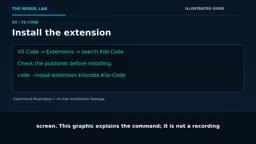
VS Code users can search for Kilo Code directly in the extensions panel. Before installing, be sure to verify the publisher identity to avoid installing a counterfeit package. CLI users install via the NPM command given in the documentation:
npm install -g @kilocode/cli
After installation, run kilo --version to confirm the actual installed version, then open Kilo and use /connect to enter interactive provider configuration. Credential management is handled by the kilo auth command.
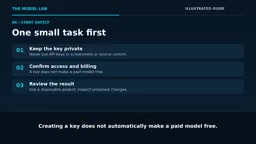
Note that these interfaces may change between versions, so refer to the current official documentation when operating. After selecting a provider and model, keep your API key safe and confirm whether billing is enabled and what usage limits apply.
Start with a Small Task: Verification and Cost Awareness
After configuration, it is not advisable to jump straight into a formal project. A safer approach is to run a small task in a disposable test project: check whether the model responds correctly, and review each proposed file change before accepting it.
This step is both functional verification and cost awareness—you can directly see how many tokens a real task consumes, providing a baseline for later estimates.
How to Calculate Cost: A Reusable Estimation Example
Model Lab gives a hypothetical example: 10 million input tokens and 2 million billed output tokens. This is only a demonstration usage, not an actual monthly bill. The calculation is straightforward—input volume times input unit price, plus output volume times output unit price, plus billable thinking tokens where applicable.
Taking Gemini 4 Argon mentioned in the article as an example, its published introductory price is $2 per million input tokens and $10 per million output tokens (discount period through November 30). Based on the above usage: $20 for input, $20 for output, totaling $40.
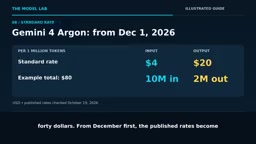
Starting December 1, the published price adjusts to $4 input and $20 output. The same usage becomes $40 for input and $40 for output, totaling $80—costs double directly before and after the discount period. Meta's Muse Wonder is published at $4 and $20, and the same example also yields $80. Note that Muse Wonder Full is a separate subscription product within Muse Code, and the standard API does not include this model.
Token is the basic unit of measurement for text processed by a model, roughly equivalent to part of an English word or one Chinese character. Input tokens refer to the context you send to the model (prompts, code files, conversation history), and output tokens refer to the replies the model generates. Most providers price input and output separately, with output unit prices usually higher because generation involves more computation. Billable thinking tokens refer to tokens generated by reasoning models during internal reasoning before giving a final answer. Some providers count these toward output billing, which is one reason actual bills often exceed rough estimates. Estimates should be based on actual usage statistics in the provider console, not merely inferred from conversation word counts.
Is Pay-Per-Token Always More Cost-Effective Than a Subscription? Not Necessarily
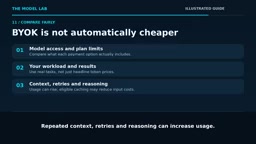
The numbers above do not prove that per-token billing is better than a $20 subscription. What really should be compared is: the range of models you can access, plan quotas, actual usage, and output quality.
A few easily overlooked cost amplifiers: repeated context, retries, and reasoning processes all drive up usage; caching may reduce qualifying input costs. Also distinguish token markups from other fees—Kilo separately publishes information about credit purchases and cloud compute, so be sure to read the terms of the payment method you actually choose.
Free software does not promise that all managed services are free, and a paid API key is not the only option, nor the only way to use this agent. The recommended path is: start with a small task, connect a supported model, run a real task, check the cost, review the changes, and then choose a payment method that matches your workload.
Prompt Caching is a capability offered by some providers: when multiple requests share the same prefix content (such as system prompts or large codebase snippets), input tokens that hit the cache can be billed at a significant discount, or even charged only for storage. This is especially valuable for coding agents that work on the same code repository for long periods, because repeated context is one of the main sources of token consumption. Conversely, if every request carries the full context and cannot hit the cache, costs will expand linearly. Retries also drive up bills: the agent may automatically resend requests when tool calls fail or output does not comply, and the actual number of calls for a task is often more than the visible rounds. When evaluating costs, factor in cache hit rate and retry rate, not just the theoretical price of a single call.
FAQ
Does Kilo Code cost money to install? No. The software itself is open source and free; costs occur at the model invocation stage.
Are models free after creating an API key? No. The key is only an access credential; billing depends on the provider's pricing policy.
How can I avoid unexpected bills? First test on a small scale in a disposable project, confirm the billing status and usage caps, and then scale up gradually.
One-line Summary
Kilo Code software is free but models are billed per token, so estimate costs before scaling up.
Paragraph Summary
Kilo Code is an open-source AI coding agent offering both a VS Code extension and a CLI. Installation is free, but connected models are still billed per token, and creating an API key does not make paid models free. Based on Model Lab's hands-on walkthrough, the article covers installation, configuring providers via /connect, and managing credentials with kilo auth, and emphasizes running small tasks in a disposable project first to verify functionality and understand costs. The cost estimation formula is input volume times input unit price plus output volume times output unit price, including billable thinking tokens; using 10 million input and 2 million output tokens as an example, Gemini 4 Argon totals $40 during the discount period and rises to $80 after the December 1 price adjustment. The article also notes that per-token billing is not necessarily better than a subscription, and judgment should combine model range, quotas, usage, and output quality.
Related articles

Is the Agent Harness Dead? Cursor's Early Engineer Breaks Down the Real Architecture of AI Coding Agents
Cursor early engineer Jediah breaks down the real architecture of the agent harness: why "the harness is dead" is only half right, how the data flywheel lets the harness obsolete itself, and how Grokbot, software factories, and primitive design open new frontiers for agents.

Python Visitor Pattern and Better Alternatives Explained
A deep dive into Python's visitor pattern and four alternatives: method pattern, pattern matching, dictionary mapping, and functools.singledispatch. Choose the best decoupling design by change frequency.

357 Days of Deep Experience: Why Omarchy Made Me Stop Distro-Hopping
A 357-day deep dive into Omarchy: 59-second install, out-of-the-box audio and GPU support, the Quattro QuickShell rewrite migration pains, and why Arch users should try it.