Kimi Code Installation & Hands-On Guide: Getting Started with a Free AI Coding Assistant

A hands-on guide to Kimi Code, a free AI coding and productivity assistant built for Chinese users.
This guide walks through installing and using Kimi Code, a free AI coding assistant from Moonshot AI. It covers four core features — video understanding, multi-model switching, real-time data queries, and Swarm parallel batch processing — and provides a detailed comparison with Claude Code to help users choose the right tool for their needs.
Why Do You Need a Domestic AI Coding Assistant?
Claude Code is one of the hottest AI coding tools available today, and its capabilities are genuinely impressive. However, for users in China, there are several obvious pain points: complex setup, the need for a VPN, high network latency, and a steep learning curve. These issues have kept many developers and everyday users at bay.
Claude Code is a command-line-based AI coding assistant developed by Anthropic, powered by the Claude series of large language models (especially the Claude 3.5/4 series). It can understand code context, perform file operations, execute commands, and engage in multi-turn conversational programming directly in the terminal. Anthropic was founded by Dario Amodei, former VP of Research at OpenAI, with "AI safety" as its core philosophy. The Claude model excels in code generation, logical reasoning, and long-text comprehension, consistently ranking at the top in authoritative benchmarks like SWE-bench (Software Engineering Benchmark). Claude Code's core advantage lies in its deep integration into developer workflows — unlike IDE plugin-based tools like GitHub Copilot, it exists as a terminal-native tool that can directly read and write project files, perform git operations, and run test scripts, creating a closed loop from "conversation" to "execution." This is why it quickly gained popularity among overseas developers, but users in China have struggled to enjoy the same experience due to network and configuration barriers.
Recently, the Moonshot AI team released Kimi Code — an AI coding and productivity tool built specifically for the Chinese market. Moonshot AI was founded in 2023 by Professor Yang Zhilin from Tsinghua University and is one of the leading startups in China's large model space. The company initially made its name with long-text processing capabilities — its Kimi series models were first known for supporting ultra-long context windows of 200,000 characters, later expanding into multimodal understanding, code generation, and more. As a key component of its developer tool ecosystem, Kimi Code not only benchmarks against Claude Code on the coding front but also integrates additional practical features like video understanding, real-time data queries, and batch document processing. This reflects the broader industry trend of Chinese AI companies shifting from "model capability competition" to "application tool deployment." This article will walk you through everything from installation and configuration to core features, helping you get started quickly with this AI coding assistant.
One-Click Installation & Account Setup for Kimi Code
Installation: Truly Zero Barrier to Entry
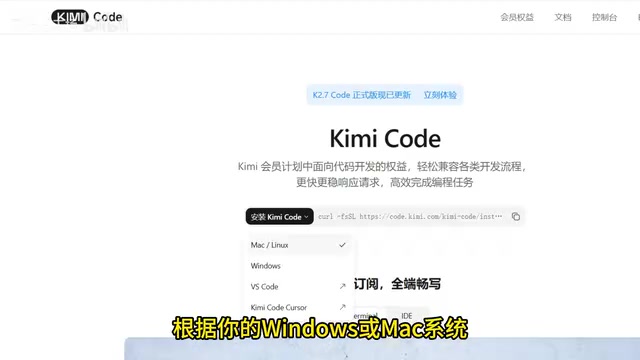
Kimi Code's installation process is extremely straightforward. Visit the Kimi Code official website, copy the one-click installation command for your operating system (Windows or Mac), paste it into your terminal, and run it. Everything is handled automatically — no need to manually configure environment variables or install dependencies.
Account Setup: Three Steps and You're Done
After installation, type kimi in the terminal to enter the interactive interface, then type login to configure your account. The system will present three options:
- New user registration
- Kimi China version (recommended for users in China)
- International version
Users in China can simply select the second option and enter their Kimi China API key to complete the setup. An API key is the most common authentication method in large model services. It's essentially a unique string generated by the service provider, used to identify the caller, control access permissions, and meter usage quotas. When you configure an API key in Kimi Code, you're establishing a secure communication channel between your local terminal tool and Kimi's cloud-based model service. Each time a request is sent, the key is transmitted along with it to the server for verification. Compared to complex authentication flows like OAuth, the advantage of API keys is their simplicity and suitability for developer tool scenarios — but you should also take care to keep them safe, as a leaked key could result in unauthorized usage of your quota.
The entire process takes less than a minute. Once configured, it defaults to the latest Kimi 2 Pillow 7 large model, with stable connections and fast response times — none of the constant timeout issues you get with Claude Code.
Four Core Features of Kimi Code Explained
Video Understanding & Content Extraction
This is a game-changer for content creators and media professionals. The traditional approach — manually watching videos, taking notes, and organizing key points — is time-consuming and tedious. Kimi Code offers powerful video parsing capabilities: simply feed it a Bilibili video link, and it will automatically parse the entire video content and organize the core logic. This capability relies on multimodal large model technology, meaning the model can process not just text but also understand visual frames, audio, and subtitles in videos, fusing information from multiple modalities for semantic understanding and content distillation.

Type the auto command to enable fully automatic mode with no manual intervention needed. After a few seconds, a complete video summary will be generated. You can then further process it in various ways:
- Extract key points: Quickly capture core insights
- Content breakdown: Analyze the video's structural framework
- Derivative narration: Generate new commentary scripts based on the summary
- Knowledge review: Systematically organize key takeaways
For users who need to digest large volumes of video content daily, this feature can save enormous amounts of time.
Flexible Model Switching
Different tasks have different model requirements — coding might need a model with stronger logical reasoning, while copywriting might need one with better language expression. Kimi Code supports one-click switching between various mainstream large models via the provider command.
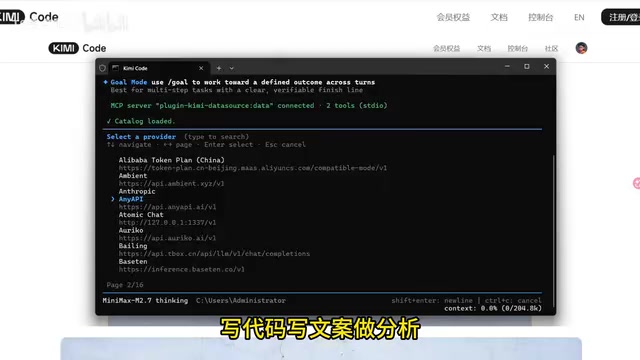
Supporting multi-model switching reflects an important trend in AI tool development — "Model Routing." Different large models have different strengths across different tasks: for example, the Claude series excels at code generation and long-text reasoning, GPT-4o stands out in multimodal understanding, and China's DeepSeekAd has advantages in mathematical reasoning. No single model can achieve optimal performance across all scenarios, so more and more AI tools are adopting a "model aggregation" architecture that allows users to select the most suitable model for specific tasks. Under the hood, this architecture typically relies on a unified API adaptation layer that abstracts away the interface differences between model providers, presenting users with a consistent interaction experience. Platforms like OpenRouter and SiliconFlow are doing similar things, but Kimi Code builds this capability directly into the terminal tool, reducing the switching cost for users.
This flexibility means you don't have to jump between multiple tools. A single terminal interface can adapt to all scenarios — whether it's code debugging, copywriting, or data analysis, you can find the most suitable model for the job.
Real-Time Data Queries
Type pagin in the terminal to open the plugin center. After installing the official DataPagesource plugin, you'll unlock real-time data query capabilities across the web. This feature essentially connects external data sources to the large model through a plugin mechanism, addressing a core limitation of large language models — their training data has a temporal cutoff and cannot access real-time information. By calling external APIs and data interfaces through plugins, the model can dynamically retrieve the latest data during inference. This "Retrieval-Augmented Generation" (RAG) approach has become the mainstream solution for real-time information in the industry.
Supported data types include:
- Stock market data: Real-time stock prices, candlestick charts
- Business information: Company registration details, equity structures
- Academic literature: Paper search and abstract extraction
- Industry data: Market reports, trend analysis
For professionals who frequently conduct market research and data analysis, this feature directly eliminates late-night research sessions and can double your research efficiency.
Swarm Parallel Processing Mode (Flagship Feature)
This is one of Kimi Code's most differentiated features. Ordinary AI tools can only process documents one file at a time, making them extremely inefficient when dealing with large volumes of files. Kimi Code's Swarm (parallel processing) mode can handle multiple files simultaneously.
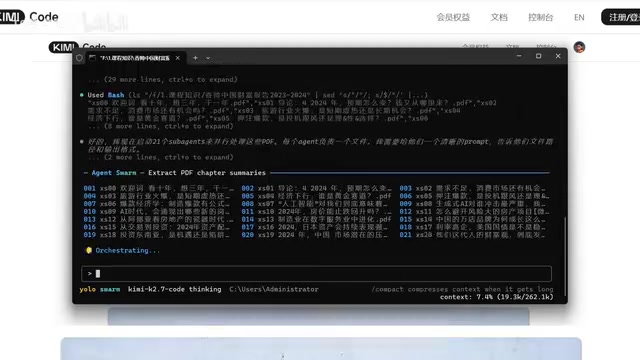
The core concept behind Swarm parallel mode originates from the "task parallelism" paradigm in distributed computing. Traditional single-threaded document processing is sequential — you can't start the second file until the first one is finished, so total time equals the sum of all individual processing times. Parallel mode, on the other hand, launches multiple processing instances simultaneously, each handling one file independently, bringing total time close to that of processing a single file. In large model application scenarios, implementing this capability requires solving several key technical challenges: first, concurrent request management — properly controlling the number of simultaneous requests sent to the model to avoid triggering rate limits; second, context isolation — ensuring that each file's processing doesn't interfere with others; and third, result aggregation — consolidating outputs from multiple parallel tasks into unified, structured results. This design philosophy shares similarities with the MapReduce framework — first "Map" (distribute), then "Reduce" (aggregate) — making it ideal for batch document analysis, large-scale data extraction, and similar scenarios.
The usage is also intuitive: after enabling Swarm mode, simply import an entire folder path, and all files will be processed in parallel simultaneously. In actual testing, when processing 21 PDF documents at once, Kimi Code was able to parse, summarize, and consolidate content simultaneously, automatically generating a complete summary.
This feature is particularly useful in the following scenarios:
- Academic research: Batch reading and organizing literature
- Project management: Quickly digesting large volumes of project documents
- Content creation: Distilling insights from multiple source materials
Kimi Code vs Claude Code: How to Choose?
| Comparison | Kimi Code | Claude Code |
|---|---|---|
| Installation difficulty | One command, zero configuration | Requires environment setup, multiple steps |
| Network requirements | Direct connection in China, no VPN needed | Requires VPN |
| Cost | Free to use | Requires paid subscription |
| Model switching | Supports multi-model switching | Limited to Claude series only |
| Additional features | Video parsing, data queries, batch processing | Focused on code development |
| Coding capability | Relies on Kimi 2 model, upper-middle tier | Industry-leading |
Objectively speaking, if your core need is pure code development, Claude Code remains in the top tier for programming capability. The Claude model continues to lead in code evaluation benchmarks like SWE-bench Verified, and its depth of understanding for complex codebases and quality of multi-step programming task completion remain hard to surpass. However, if you're a student, content creator, or a professional who needs a comprehensive AI productivity assistant, Kimi Code's combination of zero barrier to entry + multi-functionality + China-optimized is clearly more appealing.
It's worth noting that these two tools aren't in direct competition — they represent two different directions in AI coding tool development: Claude Code takes the "deep specialization" route, pursuing excellence in the vertical scenario of code development; Kimi Code takes the "broad and comprehensive" route, aiming to become a multi-scenario terminal AI assistant covering coding, office work, content creation, and more. Users can absolutely use both tools for different scenarios.
Conclusion
Kimi Code fills a gap for Chinese users in the terminal AI tool space. It doesn't try to outperform Claude Code on every single feature. Instead, through lightweight installation, local market adaptation, and multi-feature integration, it offers Chinese users a more practical choice.
From a broader perspective, Kimi Code's launch also signals that China's AI tool ecosystem is shifting from "model-layer competition" to "application-layer competition." Over the past year, Chinese AI companies primarily focused on base model parameter scales and benchmark scores. Now, more and more teams are realizing that what truly determines user retention isn't model benchmarks but tool experience — whether installation is convenient, whether features align with actual needs, and whether the ecosystem is well-developed. Kimi Code has taken a commendable step in this direction.
Whether you're a complete beginner or an experienced developer, it's worth spending a few minutes to install and try it out. After all, it's just one command.
Related articles

Private Key Set to 4? CA's Elementary Mistake Leaves TLS Exposed
CA eMudra set private keys to tiny values like 4, making TLS certificates brute-forceable. A Computerphile video demonstrates the full process from extracting public keys to forging certificates, and explores the fragility of the PKI trust chain.

How Gen Turns Data into Decisions with ChatGPT Work
In an OpenAI user case, business leader Gen shares how ChatGPT Work turns data into decisions: within hours of launch, teams can judge whether integrations and onboarding flows work, shifting decision iteration from hundreds of trial-and-error attempts to a fast feedback loop.

ChatGPT vs. Claude In-Depth Comparison: Strong at Coding but Weak at Research — How to Bridge the Gap?
A user considers switching from ChatGPT to Claude, finding Claude stronger at coding but shallower at research. We analyze the differences and share tips to make Claude's research deeper.