Kiro AI IDE In-Depth Review: How Spec Mode Makes AI Coding More Reliable and Powerful

AWS launches Kiro AI IDE, differentiating from Cursor with its Spec Mode approach
At the 2025 New York Summit, AWS unveiled several major products, with the AI IDE Kiro drawing the most attention. Built on a VS Code-based interface, Kiro offers two working modes: Vibe and Spec. Spec Mode is its core differentiator, forcing the AI to complete requirements analysis and architecture design before writing code — addressing a key weakness in traditional AI IDEs that skip the planning phase. Kiro supports Claude 4 with unlimited free usage during the Preview phase and includes built-in MCP protocol support. Hands-on testing with a real WeChat mini program project showed impressive results.
A Major Launch from the AWS 2025 New York Summit: Kiro AI IDE Arrives
At the 2025 New York Summit, AWS unveiled a series of major products, including Amazon Bedrock AgentCore, Kiro AI IDE, Amazon Nova Act, SM Vectors, and more. Among them, AgentCore is considered the most innovative — in the past, building Agent products like Manus required developers to set up complex runtime environments from scratch, including session isolation, memory management, and authentication. AgentCore encapsulates all these technical details, making Agent deployment and management easier than ever before.
To truly appreciate AgentCore's value, you first need to understand the engineering complexity behind AI Agent infrastructure. Traditionally, building a production-grade AI Agent system requires developers to solve numerous engineering problems on their own: session isolation ensures data doesn't leak between concurrent users; memory management involves coordinating short-term context windows with long-term knowledge storage; and authentication and access control are critical for security and compliance. These infrastructure concerns often consume over 80% of the engineering effort in Agent development, while the actual business logic gets buried underneath. AgentCore's emergence is similar to how AWS Lambda abstracted away server management — developers no longer need to worry about the underlying runtime and can focus entirely on designing the Agent's core capabilities. This trend also reflects an industry-wide paradigm shift from "how to build Agents" to "how to rapidly deploy and scale Agents."
However, today's focus isn't AgentCore — it's AWS's brand-new AI IDE: Kiro. As an AI coding tool positioned to compete with Cursor, how well does Kiro actually perform? What differentiating features does it offer? Let's find out through a hands-on project.
First Impressions of Kiro: Interface Design and Core Features
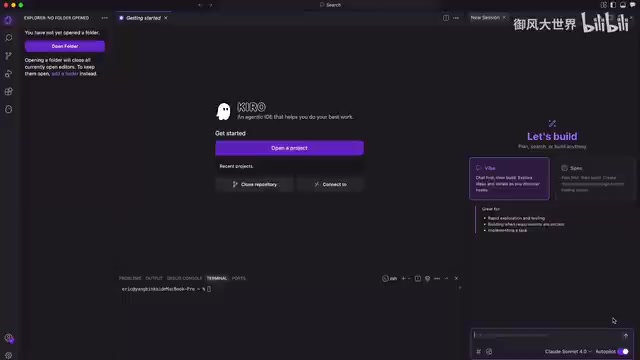
When you first open Kiro after downloading and installing it, the app guides you through importing your VS Code plugins and theme configurations. The overall interface style is highly consistent with VS Code, making the learning curve extremely low. Buttons in the upper-right corner control the visibility of different panels, offering a flexible layout.
Vibe Mode vs. Spec Mode: Two Core Workflows
Kiro's AI chat panel offers two working modes:
- Vibe Mode: Best for quick validation and testing, handling small tasks, or scenarios without well-defined requirements — similar to the instant conversational coding experience found in AI IDEs like Cursor.
- Spec Mode: This is Kiro's most significant differentiator. It performs deep analysis and planning of the user's requirements, creating a detailed implementation plan before writing any code.
Spec Mode's design philosophy is rooted in the software engineering tradition of "Specification" documents. In classical software development workflows, a Software Requirements Specification (SRS) is a mandatory prerequisite before project kickoff, defining the system's functional boundaries, technical constraints, and acceptance criteria. However, in the AI IDE era, most tools skip this step entirely, causing AI-generated code to frequently deviate from actual requirements and forcing developers into repeated correction cycles. Research shows that fixing issues discovered during the requirements phase costs only 1/10 of what it costs during the coding phase — Spec Mode forces the AI to complete requirements analysis and architecture design before entering the coding phase, using engineering discipline to address a systemic weakness in AI tools.
Model Support and Configuration Options
Kiro currently supports two models: Claude 3.7 and Claude 4. Claude 4 is Anthropic's next-generation large language model, offering significant improvements over its predecessor in code generation, long-context comprehension, and instruction following. Anthropic places particular emphasis on "Constitutional AI" methods in model training, enabling the model to maintain better goal alignment during complex tasks while reducing hallucinations and drift — a characteristic especially important in Spec Mode, where the model needs to continuously reference the initially created specification document throughout the entire development cycle rather than gradually "forgetting" the original requirements across multiple conversation turns.
During the Preview phase, Claude 4 is completely free with unlimited usage, which is extremely appealing for developers eager to try it out. This strategy reflects the deep strategic partnership between AWS and Anthropic: AWS is a major investor in Anthropic, and the two companies have formed a tight ecosystem integration at the model deployment and cloud service layers, enabling Kiro to build a competitive moat through differentiated model capabilities in the fiercely competitive AI IDE market. Additionally, Kiro offers an Autopilot mode, which is recommended for a smoother development experience.
For context support, Kiro allows adding various types of context through the # symbol, including image recognition. MCP (Model Context Protocol) is enabled by default and can be configured in detail at both the user level and project level in the settings.
MCP is a standardized protocol proposed and open-sourced by Anthropic in late 2024, designed to solve the fragmentation problem in integrating AI models with external tools and data sources. Before MCP, every AI application needed custom integration code for different data sources (databases, file systems, API services, etc.), resulting in extremely high maintenance costs. MCP defines a unified client-server communication specification that enables AI models to invoke any external tool in a standardized way — similar to how the USB interface standardized hardware connections. Kiro's support for both user-level and project-level layered configuration means developers can customize different toolsets for different projects while maintaining universal tool configurations at the personal level. As more and more IDEs and AI tools adopt the MCP standard, this protocol is becoming a critical piece of infrastructure for AI tool ecosystem interoperability.
Hands-On Review: Building a WeChat Mini Program with Kiro's Spec Mode
To test Kiro's practical coding capabilities, we chose an interesting project — a "Living Alone Buddy Anti-Decay Mini Program" (inspired by the Bilibili content creator "AI小透明"). This mini program includes the following features:
- Daily Check-in: Report that "you're still alive"
- Emergency Contacts: If no check-in for two consecutive days, the system automatically triggers notifications (phone calls or text messages)
- "Alive Friends" Feed: A social feed similar to WeChat Moments
- Survival Leaderboard: Check-in count statistics and rankings
Spec Mode's Requirements Planning Capabilities
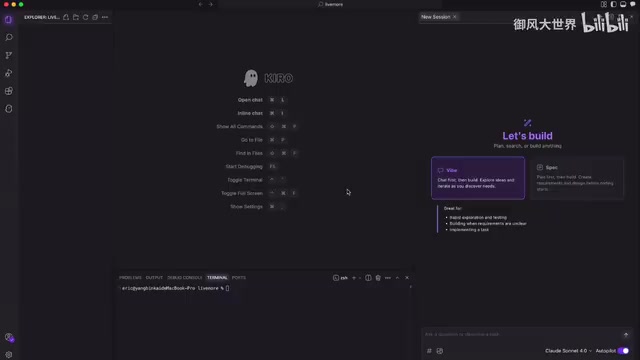
After feeding the requirements directly to Kiro, because we selected Spec Mode, it didn't immediately start writing code. Instead, it produced a highly detailed implementation plan covering:
- UI design plan
- Technology stack selection
- Logic analysis and module breakdown
This was truly impressive. When using Cursor, many developers habitually ask the AI to generate structured prompts first, confirm them, and then have it write the code. Kiro's Spec Mode eliminates this step entirely, internalizing requirements analysis and solution design as part of the workflow. This design corresponds to the core value of Sprint Planning in agile development: aligning goals, breaking down tasks, and assessing risks before taking action, thereby making subsequent execution more efficient and predictable.
Development Process and Final Results
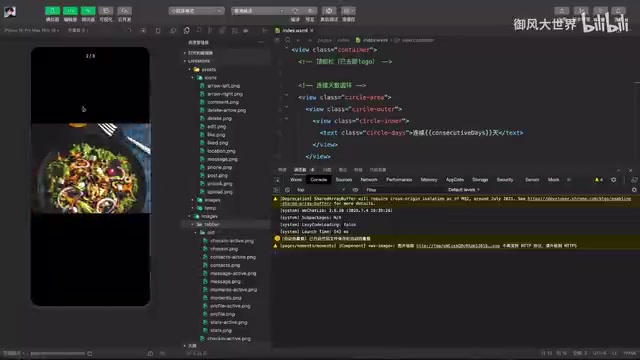
During execution, timeout errors occasionally occurred — simply telling it to "continue execution" resolved the issue.
Related articles
 Product Reviews
The Programmer's Desk Setup Guide: Building a Workspace That Feels Like Home
Discover how programmers build productive, comfortable workspaces. From multi-monitor setups to ergonomic design, explore the desk philosophy that drives focus and flow.
 Product Reviews
Qoder vs Cursor Real-World Comparison: Which $20/Month AI IDE Is Better?
Hands-on comparison of Qoder vs Cursor AI IDEs: Agent autonomy, human interaction count, and architecture decisions. Qoder needed only 2 interactions vs Cursor's 8.
 Product Reviews
Cursor Cloud Agent Demo: Eliminating Bottlenecks Across the Entire Software Development Lifecycle
Deep analysis of Cursor's Cloud Agent demo showing how cloud VMs, automated test artifacts, and a full-chain control plane systematically eliminate human bottlenecks across the software development lifecycle.