Kiro In-Depth Review: Breaking Down Amazon's AI Coding Tool and Its Four Core Features

Amazon's AI coding tool Kiro stands out with spec-driven development and automated hooks.
Amazon's AI coding tool Kiro is built on VS Code and powered by Claude models, featuring two major highlights: Specs for specification-driven development and Agent Hooks for automation. Specs transforms vague requirements into a structured "Requirements → Design → Tasks" workflow, solving the common problem of AI-generated code drifting from the original intent. Agent Hooks automatically triggers AI to handle repetitive tasks during development events like file saves and component creation, significantly boosting developer productivity.
Introduction
The AI coding tool arena has welcomed another heavyweight contender — Kiro, developed by Amazon. This tool earned exceptionally high praise during its beta period and has finally been opened to the public. As an AI IDE also built on VS Code and powered by the familiar Claude model series, what makes Kiro stand out from the crowd? This article takes a hands-on approach to break down Kiro's four core features and examine what it gets right.
Notably, Kiro offers new users a generous free trial of 500 requests over 30 days — quite substantial compared to other AI coding tools on the market. Its UI design is also visibly superior to similar products, and it recently launched a CLI version that can be used directly in the terminal.
Specs: Specification-Driven Development — No More AI Going Off the Rails
Kiro's most essential feature is Specs (Specification-Driven Development). It transforms a typical "one-sentence requirement" into a complete, structured documentation system, fundamentally solving the most common problem in AI coding: the AI gradually drifting off course as it writes.
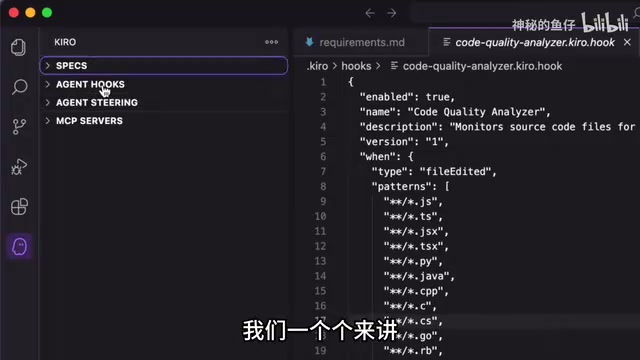
This design is deeply rooted in software engineering principles. In traditional software engineering, requirements documentation, architecture design, and task breakdown are three separate phases handled by product managers, architects, and developers respectively. The biggest pain point of early AI coding tools was skipping all three phases — jumping straight from vague requirements to code generation, leading to "hallucination drift" where the AI gradually deviates from the original intent over long contexts. Kiro's Specs essentially encodes software engineering best practices into the AI workflow. The approach of pairing each requirement with Acceptance Criteria also closely aligns with the "user story" format in Agile development.
As a practical example, when you ask Kiro to generate an e-commerce homepage using Specs mode, it follows three steps:
- Create a Requirements Document: The overall requirements are broken down and refined, with each requirement given corresponding acceptance criteria according to the specification
- Design Planning: Once requirements are confirmed, it automatically performs architecture design and plans the implementation path for the overall functionality
- Create a Task List: The design is decomposed into executable tasks, and you can have each task executed step by step
This "Requirements → Design → Tasks" three-step workflow ensures the AI strictly follows specifications when generating code, dramatically reducing the "progressive deviation" problem in AI-generated code. Compared to other tools that let AI generate all the code in one go, Specs mode is more like assigning a project manager to your AI.
Agent Hooks: Automated Hooks That Eliminate Repetitive Work
Agent Hooks is Kiro's second standout feature and a genuinely innovative AI application. The core idea is simple: take the tasks you'd normally have to perform manually over and over, and let AI execute them automatically through "hooks."
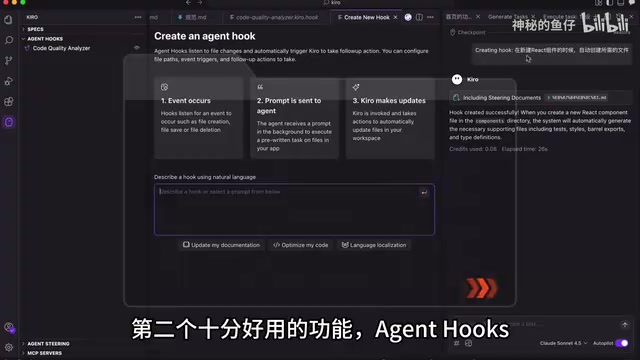
To understand Agent Hooks, you first need to understand where the "hook" mechanism comes from. In software development toolchains, Git Hooks, Webpack plugins, and IDE file-watch events are all similar concepts — triggering predefined actions at specific lifecycle points. Kiro combines this mechanism with an AI Agent, enabling development events like "file saved" or "component created" to trigger intelligent follow-up actions, rather than just simple script execution. This shares the same philosophy as GitHub Actions CI/CD triggers, with the key difference being that the executor has been upgraded from a deterministic script to an AI Agent with reasoning capabilities, able to handle more complex, context-dependent tasks.
Here are a few practical scenarios:
- When creating a new React component: Automatically scaffolds the base code and generates the corresponding test file
- When saving a file: Automatically formats the code
- After saving a file: Automatically updates or generates the corresponding test cases
Each of these operations is straightforward on its own, but in day-to-day development they require constant manual repetition. Agent Hooks automates these workflows — it's like having an always-ready assistant at your side, truly enabling developers to focus solely on business logic while writing code.
Related articles
 Product Reviews
The Programmer's Desk Setup Guide: Building a Workspace That Feels Like Home
Discover how programmers build productive, comfortable workspaces. From multi-monitor setups to ergonomic design, explore the desk philosophy that drives focus and flow.
 Product Reviews
Qoder vs Cursor Real-World Comparison: Which $20/Month AI IDE Is Better?
Hands-on comparison of Qoder vs Cursor AI IDEs: Agent autonomy, human interaction count, and architecture decisions. Qoder needed only 2 interactions vs Cursor's 8.
 Product Reviews
Cursor Cloud Agent Demo: Eliminating Bottlenecks Across the Entire Software Development Lifecycle
Deep analysis of Cursor's Cloud Agent demo showing how cloud VMs, automated test artifacts, and a full-chain control plane systematically eliminate human bottlenecks across the software development lifecycle.