Kitbar: A Lightweight Solution for Aggregating Developer Tools into a Single Edge Bar

Kitbar is a screen-edge developer status bar aggregating Vercel, GitHub, Stripe, and Claude Code in real time — no account required.
Kitbar is a Mac/Windows productivity tool by indie developer Abbas Aga that aggregates real-time status from Vercel, GitHub, Stripe, and Claude Code into a thin screen-edge bar, using ring indicators for at-a-glance health checks with hover-to-detail and in-place actions. Its standout architectural choice is local-first: no account, no server, all API keys stored in the system Keychain. The Claude Code integration signals that AI coding tool usage is now a routine ops concern being productized alongside deployments and payments.
One Thin Bar to Rule Your Daily Dev Monitoring
Developers typically juggle a pile of open tabs: Vercel for deployment status, GitHub for CI checks, Stripe for payment activity, and increasingly, Claude Code usage limits. Constantly switching context not only breaks focus but also makes it easy to miss something going wrong. Kitbar, a newly launched Product Hunt project, aims to solve exactly this fragmentation problem.
Its positioning is straightforward — a thin bar docked to the edge of your screen that consolidates the status of your most critical development services in one place. It currently sits at 73 upvotes and ranks #9 on Product Hunt, categorized under Productivity, Developer Tools, and Menu Bar Apps, built independently by developer Abbas Aga.
What It Actually Does
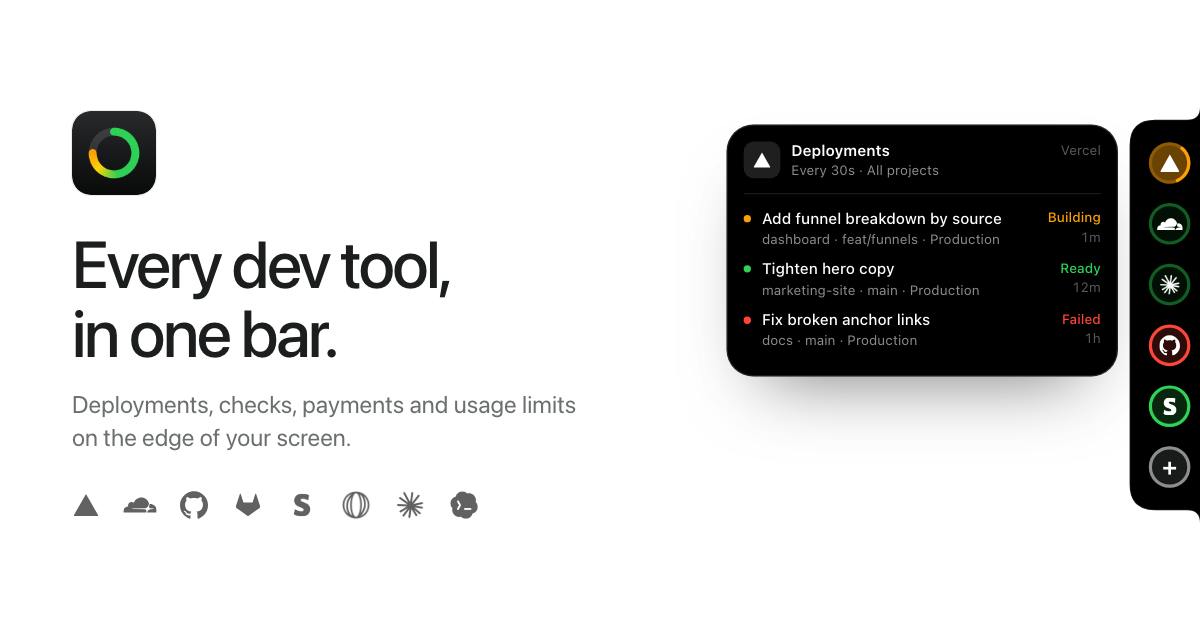
Kitbar's interaction design revolves around a "ring" indicator. Each connected service appears as a status ring on the edge bar, giving you an at-a-glance view of its current health:
- Vercel: Deployment progress and results
- GitHub: CI/CD check pass/fail status
- Stripe: Payment data
- Claude Code: AI coding tool usage limits
Hovering over a ring expands it to show more detail; beyond that, you can act directly from there without jumping to each service's web dashboard. This "see it instantly, handle it right there" design is the classic philosophy of menu bar tools — but Kitbar extends it beyond passive notifications into actionable territory.
Menu bar apps are a mature, lightweight application pattern in the macOS ecosystem. Instead of occupying Dock space, they live persistently in the top menu bar, surfacing information through icons or minimal UIs. The Windows equivalent is the System Tray. The core design philosophy of this category is "zero-switching-cost awareness" — users get critical information at a glance without opening a new window. Kitbar evolves this pattern into a screen-edge thin bar with ring-based visual indicators, a spatial expansion of the traditional menu bar paradigm: from point-like icons to a linear aggregate, with higher information density and more intuitive side-by-side service comparison.
Privacy and Architecture: No Account, No Server
In aggregation tools like this, key management is usually what developers care about most. Kitbar's approach is worth noting: no account registration required, and no self-hosted server. Your API keys are stored directly in the system Keychain and never routed through a third party.
This means the data flow chain is as short as it gets — Kitbar is essentially a local client that uses locally stored credentials to connect directly to each service's API. For developers who treat Stripe keys and GitHub tokens as highly sensitive credentials, this local-first architecture lowers the trust barrier and sidesteps the concern of "yet another SaaS that wants to host my keys."
The system Keychain is an OS-level encrypted credential storage mechanism. macOS Keychain and Windows Credential Manager are both encrypted and access-controlled by the OS kernel. Applications can only read and write their own entries via system APIs and cannot directly access credentials stored by other apps. Compared to encrypting keys and storing them in a regular database or config file, the Keychain's security boundary is enforced by the operating system rather than the application itself. This is why "store in Keychain" is considered the baseline practice for local key management in the developer community — even if the app itself has a vulnerability, an attacker cannot easily bulk-export credentials. For Kitbar, using the Keychain means it doesn't need to implement its own encrypted storage, while also sending users a verifiable trust signal: your Stripe keys and GitHub tokens never leave your machine.
Why This Direction Is Worth Watching
Kitbar addresses a real but often overlooked pain point: developer "monitoring anxiety." As projects depend on more and more external services, the cognitive overhead of staying on top of them keeps growing. Consolidating scattered statuses into a single edge bar and replacing the habit of constantly refreshing dashboards with ring-based visuals is fundamentally about reducing attentional load.
The Claude Code usage integration is particularly telling. It reflects the fact that AI coding tools have become a regular part of the developer workflow — usage limits and cost control are now things that need to be monitored alongside deployment status and payment activity. The fact that a newly launched tool puts it on equal footing with Vercel, GitHub, and Stripe signals that the operational and monitoring needs around AI coding tools are being productized.
Current State and Limitations
As an early-stage product fresh on Product Hunt, Kitbar currently supports both Mac and Windows — no small feat for an indie developer's project. That said, based on public information, its integration scope is currently limited to Vercel, GitHub, Stripe, and Claude Code. For teams with more complex toolchains, whether it supports additional services (such as AWS, Datadog, Linear, etc.) will directly determine whether it can grow from "a handy little utility" into a daily essential.
The low comment count of 5 also indicates it's still in a very early validation stage. Its core value proposition — consolidated, actionable, local-first — points in a clear direction, but whether it can sustain iteration and expand its ecosystem remains to be seen.
Summary
Kitbar is a cleanly conceived developer productivity tool: a screen-edge bar that aggregates real-time status from multiple key services, supports hover-to-detail and in-place actions, and stores credentials locally without requiring an account or server. It doesn't make grand claims — it solves a specific, high-frequency annoyance. For developers who spend their days switching between multiple dashboards, tools like this tend to be more valuable than they first appear.
Related articles

Chain of Thought Isn't Just for AI: How Humans Can Use CoT to Improve Thinking Quality
Chain of Thought isn't just a prompt trick for large models. Starting from a Hacker News discussion, this article analyzes why CoT works for human thinking too, breaks down actionable ways to transfer it, and highlights the key differences between human CoT and machine CoT.
Cloudflare Teams Up with OpenAI: Closi…
Cloudflare Teams Up with OpenAI: Closing the Loop from Vulnerability Discovery to Defense with AI
Cloudflare uses OpenAI Daybreak to investigate security vulnerabilities and generate reviewable remediation plans, while developers use Codex to boost coding efficiency and quality.

Orca Multi-Agent Orchestration in Practice: A Guide to Parallel Collaboration with Claude and Codex
Orca is Stable AI's free open-source agent workbench supporting 34 agents like Claude Code and Codex in parallel. Learn its Git worktree isolation, multi-model orchestration, and mobile management.