Kleanly: Lock Your MacBook Keyboard and Trackpad with One Tap for Hassle-Free Cleaning

Kleanly locks your MacBook keyboard and trackpad via the notch so you can clean without accidental inputs.
Kleanly is a minimalist MacBook utility that solves the problem of accidental inputs while cleaning your device. It lives in the screen notch — tap once to lock the keyboard and trackpad, video keeps playing, and a double-tap unlocks everything. The latest update adds in-app updates, self-serve license migration, and non-notch display support. It earned 97 upvotes on Product Hunt, ranking 8th for the day, and is a perfect fit for users who clean frequently or have kids and pets around.
For MacBook users who frequently wipe down their screens, clean their keyboards, or have young children or pets nearby, there's always been an awkward problem: cleaning inevitably leads to accidental keystrokes and trackpad inputs, causing garbled text, misclicks, or unintended actions. Kleanly, a Mac utility that recently appeared on Product Hunt, tackles this pain point with a minimalist approach — embedding the lock function directly into the MacBook's notch.
The app was built by Haider Nawaz, and after launch it earned 97 upvotes and 12 comments, ranking 8th on the daily leaderboard under the Mac, Productivity, and Menu Bar categories.
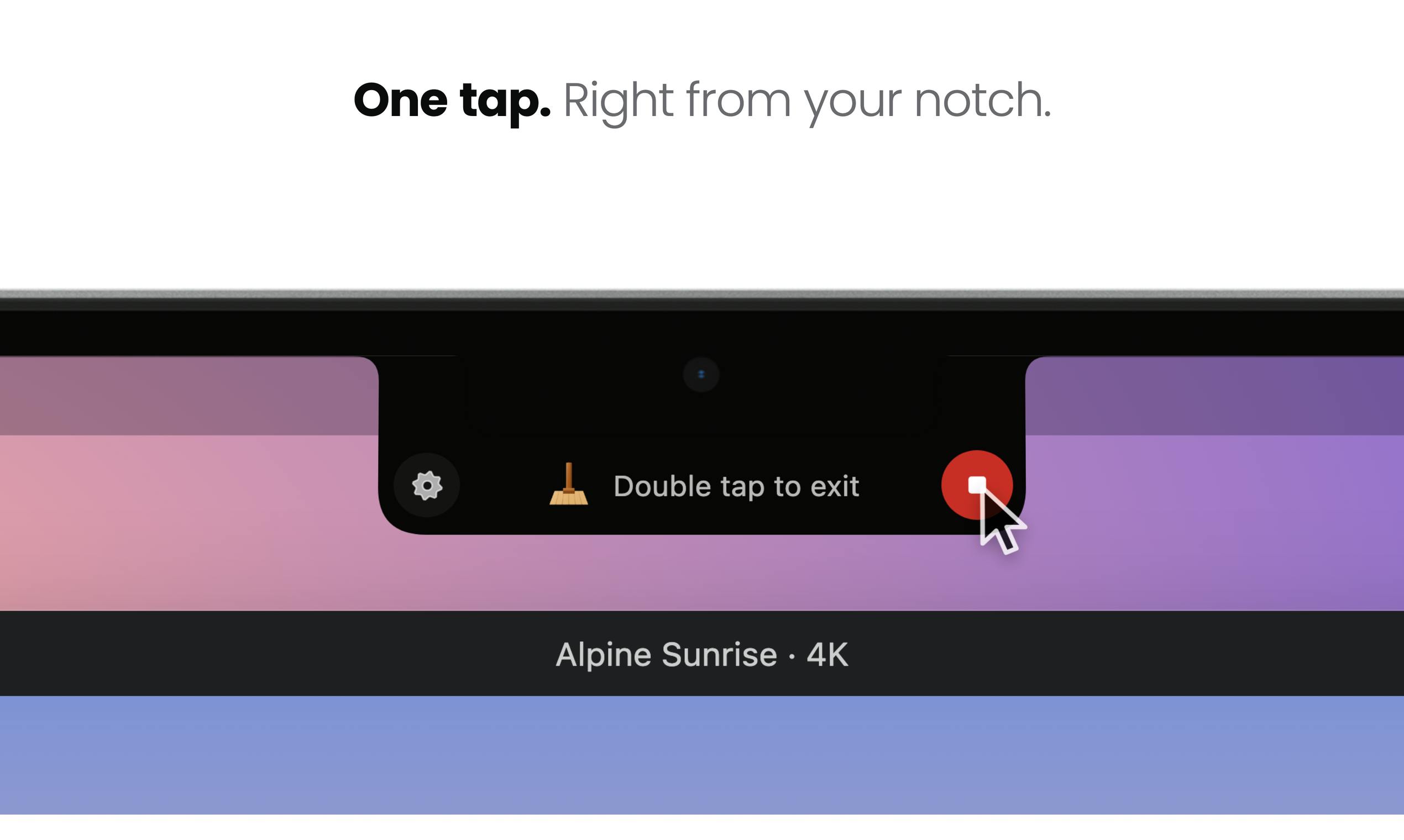
Core Feature: One Tap to Lock, Clean Away
Kleanly lives persistently in the notch at the top of your MacBook's screen. Tap it once and your keyboard and trackpad are locked — you can then wipe down the entire device without worrying about accidental input. A particularly thoughtful touch: video continues playing while the device is locked. That means you can clean while watching a show, or lock the keyboard while your kids watch cartoons, letting them bang away without typing a single character.
When you're done, simply double-tap the trackpad to unlock and return to normal use. The entire interaction is reduced to two gestures — one tap, one double-tap — with virtually no learning curve.
Why the Notch Makes Sense as the Entry Point
The notch on recent MacBook models has long been an awkward dead zone — it takes up screen real estate while offering little practical value. Kleanly embeds its control interface directly into the notch, making clever use of this otherwise idle space and keeping the lock action immediately accessible without digging through the menu bar.
For displays without a notch, Kleanly also provides a small tab as an alternative entry point, ensuring usability on external monitors or older devices. This consideration for different hardware configurations reflects the developer's attention to detail.
The MacBook notch was first introduced in 2021 with the 14-inch and 16-inch MacBook Pro models, later extending to the MacBook Air M2 and others. The notch houses the camera and sensors, but from a system perspective, the black areas on either side of the notch aren't counted as usable screen space by default — the menu bar distributes itself around it. This leaves third-party developers a visual region they can "overlay": by rendering a custom UI layer at the notch position, apps can visually "claim" that space, making the notch feel purposeful. Kleanly leverages exactly this, embedding its control button above the notch so it integrates visually and functionally with the hardware design, rather than appearing as a floating window somewhere on screen.
What's New in This Update
Compared to its initial release, this update brings several practical improvements:
- Notch control: The primary control interface has moved into the notch for more intuitive access.
- In-app updates: No need to manually download installers — upgrades happen directly within the app.
- Self-serve license migration: Users can transfer their license to a new Mac themselves, making device upgrades painless.
- Non-notch display support: A small tab entry point for external monitors or older machines.
None of these changes are groundbreaking, but they all address real, high-frequency user needs. The self-serve license migration in particular solves a common headache with perpetual-license software when switching to a new machine.
Who Needs This Tool Most
Kleanly has a clearly defined target audience:
- Users who clean their devices frequently: No more unplugging, closing the lid, or gritting your teeth through accidental inputs.
- Users with young children or pets: Once input is locked, a toddler hammering the keyboard or a cat strolling across the trackpad won't cause any disruption.
- Detail-oriented professionals: A lightweight, always-available utility often does more for daily workflow than a bloated feature set.
macOS itself offers some alternatives for similar scenarios — for example, setting a keyboard shortcut via System Settings → Lock Screen to lock the entire device, or using Mouse Keys in Accessibility settings to disable the trackpad. But these options either lock the whole screen (interrupting video playback) or require navigating deep menus and aren't immediately accessible. Kleanly's choice to lock only the input devices while keeping the screen and audio/video running fills a gap in native macOS functionality specifically for the "cleaning mode" use case — and that's its core differentiator from built-in solutions.
The Value of Small, Focused Tools
Kleanly is a quintessential "solves one specific small problem" Mac utility. It doesn't pile on features — instead, it takes the single scenario of "locking input while cleaning" and makes it feel effortless. Tools like this tend to perform well on Product Hunt precisely because they hit long-tail needs that mainstream software overlooks.
For the mature macOS ecosystem, these practical small utilities built by independent developers represent an important complement to the platform experience. If you've ever been frustrated by accidental inputs while cleaning your screen, Kleanly is worth a try.
Related articles

@ai-sdk/vue 3.0.306 Patch Release Syncs with [email protected] Update
@ai-sdk/vue 3.0.306 released, synced with [email protected]. A routine patch release for the Vercel AI SDK ecosystem with no public API changes; the Vue adapter layer stays version-aligned with the core package.

Gemini 4 Argon API Launches: The Era of Million-Token Output Begins
Google launches Gemini 4 Argon with sparse MoE architecture, up to 1M output tokens, and a 68.90% Vals Index score, available across API, AI Studio, and the Gemini app.

DukaanAI: Turning Product Photos into Inventory Lists with Open-Source AI
DukaanAI is an AI inventory tool for small retailers that turns product photos into inventory entries using the open-source Gemma 3 model, with local inference, editable fields, and CSV export.