Korinotch: Turning the MacBook Notch into a Productivity Command Center

Korinotch turns the MacBook notch into a control center with seven categories of features, entering the niche productivity market with a freemium strategy.
Korinotch is a macOS productivity tool that transforms the MacBook notch into a multifunctional control center, built natively with SwiftUI for macOS 14+. It integrates seven-plus categories of features — media HUD, notifications, file tray, clipboard history, keep-awake, keyboard lock, and widgets — to reduce menu bar clutter and shorten interaction paths. It uses a 14-day trial then $11.50 one-time purchase model and offers 11 utilities as free standalone menu bar apps. Ranked #15 on Product Hunt with 68 votes, it targets power Mac users and developers. Limitations include limited notch space and a high system requirement, and users must weigh migration costs against existing menu bar tools.
The MacBook's notch display has been controversial since its debut, but developers clearly have no intention of wasting that space. Korinotch, ranked #15 on Product Hunt, turns the notch into a multifunctional control center.
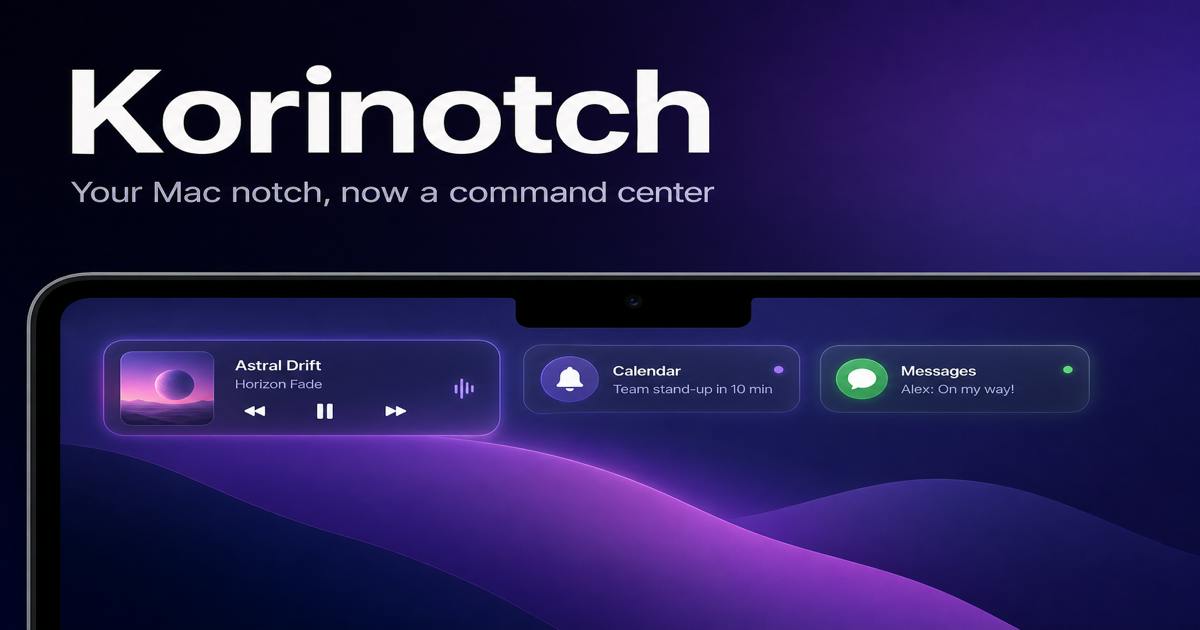
A Second Life for the Notch: From Eyesore to Handy
Korinotch's core idea is simple: since the notch occupies a small strip at the top of the screen, why not turn it into a persistent information panel? Built natively with SwiftUI and supporting macOS 14 and above, it packs media controls, notifications, a file tray, clipboard history, keep-awake, keyboard lock, and various widgets into this cramped area.
This design approach is similar to some earlier notch tools, but Korinotch's distinguishing feature is its high feature density. According to its Product Hunt page, it integrates more than seven categories of utilities, so users don't need to switch back and forth between multiple menu bar apps — everything is done right at the notch.
SwiftUI is Apple's declarative UI framework introduced in 2019. Developers build user interfaces by describing interface states rather than traditionally manipulating views imperatively. It supports all Apple platforms (iOS, macOS, watchOS, tvOS), significantly reduces boilerplate code, and automatically adapts to system features like Dark Mode and Dynamic Type. For a tool like Korinotch that requires fine-grained control over the notch area's layout, SwiftUI's declarative nature makes binding UI state to data more intuitive, while native development ensures deep integration with macOS and low performance overhead. That said, some advanced customization capabilities of SwiftUI on macOS still rely on AppKit bridging — a common hybrid pattern in the development of such tools.
Eleven Free Standalone Tools: A Smart Try-Before-You-Buy Strategy
Korinotch uses a freemium model: a 14-day full-feature trial, followed by a one-time purchase of $11.50. This pricing isn't high among comparable tools, but what's more interesting is its distribution strategy — the company says eleven of its utilities can be used for free as standalone menu bar apps.
This means users don't have to buy the whole suite just for a clipboard manager or a media control tool. This "split-free" approach lowers the barrier to trying it out and lets users experience the core features first before deciding whether to upgrade to the full notch integration. For indie developers, this is a pragmatic customer acquisition method.
Freemium is a common software business model in which basic features are offered for free while advanced features or the full version require payment to unlock. It's especially popular among indie developers and productivity tools because it can quickly build a user base through the free version and then generate revenue through paid conversions. Korinotch's uniqueness lies in splitting the "free" portion into 11 standalone menu bar apps rather than merely offering a feature-limited free version. This essentially combines freemium with a product matrix strategy: each standalone tool is a customer acquisition entry point, and users may discover the brand through one free tool and then pay for the integrated notch solution. This strategy lowers the psychological barrier for users and increases brand exposure.
Feature Breakdown: What Can Actually Fit in the Notch
According to the official description, Korinotch integrates the following categories of tools into the notch area:
- Media HUD: Displays currently playing media info with quick controls
- Notification Center: Shows system notifications at the notch, reducing distraction from the main screen
- File Tray: Temporarily holds files being dragged, making cross-app operations easier
- Clipboard History: Records copied content for instant recall
- Keep Awake: Prevents the Mac from going to sleep, ideal for downloads or presentations
- Keyboard Lock: Temporarily disables input when cleaning the keyboard
- Widgets: Customizable mini information panels
None of these features are novel individually, but unifying them in the notch area does reduce menu bar clutter and shorten interaction paths. For users who frequently switch between multiple tasks, this integration has a certain appeal.
The Signal Behind 68 Votes: The Niche Market for Productivity Tools
Korinotch received 68 votes on Product Hunt, ranking #15, with only 3 comments. This data suggests it's still a relatively niche product that hasn't yet sparked widespread discussion. But that doesn't mean the product itself lacks value — Product Hunt's voting mechanism tends to favor products with strong topicality or visual impact, while "utility patch" tools like Korinotch typically need more time to build word-of-mouth.
In terms of categorization, it falls under three tags: Mac, Productivity, and Developer Tools, with a clear target audience: power Mac users, developers, and people who enjoy tinkering with system productivity tools. This group is relatively less price-sensitive but demands stability and no interference with the existing system experience. Whether Korinotch can build word-of-mouth among these users depends on its actual stability and the frequency of updates and maintenance.
Product Hunt is a platform where creators launch new products and early adopters discover and vote on them, with a daily leaderboard generated based on vote counts. Its voting mechanism favors the early-adopter community, and whether a product gets high votes often depends on launch timing, community engagement, and topicality rather than product quality alone. 68 votes at #15 is a mid-to-low level of exposure, usually meaning the product didn't make it into the top discussion circles on its launch day. For productivity tools, Product Hunt's ranking is more of a cold-start booster; long-term reputation still depends on ongoing discussion and recommendations in user communities (such as Reddit and the MacPowerUsers forum).
Trade-offs Worth Noting
Concentrating features into the notch area also means some limitations. The notch itself has limited space, so information density can't be too high or it will feel crowded. Additionally, the macOS 14+ requirement excludes some users with older devices, and while the $11.50 one-time price isn't high, in a menu bar tool market with plenty of free alternatives, whether users will pay for the "notch integration" selling point remains to be validated by the market.
Korinotch's approach is a classic "micro-innovation": not inventing new features, but reorganizing the entry points to existing ones. For users who value a clean desktop and operational efficiency, this integration is worth a try. But if you already have a stable set of menu bar tools, the migration cost is also a factor to consider.
One-line Summary
Korinotch turns the MacBook notch into a control center integrating seven categories of features, entering the niche productivity market with a freemium strategy.
Paragraph Summary
Korinotch is a macOS productivity tool that transforms the MacBook notch area into a multifunctional control center, built natively with SwiftUI and supporting macOS 14 and above. It integrates more than seven categories of features — media HUD, notification center, file tray, clipboard history, keep-awake, keyboard lock, and widgets — aiming to reduce menu bar clutter and shorten interaction paths. The product uses a freemium model with a 14-day full-feature trial followed by a $11.50 one-time purchase, and offers 11 of its utilities as standalone free menu bar apps to lower the barrier to entry. It received 68 votes on Product Hunt, ranking #15, positioning it as a niche utility patch tool targeting power Mac users and developers. Its limitations include limited notch space and a relatively high system version requirement, and users need to weigh the migration cost against their existing menu bar tools.
Related articles

JobRunner MCP Server: AI Agents Can Now Fix Failed Java Jobs
JobRunner launches an open-source MCP server enabling AI agents to view cluster status, diagnose failures, and recover Java jobs—incident response from any cloud coding environment or existing agent.

MLAI Digital Launches 9 Security Agents: MCP Server Safeguards the Full Lifecycle of Agentic AI
MLAI Digital launches Security MCP Server with nine built-in specialized security agents covering vulnerability discovery, attack simulation, prompt injection detection, API and infrastructure assessment, and accelerated remediation—embedding security validation across the full Agentic AI lifecycle from development to production.

Running Isaac Lab on H100 GPUs: Exploring Better Approaches
Exploring optimization methods for running Isaac Lab on NVIDIA H100 GPUs, including MIG configuration, mixed precision, TensorRT acceleration, and community experience to improve robotics simulation and reinforcement learning efficiency.