Kraa 2.0 Review: A Minimalist Writing and One-Click Publishing Platform

Kraa 2.0 unites minimalist writing with built-in publishing, aiming to close the loop from draft to share.
Kraa 2.0 is a writing tool that combines a clutter-free UI, powerful editing, built-in publishing, and voice input in one platform, earning 109 upvotes on Product Hunt. It takes on the classic design dilemma of minimalism vs. functionality, while also integrating content publishing to compete with tools like Ghost and Notion. Whether it can truly stand out hinges on the quality of its voice experience and the network effects of its publishing platform.
When a Writing Tool Meets a Publishing Platform
In an era where text editors have become increasingly commoditized, Kraa 2.0 is charting a different course. This writing tool recently climbed to #13 on Product Hunt with 109 upvotes, and it sums up its own ambition with a boldly self-aware tagline: "We're attempting the impossible."
The "impossible" refers to pursuing two seemingly contradictory goals at once — delivering a clutter-free UI while also serving as a true text-editing workhorse. Add in a built-in content publishing platform and voice input support that's supposedly "like you haven't seen before," and Kraa is making a play to own the entire pipeline from writing to publishing under one roof.

The Hard Problem: Balancing Minimalism with Power
Why This Is Actually "Impossible"
Anyone who has used writing tools seriously knows this tension well. On one hand, users want interfaces as clean as possible — no cluttered toolbars, no flickering side menus, just full attention on the words. This is precisely why minimalist writing tools like iA Writer and Ulysses have maintained devoted followings for years.
On the other hand, professional writers need serious editing muscle: structured organization, format control, keyboard shortcuts, multi-document management, and more. These two goals tend to trade off against each other — the more features you add, the heavier the interface becomes; the cleaner the interface, the harder it is to access deeper functionality.
Kraa 2.0's core proposition is to break this trade-off. While the product description doesn't go into detail about how exactly this is achieved, the deliberate pairing of "clutter-free UI" and "text-editing workhorse" makes clear which user pain points the team is targeting.
Target Use Cases and Positioning
Looking at Kraa 2.0's Product Hunt category tags — Writing, Notes, and Text Editors — it's clear this isn't purely a blog publishing tool or a note-taking app. Instead, it aims to be a universal writing space that spans the full spectrum of capture, creation, and publishing.
Voice Writing: Kraa 2.0's Differentiating Edge
Kraa 2.0 places particular emphasis on its voice input capabilities, describing them as "like you haven't seen before." As AI-powered speech recognition matures, voice writing is evolving beyond simple dictation into a more intelligent creative assistant.
While the team hasn't disclosed technical specifics, current trends suggest this feature likely goes beyond basic speech-to-text — potentially including voice-based editing commands and intelligent formatting of spoken content. For creators who capture ideas by talking out loud, or users who write on the go, a truly reliable voice interface could be a meaningful differentiator.
That said, phrases like "like you haven't seen before" are common in product launches, and the real test will always be hands-on experience in actual use.
Writing and Publishing in One: From Draft to Share
The biggest distinction between Kraa 2.0 and most pure text editors is its built-in publishing platform. In the traditional workflow, writing and publishing are separate steps — you write in one tool, then copy and paste into WordPress, Medium, or another platform, often dealing with lost formatting and layout headaches along the way.
Kraa's approach is to merge these two steps: write in the same tool, then publish and share directly from it. This integrated design is especially appealing to independent creators, newsletter writers, and bloggers, as it significantly reduces the friction between "idea" and "published content."
This also positions Kraa closer to the competitive space occupied by tools like Bear, Notion, or Ghost — products that blend writing and publishing — rather than competing purely with local text editors.
Market Reception and Competitive Analysis
By the numbers, Kraa 2.0 earned 109 upvotes and a #13 ranking on Product Hunt, with 4 comments. This indicates a solid level of interest, though it hasn't yet sparked explosive community discussion. For a product entering the mature and highly competitive text editor market, it's a respectable start.
It's worth noting that the writing tools market is already saturated. From Obsidian and Notion to countless minimalist editors, users face low switching costs but high inertia once settled into a tool. For Kraa 2.0 to truly stand out, positioning alone around "minimalist yet powerful" may not be enough. Its real moat likely hinges on the actual quality of the voice writing experience and whether its publishing platform can build enough network effects to create meaningful content distribution value.
Verdict: Is Kraa 2.0 Worth Trying?
Kraa 2.0 represents a clear direction for the evolution of writing tools: moving beyond single-purpose utilities to close the loop from creation to publishing, while lowering the barrier to writing with new interaction models like voice input.
For users looking for an all-in-one writing and publishing solution, Kraa 2.0 is worth watching and trying. But whether it can truly deliver on its self-described "impossible" mission ultimately depends on whether the tensions between minimalism and power, writing and publishing, are resolved gracefully in real-world use.
Related articles

DeepSeek Harness: A Beginner's Installation and Testing Guide
A DeepSeek Harness tutorial for test engineers: set up Node.js, launch with one NPX command, configure official and third-party models, and explore web search, file I/O, and trace-view agent observability.
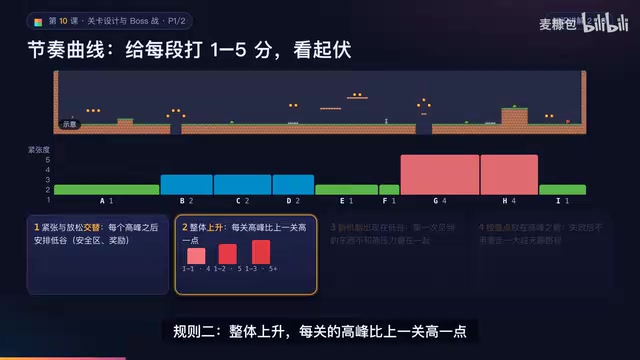
AI Game Development in Practice: Designing Levels with the Four-Step Method and Pacing Curves
AI game development lesson 10: design levels with the four-step method (teach, practice, combine, test) and a 1-5 pacing curve, plus sightline guidance and safety zones—implement Animatable Body 2D moving platforms and generate ASCII sketches for 1-2 Underground Cavern and 1-3 Guard Hall.

AI Game Development in Practice: Two-Phase Boss State Machines and Death Heatmap Tuning
AI game development lesson 10: implement a two-phase Boss with a state machine, guarantee fairness with color signals and a 0.4-second warning floor, locate difficulty cliffs with a death heatmap, and apply lightest-to-heaviest fixes one at a time, with an acceptance checklist and common pitfalls.