LangChain Tool Calling in Practice: Adding Your First Tool to an AI Agent with the @tool Decorator

A practical guide to adding your first tool to a LangChain AI Agent using the @tool decorator.
This article explains the complete tool calling workflow in LangChain, covering how to define tools with the @tool decorator, connect them to an Agent, and let the model automatically decide when to invoke them. It includes a calculator tool example, discusses security concerns around eval(), and highlights naming conventions to avoid common pitfalls.
From "Can Talk" to "Can Do": Tools Are the Key Step for Agents
No matter how smart a large language model is, it's still fundamentally just a text generator. It doesn't know the current time, can't check the weather, and certainly can't book a flight for you—because it can only generate language based on training data and cannot interact with the real world.
From a technical standpoint, the core mechanism of a Large Language Model (LLM) is autoregressive text generation based on the Transformer architecture—it predicts the next most likely token given an existing context token sequence. This means all of the model's "knowledge" is frozen in the parameter weights from training time. It cannot perceive the current time, access real-time data, or perform any action beyond computation. This limitation is known as the "knowledge cutoff" problem. To break through this boundary, the model needs to be connected to the real world through external interfaces.
This is precisely why "Tools" exist. In Lesson 3 of Bilibili creator Xiao Ke's AI Agent tutorial series, the author explicitly states: tools are the key step that transforms an Agent from "can only talk" to "can actually do things." Once you equip a large model with tools, it can retrieve real-time information by calling external APIs, executing code, or querying databases—truly getting things done.
This article is based on that course content, organizing the complete tool calling workflow and minimal implementation in LangChain to help beginners quickly get started with Agent development.
The Complete Tool Calling Workflow in LangChain
To understand tool calling, you first need to see the entire pipeline clearly. Using a simple question like "What is 25 times 4 plus 10?" as an example, the tool calling process goes through four steps:
Four Steps to Complete the Tool Calling Pipeline
- User asks a question: The user sends a request to the Agent, such as asking a math calculation question.
- Model returns a structured request: After analysis, the large model doesn't directly answer with text. Instead, it returns a structured tool call request. It's as if the model says: "I need to use the calculator tool with the parameter 25×4+10." The key technical foundation here is the Function Calling protocol—when the model determines it needs to use a tool, its output is not natural language but a structured object conforming to JSON Schema specification, containing the tool name and parameters. JSON Schema is a metadata standard for describing JSON data structures, precisely defining each field's type, whether it's required, value ranges, and other constraints. Major model providers (OpenAI, Anthropic, DeepSeekAd, etc.) have all implemented similar protocols, allowing frameworks to uniformly parse the model's tool calling intent.
- Framework executes automatically: The LangChain framework automatically executes this tool call, runs the corresponding calculation function, and gets the result 110.
- Organizes natural language response: The tool's returned result is passed back to the large model, which then organizes it into a natural language answer for the user.

The entire process is invisible to the user—the user only sees the question and the answer, while the tool calling in between is handled automatically by the Agent. This division of labor between "model decision-making + framework execution" is the essence of Agent architecture.
It's worth noting that this pattern corresponds to the ReAct (Reasoning + Acting) paradigm from academia, proposed by Yao et al. in 2022. Its core idea is to have the LLM alternate between reasoning (Thought) and acting (Action): the model first thinks about what needs to be done, then selects an appropriate tool to execute, observes the result, and then decides on the next step. LangChain's Agent implementation is based on this loop—the model generates a tool call request → the framework executes the tool → the result returns to the model → the model decides whether to continue calling tools or directly answer the user. This loop can iterate multiple times until the task is complete.
Defining Tools with the @tool Decorator
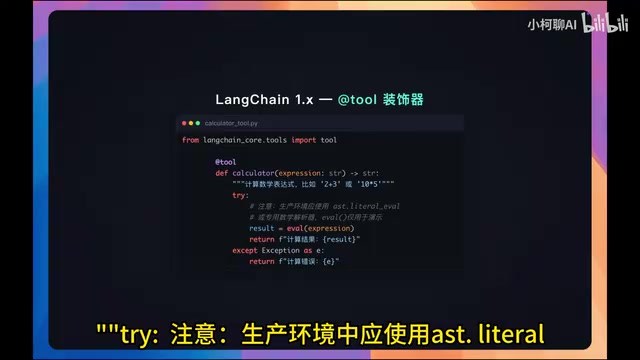
In LangChain, the most concise way to define a tool is using the @tool decorator. Here's the calculator tool example from the course:
from langchain_core.tools import tool

@tool
def calculator(expression: str) -> str:
    """计算数学表达式,比如 2+3 或 10*0.5"""
    try:
        # Note: In production, use ast.literal_eval or a dedicated math parser
        # eval is used here for demonstration only; guard against code injection in real projects
        result = eval(expression)
        return f"计算结果:{result}"
    except Exception as e:
        return f"计算错误:{e}"
Three Things the @tool Decorator Does Behind the Scenes
Python decorators are a design pattern that allows adding extra functionality to a function without modifying its original code. It's essentially a higher-order function: it takes the original function as input and returns an enhanced object. In LangChain, the @tool decorator wraps a regular Python function into a StructuredTool object that not only retains the original function's execution logic but also automatically generates metadata conforming to the LLM tool calling protocol.
Specifically, the @tool decorator automatically completes three key tasks:
- Generates input parameter definitions: Converts the function's type annotations (like
expression: str) into JSON Schema format, letting the large model know what parameters to pass when calling this tool. - Extracts tool description: Extracts the function's docstring as the tool's natural language description. The large model relies on this description to determine "when to use this tool," so the clearer the docstring, the more accurate the model's calls will be.
- Generates a unique tool name: Defaults to using the function name as the tool name (e.g.,
calculator).
There's a notable security detail here: the example uses eval to execute expressions, but the author specifically warns—never use eval directly in production. Python's eval() function can execute arbitrary Python expressions, meaning malicious users could construct special inputs (like __import__('os').system('rm -rf /')) to execute dangerous system commands—this is a code injection attack. The risk is even higher in Agent scenarios because user input passes through the LLM before being fed into tools, making the attack surface harder to predict. Safe alternatives include: ast.literal_eval (only parses Python literals), the sympy library (professional math expression parsing), the numexpr library (safe numerical expression evaluation), and sandbox-based code execution environments.
Connecting Tools to an Agent
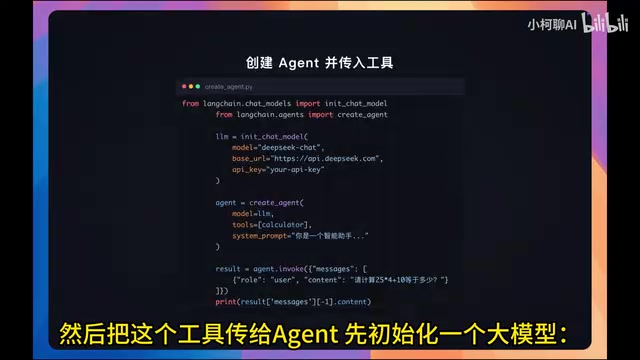
After defining tools, the next step is initializing the large model and creating an Agent. The course uses the DeepSeek model as an example:
from langchain.chat_models import init_chat_model

llm = init_chat_model(
    model="deepseek-chat",  # Replace with your model
    base_url="https://api.deepseek.com",
    api_key="替换为你的API Key"
)
Then create the Agent and pass in the tools via the tools parameter:
from langchain.agents import create_agent

agent = create_agent(
    model=llm,
    tools=[calculator],
    prompt="你是一个智能助手,可以使用计算器工具来回答数学计算问题"
)

result = agent.invoke({
    "messages": [{"role": "user", "content": "请计算 25*4+10 等于多少"}]
})
print(result["messages"][-1].content)
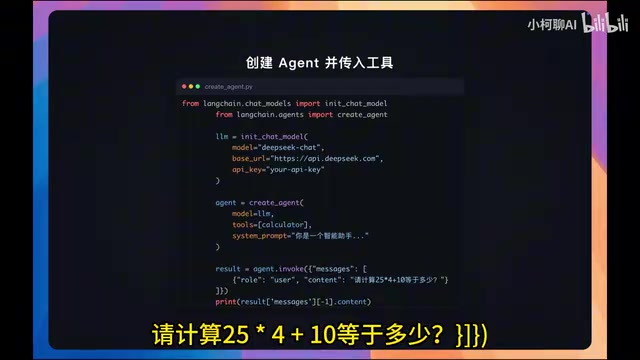
As long as you pass defined tools to create_agent via the tools parameter, the Agent can automatically determine when to call them without any manual intervention from the developer. This "automatic determination" relies on the model's understanding of tool description information during the reasoning phase—LangChain injects all available tools' names, descriptions, and parameter Schemas into the system prompt sent to the model, and the model decides accordingly whether it needs to call a tool and which one to call.
Tool Naming Considerations
At the end of the lesson, the author also mentions an easily overlooked detail: tool names should use snake_case, such as web_search rather than Web Search. The reason is that some model providers will throw errors on names containing spaces or special characters. This is because tool names in the Function Calling protocol typically need to serve as JSON object key names or function identifiers, and JSON specifications and most programming languages' identifier naming rules don't support spaces or special characters.
If you need to customize the tool name or description, you can pass parameters to the @tool decorator:
from langchain_core.tools import tool

@tool("calculator", description="执行数学运算,如加减乘除")
def calc(expression: str) -> str:
    """计算数学表达式"""
    ...
This approach is very useful when you need more precise control over tool metadata, especially when the function name isn't intuitive enough or when you need to provide the model with more detailed calling guidance.
Summary and Outlook
Let's review the core takeaways from this lesson:
- Tool calling allows large models to obtain information and perform operations by calling external functions, breaking through the inherent limitation of "can only generate text."
- The
@tooldecorator is the most concise way to define tools in LangChain, automatically handling three things: type annotations, documentation descriptions, and tool naming. - Pass defined tools to
create_agentvia thetoolsparameter, and the Agent can automatically call them when needed. - Security and naming conventions cannot be ignored: avoid using
evalin production, and tool names should use snake_case.
This lesson demonstrates the simplest scenario with a single tool and single parameter. In real projects, tools often require multiple parameters, complex inputs, or even need the Agent to coordinate calling multiple tools simultaneously (i.e., parallel function calling). More complex scenarios include tool calling chains (one tool's output serving as another tool's input), retry and fallback strategies after tool call failures, and tool permission management in multi-Agent collaboration. These advanced topics will continue to be covered in subsequent lessons.
For readers looking to get started with Agent development, understanding the "model decides, framework executes" division of labor is the foundation for mastering more complex orchestration patterns later on.
Related articles

Chain of Thought Isn't Just for AI: How Humans Can Use CoT to Improve Thinking Quality
Chain of Thought isn't just a prompt trick for large models. Starting from a Hacker News discussion, this article analyzes why CoT works for human thinking too, breaks down actionable ways to transfer it, and highlights the key differences between human CoT and machine CoT.
Cloudflare Teams Up with OpenAI: Closi…
Cloudflare Teams Up with OpenAI: Closing the Loop from Vulnerability Discovery to Defense with AI
Cloudflare uses OpenAI Daybreak to investigate security vulnerabilities and generate reviewable remediation plans, while developers use Codex to boost coding efficiency and quality.

Orca Multi-Agent Orchestration in Practice: A Guide to Parallel Collaboration with Claude and Codex
Orca is Stable AI's free open-source agent workbench supporting 34 agents like Claude Code and Codex in parallel. Learn its Git worktree isolation, multi-model orchestration, and mobile management.