Launch Your Indie Product for $0: The 2026 Free Tool Stack for Solo Developers

Bilibili creator Yuzai shares a zero-cost tech stack covering frontend, backend, database, storage, auth, and email for indie developers.
Based on Bilibili creator Yuzai's sharing, this article outlines a tech stack for indie products that can go from zero to launch at no cost. Frontend: Cloudflare Pages (unlimited bandwidth, commercial use allowed) or Vercel (non-profit only). Backend: Cloudflare Workers (100K requests/day) or Supabase (unlimited API, 5GB traffic). Database: Supabase (500MB), D1 (5GB/10 DBs), or Turso (more generous read/write quotas). Storage: R2 (10GB) or Supabase (1GB). Auth: Supabase or Clerk (50K MAU each). Email: Resend (100/day, own domain). Core logic: free quotas cover the validation phase—hitting limits signals real demand.
The cost of trial and error has always been an unavoidable topic in indie development. From idea to launch, every link in the chain—frontend hosting, backend deployment, databases, storage, authentication, email—can rack up costs. But Bilibili creator "Yuzai" recently shared a complete free tool combination that covers the entire technical requirements of an indie product from zero to launch. This article, based on that video's content and combined with the actual capability boundaries of each tool, provides an actionable reference for choosing your stack.
Frontend Hosting: Cloudflare Pages vs Vercel
There are two mainstream choices for frontend hosting: Cloudflare Pages and Vercel. Both let you build and deploy frontend projects directly to the platform and assign a subdomain for access.

The core difference lies in the terms of use and resource limits. Cloudflare Pages has no bandwidth cap and explicitly permits commercial use, making it one of the most developer-friendly options for indie creators. Vercel is better suited for non-profit projects like personal blogs and portfolios, since its free plan requires upgrading to Pro for commercial use.
The deployment process no longer requires manual configuration either. You just tell your AI Agent "deploy my project to Cloudflare Pages," and the AI handles the rest. This "AI-as-operator" model runs through the entire tool chain, dramatically lowering the barrier to entry.
Unlimited bandwidth matters enormously in practice: frontend hosting platforms typically bill by CDN egress traffic, and when static assets like images, fonts, and JS bundles get heavily accessed, traffic costs can far exceed expectations. Vercel's free tier, while not explicitly priced, has Fair Use terms that constrain commercial use and abnormal traffic—sudden spikes may result in throttling or upgrade demands. Cloudflare itself is a global backbone-level CDN provider, and Pages static assets run directly on its own network, which is why it can promise unlimited bandwidth.
Commercial licensing is another commonly overlooked pitfall. Many platforms prohibit commercial use on free plans, and once your product starts charging or embedding ads, you may violate the terms and get taken offline. Cloudflare Pages explicitly allows commercial use, saving indie developers the risk of migration.
Backend Deployment: Weighing Workers Against Supabase
On the backend, Cloudflare Workers and Supabase represent two typical paths.
Supabase offers out-of-the-box backend services, which I've covered separately before. Its free plan doesn't limit API request counts but has a 5GB traffic cap. Once a project reaches that scale, it means the product has market validation, and investing some cost at that point is reasonable.
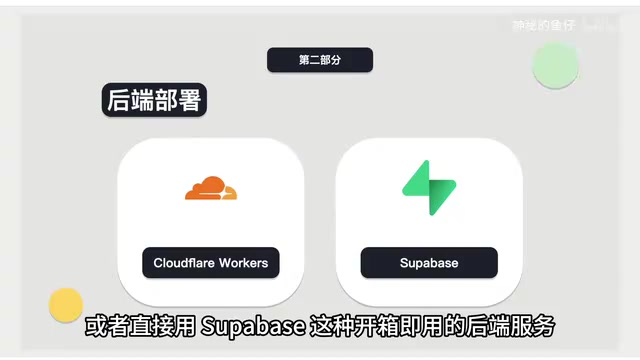
Cloudflare Workers offers 100,000 free requests per day with no bandwidth limit. For early-stage projects with modest traffic, this quota is quite generous. Each path has its strengths: Supabase wins on feature integration, Workers wins on generous quotas and no bandwidth constraints.
Understanding the difference requires distinguishing between BaaS (Backend as a Service) and Serverless compute platforms. Supabase belongs to the former: it hosts an entire backend suite—database, auth, storage, realtime subscriptions, edge functions—on your behalf, so you just call APIs without worrying about server operations, at the cost of adhering to its data model and quota rules. Cloudflare Workers belongs to the latter: it provides a runtime environment, and you write your own logic, connect databases, and build authentication yourself—more freedom and generous quotas, but more integration work.
The 5GB traffic limit for Supabase refers to egress traffic generated through its API gateway and storage services; internal database reads and writes don't count. This means if your product is data-intensive but returns small payloads (like pure text APIs), 5GB can last a long time; conversely, if it involves heavy image or video distribution, it'll be exhausted quickly. This is also why the main text recommends putting static assets in R2 rather than Supabase Storage.
Databases: Comparing Three Free Options
For databases, you can choose from Cloudflare D1, Supabase, and Turso.
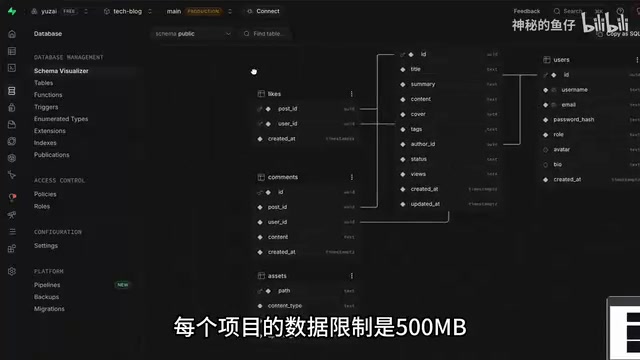
Supabase offers an online PostgreSQL database with a 500MB storage limit per project. For small early-stage data volumes, this quota is generally sufficient. Cloudflare D1 supports creating 10 databases with 5GB total storage, but has a limit of 5 million row reads and 100,000 row writes per day.
Turso supports 100 databases with 5GB total storage, with read/write quotas that reset monthly—500 million row reads and 10 million row writes per month. From a quota perspective, Turso is clearly more generous on read/write row counts, making it suitable for applications with frequent reads and writes but modest data volumes. D1 is better suited for projects already in the Cloudflare ecosystem, reducing cross-platform management overhead.
Row read / row write quotas are a billing dimension unique to edge databases like Cloudflare D1 and Turso. Traditional cloud databases bill by storage and compute time, while edge databases—running on globally distributed nodes—typically bill by actual rows scanned. D1's daily 5 million row reads and 100,000 row writes mean that a single SELECT * FROM users returning 1,000 rows consumes 1,000 rows of read quota. When designing queries, you must pay attention to indexes and pagination to avoid full table scans rapidly exhausting your quota.
Turso is based on libSQL (an open-source fork of SQLite), and its monthly quota of 500 million row reads and 10 million row writes is extremely generous for small applications, with edge replication support for low read latency. D1 is also SQLite-based but deeply integrated into the Cloudflare ecosystem, requiring no extra connection pool configuration when paired with Workers. Beyond looking at quota numbers, consider whether you're already using Workers—projects within the same ecosystem should use D1, while cross-platform or read-scaling needs point to Turso.
Storage & Authentication: R2, Supabase, and Clerk
File storage reuses the "old friends" from earlier: Cloudflare R2 and Supabase. Supabase offers 1GB of free storage with a 50MB per-file limit. R2 provides 10GB of storage space, more than enough for early-stage projects. If your product involves images, attachments, and other static assets, R2's 10GB quota can sustain you for quite a while.
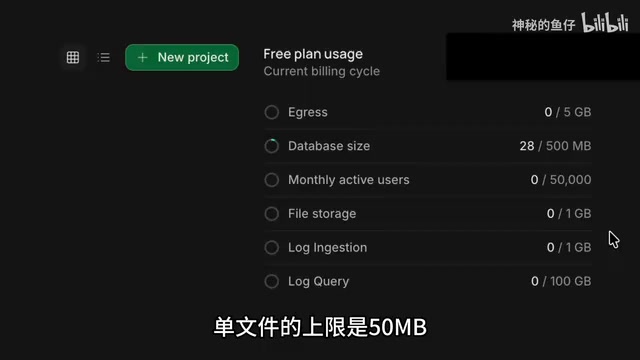
For authentication, both Supabase and Clerk offer 50,000 monthly active users on their free tiers. 50K MAU is a ceiling-level number for the vast majority of early-stage products, only reachable once a product truly takes off. The two tools are nearly identical on this dimension, so you can choose based more on integration convenience with your existing tech stack.
Email Services: Resend's Free Quota and Domestic Alternatives
For email functionality, you can use Resend, which supports 100 free emails per day with simple configuration—but you need to own a domain. If you don't have one yet, that's a necessary upfront investment. Some domestic cloud providers also offer corresponding email quotas, which can serve as alternatives for products targeting domestic users.
The Real Boundaries of a Complete Zero-Cost Tech Stack
Stringing this combination together, an indie developer can spend absolutely nothing in the early launch phase:
- Frontend: Cloudflare Pages (unlimited bandwidth, commercial use allowed)
- Backend: Cloudflare Workers (100K requests/day) or Supabase (unlimited API requests, 5GB traffic)
- Database: Supabase (500MB), Cloudflare D1 (5GB/10 DBs), or Turso (5GB/100 DBs)
- Storage: Cloudflare R2 (10GB) or Supabase (1GB)
- Authentication: Supabase or Clerk (50K MAU each)
- Email: Resend (100/day, own domain required)
The core logic here is: use free quotas to cover the product validation period, then pay for scale once the product proves out. Each tool's free quota sets a "safety line"—when you hit the limit, it precisely means your product has real user demand, and paying at that point is worthwhile.
Keep in mind that free quotas aren't set in stone. Platforms may adjust policies at any time, so check the latest official pricing pages before committing to a stack. Also, while AI-assisted deployment lowers the operational barrier, understanding the underlying configuration remains important—when problems arise, you need to know where to look.
There really are "saintly" free services on the internet. By making rational use of them, indie developers can validate their ideas at the lowest possible cost.
One-line Summary
Bilibili creator Yuzai shares a zero-cost tech stack covering frontend, backend, database, storage, auth, and email, helping indie developers validate products for free.
Paragraph Summary
Based on Bilibili creator Yuzai's sharing, this article lays out a tech stack combination for indie products that can go from zero to launch at no cost. Frontend: Cloudflare Pages (unlimited bandwidth, commercial use allowed) or Vercel (non-profit only). Backend: Cloudflare Workers (100K requests/day) or Supabase (unlimited API, 5GB traffic). Database (pick one of three): Supabase (500MB), D1 (5GB/10 DBs), Turso (more generous read/write quotas). Storage: R2 (10GB) or Supabase (1GB). Auth: Supabase or Clerk (50K MAU each). Email: Resend (100/day, own domain required). The core logic is using free quotas to cover the validation phase—hitting limits means your product has real demand, making payment reasonable at that point.
Related articles

JobRunner MCP Server: AI Agents Can Now Fix Failed Java Jobs
JobRunner launches an open-source MCP server enabling AI agents to view cluster status, diagnose failures, and recover Java jobs—incident response from any cloud coding environment or existing agent.

MLAI Digital Launches 9 Security Agents: MCP Server Safeguards the Full Lifecycle of Agentic AI
MLAI Digital launches Security MCP Server with nine built-in specialized security agents covering vulnerability discovery, attack simulation, prompt injection detection, API and infrastructure assessment, and accelerated remediation—embedding security validation across the full Agentic AI lifecycle from development to production.

Running Isaac Lab on H100 GPUs: Exploring Better Approaches
Exploring optimization methods for running Isaac Lab on NVIDIA H100 GPUs, including MIG configuration, mixed precision, TensorRT acceleration, and community experience to improve robotics simulation and reinforcement learning efficiency.