Learn AI Agent Development for Free: Build a Minimal Conversational Agent from Scratch
Free course breaks down agent development into 26 cases, first lesson hand-writes a minimal Java conversational agent.
This article introduces Bilibili creator Xiao Fu Ge's free agent development course launched on 1024 Programmer's Day, splitting knowledge into five progressive stages: LLM calls and ReAct tools, planning and RAG, multi-agent systems, engineering capabilities, and comprehensive practice, with multi-language versions in Java, Python, TypeScript, Go, and more, emphasizing hand-written code. It focuses on lesson one: using JDK 17's HttpClient to connect to the OpenAI chat completions protocol without frameworks, abstracting conversation operations via the ChatModel interface and Message record, completing request building, status checking, and choices[0].message.content parsing, and finally running a minimal conversation loop with ChatAgent to verify the chain works.
AI Agent development sounds intimidating, but Bilibili creator Xiao Fu Ge launched a "spend-not-a-single-coin" free course on 1024 Programmer's Day, breaking down complete agent development into 26 small case studies and walking beginners through hands-on implementation using toy projects. This article is based on the first lesson of that course, covering the overall roadmap through to the engineering setup of a minimal MVP conversational agent — suitable for anyone looking to transition into agent development or just getting started.
Course Overview: Five Stages for Breaking Down Agent Development
The course splits the knowledge needed for agent development into five progressive stages, each with runnable code examples.
Stage one builds the foundation: learning how to call LLM large models, making curl requests, establishing chat connections, then implementing ReAct (the reasoning-and-action loop), tool calling, and conversation memory. Stage two moves into planning and knowledge bases, including task planning, RAG retrieval augmentation, and MCP Skills. Stage three covers multi-agent development, involving sub-agents and the A2A protocol. Stage four adds engineering capabilities like clarification, approval, sandboxing, hooks, CLI, and scheduled tasks. Stage five is comprehensive hands-on practice. The entire curriculum covers the main knowledge points needed to build one complete core agent.
The creator provides multi-language versions in Java, Python, TypeScript, Go, and plain JS for cross-referencing. But the course emphasizes "old-school programming" — not using AI to auto-generate code, but typing it out manually, so developers don't forget how to write code and deeply understand how agents work under the hood.
The Minimal MVP: Connecting Directly to the OpenAI Protocol
The goal of lesson one is to get a minimal conversational agent running. Before introducing frameworks like LangChain or AgentScope, you first need to understand the underlying HTTP integration — this is the foundation for everything that follows.
The creator suggests reading the official OpenAI API docs first to understand the request body structure. Common protocols include OpenAI's early chat completions, the later responses, and Claude's messages protocol. Different models or relay services support different protocols, and a local gateway can be used for protocol conversion. In the course demo, the request body includes the base URL, endpoint path (e.g., /v1/chat/completions), API Key, model, messages, and temperature parameters. In the response body, the choices array, message.content, reasoning_content, and token consumption data are all fields you'll need to parse later.
To lower the barrier, the creator also provides free models through channels like Wali API, so learners can test conversations directly with free models at no cost.
The Chat Completions protocol is the conversational completion interface OpenAI launched in 2023 (endpoint /v1/chat/completions). Its request body centers on a messages array, where each message contains a role field (system/user/assistant) and a content field, and the model generates the next assistant reply based on the conversation history. It became the de facto standard because a large number of domestic and international models and relay services are compatible with this structure — developers only need to change baseUrl and model to switch backends. OpenAI's later Responses protocol (endpoint /v1/responses) builds on it by integrating tool calling, built-in state management, and multimodal input, but its compatibility still lags behind chat completions. Anthropic's Messages protocol (/v1/messages) differs slightly in field naming (e.g., system is a separate parameter, and max_tokens is required). Different protocols can be converted through a local gateway, which is why the course emphasizes "understand one protocol first."
Engineering Setup: A Lightweight Java Project and Core Interfaces
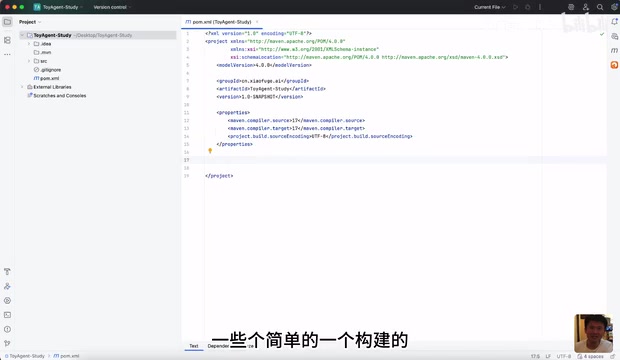
The course uses JDK 17 to create the base project without introducing heavy frameworks like Spring Boot, keeping the code lightweight. The core is defining a ChatModel interface that represents a single conversation operation with a large model: it receives a list of messages and returns a String result.
The message object is defined using a Java record with two fields, role and content, plus three static factory methods: system, user, and assistant. This immutable-object design resembles a value object in DDD, ensuring messages aren't accidentally modified as they're passed around.
public record Message(String role, String content) {
    public static Message system(String content) { return new Message("system", content); }
    public static Message user(String content) { return new Message("user", content); }
    public static Message assistant(String content) { return new Message("assistant", content); }
}
The ChatModel interface then defines the conversation contract:
public interface ChatModel {
    String chat(List<Message> messages);
}
Next, OpenAIChatModel is implemented, using the JDK's built-in HttpClient to send POST requests internally. The constructor takes three fields — baseUrl, apiKey, and model — and performs URL normalization, such as using regex to strip or append trailing slashes, preventing request failures caused by configuration differences.
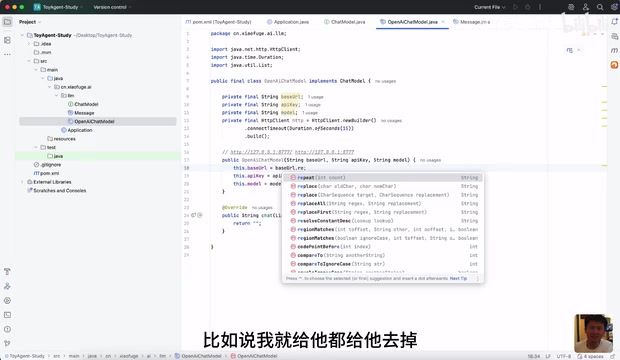
Java record is a language feature formally introduced in JDK 16 and widely used in JDK 17, used to declare immutable data-carrier classes. The compiler automatically generates a constructor, equals, hashCode, toString, and accessor methods (e.g., role() rather than getRole()), with fields defaulting to private final, so they can't be modified once created. Compared with traditional POJOs, records greatly reduce boilerplate code and are semantically closer to DDD value objects — two record instances are considered equal as long as their fields match. In agent development, messages, tool call results, and configuration items are all good candidates for records, ensuring thread safety and preventing messages from being accidentally tampered with as they pass through multiple layers — consistent with the design intent of Message in the course.
HTTP Request and Response Parsing Details
When sending a request, you need to build an HttpRequest: set the URI (baseUrl + endpoint path), headers (Content-Type: application/json, Authorization: Bearer {apiKey}), timeout, and send the JSON body via POST. The body can include model, the messages array, and temperature (set to 0.7 in the example).
Response handling first checks whether the status code is 200. On failure, it returns the HTTP error code and a truncated response body (to avoid overly long logs) for easier troubleshooting; on success, it parses the JSON and extracts choices[0].message.content layer by layer. The code uses a lightweight JSON toolkit without introducing heavy dependencies like Fastjson, keeping the project lean.
The creator specifically notes that although this code is fixed, the goal is for learners to understand "how data flows from request to response." Once you master one protocol, switching to other languages or frameworks becomes quick.
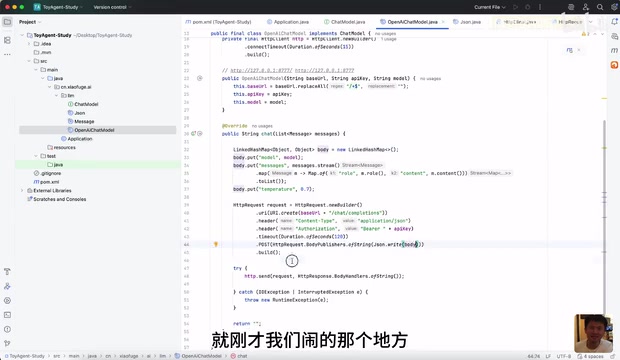
The JDK's built-in HttpClient (java.net.http.HttpClient) is the modern HTTP client introduced in Java 11, replacing the outdated HttpURLConnection. It supports both synchronous and asynchronous calls (sendAsync returns a CompletableFuture), provides a chain-built HttpRequest (where you can set URI, headers, timeout, request method, and body), and natively supports HTTP/2. Compared with pulling in third-party libraries like OkHttp or Apache HttpClient, using the built-in HttpClient keeps the sample project free of external dependencies and reduces the environment setup burden for beginners. Its limitation is that connection pool configuration and retry strategies must be implemented yourself, so production environments often still choose mature clients — but for understanding "how a single HTTP request round-trips," it's more than sufficient.
The Agent Interface and the First Case
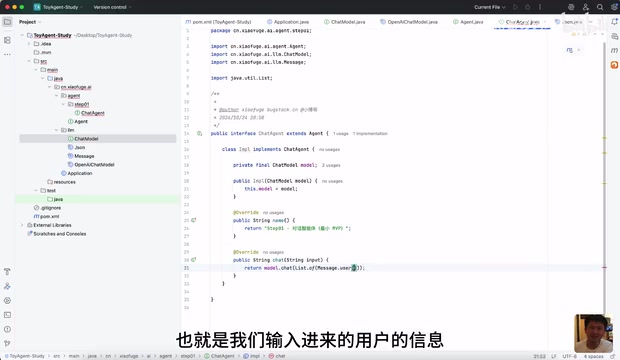
On top of the model integration, the course defines an Agent interface containing methods for the scenario name, chat, trajectory recording, and clearing memory. The first implementation is ChatAgent, which holds a ChatModel internally; its chat method wraps user input into a list of Messages and hands it to the model, returning the result.
Configuration is read from a properties file containing baseUrl, apiKey, and model, loaded by a utility class. In the main function, you build an OpenAIChatModel, inject it into ChatAgent, and input "introduce yourself in one sentence" to complete the first conversation test. The creator also demonstrates switching to a free model to verify the entire chain works.
Multi-Language Comparison and Learning Advice
The course repository includes versions in Go, TypeScript, Python, and other languages. The creator compares the Go and TypeScript implementations, showing the core logic is identical: define a ChatModel interface, implement the OpenAI protocol, build the HTTP request, and parse the response. Language is just a vehicle; the architectural approach is the same. Once you master one, you can quickly migrate to others.
As for the question "do we still need to hand-write code in the AI era," the creator's view is clear: complex corporate projects won't allow black-box delivery — developers must be able to read the code they submit, otherwise testing and production incidents will cause trouble. Implementing it manually once is about building a clear understanding of the business flow.
This course is completely free, and lesson one completes the closed loop of a minimal conversational agent. Subsequent lessons start with prompt engineering and gradually add tool calling, memory, planning, and other capabilities — suitable for following along step by step.
One-line Summary
A free course breaks down agent development into 26 cases, with the first lesson hand-writing a minimal conversational agent in Java.
Paragraph Summary
This article introduces Bilibili creator Xiao Fu Ge's free agent development course launched on 1024 Programmer's Day, which splits the knowledge into five progressive stages: LLM calls and ReAct tools, planning and RAG, multi-agent systems, engineering capabilities, and comprehensive practice, with multi-language versions in Java, Python, TypeScript, Go, and more, emphasizing hand-written code over AI generation. The article focuses on lesson one: without frameworks, using JDK 17's HttpClient to connect to the OpenAI chat completions protocol, abstracting conversation operations through the ChatModel interface and Message record, completing request construction, status code checking, and choices[0].message.content parsing, and finally running a minimal conversation loop with ChatAgent to verify the chain works.
Related articles

Zero-Code AI God Sandbox: Is This Reddit User's Wild Idea Feasible?
A Reddit user wants 3-4 AI agents to play gods in a sandbox world for friends to interact with. Is this zero-code idea technically feasible? We break down the barriers.

Is Claude the AI That Refuses to Be a "Yes-Man"? A Reddit Discussion
Reddit discusses whether Claude is the least "yes-man" LLM. This article analyzes Claude's honesty design, comparisons with other models, and users' real attitudes toward AI people-pleasing.
What Security Teams Need to Know: Risks of Abliterated Models in Agents
Abliterated models strip alignment constraints at the weight level. When used in AI Agents with tool-calling capabilities, risk escalates from content to operations. This article offers security teams four directions: model provenance auditing, behavioral baseline detection, runtime protection, and supply chain admission.