Lenovo Yoga Pro 9N: 128GB Unified Memory + RTX Spark as a Local AI Workstation

Lenovo Yoga Pro 9N uses 128GB unified memory to break VRAM limits and enable local large-model AI inference.
Lenovo's new Yoga Pro 9N and Yoga 9N 2-in-1 offer up to 128GB of unified memory shared with the NVIDIA GPU, positioning these flagships as all-in-one workstations for local AI inference, creative production, and gaming. Both run the RTX Spark platform with Blackwell GPU performance rivaling a desktop RTX 5070. The Pro prioritizes raw performance and storage (up to 4TB dual SSD), while the 2-in-1 offers a larger display, bigger battery, and flexible form factor with a 64GB RAM ceiling. Unified memory breaks the traditional VRAM capacity barrier for local AI, though real-world inference efficiency on the NVIDIA platform versus Apple M-series remains unproven. Pricing has not been announced, and thermal and battery performance under load still await real-world testing.
Lenovo's latest flagship Yoga laptop pushes the spec sheet to a new level — up to 128GB of RAM that can be shared with the NVIDIA GPU. The machine, called the Yoga Pro 9N, runs on the RTX Spark platform, combining up to 20 CPU cores with a Blackwell-architecture RTX GPU whose performance is claimed to rival a desktop RTX 5070. For local AI inference, the implications of this design go far beyond what the spec sheet alone suggests.
Unified Memory: Bringing the Mac's Approach to the NVIDIA Platform
What's really worth paying attention to is the unified memory architecture this system uses. It works similarly to how Apple's M-series chips share a single memory pool between the CPU and GPU. In a typical gaming laptop, VRAM is separate and limited in capacity — which directly constrains how large an AI model you can load locally.
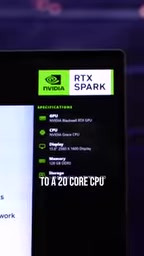
Up to 128GB of shared memory means users can run much larger AI models locally, while also handling demanding video editing and 3D creation workloads. In other words, this oversized memory pool transforms the laptop from a pure gaming device into a creative workstation capable of local large-model inference. That's the angle Lenovo is pushing this time — a portable AI and creative workstation that also happens to play games.
The core idea behind Unified Memory Architecture (UMA) is to let the CPU and GPU share the same physical memory, eliminating the overhead of copying data between them. In traditional PC architectures, the GPU has its own dedicated VRAM, and when an AI model needs to pass data between the CPU and GPU, it must go through a VRAM ↔ system memory transfer — a process that is both time-consuming and bandwidth-intensive. Apple's M-series chips take this architecture to its logical extreme: their "unified memory" allows neural network inference frameworks like MLX to have both the CPU and GPU operate directly on the same data with no copying involved. The shared memory pool NVIDIA implements in this machine follows a similar principle, though the underlying implementation differs — it relies on modern OS memory management and PCIe/VRAM virtualization to let the GPU address a much larger range of system memory. One important caveat: shared system memory typically has lower bandwidth than dedicated GDDR VRAM, so whether the 128GB capacity advantage can offset the bandwidth gap in real-world AI inference is the key variable when evaluating this approach.
Two Models: How the Pro and 2-in-1 Differ
Lenovo launched two models at once, with slightly different positioning.

Yoga Pro 9N: The Standard Flagship Form Factor
The Pro is a conventional laptop, weighing around 1.65kg and featuring a 15.3-inch 165Hz OLED display. It offers two SSD slots with storage configurable up to 4TB. This model is all about raw performance headroom — its top configuration pairs 128GB of RAM with 4TB of storage.

Yoga 9N 2-in-1: The More Versatile Convertible
The other model is the Yoga 9N 2-in-1, which by some reviewers' accounts is actually the more appealing of the two. Its RAM tops out at 64GB, but in exchange it comes with a larger 16-inch 120Hz OLED display, supports tent mode, and can fold flat into a full tablet. It also packs a larger battery.

The trade-off between the two models is clear: choose the Pro if you want maximum local AI performance and storage expandability; choose the 2-in-1 if display size, form-factor flexibility, and battery life matter more.
Unanswered Questions: Price and Real-World Performance
Lenovo hasn't announced pricing yet. Given the top-end combination of 128GB RAM and 4TB storage, this machine is almost certainly not going to be cheap — the fully maxed-out configuration could end up costing a staggering amount.
Beyond price, real-world performance remains an unknown. Whether a desktop RTX 5070's performance level can be sustained within a laptop's thermal and power constraints, and how much impact the large memory and high-performance components have on battery life, are questions that can only be answered through hands-on testing. The unified memory architecture is theoretically attractive, but the software ecosystem on the NVIDIA platform is not the same as Apple's M-series, and actual local AI model inference efficiency remains to be seen.
What This Product Category Signals
Setting aside the specific models, the direction Lenovo has taken with this configuration sends a clear signal: local AI capability is becoming a core differentiator for high-end laptops. As more users want to run large models locally rather than depending on the cloud, VRAM/memory capacity — a metric that used to matter mainly to gamers and professional creators — is now taking on a new role in AI inference.
The introduction of unified memory architecture is the industry's attempt to break through the traditional VRAM capacity ceiling. Lenovo's move to integrate gaming performance, creative productivity, and form-factor flexibility into a single product line reflects an obvious intent — targeting users who want productivity, entertainment, and local AI capability all in one device. Whether this solution is worth paying for will only become clear once pricing drops and real reviews come in.
The memory requirements for local large-model inference can be understood with a simple framework: a model with N parameters requires roughly 2N bytes of VRAM to load at FP16 precision. Take the currently popular open-source model Llama 3 70B as an example — it needs around 140GB at FP16, and still requires roughly 35GB even after 4-bit quantization. This means the 8–16GB of dedicated VRAM in a typical gaming laptop is completely inadequate, and even professional cards face bottlenecks. A 128GB shared memory pool genuinely covers most current mainstream open-source models from a capacity standpoint (including quantized hundred-billion-parameter models), which is its most direct value proposition for local AI users. As model parameter counts continue to grow, memory capacity will become an increasingly important competitive metric in consumer hardware.
Related articles

Kimi K3.1 Hands-On Test: Open-Source Model Nears Opus, Video Generation Steals the Show
Kimi K3.1 completed motion graphics, 3D rendering, mini-games, and video generation in a live test. Analysis of its 2.8T MoE architecture, gap vs Opus/GPT, and hidden video generation.

Sam Altman: Why Life's Biggest Advice Should Still Come from Humans
OpenAI CEO Sam Altman on the limits of AI advice: AI can talk you out of an impulsive email, but life's biggest advice should still come from humans.

"Black October": Did AI Uncover 3% of All Critical Vulnerabilities Ever?
A Reddit post claims 3% of all critical software vulnerabilities ever were found in the past month, dubbed 'Black October.' We break down the statistical issues, how AI-assisted code auditing accelerates discovery, and how developers should respond.