LG Cinebeam AI Review: 120-Inch Giant Screen + 3000 Lumens, a New Choice for the Living Room Theater

LG Cinebeam AI brings 3000-lumen 4K and AI features to fixed living-room projection.
LG launches the Cinebeam AI projector, extending the Cinebeam series from portable bedroom use to fixed living-room installation. It packs three HDMI, two USB-A, a LAN port, and more with no external power brick, and supports 4K resolution and 3000 ANSI lumens—about 8 cm for 100 inches and 18 cm for 120 inches. The article notes that enlarging the image dilutes brightness and pixel density, with 100 inches sharper and 120 inches better for distant viewing, and ambient light control remains the ceiling on picture quality. The A8 Gen 3 processor drives AI Concierge recommendations, AI Voice ID, and Google Gemini Q&A, while AI Sound Pro virtualizes 11.1.2 surround and enhances vocals. Game mode auto-enables low latency with multiple presets. Projection's diffuse reflection delivers a glare-free, painting-like, comfortable view, forming a clear division of scenarios with the portable S series.
LG's Cinebeam projector lineup has long been known for being compact and portable. The Cinebeam S in particular, with its cute design and solid portability, has drawn enormous attention on social media—according to a YouTube channel, a short video about this little projector racked up roughly 30 million views across multiple platforms. Now LG has introduced the series' "big guy": the Cinebeam AI. It shifts its target from the bedroom to the living room, attempting to redefine the home viewing experience with a bigger picture and higher brightness.
From Portable to Living Room: The Cinebeam AI's Repositioning
The core selling point of the Cinebeam S is portability: it comes with an external power adapter, supports USB-C, and can be carried from room to room or even taken on trips. Both LG and users see it as a flexible companion for "movie night," and kids even take it out and about.
The Cinebeam AI takes a different path. Aimed at fixed installation scenarios, it features three HDMI ports, two USB-A ports, digital audio output, a LAN port, and a power input—with no external power brick. You can place it permanently in the living room, hook up a sound system and game consoles, and use the built-in webOS to stream directly without extra peripherals. It also has a built-in center-channel speaker, so it delivers decent sound even without external speakers.
The division of labor is clear: the S handles the bedroom and mobile scenarios, while the AI handles the living room and maximum audiovisual output.
The Trade-offs of Brightness, Size, and Picture Quality
The Cinebeam AI offers 4K UHD resolution and 3000 ANSI lumens of brightness. It can project a 100-inch image from about 8 cm away, and 120 inches from about 18 cm—though in actual testing, 100 inches was achieved at roughly 10 cm from the wall.

There's a key trade-off here: going from 100 inches to 120 inches keeps the pixel count and total light output the same, which means both brightness and pixel density get diluted. As a result, the picture is sharper at 100 inches, while 120 inches suits a farther viewing position. When choosing a size, room dimensions and viewing distance matter more than "bigger is better."
The high brightness lets the Cinebeam AI cope with a certain amount of ambient light—say, when there's a window or other light source nearby—while maintaining usable brightness and contrast. But as with all projectors, controlling ambient light significantly improves the experience; adding light-blocking or diffusion measures takes picture quality up another notch.
ANSI lumen is the mainstream unit for measuring projector brightness, established by the American National Standards Institute (ANSI). It's derived by measuring the average illuminance across the nine zones of the projected image, and it reflects real-world perception more closely than the "peak lumens" that manufacturers used to favor. 3000 ANSI lumens is a mid-to-high brightness tier for home projectors—enough for a living room with some ambient light, though still short of "projecting straight through an open window in daylight." Note that ANSI lumens only reflects total white light output and doesn't capture color brightness; some manufacturers cite "color brightness" or "center brightness" as a supplement. In addition, brightness varies with projection distance and image size—the larger the image from the same machine, the lower the brightness per unit area, which is the physical root of the picture-quality difference between 100 and 120 inches mentioned above.
Installation and Correction: Designed for Fixed Setups
In the setup wizard, edge correction can be configured manually, with adjustment points ranging from 4 to 15—ideal for users who want fine calibration. It supports four projection modes: front, front ceiling, rear, and rear ceiling, and also offers a high-altitude mode. All of these point to the same usage logic: install once, keep it fixed long-term, rather than moving and refocusing frequently like a portable model.
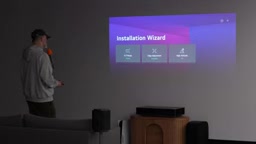
Keystone correction is used to fix trapezoidal distortion that occurs when the projector isn't perpendicular to the screen. Traditional models only support vertical/horizontal keystone correction, whereas the Cinebeam AI's 4-to-15-point correction is "multi-point geometric correction," allowing separate fine-tuning of the four corners and even grid nodes—suitable for ceiling mounting, side projection, and other non-ideal placements. The more correction points, the better the image fits the screen edges, but digital correction essentially crops and resamples the image, losing a bit of resolution and brightness. So for fixed installations, it's still best to align the projector head-on as much as possible and use correction as a fine-tuning tool rather than a primary reliance.
AI Features: From Voice Recommendations to Audio-Visual Enhancement
The Cinebeam AI is powered by the A8 Gen 3 processor, with AI capabilities woven through multiple layers. There's a dedicated AI button on the remote that invokes AI Concierge for personalized content recommendations. In hands-on testing, when asked to "recommend a movie focused on AI and sci-fi," the system suggested Ex Machina; when playing an autumn jazz video and requesting similar content, it could also identify the current on-screen content across apps and offer suggestions.
AI Voice ID can identify who is speaking, give personalized answers based on different accounts, and includes built-in Google Gemini support for Q&A.
On the audio side, AI Sound Pro virtualizes 11.1.2-channel surround sound, separating dialogue, music, and effects channels and remixing them to enhance vocal clarity—meaning you can still hear the dialogue at low volume without cranking up the explosions just to follow the lines.
AI Sound Pro's 11.1.2-channel virtualization doesn't rely on 13 physically distributed speakers; instead, it uses psychoacoustic algorithms to spatialize the output of stereo or built-in speakers, simulating sound localization overhead and around the listener. The "11" refers to ground-level surround channels, the "1" to the subwoofer, and the "2" to height channels—the channel-naming convention for immersive cinema audio. Virtualization can create a wider soundstage on small devices, but the effect is heavily influenced by room reflections and listening position; dialogue enhancement works by isolating the vocal frequency band and dynamically boosting its level, which is why lines sound clearer at low volume.
Gaming Performance: Low Latency and Automatic Optimization
When you connect a game console, the Cinebeam AI automatically switches its interface and prompts you to enter game mode, with latency dropping automatically to a low level. The Game Optimizer offers image presets such as Standard, FPS, RPG, and RTS, and adjusts the black stabilizer.

In hands-on play of a recent hit title (the original hints at the new GTA installment), there was virtually no perceptible latency—driving and controls responded smoothly. Game mode also has a dedicated colored overlay indicator to confirm the current status. The A8 Gen 3 processor handles both image processing and upscaling, so even low-resolution content gets a picture-quality boost.
Projection vs. TV: A Different Viewing Experience
One often overlooked advantage is projection's "diffuse reflection" nature: the image has none of the specular reflection and glare of a TV, so your eyes don't have to fight reflections, making long viewing sessions more comfortable. The flat, reflection-free look even has an artistic, painting-like quality, and combined with a cinema-style immersive atmosphere, it's an experience a TV of the same size struggles to replicate.
It's worth noting that any color banding that may appear in the video recording is due to the capture equipment; in actual viewing the picture is clean with no such issue.
Diffuse reflection refers to the phenomenon in which light strikes a rough surface and scatters in all directions. A projected image enters the eye after being reflected off a screen or white wall, rather than being emitted directly from a panel toward the viewer as with a TV, so there are no specular highlights or directional glare, and the eye receives less direct light stimulation. This is one reason projection is less tiring over long viewing sessions. However, diffuse reflection also means brightness depends heavily on ambient light—the stronger the ambient light, the more the reflected image gets "washed out" and contrast drops, so light control remains a prerequisite for getting the most out of a projector's picture quality.
Conclusion
The Cinebeam AI represents a clear segmentation of LG's home projector lineup: the S series holds down portability and bedroom scenarios, while the AI series pushes into the living room's main spot. 3000 ANSI lumens, 4K with upscaling, the A8 Gen 3 processor, AI Concierge, and AI Sound Pro form its core selling points, while the picture-quality trade-off between 100 and 120 inches and the need to control ambient light are two things to think through before buying. For users who want the atmosphere of a giant-screen cinema without the glare problems of a TV, this is a new option worth serious consideration.
Related articles

A 19-Year-Old's Rental Horror Story: Ceiling Collapse, Bug Infestation, and the Lessons It Taught Me
At 19, my first off-campus rental brought bug infestations, no heat, a collapsed ceiling, and a ruined laptop with no renter's insurance. Here are the hard-won lessons for first-time student renters.

Veda Nurse's Cranial Nerve Exam: Why ASMR Role-Play Is Going Viral
Bilibili creator Veda's cranial nerve exam ASMR video goes viral, blending humor and sensory triggers through nurse role-play. This article analyzes its unique appeal and the audience psychology behind ASMR role-play.

Rolling Your Eyes Can "Raise" Your Line of Sight? Uncovering a Visual Geometry Trick
A darkroom experiment reveals the geometric secret of the human eye: the pupil is not at the eyeball's center, so rolling your eyes upward raises the pupil's position and lets blocked light enter from the peripheral field.