Lobster Agent Hands-On: Generating and Deploying Public Webpages via WeChat on Your Phone

Lobster Agent: an AI tool that generates and deploys public webpages via WeChat messages
Lobster Agent is an AI automation assistant deeply integrated with the WeChat ecosystem. By sending natural language instructions via WeChat, users can automatically generate and deploy public webpages, auto-generate and push weekly reports, transfer files remotely, and execute code. Its core technology leverages Tencent Cloud's Cloudbase serverless architecture and WeChat remote control channels, supporting multi-Agent collaboration with independent memory — all with zero coding required, suitable for both general users and developers.
Introduction: Deploy Public Webpages from WeChat on Your Phone?
You might not believe it, but now you can generate and deploy a publicly accessible webpage directly through WeChat on your phone. No coding required, no server configuration needed — just send a message to an AI, and within minutes you'll have a shareable link.
The tool behind this is "Lobster Agent" (QCloud), an AI automation assistant deeply integrated with the WeChat ecosystem. This article provides a detailed overview of its core features, usage tips, and how it differentiates itself from similar products, all based on hands-on experience.
Getting Started with Lobster Agent: From Installation to Creating Your Own Agent
Installation and Login
The onboarding process is incredibly streamlined: download the client from the official website, scan the QR code with WeChat to log in — the entire process takes less than a minute. For beginners, this "out-of-the-box" experience significantly lowers the barrier to entry.
Creating a Custom Agent
Click "New Agent" in the client, select custom mode, and you can freely configure:
- A dedicated name and persona
- Detailed role descriptions based on your personal needs
- Bind the WeChat remote control channel (just scan a QR code)
- Add Cloudbase skills (install by sending a command)
Once Cloudbase skills are configured, the Agent gains cloud deployment and database operation capabilities, enabling it to generate webpages and deploy them to the public internet directly.
Cloudbase and Serverless Architecture Background: Cloudbase is Tencent Cloud's integrated backend cloud service platform. Its core concept is "Serverless" — users only need to focus on business logic while the platform automatically handles underlying compute resources, scaling, and operations. After Lobster Agent integrates Cloudbase skills, AI-generated HTML/CSS/JS code can be pushed directly to Tencent Cloud's CDN nodes, producing a publicly accessible URL. This entire process bypasses the traditional workflow of "purchasing a server → configuring the environment → uploading files → binding a domain," truly achieving end-to-end automation from natural language instructions to public webpages.
Hands-On Cases: Automation Scenarios Driven by WeChat Messages
Case 1: One-Click Lottery Webpage Generation and Deployment
Pick up your phone and send a command to the bound Agent in WeChat: "Create an anime-style lottery page and deploy it to the public internet." No manual coding needed — just wait for the Agent to automatically generate and deploy it.
Once deployment is complete, you'll receive a push notification in WeChat containing the public access link. Click to use it, share it with friends for direct access — one click, one draw.
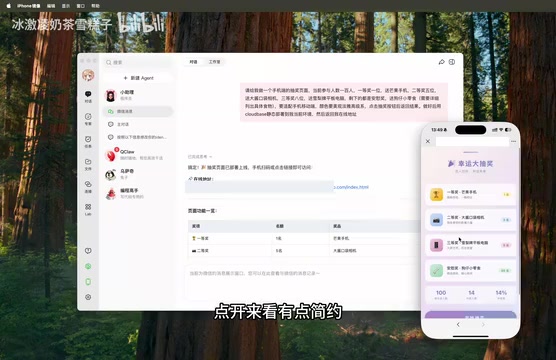
While the initial page might be fairly minimal, the convenience of the entire workflow is genuinely impressive. If you encounter bugs, you can ask the Agent to fix them directly in WeChat — for example, if images aren't displaying correctly, tell it "give me the real images," and you'll receive a new link with the fix shortly after.
Technical Principles of the WeChat Remote Control Channel: The WeChat remote control channel is essentially a message relay mechanism based on persistent connections (WebSocket). A background client process runs on the user's local device, maintaining a persistent connection with cloud servers. When a user sends a command via WeChat, the message travels through the chain: WeChat servers → Lobster cloud → local client, triggering the local computer to execute the corresponding operation. The advantage of this architecture is that no public IP or port mapping is needed — it works even when the user's device is behind NAT (Network Address Translation), such as home broadband or corporate intranets. Similar technical principles are used in remote desktop tools like TeamViewer; Lobster Agent deeply integrates this with the WeChat ecosystem, turning WeChat into a natural language terminal for controlling local devices.
Case 2: Automatic Weekly Report Generation Pushed to WeChat
This is one of the most practical scenarios for office workers. Set up a scheduled task to have the Agent automatically:
- Query Git commit records on your computer
- Summarize the week's work
- Generate a weekly report and push it to WeChat
No more struggling to remember "what did I do this week" — it saves a tremendous amount of organizing time. If the task configuration is incorrect, you can edit and adjust it at any time.
Technical Principles of Git Commit Records and Automatic Weekly Reports: Git is currently the most popular distributed version control system. Each code commit records the modifications, timestamp, and commit message. The
git logcommand can filter all commits within a time range for the current week, including file change statistics and developer notes. Lobster Agent executes this command in the local real environment, obtains structured commit data, then calls a large language model to transform technical code change descriptions into natural language work summaries, and finally sends them to the user via the WeChat push channel. The key to this workflow is that the Agent runs locally rather than in a cloud sandbox, so it can directly read Git repositories on the user's computer without any additional data synchronization configuration.
Case 3: Remote File Transfer and Code Execution
Out shopping and suddenly need a file from your computer? Send a message to the Agent, and it will transfer the file to WeChat for direct download and forwarding.
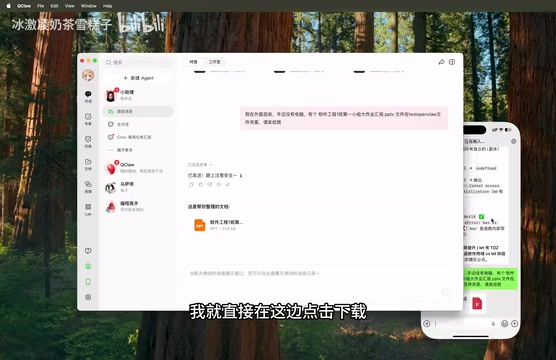
For students and coding enthusiasts, when you don't have your laptop but want to execute code for practice, the Agent runs code in the real environment on your computer rather than relying on model-based text guessing — this means more reliable results, making it very convenient for ad-hoc code testing.
Local Real Environment Execution vs. Cloud Sandbox: A Cloud Sandbox is an isolated execution environment used by many AI programming tools, where code runs in virtual containers on remote servers, completely isolated from the user's local device. While this approach offers high security, it has clear limitations: it cannot access local files, databases, or installed software environments, and execution results may differ from local outcomes due to environment discrepancies. Lobster Agent chooses to execute code in the real environment on the user's local computer, meaning the Python version, installed dependency libraries, local database connections, and file system permissions are all completely consistent with the user's daily development environment. Code execution results are genuinely reliable and trustworthy, particularly suitable for scenarios requiring access to local resources or verification of actual runtime behavior.
Deep Dive into Lobster Agent's Core Features
Multi-Agent Collaboration and Independent Memory
Different Agents can be configured with dedicated personas and independent memory, with skills handled separately. For example, you can create one Agent specifically for development and another for content creation — each handling its own responsibilities for higher efficiency.
It supports importing custom skill packages, even from GitHub, offering strong extensibility.
Multi-Agent Collaboration Architecture Background: In the AI field, "Agent" specifically refers to an AI system capable of perceiving its environment, formulating plans, and autonomously executing multi-step tasks — distinct from ordinary large language models that can only handle single-turn Q&A. Multi-agent collaboration architecture distributes different responsibilities to independent Agent instances, each maintaining its own context memory, tool permissions, and behavioral rules, similar to employees in different roles collaborating within an enterprise. The advantages of this design include: a single Agent's context window won't be polluted by irrelevant information, task execution precision for specialized work is higher, and it also facilitates permission isolation — for example, a development Agent can access code repositories while a content Agent cannot.
Related articles
 Product Reviews
The Programmer's Desk Setup Guide: Building a Workspace That Feels Like Home
Discover how programmers build productive, comfortable workspaces. From multi-monitor setups to ergonomic design, explore the desk philosophy that drives focus and flow.
 Product Reviews
Qoder vs Cursor Real-World Comparison: Which $20/Month AI IDE Is Better?
Hands-on comparison of Qoder vs Cursor AI IDEs: Agent autonomy, human interaction count, and architecture decisions. Qoder needed only 2 interactions vs Cursor's 8.
 Product Reviews
Cursor Cloud Agent Demo: Eliminating Bottlenecks Across the Entire Software Development Lifecycle
Deep analysis of Cursor's Cloud Agent demo showing how cloud VMs, automated test artifacts, and a full-chain control plane systematically eliminate human bottlenecks across the software development lifecycle.