Local AI Coding Agents Put to the Test: Can They Actually Fix Bugs or Just Break Your Code?

Local coding agents succeed or fail based on the full stack, not any single model — keep diffs visible and control in your hands.
Using a real-world invoice date bug as a through-line, this article maps the true capability limits of local AI coding agents. The core argument: results depend not on any single model but on the full stack of editor, model runtime, and agent framework. The piece breaks down hidden context window constraints, the fundamental difference between autocomplete and agent tasks, why tool support doesn't guarantee good tool use, and how an all-green test suite can mask a wrong fix. The recommended setup is Ollama + Continue + Qwen2.5-Coder (autocomplete) + Qwen3-Coder (agent tasks), with hardware realities, diff review, and keeping final commit authority with the human front and center.
The Real Capability Limits of Local Coding Agents
Local coding agents can read your repository, edit files, and run tests — sounds great. But a hands-on test by an overseas developer revealed a critical truth: they can just as easily change the wrong date field and confidently declare the bug fixed. What determines success or failure isn't any single model's strength — it's the entire stack you build around it.
The test uses one concrete case throughout: an e-commerce store where invoice dates come back empty, but only on invoices created after a user updates their shipping address. That detail matters. When facing this kind of problem, you have two choices: paste a single file into a chatbot and hope for the best, or let a local agent that understands the full repository trace the call chain, propose a patch, and verify it before deployment. The latter is now genuinely feasible.
The full pipeline involves three roles: an editor that hosts the assistant (e.g., VS Code or JetBrains with the Continue plugin), a runner that loads the model (e.g., Ollama or LM Studio), and an agent that decides which files to touch and which commands to run (e.g., OpenCode, Claude Code, or Codex). Models like Qwen3-Coder and GPT-OSS earn their place by actually calling tools — not just describing what should be done.
Context Is the Real Bottleneck
A generic chatbot might suggest you "check the date formatting function." An assistant that understands the repository structure can simultaneously search the checkout flow, invoice generation logic, and address update code. If updating an address creates a new order object but drops the original purchase timestamp, you get a concrete root cause — not a guess.
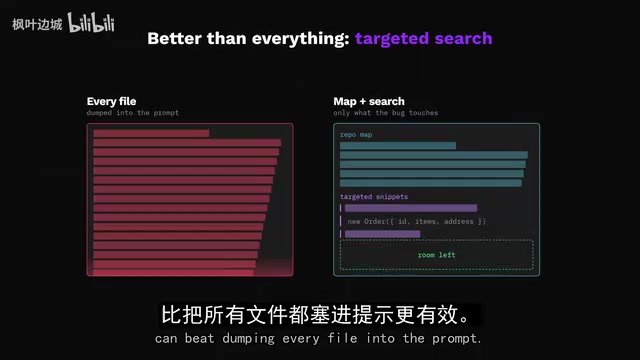
But context is a trap. A model's advertised context window only tells you how much input it can accept — not how much your editor actually sends, and not whether your machine can handle it. The test specifically notes that Continue warns its default context settings may exceed what a typical Ollama environment can sustain. When memory is tight, you should proactively reduce context size or switch to a smaller model.
A key insight: a repository map or targeted search is often more effective than stuffing every file into the prompt. The less irrelevant code there is, the more clearly the real clues stand out. And once the model finds information, it still has to genuinely understand it.
A context window refers to the maximum number of tokens a model can process in a single inference pass — roughly 0.75 English words or half a Chinese character per token. A 128K context window can theoretically hold around 100,000 words of English code, but several hidden constraints apply in practice: models pay the most attention to the beginning and end of their context, with information in the middle prone to being "forgotten" (known as the "Lost in the Middle" problem); more tokens mean more computation and memory per generation, significantly slowing things down; and local runtimes like Ollama store the entire KV cache in GPU or system memory, so longer contexts create mounting memory pressure. This is precisely why repository map strategies are more practical — they use static analysis to extract function signatures and module dependencies, conveying the skeleton of a codebase to the model with minimal tokens rather than feeding raw files line by line.
Autocomplete and Agent Are Fundamentally Different Capabilities
The test splits the job into two distinct "auditions." The first is autocomplete while writing tests — predicting the next few lines based on code near the cursor. Continue's current configuration guide recommends Qwen2.5-Coder 1.5B for this role. The model is intentionally small, because waiting several seconds for a single suggestion defeats the entire purpose of autocomplete.
The second audition is the real challenge: tracing a bug across order service and invoice rendering modules, patching it, and running tests. An autocomplete model can help you finish a function, but it can't decide which file needs changing. An agent must plan, call tools, read results, and recover from errors — a fundamentally different capability.
An important clarification on parameters: the Qwen3-Coder 30B version listed on Ollama is a 19GB download with a 256K token context window. Although it only activates roughly 3 billion parameters per token to reduce per-token computation, the download still contains the full large model — it doesn't shrink into a 3B package. A longer context window also doesn't mean "a software engineer in a box" — the model can still miss database migration scripts or timezone assumptions.
Qwen3-Coder 30B uses a Mixture of Experts (MoE) architecture. MoE models split network layers into multiple "expert" sub-networks, with a lightweight router dynamically selecting a small subset of experts for each inference pass rather than activating all parameters. The 30B total parameter count means the model file contains the full weights of all experts (hence the 19GB download), but each token generation only activates the computational load of roughly 3B parameters, reducing floating-point operations per inference while doing nothing to reduce the memory footprint required to load the model. By contrast, a dense model with equivalent active parameters (like the Llama series) uses all parameters on every inference pass — higher compute but more uniform memory utilization. MoE architecture makes large context windows marginally feasible on consumer hardware, but "fewer active parameters" does not equal "less memory usage" — a critical distinction that's easy to confuse when selecting a model.
Tool Support Is Not Proof of Good Tool Use
When an agent can actually take action, the power becomes real: locate the date field, read the order update logic, patch the mapping, run the checkout tests. Ollama's coding integration provides a one-click path to launching OpenCode, Claude Code, or Codex, giving agents the "inspect file → propose change → receive result → continue" loop that a plain chat window lacks.
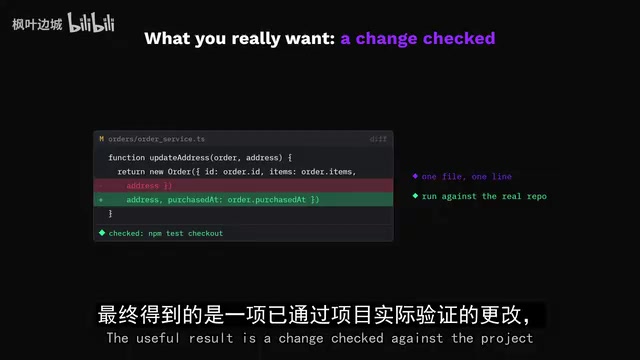
But the test repeatedly emphasizes: tool support is not proof of good tool use. Some models that claim to support tool calling will, in practice, send malformed calls, inspect the wrong files, or offer a plausible-sounding explanation and stop there. Continue also notes that agent mode is heavily dependent on reliable tool handling.
The solution is to make the entire loop observable: let the agent read freely, but review every diff, run tests in a safe isolated workspace, and keep the final commit authority firmly in your own hands. "File access" is not the same as "publish rights."
Large language models' tool calling capability (also called Function Calling) depends on a specific training paradigm: models need to see large volumes of structured tool-calling examples during fine-tuning to reliably output JSON call requests that conform to format specifications at inference time — rather than describing in natural language "I intend to call this function." Different frameworks define tool-calling formats differently (e.g., OpenAI format, Anthropic format, Ollama's own format), and a model not trained on a specific format will produce malformed calls, causing the agent loop to terminate early or fall into error-retry cycles. Tool calling also involves multi-turn interactions: model issues call → runtime executes → result returned → model continues reasoning. Any latency or error at any stage compounds. This explains why agent effectiveness is highly dependent on the specific combination of model, runtime, and framework — not just parameter count.
A Green Test Suite Can Be a False Signal
Imagine the agent changes the invoice timestamp to "current time" — the date field is no longer empty, but the invoice data is wrong. An all-green test suite only means something when it checks the behavior users actually care about. The right approach is to add a regression test: after updating a shipping address, verify that the original purchase date is preserved.
Coding benchmarks measure performance on predefined tasks in specific test frameworks. They cannot guarantee your checkout fix will succeed with your own framework, conventions, and legacy decisions baked in. The only metric that actually matters: a reviewable change that passes the test that truly counts.
Two Workflows and Recommendations
The test concludes with two viable paths.
Path 1: Continue + IDE. Keep the assistant inside VS Code or JetBrains, configuring separate models for chat, autocomplete, editing, and embeddings. Small models handle instant completions; large models investigate the invoice bug. The advantage is that no single model tends to win across all roles. The tradeoff is more complex configuration and the need to keep context within what your machine can handle.
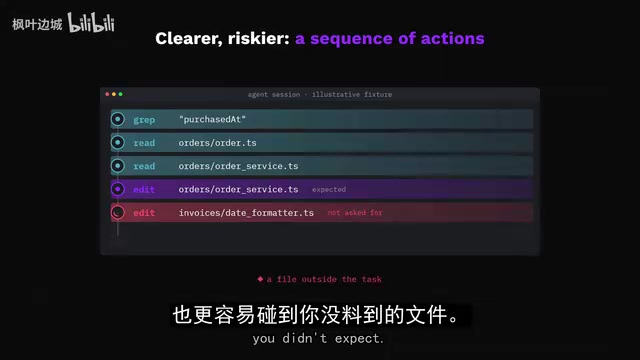
Path 2: Ollama + OpenCode. Jump straight into the agent loop — describe the bug, let the tools inspect the repository, review what it wants to change. The advantage is seeing the entire task as a sequence of actions. The risk is that an overly aggressive agent is more likely to touch files you didn't anticipate, making permissions and review especially important.
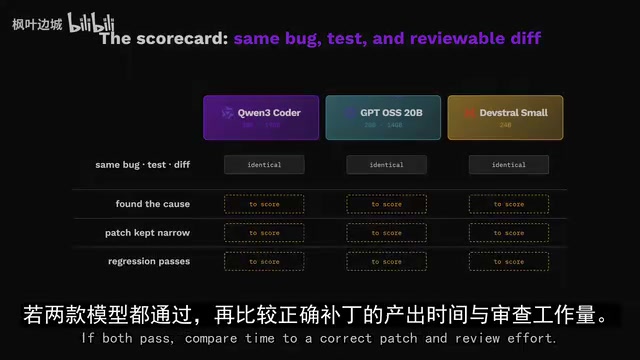
The recommended combination is: Ollama + Continue + Qwen2.5-Coder (autocomplete) + Qwen3-Coder (agent tasks), with clear reasoning for each component. Other options include GPT-OSS 20B (OpenAI's open-weight model, ~14GB, 128K context, well-suited for tasks mixing business logic and code) and Mistral's Devstral Small. But no vendor's published strengths can make the decision for you — prompting, format, quantization, runtime, hardware, and integration all affect outcomes. The only reliable comparison method: use the same bug, the same test, and the same reviewable diff to score each option — checking whether it found the root cause, whether the patch is appropriately minimal, and whether it passes a meaningful regression test.
Don't Overlook the Hardware Requirements
Finally, the practical reality. Beyond Qwen3-Coder's 19GB download, the runtime also needs memory headroom for context, runtime overhead, the OS, and the editor. A 16GB VRAM GPU cannot fit the entire model in VRAM — it has to offload to CPU or shared memory, at the cost of speed. If your machine is constrained, go with a smaller model, shorten the context, or split autocomplete and chat across different model sizes. A useful local coding assistant doesn't have to start with the highest-end configuration.
Back to that blank invoice date: the stack earns its place when it can trace why the timestamp disappeared, propose a small and precise fix, and let tests prove the behavior is correct. Keep the model weights local, the diffs visible, and the final decision in your hands — that's the right way to work with local AI coding tools.
When model weights exceed GPU VRAM, runtimes like Ollama automatically offload some layers to CPU memory or system RAM — a mechanism called "CPU offload" or "layer splitting." Offloaded layers require data to be transferred between CPU memory and GPU VRAM through the PCIe bus during inference. PCIe bandwidth (typically 16–32 GB/s) is far lower than GPU internal memory bandwidth (typically 400–900 GB/s), causing significant inference latency. Take Qwen3-Coder 30B as an example: using a Q4 quantized version (~19GB) on a 16GB VRAM GPU, roughly a quarter of the layers need to be offloaded, potentially dropping generation speed from 20+ tokens/second (full GPU load) to under 5 tokens/second — practically unusable for autocomplete that requires instant response. When choosing hardware, look beyond VRAM capacity: consider whether you have enough system memory (32GB+ recommended) to absorb offloaded layers, and decide what speed penalty you can tolerate.
Related articles

Chain of Thought Isn't Just for AI: How Humans Can Use CoT to Improve Thinking Quality
Chain of Thought isn't just a prompt trick for large models. Starting from a Hacker News discussion, this article analyzes why CoT works for human thinking too, breaks down actionable ways to transfer it, and highlights the key differences between human CoT and machine CoT.
Cloudflare Teams Up with OpenAI: Closi…
Cloudflare Teams Up with OpenAI: Closing the Loop from Vulnerability Discovery to Defense with AI
Cloudflare uses OpenAI Daybreak to investigate security vulnerabilities and generate reviewable remediation plans, while developers use Codex to boost coding efficiency and quality.

Orca Multi-Agent Orchestration in Practice: A Guide to Parallel Collaboration with Claude and Codex
Orca is Stable AI's free open-source agent workbench supporting 34 agents like Claude Code and Codex in parallel. Learn its Git worktree isolation, multi-model orchestration, and mobile management.