Local AI Inspects NAS: Automatic WeChat Alerts for Anomalies

Use zero-dependency Python scripts plus a local LLM to enable automatic WeChat alerts for NAS anomalies.
This article presents a lightweight monitoring and alerting solution for home NAS and small hosts, centered on two scripts written purely with the Python standard library: one inspects disk usage, memory, and core container status; the other packages anomalies into a payload and pushes them to WeChat. It uses threshold triggers with user-adjustable limits, and via the local LLM's function calling, users can ask about NAS status in natural language. In tests, WeChat received alerts within three seconds. Compared with traditional platforms that require agents and databases, it is zero-dependency, low-power, and low-maintenance—ideal for Raspberry Pi and small servers, shifting from passive troubleshooting to proactive defense.
Title
Local AI Inspects NAS: Automatic WeChat Alerts for Anomalies
Meta Description
A Bilibili creator shares a local AI NAS inspection solution: a zero-dependency Python script monitors disk, memory, and container status, automatically sending WeChat alerts within three seconds when anomalies occur. No expensive monitoring platform needed—runs on low-power devices.
Article Content
When a NAS or a small home server suddenly crashes, it often goes unnoticed until the network outage starts affecting daily use. In fact, you don't need to buy an expensive monitoring platform—pairing a local large language model with a lightweight script can enable proactive alerting. The solution shared by a Bilibili creator boils down to just two things: a zero-dependency inspection script and a WeChat notification bot script. Both are written purely with the Python standard library, requiring no third-party packages, and run easily even on low-power machines. When the disk is nearly full, memory is maxed out, or a core container goes down, the script immediately captures the anomaly and proactively pushes a notification—saying goodbye to the hassle of manually logging into the admin panel every day.
Core Components: Zero-Dependency Inspection and WeChat Notifications
The solution requires only two scripts. The inspection script checks key system metrics such as disk usage, memory consumption, and container status. It is built entirely on the Python standard library with no external dependencies, so its system resource footprint is extremely low—ideal for long-term operation on a NAS or low-power mini PC. The WeChat notification bot script packages alert information into a payload and sends it to WeChat. According to the creator's demo, the core code is only a few dozen lines; when a preset threshold is exceeded, an alert is triggered automatically.
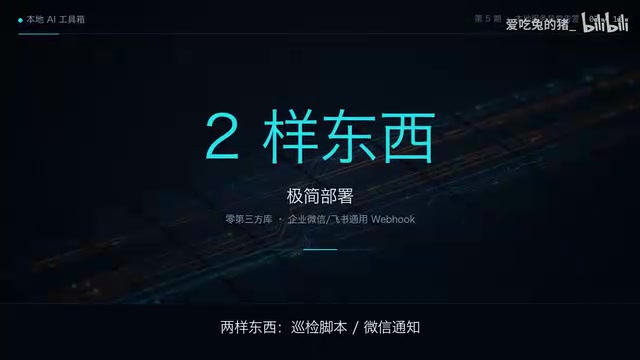
The advantage of this design is that it's lightweight and controllable. Traditional monitoring platforms often require deploying agents, configuring databases, or even purchasing subscription services, whereas this solution minimizes complexity—just two script files cover the most common anomaly scenarios. For home users, maintenance costs are virtually zero.
WeChat Bot Webhook and Payload
WeChat itself does not offer an open bot API for individual users. The "WeChat notification bot" mentioned here usually refers to a Webhook address provided by a WeCom (Enterprise WeChat) group bot or a third-party relay service. A Webhook is essentially a pre-allocated HTTPS endpoint: simply POST a JSON payload to it, and the message appears in the corresponding group chat. The most critical field in the payload is msgtype (e.g., text, markdown, news), which determines whether the message renders as plain text, Markdown, or a card. The card format can also include a title, description, and jump link, making it visually closer to the "alert card" mentioned in the article. The advantage of this approach is that the server side only receives—no long connections or authentication handshakes are needed—and on the script side, a single standard library module, urllib.request, is enough to send the message, perfectly matching the "zero-dependency" design. Note that the Webhook address is equivalent to a password: anyone who obtains it can post messages to the group. Therefore, it's recommended to store it in an environment variable or a separate configuration file rather than hardcoding it into the script.
Detection Mechanism: Threshold Triggering and Container Monitoring
The core logic of the inspection script is threshold detection. For example, when disk usage exceeds a set value, memory consumption reaches a critical point, or a core container unexpectedly stops, the script flags it as an anomaly. In the video, the creator demonstrates the handling flow after a threshold breach is detected: the script automatically packages the alert data and sends it via the WeChat bot.
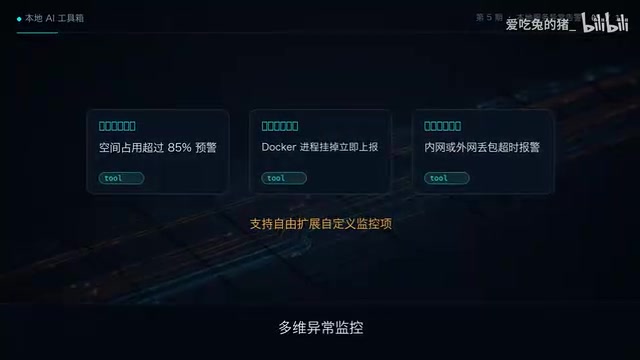
Although this threshold-based detection method is simple, it is very effective. It doesn't rely on a complex monitoring system or require continuous collection of a large number of metrics—it only needs to watch the most critical health signals. For a home NAS, a full disk, exhausted memory, and container crashes are precisely the most common causes of failure; focusing on these few points covers most risks.
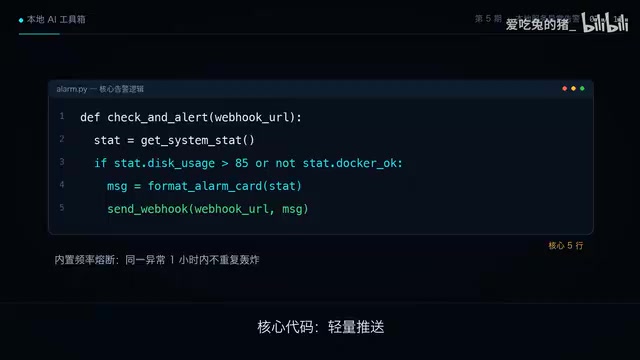
The script is also somewhat flexible—users can adjust thresholds according to their own device conditions. For example, disk usage can be set to 90% or lower, and the memory limit can be set reasonably based on total capacity. This customizability allows the solution to adapt to NAS and mini PCs with different configurations.
How Container Status Is Detected
The script determines whether a "core container is down" without needing to integrate a heavyweight monitoring system. There are two common approaches. The first is to read the local interface exposed by the container runtime: Docker provides a Unix socket at /var/run/docker.sock by default, through which you can list containers and query the State.Running or State.Status fields; Podman also offers a compatible interface. The second is a fallback: use subprocess to call docker ps and parse the output. The former is cleaner but requires the script process to have read permission on the socket (usually meaning membership in the docker group, which is a high privilege level); the latter is simpler to implement but depends on the external command being present. Beyond "is it running," stricter checks also look at the restart count (RestartCount) and health check status (Health.Status), because a container may be running while its internal service is unresponsive. For home NAS scenarios, monitoring "whether the container has exited" already covers most failures; adding health checks further improves accuracy.
Interactive Experience: Asking the Local Assistant for Status
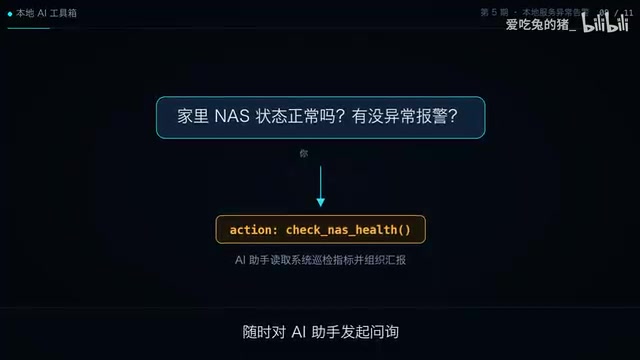
In addition to automatic alerts, the solution supports interactive queries. The user simply asks the local assistant, "How is the home NAS doing right now?" and the assistant calls a tool to run the inspection script and immediately reports the current status. This effectively adds a natural language interface to the NAS, making status queries as simple as chatting.
According to the creator, the local large language model plays the orchestration role here. It understands the user's intent, calls predefined tool functions, and organizes the results to return to the user. The entire process happens locally without relying on cloud services, which both protects privacy and reduces latency.
Function Calling
Getting the local LLM to "execute a script" relies on the function calling mechanism—not on the model itself running code. The approach is: when requesting the model, include a tool description (function name, purpose, parameter JSON Schema). Based on the user's question, the model decides whether to call a tool, which function to call, and what parameters to pass, then returns a structured call intent. The host program parses this and actually executes the inspection script, then sends the script output back to the model as a tool result, which the model organizes into a natural language answer. Thus the model is only responsible for "understanding intent" and "organizing wording," while permissions and execution always remain in the hands of the local program. Locally deployed open-source models (e.g., the Qwen and Llama series running via Ollama) mostly support this capability, but small-parameter models are prone to parameter-format errors, so fault tolerance is usually needed at the parsing layer. The entire chain is fully offline—user data never leaves the machine—which is the main advantage over cloud-based assistants.
Real-World Results: Accurate Delivery Within Three Seconds
The creator conducted real tests: whether unplugging the network cable to simulate a network outage or simulating a full disk, WeChat received the alert card accurately within three seconds. This real-time capability means failures are known almost immediately after they occur, rather than being discovered passively when they impact usage.
The difference between being passively hit and actively defending is obvious. In the traditional approach, users often only investigate after the network goes down or a service becomes unavailable, whereas local AI real-time inspection sends a notification the moment an anomaly occurs, allowing users to intervene early and avoid data loss or service interruption.
Why Simulate "Unplugging the Network Cable"
A network outage is one of the most typical and insidious NAS failures: the device is still running, the disk lights are still blinking, but remote access, sync, and media services are all unavailable—users often only discover it when they want to use them. The point of the unplugging test is to verify whether the monitoring chain covers "network-level" anomalies, not just process-level crashes. Note that if the inspection script runs on the same machine being monitored, the script itself cannot send an alert when the machine goes down entirely or goes fully offline. A more robust approach is to add a "heartbeat" mechanism: the script periodically reports liveness to an external endpoint, and the external side sends a reverse alert when it times out waiting for a heartbeat; or simply deploy the inspection script on another always-on device and check the target host via SSH or HTTP. This way, the most severe scenario—the machine completely dying—won't be missed.
Advantages and Use Cases
The biggest advantages of this solution are zero dependencies, lightweight design, and low cost. Being written purely with the Python standard library means no pip packages need to be installed, avoiding environment conflicts and dependency management hassles. It runs smoothly even on low-power machines without burdening the NAS itself. WeChat notifications cover the most commonly used instant messaging tool, with no additional app installation required.
Use cases include home NAS, small servers, Raspberry Pi, and other low-power devices. For individual users and small teams, this is a cost-effective monitoring and alerting solution. The creator revealed that the complete alert code is in the first line of the video description, and teased that the next episode will cover one-click setup of a local knowledge base retrieval system.
Conclusion
The local AI NAS inspection solution achieves practical alerting functionality with extremely simple scripts. It doesn't aim for a comprehensive monitoring platform but focuses on the most common failure scenarios, using threshold detection and WeChat notifications to let users learn about anomalies immediately. For users who value lightweight design and self-control, this is an approach worth trying.
One-line Summary
Using zero-dependency Python scripts plus a local large language model to enable automatic WeChat alerts for NAS anomalies.
Paragraph Summary
The article introduces a lightweight monitoring and alerting solution for home NAS and small hosts. Its core consists of just two scripts written purely with the Python standard library: one inspects disk usage, memory consumption, and core container status, and the other packages anomaly information into a payload and pushes it to WeChat. The solution uses threshold-triggered mechanisms, allowing users to adjust thresholds to suit devices with different configurations; at the same time, leveraging the local LLM's function calling capability, users can ask about the NAS's current status in natural language, and the assistant executes the script and reports the results. In real tests, whether unplugging the network cable or simulating a full disk, WeChat received the alert card within three seconds. Compared with traditional monitoring platforms that require deploying agents and configuring databases, this solution is zero-dependency, low-power, and extremely low-maintenance—suitable for scenarios like Raspberry Pi and small servers, enabling a shift from passive troubleshooting to proactive defense.
Related articles

Pi Agent Tutorial: How Minimalist Design Reshapes AI Agent Development
An in-depth look at Pi Agent's minimalist design philosophy: why it still draws high attention alongside Codex and Claude Code, from GitHub Star trends to extension mechanisms, with a Bilibili practical tutorial covering installation, configuration, and Agent development for beginners and advanced developers.

Codex in Practice: A Complete Guide to Enterprise-Grade Agent Skills Development
An in-depth analysis of a Bilibili Codex practical course covering core capabilities, agents.md configuration, MCP protocol, multi-agent collaboration, and enterprise plugin development—building a complete framework for enterprise AI coding tool adoption.

A Beginner's Guide to LLM Fine-Tuning: From Principles to Industry Implementation
Starting from the layered structure of general LLMs, this guide systematically covers the motivations, cost comparisons, and applicable scenarios of LLM fine-tuning, with three open-source cases: Bencao, LawGPT, and FinGPT, illustrating implementation paths in healthcare, law, and finance.