Local Calendar Sync Tool: A Privacy-First Solution for Merging Multi-Account Schedules

A privacy-first local tool that merges multi-account calendars to prevent double bookings.
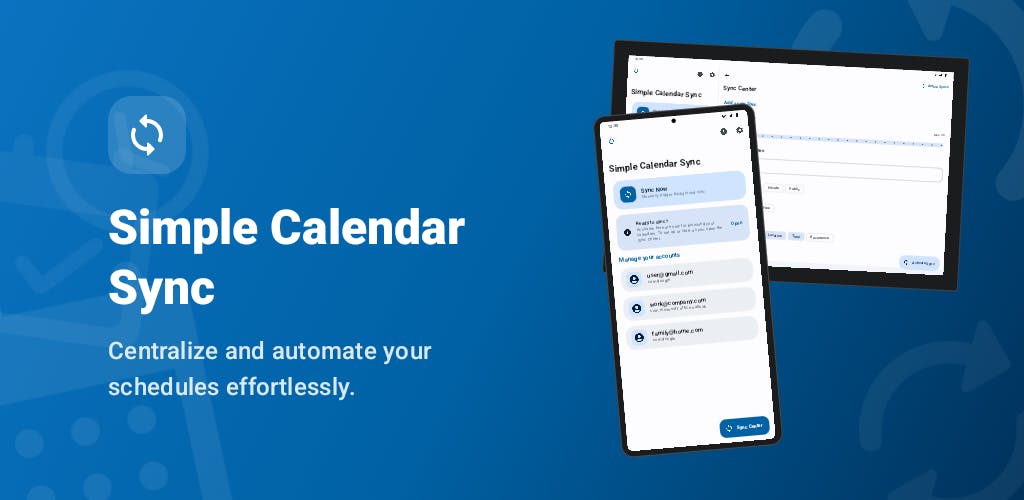
Simple Calendar Sync is an Android app that merges calendars from Google, Outlook, and other accounts entirely on-device, with no data sent to external servers. It creates placeholder "busy" events across accounts to prevent double bookings while protecting sensitive schedule details. Built on a local-first philosophy, it leverages Android's Calendar Provider to sync without cloud APIs, offering a privacy-friendly alternative to traditional cloud-based calendar aggregation tools.
In the modern world of multiple accounts and platforms, calendar management has become a pain point for many. You might have a Google Calendar for personal life, an Outlook calendar for work, and schedules scattered across various other platforms. How to make these fragmented calendars "aware" of each other and avoid double bookings has become a real need. Simple Calendar Sync, recently launched on Product Hunt, offers a distinctive approach — performing all syncing and merging entirely on the local device.
Calendar Protocol Fragmentation: The Technical Root of the Problem
Most modern calendar systems store event data based on the iCalendar (RFC 5545) standard format, while cross-platform syncing relies on the CalDAV protocol. Google Calendar and Apple Calendar natively support CalDAV, whereas Microsoft Outlook uses its proprietary Exchange ActiveSync or Microsoft Graph API. This protocol-level fragmentation is one of the root causes of cross-platform calendar sync complexity. Third-party sync tools typically need to integrate with each platform's API separately, obtaining OAuth authorization to read and write calendar data. Simple Calendar Sync's choice to handle this process locally means it likely reads calendar databases already synced to the device at the operating system level, bypassing the dependency on cloud APIs.
Core Philosophy: All Data Stays on Your Device
Simple Calendar Sync's most distinctive selling point is its privacy promise: all sync operations are performed 100% locally on the user's device, with no data sent to external servers and no tracking software integrated.
This stands in stark contrast to most calendar aggregation services on the market. Traditional third-party calendar sync tools typically require users to grant calendar access permissions to a cloud service, with schedule data processed and relayed through the provider's servers. For calendar data that contains a wealth of sensitive information (meeting topics, contacts, locations, etc.), this model always carries privacy concerns. Simple Calendar Sync keeps the processing logic local, architecturally eliminating the risk of data leakage.
The "Local-First" Technical Philosophy
The "Local-first" philosophy that Simple Calendar Sync embodies originated from a seminal 2019 paper by the Ink & Switch research lab titled Local-first software: You own your data, in spite of the cloud. This philosophy advocates that software should primarily run on local devices, with data ownership belonging to users rather than service providers. This approach has inspired numerous products, such as the note-taking app Obsidian and the collaboration tool Anytype. In the calendar sync context, local-first means that all data processing and merging logic is completed on the device, without relying on server-side relay. This architecturally eliminates risks such as man-in-the-middle attacks, provider data breaches, or compelled data disclosure, but it also means sacrificing the real-time cross-device sync capabilities that cloud-based solutions inherently offer.
For privacy-conscious users — especially professionals dealing with trade secrets or personal sensitive information — this "offline-first" design holds clear appeal.
Core Feature: Resolving Cross-Account Time Conflicts
The app's core functionality can be summed up in one word: "merging." It aggregates events from Google Calendar, Outlook, or any calendar account on the device into a unified calendar view.
Android Calendar Provider: The System Foundation for Local Sync
On Android, calendar data is managed through the Calendar Provider (a content provider). Event data from various calendar accounts added by the user — Google, Outlook, Exchange, etc. — is synced to a local SQLite database on the device and exposed through the ContentProvider interface. This means any app with calendar read/write permissions can directly access all synced calendar data on the device without needing to go online or call cloud APIs again. Simple Calendar Sync most likely leverages this system-level mechanism — reading existing multi-account calendar data locally and creating merged and placeholder events on-device, achieving a "sync without internet" effect.
Avoiding Double Bookings
The most common predicament for multi-account users is that different calendars are "unaware" of each other. When a colleague schedules a meeting on your work calendar, they can't see your existing commitments on your personal calendar, and vice versa. This information siloing easily leads to time conflicts and double bookings.
Double booking is a costly and common problem in enterprise collaboration. According to industry research data, approximately 76% of knowledge workers manage two or more calendar accounts simultaneously, and more than a third of them experience at least one time conflict per month due to calendar desynchronization. This not only wastes time but can also damage professional reputation and client relationships. Current mainstream solutions include Calendly, SavvyCal, Reclaim.ai, and others, most of which aggregate multiple calendar sources via the cloud to present unified availability — but at the cost of granting full calendar read access to a third-party cloud service.
Simple Calendar Sync solves this by "blocking time" across accounts: when one account has an event scheduled, it syncs a placeholder event to the other accounts, ensuring every platform reflects your true availability. This way, regardless of which channel someone uses to check your schedule, they see an accurate picture of your free time.
The Technical Implementation of Time Blocking
The "block time" strategy employed by Simple Calendar Sync is technically known as "mirrored busy events" or "placeholder sync." It works as follows: when an event is detected in Calendar A, a placeholder event for the corresponding time slot is automatically created in Calendar B, marking that period as "busy." This placeholder event typically does not include sensitive details from the original event (such as title, attendees, or location) — it simply marks the time slot as unavailable. This design strikes an elegant balance between privacy protection and usability — colleagues can only see that you're "busy" but cannot peek at your specific commitments under a different identity.
Keeping Availability in Sync
The practical value of this mechanism lies in keeping your "real availability" consistent across all platforms. For users who frequently collaborate across teams and organizations, or who manage schedules across multiple roles, this is both a practical and essential feature.
Product Positioning and Current Status
Based on Product Hunt information, Simple Calendar Sync is currently positioned in the Android, Productivity Tools, and Calendar categories, built by independent developer Rafael Pérez.
On its launch day, it received 3 upvotes, 1 comment, and ranked #20. Judging by the numbers, this is an early-stage indie developer product that has not yet generated significant user traction. As a tool with "Simple" in its name, its product philosophy is clearly to focus on a single use case and do one thing well, rather than pursuing feature bloat.
Strengths and Questions to Be Validated
On the strengths side, the privacy advantage of local processing is a genuine and differentiated selling point. In an era of growing data privacy awareness, the product narrative of "works offline" and "data never leaves your device" has market potential, especially for users who are cautious about cloud services.
On the questions-to-be-validated side, local sync may also involve some technical trade-offs. For example, how is cross-device consistency ensured? If the same user needs to merge calendars on both a phone and a computer, can a purely local solution cover multi-device scenarios? Additionally, real-time responsiveness and the stability of background syncing are critical to whether such tools are truly usable — Android's battery optimization strategies (such as Doze mode) throttle background app execution frequency, which could affect the timely creation of placeholder events. These questions need to be tested through actual use.
The app currently targets the Android platform, and whether it will expand to iOS or desktop will also affect its reach. It's worth noting that iOS imposes stricter limitations on background execution than Android, meaning a purely local solution would face greater technical challenges on iOS.
Conclusion: Trading Local Computation for Privacy Protection
Simple Calendar Sync represents a product approach gaining increasing attention: trading local computation for privacy protection. It targets a real pain point for multi-account users — schedule conflicts and availability synchronization — and offers a privacy-friendly answer. For those who need to merge multiple calendars but are unwilling to hand their schedule data to the cloud, it's worth a try. As an early-stage indie product, its actual user experience and future iterations still need to be validated by more user feedback.
Related articles

Chain of Thought Isn't Just for AI: How Humans Can Use CoT to Improve Thinking Quality
Chain of Thought isn't just a prompt trick for large models. Starting from a Hacker News discussion, this article analyzes why CoT works for human thinking too, breaks down actionable ways to transfer it, and highlights the key differences between human CoT and machine CoT.
Cloudflare Teams Up with OpenAI: Closi…
Cloudflare Teams Up with OpenAI: Closing the Loop from Vulnerability Discovery to Defense with AI
Cloudflare uses OpenAI Daybreak to investigate security vulnerabilities and generate reviewable remediation plans, while developers use Codex to boost coding efficiency and quality.

Orca Multi-Agent Orchestration in Practice: A Guide to Parallel Collaboration with Claude and Codex
Orca is Stable AI's free open-source agent workbench supporting 34 agents like Claude Code and Codex in parallel. Learn its Git worktree isolation, multi-model orchestration, and mobile management.