Local LLM Deployment in Practice: A Complete Guide to Ollama, vLLM, and Quantization

Compare Ollama, vLLM, and LM Studio, then see how BF16/FP8/INT4 quantization shapes GPU needs for Qwen3 27B.
This article covers two core decisions in local LLM deployment: tool selection and hardware planning. Ollama suits lightweight personal experiments, vLLM targets high-concurrency enterprise production, and LM Studio serves non-technical users. Using Qwen3 27B as a case study, BF16 weights require ~50 GB with a ~56 GB peak including KV Cache, demanding 80 GB-class professional GPUs. FP8 quantization cuts this to 26–29 GB, and INT4 makes consumer RTX 4090s viable. The article recommends BF16 for production, INT4 for testing, and treating INT4 as the minimum acceptable precision floor.
Local deployment of large language models has become an unavoidable technical topic for enterprises and individual developers alike. Whether driven by data security, cost control, or customization needs, mastering the major deployment tools and their corresponding hardware requirements is a prerequisite for building real-world LLM applications. Drawing on hands-on deployment experience, this article maps out the use cases for three popular deployment tools and uses the Qwen3 series as a concrete example to explain how different quantization strategies affect actual VRAM requirements.
Three Local Deployment Tools: Positioning and Trade-offs
Three tools dominate the local LLM deployment landscape today, each targeting a different audience.
Ollama is the most well-known. It's a lightweight deployment tool with a gentle learning curve, ideal for individual developers doing local testing or experimental projects. For anyone who wants to quickly get a model running on their own machine, Ollama is essentially the zero-friction default.
vLLM is a production-grade LLM inference framework designed for high-concurrency enterprise environments. If you need to reliably serve inference requests in production, vLLM is the more sensible choice. The trade-off is that it carries the highest complexity and hardware requirements of the three — a GPU is mandatory — but in return it delivers the strongest inference performance.
LM Studio takes a graphical approach, offering a visual interface for deploying and managing LLMs, making it especially suitable for non-technical users. For professional IT practitioners, however, Ollama for personal testing and vLLM for production deployment is usually sufficient, leaving LM Studio with a relatively limited niche. It's also worth noting that LM Studio is closed-source, while both Ollama and vLLM are open-source — a factor worth weighing in enterprise tool selection.
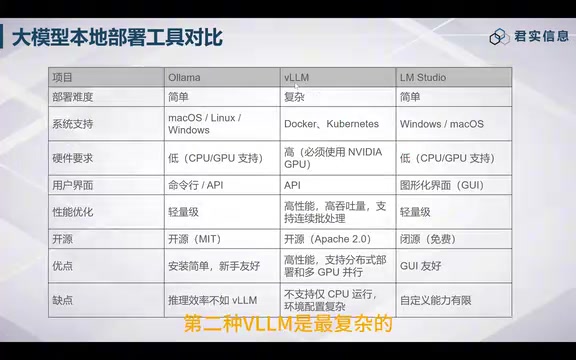
In short, the selection logic is: choose Ollama for personal experimentation, vLLM for enterprise production, and LM Studio for non-technical users or quick demos.
vLLM's core competitive advantage comes from its PagedAttention technology — inspired by the virtual memory paging concept in operating systems, it splits the KV Cache into fixed-size blocks for dynamic management, dramatically reducing VRAM fragmentation and achieving significantly higher GPU utilization and throughput than traditional inference frameworks. Ollama, under the hood, actually calls llama.cpp, which excels at CPU/GPU hybrid inference and can run on a Mac or ordinary PC without a dedicated GPU — but its concurrency is limited, making it unsuitable for production scenarios with multiple simultaneous users. Understanding this underlying difference helps explain why the two tools diverge so sharply in performance and hardware requirements.
Qwen3.8 as a Case Study: Model Sizes and Hardware Thresholds
In practice, local deployment typically targets the latest available models. The Qwen3.8 series offers several official model variants, spanning from flagship to lightweight scales.
- Qwen3.8 Max: With 2.4 trillion parameters — roughly 4× the size of DeepSeekAd 671B — this is a colossal model. DeepSeek 671B alone requires around 10 H100 GPUs, so the Max variant would need approximately 40 H100s by that ratio. This is far beyond the capacity of most organizations.
- 27B Flash (125B): Approximately 5× the size of the 27B model. If 27B requires one Pro 6000 GPU, this variant would need around five. At roughly ¥100,000 per Pro 6000, that's about ¥500,000 in hardware — still a significant investment for most enterprises.
- 27B: This is the most widely deployed variant in production local deployments. A single Pro 6000 GPU is generally sufficient, making it the most accessible option in terms of both cost-effectiveness and deployment complexity.

There are also purpose-built variants such as Qwen3.8 Flash, Qwen3.8 Live Translate (a real-time simultaneous interpretation model), and a wide range of community-quantized versions. Community quantization is precisely what enables models like the 27B to run on lower-spec hardware — a topic we'll explore in depth below.
Qwen3 is Alibaba Cloud's third-generation Tongyi Qianwen LLM series, released in 2025, featuring parallel product lines of Mixture-of-Experts (MoE) and dense model architectures. The Max variant uses MoE architecture: although its total parameter count (2.4T) is enormous, only a fraction of those parameters are activated during each inference pass — this is the core logic behind MoE models being "large in parameters but relatively manageable in inference cost." That said, the VRAM required for even the activated parameters still far exceeds what a single consumer-grade GPU can provide. The 27B dense variant uses all 27 billion parameters on every inference pass. Its simpler architecture lowers the engineering deployment barrier, which is why it has become the mainstream choice for enterprise local deployments.
Quantization Options and VRAM Requirements for the 27B Model
To appreciate the value of quantization, you first need to understand how much VRAM the original model actually consumes. The Qwen3.8 27B model ships in BF16 precision — 2 bytes per parameter.
A rough estimate of VRAM for weights: 27B parameters × 2 bytes ≈ 50.23 GB. Adding KV Cache and other overhead, the actual peak VRAM demand reaches approximately 56 GB.

At that requirement, the following GPUs can handle the BF16 original model:
- A100 / H100 (80 GB VRAM)
- Pro 6000 (96 GB)
- 6000D (84 GB)
- Pro 5500 (84 GB)
All of these can accommodate a 27B model in full BF16 precision.
FP8 and Lower-Precision Quantization Options
With more aggressive quantization, VRAM requirements drop substantially, and so does the hardware barrier:
| Quantization | VRAM Required | Recommended GPU |
|---|---|---|
| BF16 (original) | ~56 GB | A100 / H100 / Pro 6000 |
| FP8 | 26–29 GB | Pro 5000 Blackwell |
| INT4 (Q4_K_M) | Lower | 5000D / RTX 4090 |
| INT3 | Lower still | RTX 4080 |
| INT2 | Lowest | RTX 3060 / RTX 4070 |
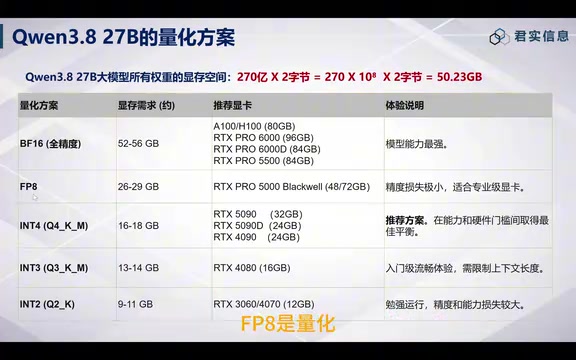
As the table shows, moving from BF16 to FP8 roughly halves the VRAM requirement — a single Pro 5000 Blackwell can handle it. With INT4 quantization, even consumer-grade cards like the RTX 4090 or 5000D become viable.
Practical Guidance on Quantization Precision
Quantization is not a free lunch — the lower the precision, the greater the loss in model capability and output quality. Based on real-world experience, here are some recommendations:
- Production environments: Prefer BF16 to preserve full model precision and capability.
- Testing environments: INT4 is a reasonable choice for validation, striking a balance between accuracy and resource usage.
- The floor: Don't go below INT4. While INT3 and INT2 can run on low-end GPUs, the degradation in precision and capability is substantial — these are only suitable for demos under extreme resource constraints.
Quantization refers to the process of compressing model weights from high-precision floating-point numbers into low-bit integer representations. BF16 (Brain Float 16) uses 2 bytes per parameter; FP8 uses 1 byte; INT4 uses 0.5 bytes; and INT2 uses just 0.25 bytes. In theory, going from BF16 to INT4 compresses the weight footprint to one-quarter of the original. Q4_K_M is a mixed-quantization format from the llama.cpp ecosystem: it retains higher precision for layers that are more sensitivity-critical, while applying 4-bit quantization to the rest — striking a balance between compression ratio and output quality, and is currently one of the most common quantization release formats in the community. KV Cache is the memory region used during inference to store key-value pairs for the attention mechanism; its size grows with context length and concurrency, which is the main reason actual peak VRAM exceeds what weight-only estimates would suggest.
Conclusion
The essence of local LLM deployment is finding the right balance among three variables: tool selection, model scale, and quantization precision. Individual developers can start cost-effectively with Ollama paired with a quantized small model; enterprise production requires vLLM backed by sufficient GPU resources, with a deliberate choice between original BF16 and FP8/INT4 quantization based on budget. A clear understanding of VRAM calculation logic enables more accurate cost estimation before purchasing GPUs — helping you avoid both wasted resources and performance bottlenecks.
Related articles

Chain of Thought Isn't Just for AI: How Humans Can Use CoT to Improve Thinking Quality
Chain of Thought isn't just a prompt trick for large models. Starting from a Hacker News discussion, this article analyzes why CoT works for human thinking too, breaks down actionable ways to transfer it, and highlights the key differences between human CoT and machine CoT.
Cloudflare Teams Up with OpenAI: Closi…
Cloudflare Teams Up with OpenAI: Closing the Loop from Vulnerability Discovery to Defense with AI
Cloudflare uses OpenAI Daybreak to investigate security vulnerabilities and generate reviewable remediation plans, while developers use Codex to boost coding efficiency and quality.

Orca Multi-Agent Orchestration in Practice: A Guide to Parallel Collaboration with Claude and Codex
Orca is Stable AI's free open-source agent workbench supporting 34 agents like Claude Code and Codex in parallel. Learn its Git worktree isolation, multi-model orchestration, and mobile management.