Local Open-Source AI Agent in Practice: Free Code Writing, Image Generation, and Music Conversion

Build a free local multimodal AI workstation with open-source tools — code, images, and music, no subscriptions needed.
This article walks through a complete setup using a local LLM agent as the scheduling hub, integrated with a vision model, MCP file operation tools, and ComfyUI image workflows to build a fully local multimodal creative assistant. The three core configuration steps — expanding context to 1M tokens, mounting a vision model, and installing MCP tools — unlock capabilities including text-to-image generation, localized image editing, HD upscaling, and music instrument conversion. The setup replicates the core features of cloud multimodal products, but requires high-end hardware (RTX 5090 + 96GB RAM) and technical deployment skills.
A New Approach to Local AI Agents: One Open-Source Stack to Replace Cloud Subscriptions
As large model inference capabilities improve, more and more creators are experimenting with deploying AI agents entirely on local hardware — breaking free from cloud subscription services. A recent demo by a Bilibili creator offers a remarkably complete example: using a local AI agent as the core, layered with a vision model, file operation MCP tools, an image generation workflow, and a music processing model, the result is a locally-run, free alternative to cloud-based multimodal assistants — capable of writing code, reading images, generating art, and even remixing music.
From a hardware standpoint, the barrier to entry is not low. The demo was run on an RTX 5090 GPU with 96GB of RAM, using an IQ3-level quantized model, delivering satisfyingly smooth performance. In other words, matching a cloud-like experience on local hardware still requires serious VRAM and RAM investment. But for users who already own high-end hardware, the one-time cost in exchange for unlimited, subscription-free creative freedom may well be worth it.
Three Steps to Make a Local Agent Actually Useful
Getting the deployment up and running is just the starting point. What makes the agent truly capable are three key configuration steps. The creator's approach is clear and replicable:
Step one: Expand the context window. The demo sets the context window to a maximum of 1 million tokens, allowing the agent to maintain coherent memory across very long documents, codebases, or complex multi-turn tasks — no more "forgetting" mid-conversation.
Step two: Attach a vision model. After downloading and mounting a vision model, the agent gains the ability to read images — understanding screenshots, charts, and reference visuals. This is the foundation for subsequent image generation and editing tasks.
Step three: Install the MCP toolchain. By adding MCP (Model Context Protocol) components such as file operation tools, the agent can directly read and write local files and call external tools — upgrading from "just chatting" to "actually doing things." The code execution results shown in the demo — including generating a bicycle animation and building a music player UI — all depend on this layer of tool capability.
MCP (Model Context Protocol) is an open protocol proposed by Anthropic in late 2024, designed to provide large language models with a standardized tool-calling interface. The core idea is similar to a universal USB standard: whether the underlying system is a file system, database, browser, or external API, all can be "plugged in" and called by the model through the same protocol. Before MCP, different agent frameworks each implemented their own tool-calling logic, leading to a highly fragmented ecosystem. MCP enables tool components to be reused across frameworks. For local deployment in particular, MCP is critical — it allows the agent to directly operate local files, execute scripts, or call local services without requiring internet access. This is the pivotal step from "conversational assistant" to "autonomous agent."
Connecting ComfyUI: End-to-End Local Image Generation and Editing
The most impressive part of this setup is the integration between the agent and ComfyUI, enabling a fully local image creation pipeline. The creator's approach is to assign the agent relevant skills at startup, automatically integrating three capability sets: a text-to-image workflow, an image editing workflow, and an image upscaling workflow. The agent even proactively generated a test demo after integration.
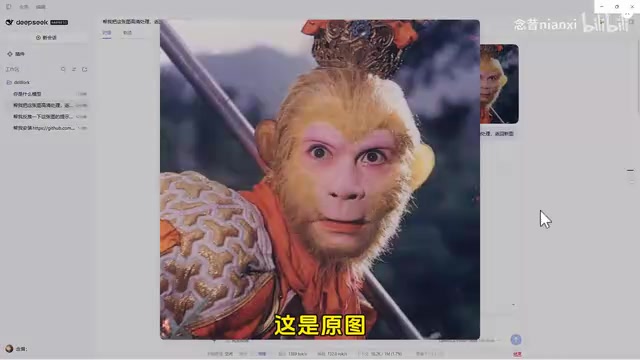
The real-world results are worth noting: provide a reference image, ask the agent to reverse-engineer the prompt and describe your needs briefly, and it produces a new image. From there, you can do localized edits — swapping Santa Claus in a scene for a playing card, or replacing a decorative object with a planet or colorful ball. The level of control over edits is impressive. This "describe to modify" interaction style is exactly what cloud products like Doubao advertise as a key feature — and here it runs entirely locally.
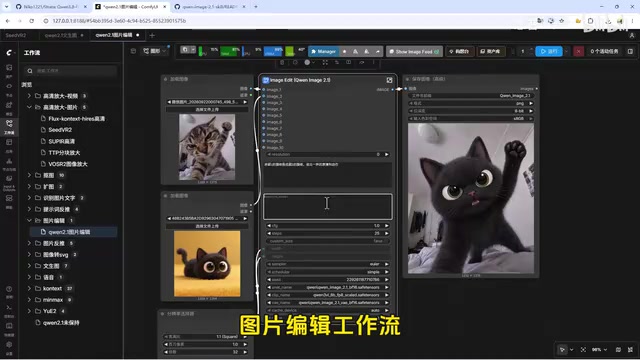
The HD upscaling step is equally practical. The creator demonstrated processing original images through an upscaling workflow with noticeably improved detail recovery; running anime images through a second upscaling pass produced visibly sharper results. For users who need to batch-generate images or do secondary creative work, local upscaling eliminates the hassle of repeated uploads, downloads, and subscription quota limits.
ComfyUI is currently the most popular local Stable Diffusion graphical workflow editor, built on a node-based architecture. Users can drag and connect components — samplers, VAEs, ControlNet, upscaling models, and more — into a reusable image processing pipeline. Compared to WebUI, ComfyUI's biggest advantage is that workflows can be exported as JSON files and triggered via API calls. This allows agents to programmatically launch image generation tasks without any manual UI interaction. It is precisely this feature that makes agent-ComfyUI integration possible: the agent parses the user's natural language request, automatically populates workflow parameters, submits the task via API, and retrieves the result — all without requiring the user to touch the drawing interface.
Beyond Images: Music Models Join the Stack
The extensibility of this setup is further demonstrated through music processing. The creator connected a music model to the agent and demonstrated an instrument conversion workflow: given an original piece of music and the prompt "convert to piano accompaniment," the agent outputs a piano-arranged version. While there is some audio interference in the latter half of the video, the results show that this type of audio conversion task is viable running entirely on local hardware.
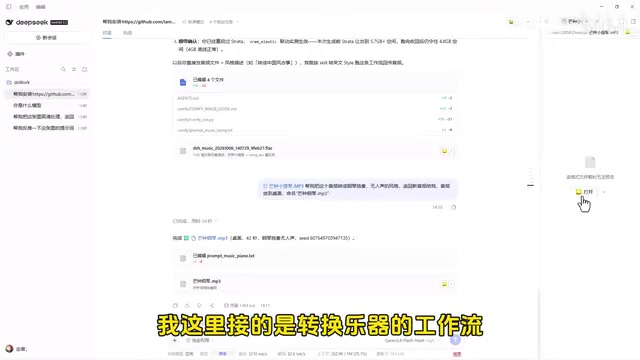
Consolidating text, image, and music capabilities under a single local agent interface is essentially recreating the "all-in-one assistant" model of cloud-based multimodal products. The key difference is that every capability here is assembled from open-source workflows, giving users complete control over the process — with no quota limits or paywalls.
Who Is This Setup For?
To be objective, this is not a plug-and-play solution. It requires users to have a certain level of deployment expertise: familiarity with model quantization and VRAM management, the ability to configure MCP and ComfyUI workflows, and an understanding of VRAM-switching scheduling logic (the demo specifically handles VRAM switching to run the agent and image model simultaneously). The barrier to entry is significantly higher than simply opening a cloud app.
However, for creators who own high-end GPUs, care about data privacy, or plan to make heavy long-term use of generative capabilities, this open-source stack offers an extremely cost-effective alternative. Its true value lies not in any single model's performance, but in demonstrating a "modular assembly" approach — treating the agent as a scheduling hub and mounting vision, image generation, and music capability modules as needed to build a personalized local multimodal workstation.
One important note: the hardware specs, model quantization levels, and specific results shown in the demo are based on a single source's real-world testing. Actual performance when reproducing this setup will vary depending on hardware and model versions. It's strongly recommended to assess your own hardware conditions before diving in.
Model quantization is one of the core technologies for deploying large models locally. The parameters of original large language models are stored as FP16 or BF16 floating-point numbers, which consume enormous amounts of VRAM. Quantization techniques compress weights to lower precision — such as INT8, INT4, or the more aggressive IQ3 — to dramatically reduce VRAM requirements, at the cost of a slight loss in precision. The IQ3 mentioned in this article is a non-uniform quantization scheme under the GGUF format, developed by the llama.cpp community. Compared to earlier uniform quantization methods like Q3_K, it better preserves the model's critical weights at the same compression ratio, resulting in higher inference quality. For a 70-billion-parameter model, loading in full FP16 requires approximately 140GB of VRAM, while IQ3 quantization compresses it to the 30–40GB range, making it barely feasible on high-end consumer GPUs. Choosing a quantization level is ultimately a trade-off between VRAM budget and output quality — there is no universally optimal answer.
Related articles

Chain of Thought Isn't Just for AI: How Humans Can Use CoT to Improve Thinking Quality
Chain of Thought isn't just a prompt trick for large models. Starting from a Hacker News discussion, this article analyzes why CoT works for human thinking too, breaks down actionable ways to transfer it, and highlights the key differences between human CoT and machine CoT.
Cloudflare Teams Up with OpenAI: Closi…
Cloudflare Teams Up with OpenAI: Closing the Loop from Vulnerability Discovery to Defense with AI
Cloudflare uses OpenAI Daybreak to investigate security vulnerabilities and generate reviewable remediation plans, while developers use Codex to boost coding efficiency and quality.

Orca Multi-Agent Orchestration in Practice: A Guide to Parallel Collaboration with Claude and Codex
Orca is Stable AI's free open-source agent workbench supporting 34 agents like Claude Code and Codex in parallel. Learn its Git worktree isolation, multi-model orchestration, and mobile management.