LockLines: Craft the Perfect Custom Message for Your Mac Lock Screen

LockLines gives Mac users a WYSIWYG editor for crafting perfectly fitted lock screen messages.
LockLines is a macOS micro-tool by indie developer Ighor July that tackles a commonly ignored pain point: macOS offers no preview when setting a custom lock screen message, forcing users into a tedious trial-and-error loop. LockLines solves this with a what-you-see-is-what-you-get interface, letting users confirm their message fits cleanly within the lock screen area before applying it. It ranked #18 on Product Hunt with 66 upvotes, and exemplifies the "single-purpose, finely crafted" indie tool trend in the Mac ecosystem.
A Small but Polished Mac Utility
In a world of feature-bloated apps, LockLines takes the opposite approach — it does exactly one thing: help you design plain-text messages that fit perfectly within the narrow custom message area on your Mac's lock screen. Built by indie developer Ighor July, this macOS app earned a spot at #18 on Product Hunt with 66 upvotes, thanks to its sharp, focused positioning.
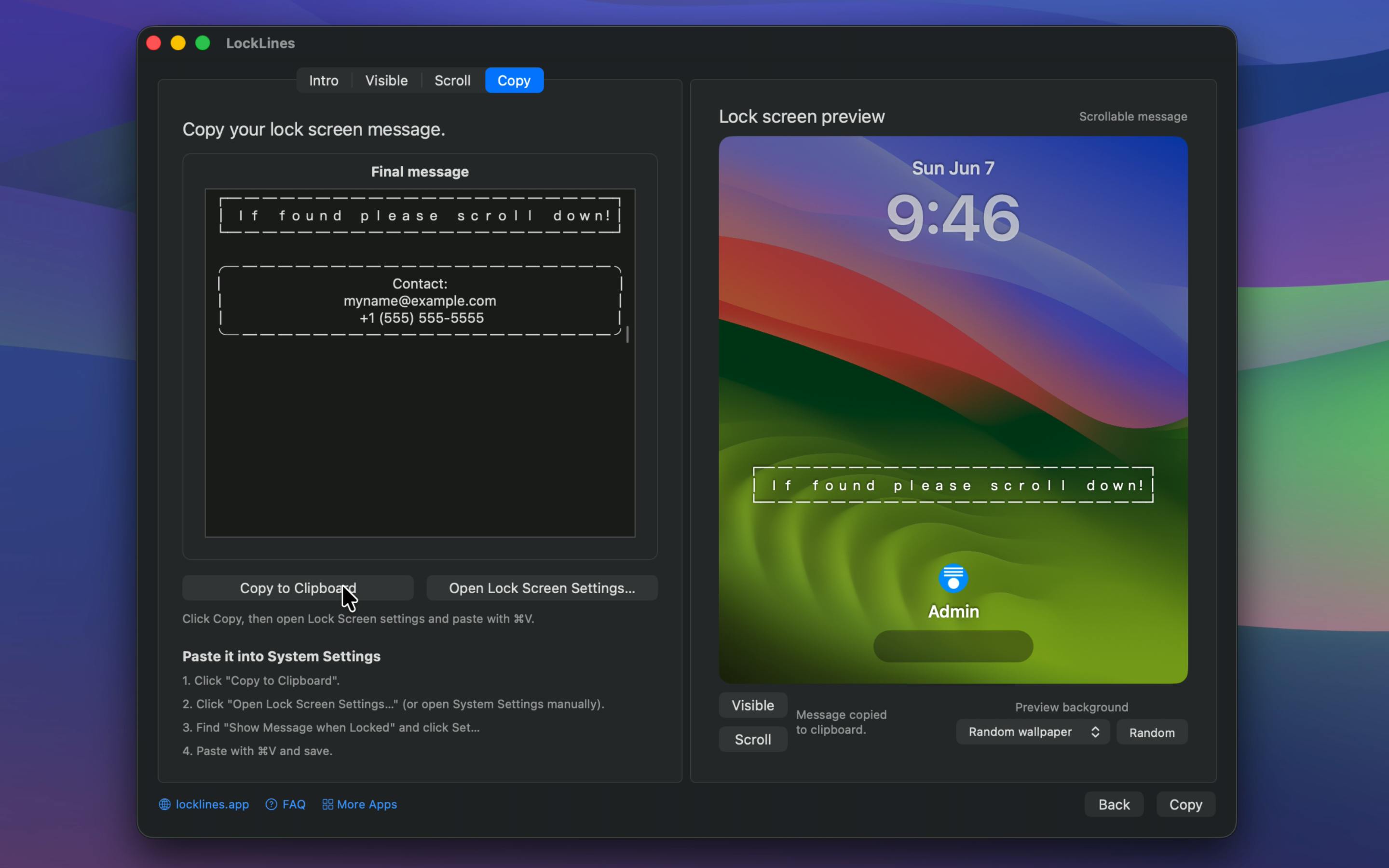
macOS lets users display a custom message on the lock screen — commonly used for lost-and-found contact info, ownership details, or reminders. The catch: that message area is tiny. Type too much and your text gets cut off, and there's no way to preview how it'll actually look. LockLines was built specifically to address this overlooked friction point.
What Problem It Solves
Setting a lock screen message sounds simple, but it's surprisingly awkward in practice. System Preferences (or System Settings) offers nothing but a plain input box — no preview, no character guidance, no layout feedback. You type something, lock your screen, check it, go back and tweak it, then repeat. For anyone trying to display something like "If found, please contact XXX" in a clean, readable format, this trial-and-error loop is tedious and inefficient.
LockLines visualizes the entire process. With plain text as its core, it lets you see exactly how your message will appear within the lock screen area before you commit — ensuring the content truly fits: no truncation, no clutter. This what-you-see-is-what-you-get approach turns a buried system setting into a quick, painless task.
The Mac lock screen message feature lives under System Settings → Privacy & Security → Advanced (or in older macOS versions: System Preferences → Security & Privacy → General). It lets you display a line of custom text at the bottom of the lock screen. This feature has existed since the Mac OS X era, originally designed so users could provide contact details if their laptop was lost. Yet Apple has never built a dedicated editing or preview interface for it — the system offers only a plain input field with no character limit indicator, no line-break preview, no font size reference, and no truncation rules. Users are left to write blind and manually lock their screen to check the result, repeating this cycle after every edit. This lack of real-time feedback makes "a well-formatted lock screen message" far more tedious to achieve than it should be.
The Indie Developer Philosophy Behind It
LockLines reflects a clear trend in the Mac ecosystem: single-purpose, finely crafted productivity micro-tools. It makes no attempt to be a sprawling platform. Instead, it zeroes in on one specific scenario and executes it well. These kinds of apps are typically built by solo developers who spot sharp pain points that larger teams overlook, and find a dedicated following among users who care about the same details.
On Product Hunt, LockLines is tagged under Mac, Design Tools, and Apple — suggesting it straddles both utility and design sensibilities. Sixty-six upvotes and 4 comments won't break any records, but for a tool this narrowly focused, it's a meaningful signal of real value within its target audience.
Product Hunt is a community discovery platform for tech products where users submit new apps and the community votes via upvotes to determine daily rankings. Landing in the top spots means significant exposure to tech professionals, early adopters, and investors — making it one of the key channels indie developers use to validate product-market fit (PMF). Ranking #18 with 66 upvotes is a respectable result for a single-purpose utility this niche. Tools like this rarely generate the buzz of an AI app or productivity platform, but they reach exactly the users who need them. Word-of-mouth among that core audience often delivers more lasting value than a high-traffic launch day.
Who Actually Needs This
The target audience is fairly well-defined: Mac users who frequently work in public and want to display contact info in case their device is lost; design-minded users who care about typographic detail and device personalization; and enterprise IT administrators who need to configure consistent, professional lock screen labels across a fleet of company devices.
For the average user, LockLines may not be an essential app. But it represents a product philosophy worth appreciating: find the tiny friction points others overlook, and eliminate them with a focused solution. In an era of increasingly bloated software, a restrained, precise little tool like this is genuinely refreshing.
Takeaway
LockLines isn't a workflow-changing powerhouse. Its value lies in making something that should have always been simple actually simple. For Mac users who care about their lock screen message, it eliminates the back-and-forth guesswork. For those who follow indie software, it's a vivid example of the "small but beautiful" product philosophy done right.
Related articles

Python 3.15 New Feature: Is the sentinel Type Better Than None?
Python 3.15 adds the sentinel type, using named unique sentinel objects to replace None and bare object(), resolving confusion among missing values, explicit emptiness, and invalid input while avoiding type hint failures.

Deep Learning's Three Architectures and the Universal Approximation Theorem: A Complete Guide to MLPs, CNNs, and Transformers
Explaining the inductive bias differences among MLP, CNN, and Transformer, the existence meaning of the Universal Approximation Theorem (UAT), and the role of Taylor expansion in approximation analysis, while clearing up common misconceptions.

GitLab Emergency Patch Release: Analysis of Critical Security Fixes
GitLab releases critical patch 19.5.1, sparking 355 points of discussion on Hacker News. This article analyzes the background, upgrade steps for self-hosted instances, and verification points to help DevOps teams respond quickly to security updates.