Lost Your Claude Code Session After Accidentally Closing the Terminal? This Open-Source Plugin Can Find It

termstash recovers Claude Code sessions lost after accidentally closing the terminal with one command or a natural-language request.
termstash is an open-source tool by developer kbuksakowski for the common accident of losing Claude Code session context after closing the terminal. It can be used by running npx termstash last to list recent sessions and recovery commands, or installed as a Claude Code plugin and triggered with natural language like "I lost my session." The article notes that AI coding assistant sessions carry substantial reasoning context and are far costlier to rebuild than ordinary terminal operations, giving patch-style tools insurance value. It also stresses the boundaries: recovery only, not loss prevention, automatic saving, or cross-device sync. termstash is presented as a representative early single-point tool in the Claude Code plugin ecosystem.
A seemingly trivial but frequently occurring pain point
Anyone who codes with Claude Code has probably experienced this moment: you accidentally close the terminal window, or click the wrong tab in the window manager. When you reopen the terminal, Claude Code's session context is gone, and the conversation and reasoning process from the past tens of minutes or even hours are nowhere to be found.
This is exactly the motivation behind developer kbuksakowski's termstash. Writing on Dev.to, he said this small tool is mainly for "when I accidentally close the terminal" to recover the most recent Claude Code session. The tool itself doesn't try to solve any grand problem; it targets a specific small accident that almost everyone encounters but few people specifically address.
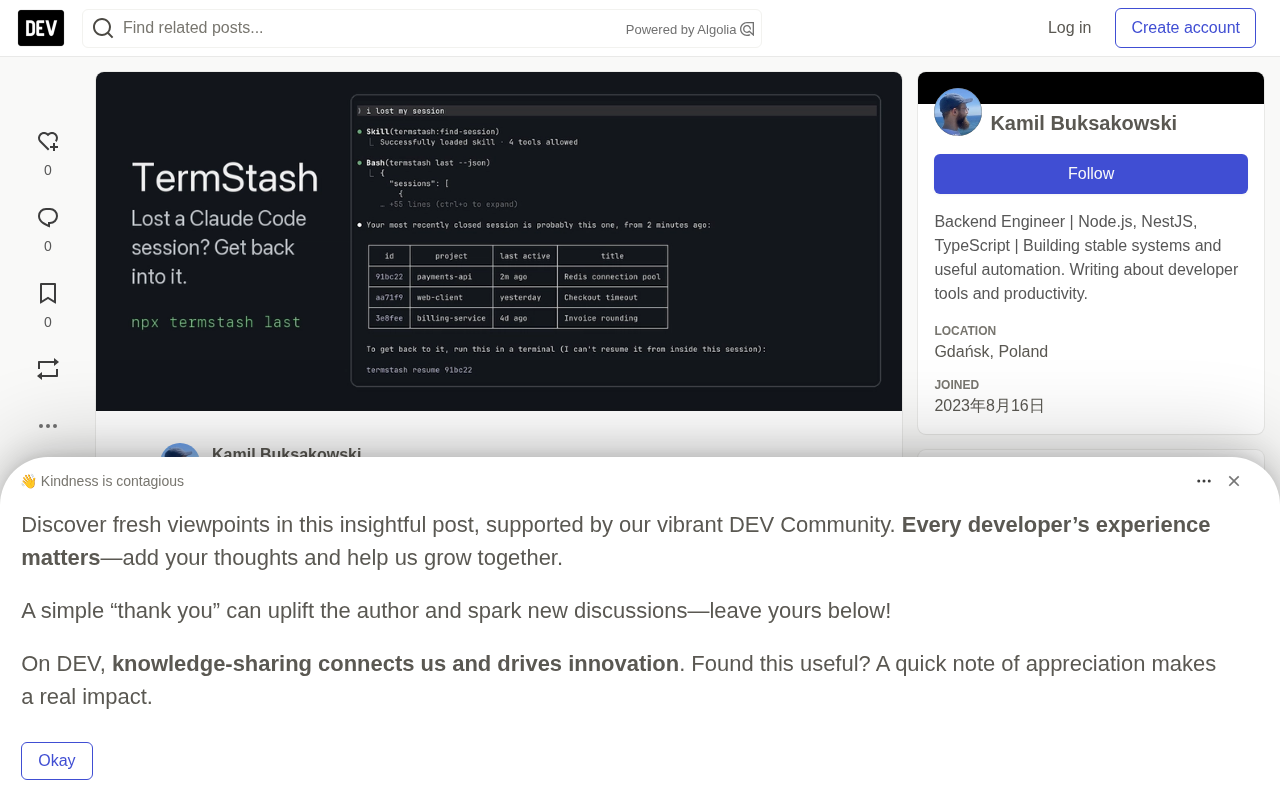
How to use termstash: two entry points
Without the plugin: a single npx command
The lightest-weight usage requires no installation steps at all—just run this directly in the terminal:
npx termstash last
This command lists recent Claude Code sessions and provides the command needed to resume a session. For users who occasionally close a window by mistake, this approach is sufficient, and there's no need to introduce any dependencies into the project.
npx is a package executor distributed with Node.js that allows users to temporarily download and run command-line tools from the npm registry without globally installing the package or writing dependencies into the current project. When you run npx termstash last, npm first checks whether the package already exists in the local cache or globally; if not, it pulls the latest version from the registry into a temporary directory and executes it, leaving no node_modules or lockfile changes in the project afterward. This mechanism makes the distribution cost of "one-off small tools" extremely low: the author only needs to publish the package to npm, and users can try it by copying a single command, without worrying about installation paths and version management. The trade-off is that the first run requires an internet connection to download, and by default it may execute a newer version; for scenarios with high reproducibility requirements, you can explicitly specify a version number.
Installing as a Claude Code plugin: trigger via natural language conversation
If you want to hand the recovery process over to Claude as well, you can install termstash as a plugin:
/plugin install termstash --marketplace kbuksakowski/termstash
After installation, users only need to say "I lost my session" to Claude, and the plugin will locate the lost session and return the command to re-enter it. This design lowers the barrier to using the tool to near zero—users don't need to remember the command name or understand the lookup logic behind it; they just need to describe their situation in everyday language.
Claude Code's plugin mechanism can be understood as a set of extension packs for the assistant's capabilities: plugins usually contain slash commands, tool definitions that can be invoked by the model, and optional hook scripts and configuration. After installation, the plugin's tool descriptions enter the model's available tool list, and the model decides whether to invoke them based on the semantics of the user's utterance. Therefore, the reason "I lost my session" can trigger the recovery process is not keyword matching, but the model understanding the intent and actively choosing the tool provided by termstash. This design shifts the burden of "remembering commands" from the user to the model, and also allows the same underlying CLI to be reused in a conversational way—a fairly typical organizational pattern for current AI coding assistant plugins.
Why this approach is worth paying attention to
In terms of functional scope, termstash is a classic "small but beautiful" tool: it doesn't build a new workflow or expand Claude Code's capability boundaries; it patches a crack in the existing workflow. It is precisely this positioning that gives it real value.
AI coding assistants are shifting from experimental tools to everyday development infrastructure, and with that comes a new kind of "state anxiety"—sessions, context, and history themselves have become assets that need to be managed. When work state is lost in a traditional terminal, you just cd back to the directory and rerun the command; but a Claude Code session carries a large amount of reasoning context, and once lost, the cost of rebuilding is far higher than ordinary terminal operations. termstash responds to this new form of loss.
Another noteworthy detail is the way the plugin combines with natural language. Users don't need to know that npx termstash last exists; they only need to express intent. This represents a direction: wrapping small CLI tools as Claude Code plugins and letting AI become the intermediary layer for tool invocation. For open-source tool authors, this is a low-cost path with decent exposure.
Claude Code's session context is not the same as the terminal scrollback buffer; it is stored locally as structured records, usually in the Claude configuration directory under the user's home directory, organized by project path and session identifier. Resuming a session essentially means locating the corresponding project and session ID from these records, then restarting in a way that continues the conversation. This also explains why "recovery" is feasible while "loss prevention" requires additional mechanisms: the records themselves often still exist after the process exits; what is lost is the entry point pointing to them and the associated state of the current terminal. Understanding this helps judge the tool's boundaries—it can locate historical sessions, but it does not change when sessions are written or how they are retained.
Who it's for, and its boundaries
termstash is aimed at heavy Claude Code users, especially developers who habitually switch between multiple terminal windows and are prone to misoperations. It is free and open source, with code hosted on GitHub (kbuksakowski/termstash), so you can inspect or modify the implementation yourself.
It should be noted that it solves "recovery," not "loss prevention." The tool itself won't stop you from closing the terminal, nor does it persist session state in real time; what it does is locate a recoverable session entry point after an accident occurs. If what you need is automatic session saving or cross-device synchronization, this plugin does not cover those scenarios.
For developers who use Claude Code daily, it's worth spending a few minutes to install it, or at least writing down npx termstash last somewhere. The value of this kind of tool is normally zero, but extremely high when something goes wrong—a typical insurance-type tool.
Looking at the early stage of the Claude Code plugin ecosystem through termstash
Claude Code's plugin mechanism is still in an early stage, and most plugins produced by the community are patch-style tools targeting specific pain points. termstash is a representative sample: single-point functionality, simple installation, and a perfect fit for AI assistant usage scenarios.
The emergence of such tools shows that Claude Code's user base has begun to shift from early adopters to everyday users. Only people who use it every day and for long enough will accumulate specific and real pain points like "accidentally closing the terminal causes session loss." The richness of a plugin ecosystem is often a signal that a tool is moving from usable to good.
If you've also stepped in a similar pit, try installing termstash; if you have other Claude Code friction points, this project's implementation also provides a low-cost template for validating ideas.
One-line Summary
termstash uses a single command or a sentence in natural language to recover a Claude Code session lost after accidentally closing the terminal.
Paragraph Summary
termstash is an open-source tool built by developer kbuksakowski for the common small accident of "accidentally closing the terminal and losing Claude Code session context." It offers two ways to use it: directly run npx termstash last to list recent sessions and provide recovery commands, or install it as a Claude Code plugin and trigger recovery with natural language such as "I lost my session." The article points out that AI coding assistant sessions carry a large amount of reasoning context, and the cost of rebuilding after loss is much higher than ordinary terminal operations, so this kind of patch-style tool has insurance value. It also emphasizes its boundaries: it only solves recovery, not loss prevention, automatic saving, or cross-device synchronization. termstash is also seen as a representative sample of early single-point tools in the Claude Code plugin ecosystem.
Related articles

Chain of Thought Isn't Just for AI: How Humans Can Use CoT to Improve Thinking Quality
Chain of Thought isn't just a prompt trick for large models. Starting from a Hacker News discussion, this article analyzes why CoT works for human thinking too, breaks down actionable ways to transfer it, and highlights the key differences between human CoT and machine CoT.
Cloudflare Teams Up with OpenAI: Closi…
Cloudflare Teams Up with OpenAI: Closing the Loop from Vulnerability Discovery to Defense with AI
Cloudflare uses OpenAI Daybreak to investigate security vulnerabilities and generate reviewable remediation plans, while developers use Codex to boost coding efficiency and quality.

Orca Multi-Agent Orchestration in Practice: A Guide to Parallel Collaboration with Claude and Codex
Orca is Stable AI's free open-source agent workbench supporting 34 agents like Claude Code and Codex in parallel. Learn its Git worktree isolation, multi-model orchestration, and mobile management.